
Beta Advanced Driver Assistance Systems 1.33
Adds safety systems to modern vehicles such as automatic braking, back-up cameras and more to come!
You may need to reload Lua (press Ctrl + L) if the mod is not working for you.
Advanced Driver Assistance Systems (ADAS)
This mod adds advanced driver assistance systems you would typically find in today’s modern vehicles. And these systems can be added to any vehicle (vanilla and modded)!
Before I begin, I want to thank BeamNG for the existing game files/code, @nick12345, ShaunJunior2006112, @atomcrash07, and @crashitall for beta testing the mod, and the community for your ideas/feedback, which all have made this mod possible!
If you really enjoy what I make and want to show your support, you can donate here
WhyBeAre
BeamDriver
Current Features (refer to «Usage Instructions» section below for usage)
Automatic Emergency Braking (AEB)

Automatic Emergency Braking (AEB) applies full braking power when it detects a possible collision with another vehicle. It is designed to mitigate or even prevent a collision from occurring. The system will first alert the driver of a possible collision with an audible tone before applying the brakes. The system uses the road markings (AI paths) to determine if an oncoming vehicle is in our vehicle’s path.
Disclaimer: System will only work effectively if lane markings are present (technically if there are AI paths mapped).
Rear Automatic Emergency Braking (Rear AEB)
Rear Automatic Emergency Braking (Rear AEB) is just like AEB except it applies the brakes when it detects a collision with both static objects and vehicles in reverse gear up to 25 km/h (15 mph). The system works without the need for lane markings.
Audible Rear Parking Sensors
This system provides an audible alert as the vehicle approaches an obstacle in reverse. The faster the warning tone is played, the closer the vehicle is to the obstacle.
Adaptive Cruise Control (ACC)
Adaptive Cruise Control works like a traditional cruise control system to maintain a set speed. The difference is when it detects a vehicle ahead, it will slow down to adapt to its speed and maintain a safe following distance apart. The minimum target speed you may select is 30 km/h (20 mph) but the system can stop and accelerate the vehicle if the vehicle in front comes to a stop and accelerates afterward.

The camera is attached to the rear of the vehicle with a wide FOV to allow the driver to see what is directly behind them. Depending on the vehicle, the camera can display guiding lines to show where the vehicle is relative to other objects (e.g. curb, wall) and where it will go in a straight line. And trajectory lines can also be displayed to show where the car will head with the current steering input.
Hill Start Assist
When the driver takes their foot off the brakes to switch over to the gas pedal, the vehicle may roll back depending on the incline. This system eliminates this issue by holding the brakes until the driver hits the gas pedal. If the user is off the brake pedal for 3 seconds, the system will release the brakes.
Automatic Headlight Dimming (DISABLED FOR NOW)
This system automatically dims the high beams if it detects a vehicle up ahead. When no vehicles are in sight, the high beams will turn back on.
1a. Use the included vehicle configs to use the ADAS systems
This mod adds vehicle configs with these ADAS installed on modern vehicles. The config names added are postfixed with «w/ ADAS». Here is an example of a vehicle config equipped with ADAS:

1 b. Or you can install the systems manually by doing the following steps:
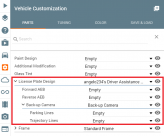
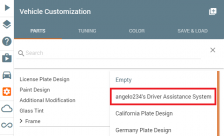
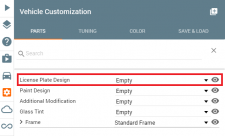
1. Open the Vehicle Customization UI and click on the «License Plate Design» slot.

2. Find «angelo234’s Driver Assistance System» part and click on that.

3. All systems are added by default. You can choose the systems to add/remove by clicking on the appropriate slots and adding/removing the parts.

2. Using the systems
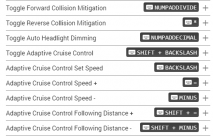
After installing the systems, they will be active (except Adaptive Cruise Control and back-up camera) by default. To toggle the systems on/off and use them with the default keybindings, refer to «Controls» section below for keybindings.
No action is required until the system completely stops the vehicle, in which case the driver must press either the gas or brake pedal to disengage the brake holding feature.
Rear AEB
No action is required until the system completely stops the vehicle, in which case the driver must press the brake pedal to disengage the brake holding feature.
Audible Rear Parking Sensors
No action is required here.
Adaptive Cruise Control
To bring up the back-up camera, put the vehicle in neutral or reverse, and then press the ‘8’ key (‘9’ key for bus). When you take the vehicle out of neutral or reverse gear with the back-up camera displayed, the camera will be switched to the last camera used.
To engage the system, stop on an incline of 4 degrees or greater, have the car in 1st gear or drive (if rear of car facing uphill, be in reverse gear), and then press the brakes down until a message appears stating «Hill Start Assist Activated». The brakes will automatically release after hitting the throttle or after 3 seconds.
Automatic Headlight Dimming (DISABLED FOR NOW)
This system is disabled by default. Press the key binding «Toggle Auto Headlight Dimming» to toggle the system. After enabling it, switch to your high beams and the system will change between low and high beams automatically.
The AEB systems only work as well as your brakes and tires, plus this mod is still in beta so some systems may not work 100% of the time and false positives may occur.
FAQ
Q: Only the back-up camera works, what do I do?
A: If you want the other systems enabled, just add them in the parts screen by clicking on the appropriate slots and adding the parts.
Q: The mod isn’t working properly, what do I do?
A: Make sure game is updated to latest version and press Ctrl + L to reload Lua if it still is not working.
Q: How do I activate the back-up camera?
A: First you must be in reverse or neutral gear. Then in most cases the ‘8’ key (‘9’ for Wentward bus). If you have other camera mods installed, try other number keys.
Q: Can I equip other vehicles with these systems?
A: Yes you can equip any vehicle with these systems!
Q: Is it possible to put back-up camera on the infotainment display?
A: No its not possible at the moment, but if only the devs could allow multiple cameras in the scene at once.
Мод Advanced Driver Assistance Systems версия 1.3 для BeamNG.drive

Эти конфигурации можно поставить практически на любое транспортное средство. Новые конфиги имеют в начале слово ADAS. Также, можно все установить вручную, в UI кастомизации транспортных средств:
— Выбираем слот License Plate Design (дизайн номерных знаков);
— Нажимаем angelo234’s Driver Assistance System и кликаем на него;
— Все системы установлены по умолчанию. Вы можете добавлять и удалять различные части (смотрим скриншоты).
— Смотрим последний скриншот, там указано все управление.


Укажите причину вашего дизлайка:
BeamNG.drive 1916
Volkswagen ID.3 версия 1.0 для BeamNG.drive (v0.23+)
Мод для BeamNG.drive добавляет новый Volkswagen ID.3.
Особенности:
— Смена цвета;
— Уникальный салон;
— Рабочий руль;
— Настройка;
— Хорошая 3D модель;
— Открывающиеся части;
— Съемные бамперы;
— И многое другое.
1999 FORD F-350 версия 1.0 для BeamNG.drive (v0.23)
— Модель хорошего качества;
— Несколько конфигураций;
— Свои текстуры;
— Повреждения.
Mazda RX-8 версия 1.0 для BeamNG.drive (v0.23.5)
Mazda MX-5 версия 1.0 для BeamNG.drive (v0.23)
— Покраска 1.5 PBR;
— Работают фары;
— Приборная панель работает (загорается);
— Рулевое колесо работает;
— Педали работают;
— Высокое качество интерьера;
— Качественная модель;
— Не свой Jbeam.
Chevrolet Caprice 2013 Ls Beta версия 1.0 для BeamNG.drive (v0.23)
Mercedes-Benz E-350 версия 1.0 для BeamNG.drive (v0.23)
— Проработано подкапотное пространство;
— Материал краски 1.5 PBR;
— Работает панель приборов (светится);
— Работает руль;
— Работают педали;
— Качественны салон;
— Качественная модель;
— Не свой Jbeam.
Mitsubishi Lancer IX версия 2.0 для BeamNG.drive (v0.23.5.2)
Mitsubishi Lancer IX:
— Несколько конфигураций;
— Скины.
VK: Mr.BoS and friends
МЕСТО ДЛЯ ВАШЕЙ РЕКЛАМЫ
По поводу размещения рекламы на сайте: [email protected]
У вас включен блокировщик рекламы. Пожалуйста, добавьте наш сайт в исключения. У нас ведь не назойливая реклама, а нам она нужна, чтобы дальше радовать вас публикацией лучших модов 🙂
Уведомляем вас, что в некоторых случаях блокировщики блокируют не только рекламу. (Есть случаи, когда у пользователей не работали раскрывающиеся меню: «Моды» и др.)
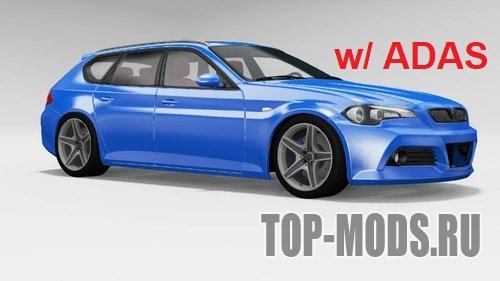
Эти конфигурации можно поставить практически на любое транспортное средство. Новые конфиги имеют в начале слово ADAS. Также, можно все установить вручную, в UI кастомизации транспортных средств:
— выбираем слот License Plate Design (дизайн номерных знаков);
— нажимаем angelo234’s Driver Assistance System и кликаем на него;
— все системы установлены по умолчанию. Вы можете добавлять и удалять различные части
Добавлена помощь при старте с горки
Добавлено автоматическое затемнение фар
Системы торможения и предупреждения теперь разделены
АЕБ менее навязчив
Исправлены ошибки
Для того, чтобы установить мод для игры BeamNG Drive необходимо скопировать скачанный архив в папку \Users\UserNAME\Documents\BeamNG.drive\mods и зайти в игру.
Рекомендуем ознакомиться с полным руководством на тему: «Как установить моды на BeamNG Drive?»
Информация о файле
- Добавил: FsModsGaming Автор: angelo234 Формат файла: ZIP Размер: 4.1 mb
Вы можете войти в свой аккаунт или зарегистрироваться на сайте, чтобы скачивать моды без ожидания.
Моды раздела «Прочие моды» 76
Cessni’s Lights Mod версия 3.0 для BeamNG.drive (v0.23)
Добавляет более чистую и красивую текстуру света. Добавлено/изменено:
Cheat Panel версия 0.1 для BeamNG.drive (v0.23)
Suzuki Katana версия обновлено 0.5 для BeamNG.drive (v0.23)
Представляю вам обновленную Suzuki Katana! Первый мотоцикл в игре. Недочеты:
— Колеса не крутятся;
— Руль не двигается.
Asr Liberty версия 0.1 для BeamNG.drive (v0.23)
Лодка для BeamNG Drive. Клавиши управления:
Цвет изменяемый. Трудно контролировать.
Pseudo Random Tour версия 1.4.6 для BeamNG.drive (v0.22)
Мод адаптирован под актуальную версию игры.
Мод использует пользовательский стартовый экран сценария, чтобы позволить вам настроить и отслеживать свои путешествия. Вы также можете установить желаемую длину путешествия и сохранить и загрузить любые маршруты, которые вы хотите.
Сценарии будут случайным образом назначать вам автомобиль (работает и с моддированными автомобилями), в случайное время суток и в случайном месте на карте. Чтобы помочь вам ориентироваться, дорожный указатель накладывается на дорогу, чтобы помочь вам найти следующую путевую точку, если ее труднее найти (карта путевых точек обычно помогает вам с перекрестками, где идти дальше). Сценарии также бывают солнечные, легкие дожди, легкий снег, сильный дождь и сильный снег, чтобы оживить сценарии.
У вас также есть модифицированная карта, которая поможет вам найти свой путь вокруг, а также увидеть, где находятся контрольно-пропускные пункты.
ETK800 Tuning Pack версия 1.5 для BeamNG.drive (v0.22)
— Передние сплиттеры;
— Задние сплиттеры;
— Изготовленный на заказ спойлер;
— Пользовательские боковые юбки;
— Изготовленный на заказ худ;
— Изготовленный на заказ диффузор;
— Темная крыша.
Все детали имеют цвет кузова и пластиковые версии. Добавлены пользовательские боковые зеркала.