· Все коды, советы, прохождение и трейнеры к игре Cinderella Escape 2 Revenge
Коды (cheats) к игре Cinderella Escape 2 Revenge
Like the previous game in the Cinderella Escape! series, Revenge gives players access to several commands which can be used to edit various settings on characters, maps and gameplay.
To run the commands in this guide you will need to start your game and continue, or start a new game, then press the «Accent Grave» key. This key is in different places depending on the language of your keyboard but it is above the tab key on an english keyboard.
Once the console has opened you will see a text box at the bottom of the screen that you can type into
Note: While it can be fun to test things out, you might want to finish the game before doing so. There are some warnings included in the console this time.
Warning: There are many commands made for developer-debug-only. They may be harmful to your game or gamesave file. Use them at your own risk. So if you plan on testing these commands out, it might be safest to start a new game so your progress won’t be lost if the save file breaks.
Has a bug where the original character is not removed from the level so multiple characters will be spawned.
Has the same bug Usage: spawngroup [group_id] | This command spawns enemies by group id.
The [group_id] depends on the level, different levels have different enemy groups, if you need some ememies to fight just pick numbers between 0 and 10
Equips an accessory (even if you haven’t bought it)
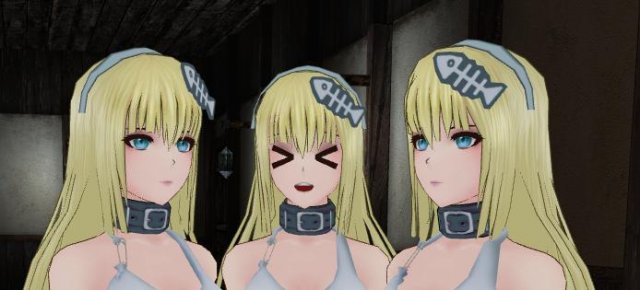
-=ID List=- 0 Hair band 1 Fish bone A 2 Fish bone B 3 Eye patch (left) 4 Eye path (right) 5 Wrist shackle (left) 6 Wrish shackle (right) 7 Glasses 8 Witch hat 9 Queen tiara A 10 Queen tiara B 11 Mage doll headset 12 Bunny ears 13 Police hat 14 Santa hat 15 Leather collar 16 Steel collar 17 Blindfold A 18 Blindfold B 19 Ball gag red A 20 Ball gag red B 21 Ball gag white A 22 Ball gag white B 23 Harness gag red A 24 Harness gag red B 25 Harness gag white A 26 Harness gag white B 27 Healer headband 28 Funny glasses A 29 Funny glasses B 30 Funny glasses C 31 Huntress mask
Other (R18 patch required)
100 Left nipple pearcing 101 Right nipple pearcing
remacc Usage: remacc [id]
Unequips an accessory (use listacc to find the [id] number)
Loads a stage. You can load into the beginning of a stage regardless of how far you have progressed in the story. There are a lot of stages that can be loaded, here is a summary of the valud numbers that can be used [stage_id] can be any of the following:
(the key above TAB) to produce a console where you can enter cheat codes.
-=Developer Tools=- While in game Press tilde
(the key above TAB) to produce a console where you can enter cheat codes.
List of console commands used to debug & test parts of the game
Introduction
Like the previous game in the Cinderella Escape! series, Revenge gives players access to several commands which can be used to edit various settings on characters, maps and gameplay.
To run the commands in this guide you will need to start your game and continue, or start a new game, then press the «Accent Grave» key. This key is in different places depending on the language of your keyboard but it is above the tab key on an english keyboard.
Once the console has opened you will see a text box at the bottom of the screen that you can type into
Note: While it can be fun to test things out, you might want to finish the game before doing so. There are some warnings included in the console this time.
Warning: There are many commands made for developer-debug-only. They may be harmful to your game or gamesave file. Use them at your own risk. So if you plan on testing these commands out, it might be safest to start a new game so your progress won’t be lost if the save file breaks.
Level State
resetplayer Moves the player back to the spawn point.
Has a bug where the original character is not removed from the level so multiple characters will be spawned.
resetbots Does the same as resetplayer but to NPCs
Has the same bug Usage: spawngroup [group_id] | This command spawns enemies by group id.
The [group_id] depends on the level, different levels have different enemy groups, if you need some ememies to fight just pick numbers between 0 and 10
Accessories
addacc Usage: addacc [id]
Equips an accessory (even if you haven’t bought it)
remacc Usage: remacc [id]
Unequips an accessory (use listacc to find the [id] number)
clearacc Unequips all accessories
Game State
loadstage Usage: loadstage [stage_id]
Loads a stage. You can load into the beginning of a stage regardless of how far you have progressed in the story
There are a lot of stages that can be loaded, here is a summary of the valud numbers that can be used [stage_id] can be any of the following:
Boss Stages: Any number from 10506 to 10513
Challenge Stages: Any number from 10551 to 10600
Player Character
armstype Usage: at [0
2] | This command changes main player’s Arms Type.
Changes the character’s arm restraints
0.5] | This command changes main player’s Breast Size.
armorstate Usage: as [0
1] | This command changes main player’s Armor State.
Sets whether the character’s armor is broken.
Sets the Player Character model. Doesn’t effect gameplay, options are cinderella, vanessa, snowwhite or eireen
emotest Usage: emotest [emo_index], where emo_index=0 to turn off emo layer.
Sets the character’s facial emotion
Cheats
gainexp Usage: gainexp [exp]
Gives you experience points. To see how many experience points you need to level up, check your status at the mirror of your home base.
showmethemoney Gives you 1,000,000 gold
spfull Fully charges your skill bars
god God mode. You don’t take any damage but your armor will still break and your skill bars will still charge
maininfo Prints gurrent game state information including the current level, game progress etc
skiptut Skips the fairy godmother’s tutorial on the first stage
passstage Instantly passes the current stage. Awards base EXP and Gold but if you haven’t done any combos, K.O.s or picked up any coins you won’t get any bonus.
skill Usage: skill [index]
[index] depends on the character, certain characters can use certain skills. Just try numbers starting from zero
Developer Tools
imptxt Imports localisation text if you want to change the language of the game
debug Resets the camera position
lockallach Resets your Steam achievements
testmb Tests the game’s Message Box function.. just pops a message up that you can click OK on
testsc Tests the Stage Complete screen.. and gives you 1000076 EXP and 1175 gold
testtg Tests the game’s Timer Gauge which is used for certain levels
exit Closes the game
clear Clears the console
help? Shows a list of console commands
Cinderella escape 2 revenge читы
Cinderella Escape 2 Revenge
Like the previous game in the Cinderella Escape! series, Revenge gives players access to several commands which can be used to edit various settings on characters, maps and gameplay.
Note: While it can be fun to test things out, you might want to finish the game before doing so. There are some warnings included in the console this time: Warning: There are many commands made for developer-debug-only. They may be harmful to your game or gamesave file. Use them at your own risk. So if you plan on testing these commands out, it might be safest to start a new game so your progress won’t be lost if the save file breaks.
resetplayer Moves the player back to the spawn point Has a bug where the original character is not removed from the level so multiple characters will be spawned
resetbots Does the same as resetplayer but to NPCs This will spawn *all* bots on the level Has the same bug
spawngroup Usage: spawngroup | This command spawns enemies by group id. The depends on the level, different levels have different enemy groups, if you need some ememies to fight just pick numbers between 0 and 10
addacc Usage: addacc Equips an accessory (even if you haven’t bought it) 0 Hair band 1 Fish bone A 2 Fish bone B 3 Eye patch (left) 4 Eye path (right) 5 Wrist shackle (left) 6 Wrish shackle (right) 7 Glasses 8 Witch hat 9 Queen tiara A 10 Queen tiara B 11 Mage doll headset 12 Bunny ears 13 Police hat 14 Santa hat 15 Leather collar 16 Steel collar 17 Blindfold A 18 Blindfold B 19 Ball gag red A 20 Ball gag red B 21 Ball gag white A 22 Ball gag white B 23 Harness gag red A 24 Harness gag red B 25 Harness gag white A 26 Harness gag white B 27 Healer headband 28 Funny glasses A 29 Funny glasses B 30 Funny glasses C 31 Huntress mask
Other (R18 patch required) 100 Left nipple pearcing 101 Right nipple pearcing
listacc Lists your currently equipped accessories
remacc Usage: remacc Unequips an accessory (use listacc to find the number)
clearacc Unequips all accessories
loadstage Usage: loadstage Loads a stage. You can load into the beginning of a stage regardless of how far you have progressed in the story
There are a lot of stages that can be loaded, here is a summary of the valud numbers that can be used can be any of the following:
Boss Stages: Any number from 10506 to 10513 Challenge Stages: Any number from 10551 to 10600 Story Stages:
armstype Usage: at | This command changes main player’s Arms Type. Changes the character’s arm restraints 0 = None 1 = Shackles 2 = Ropes A 3 = Ropes B 4 = Pillory
armorstate Usage: as | This command changes main player’s Armor State. Sets whether the character’s armor is broken. 0 = broken (hides clothes/ enables stagger) 1 = normal
setpc Usage: setpc (cinderella/vanessa/snowwhite/eireen) Sets the Player Character model. Options are cinderella, vanessa, snowwhite or eireen Depending on the character you chose there will be different skills available (see skill command)
gainexp Usage: gainexp Gives you experience points. To see how many experience points you need to level up, check your status at the mirror of your home base.
showmethemoney Gives you 1,000,000 gold
spfull Fully charges your skill bars
god God mode. You don’t take any damage but your armor will still break and your skill bars will still charge
maininfo Prints gurrent game state information including the current level, game progress etc
skiptut There are various tutorials in the game, typing this will skip the current one
passstage Instantly passes the current stage. Awards base EXP and Gold but if you haven’t done any combos, K.O.s or picked up any coins you won’t get any bonus.
skill Usage: skill depends on the character, certain characters can use certain skills. Just try numbers starting from zero
imptxt Imports localisation text if you want to change the language of the game
debug Resets the camera position
lockallach Resets your Steam achievements
testmb Tests the game’s Message Box function.. just pops a message up that you can click OK on
testsc Tests the Stage Complete screen.. and gives you 1000076 EXP and 1175 gold
testtg Tests the game’s Timer Gauge which is used for certain levels
exit Closes the game
clear Clears the console
help? Shows a list of console commands
Список команд пульта раньше отлаживал & проверял части игры
Введение
Как предыдущая игра в Спасении Золушки! ряд, Месть предоставляет доступ игроков к нескольким командам, которые могут использоваться, чтобы отредактировать различные параметры настройки на знаках, картах и геймплее.
Чтобы управлять командами в этом руководстве, Вы должны будете начать свою игру и продолжить или начать новую игру, затем нажать «ключ» Могилы Акцента. Этот ключ находится в различных местах в зависимости от языка Вашей клавиатуры, но это выше клавиши TAB на английской клавиатуре.
Как только пульт открылся, Вы будете видеть текстовое окно внизу экрана, что Вы можете напечатать в
Примечание: В то время как это может быть забава проверить вещи, Вы могли бы хотеть закончить игру прежде, чем сделать так. Есть некоторые предупреждения, включенные в пульт на этот раз.
Предупреждение: есть много команд, сделанных для «отладки разработчика только». Они могут быть вредны для Вашей игры или gamesave файла. Используйте их на Ваш собственный риск. Таким образом, если Вы планируете проверение этих команд, могло бы быть самым безопасным начать новую игру, таким образом, Ваш успех не будет потерян, если спасти файл сломается.
Государство уровня
resetplayer Кладет обратно игрока к пункту икры.
Имеет ошибку, куда исходный символ не удален из уровня, таким образом, многократные знаки будут порождены.
resetbots Делает то же самое как resetplayer, но к NPCs
Имеет ту же самую ошибку Использование: spawngroup [group_id] | Эта команда порождает врагов id группы.
[group_id] зависит на уровне, у разных уровней есть различные вражеские группы, если Вам нужны некоторые враги, чтобы бороться просто с числами выбора между 0 и 10
Аксессуары
addacc Использование: addacc [id]
Снабжает соучастника (даже если Вы не купили его),
remacc Использование: remacc [id]
Не снабжает соучастника (используйте listacc, чтобы найти [id] число),
clearacc Не оборудует все аксессуары
Государство игры
loadstage Использование: loadstage [stage_id]
Загружает этап. Вы можете загрузить в начало этапа независимо от того, как далеко Вы прогрессировали в истории
Есть много стадий, которые могут быть загружены, вот резюме valud чисел, которые могут использоваться [stage_id], может быть любое следующее:
Стадии босса: Любое число от 10 506 до 10 513
Этапы соревнования: Любое число от 10 551 до 10 600
Персонаж
armstype Использование: в [0
Изменяет ограничения руки характера
0.5] | Эта команда изменяет Размер груди главного игрока.
Устанавливает размер груди характера. «Небольшой» размер 0, большой размер.5 нет никакого фактического предела этому числу, и это может быть отрицательно (-0.6 для DFC :^)
armorstate Использование: как [0
1] | Эта команда изменяет государство Брони главного игрока.
Наборы, сломана ли броня характера.
emotest Использование: emotest [emo_index], где emo_index=0, чтобы выключить эмо слой.
Устанавливает лицевую эмоцию характера
Обманы
gainexp Использование: gainexp [exp]
Дает Вам очки опыта. Чтобы видеть, сколько очков опыта Вы должны выровнять, проверьте свой статус в зеркале Вашей основной базы.
showmethemoney Дает Вам 1 000 000 золота
spfull Полностью обвиняет Ваши профессиональные бары
бог Режим бога. Вы не наносите ущерба, но Ваша броня все еще сломается, и Ваши профессиональные бары все еще зарядят
maininfo Печати gurrent игра указывают информацию включая текущий уровень, прогресс игры и т.д.
skiptut Пропускает обучающую программу доброй феи на первой стадии
passstage Немедленно передает текущую стадию. Премии основывают EXP и Золото, но если Вы не сделали никаких компаний, K.O.s или взяли какие-либо монеты, Вы не получите премии.
умение Использование: умение [индекс]
[индекс] зависит от характера, определенные персонажи могут использовать определенные навыки. Просто попробуйте числа, начинающиеся с ноля
Инструменты разработчика
imptxt Текст локализации импорта, если Вы хотите изменить язык игры
отладка Перезагружает положение камеры
lockallach Перезагружает Ваши Паровые успехи
testmb Проверяет функцию Окна сообщения игры.. просто сует сообщение, что Вы можете нажать OK на
тесты Проверяет экран Stage Complete.. и дает Вам 1000076 EXP и золото 1175 года
testtg Проверяет Меру Таймера игры, которая используется для определенных уровней
выход Закрывает игру
ясный Очищает пульт
помощь? Показывает список команд пульта
Глючит или не запускается Cinderella Escape 2 Revenge? Решение есть! Постоянные лаги и зависания — не проблема! После установки мода Cinderella Escape 2 Revenge начала глючить или НПС не реагируют на завершение задания? И на этот вопрос найдется ответ! На этой странице вы сможете найти решение для любых известных проблем с игрой и обсудить их на форуме.
Игра не запускается
Игра вылетает на рабочий стол без ошибок. О: Скорее всего проблема в поврежденных файлах игры. В подобном случае рекомендуется переустановить игру, предварительно скопировав все сохранения. В случае если игра загружалась из официального магазина за сохранность прогресса можно не переживать.
Cinderella Escape 2 Revenge не работает на консоли. О: Обновите ПО до актуальной версии, а так же проверьте стабильность подключения к интернету. Если полное обновление прошивки консоли и самой игры не решило проблему, то стоит заново загрузить игру, предварительно удалив с диска.
Ошибка 0xc000007b.
О: Есть два пути решения. Первый — полная переустановка игры. В ряде случаев это устраняет проблему. Второй состоит из двух этапов:
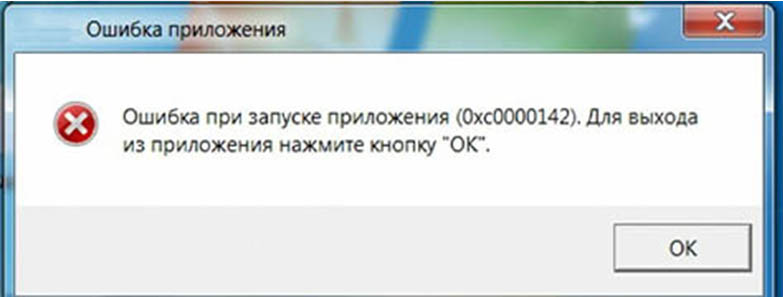
Ошибка 0xc0000142.
О: Чаще всего данная ошибка возникает из-за наличия кириллицы (русских букв) в одном из путей, по которым игра хранит свои файлы. Это может быть имя пользователя или сама папка в которой находится игра. Решением будет установка игры в другую папку, название которой написано английскими буквами или смена имени пользователя.
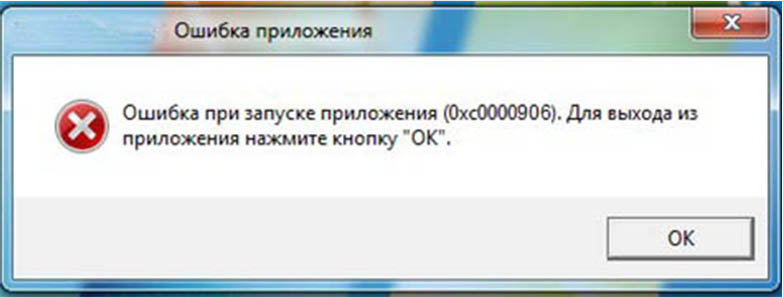
Ошибка 0xc0000906.
О: Данная ошибка связана с блокировкой одного или нескольких файлов игры антивирусом или “Защитником Windows”. Для её устранения необходимо добавить всю папку игры в исключени. Для каждого антивируса эта процедура индивидуально и следует обратиться к его справочной системе. Стоит отметить, что вы делаете это на свой страх и риск. Все мы любим репаки, но если вас часто мучает данная ошибка — стоит задуматься о покупке игр. Пусть даже и по скидкам, о которых можно узнать из новостей на нашем сайте.
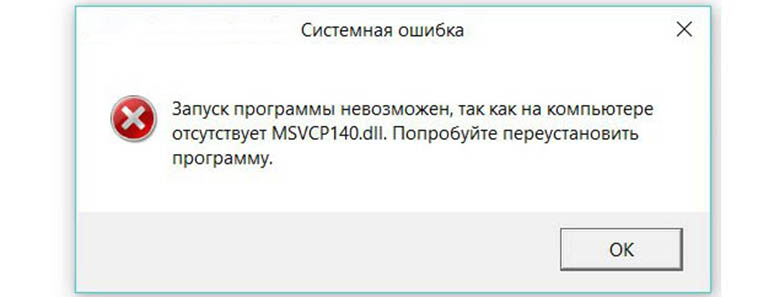
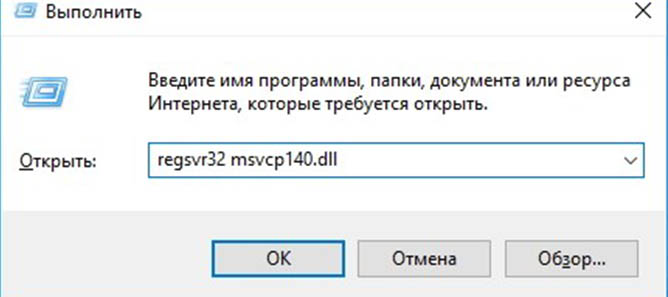
О: Ошибка возникает в случае отсутствия на компьютере корректной версии пакета Microsoft Visual C++, в который и входит msvcp 140.dll (и подобные ему). Решением будет установка нужной версии пакета.
После загрузки и установки нового пакета ошибка должна пропасть. Если сообщение об отсутствии msvcp 140.dll (120, 110, 100) сохраняется необходимо сделать следующее:
Ошибка 0xc0000009a/0xc0000009b/0xc0000009f и другие О: Все ошибки начинающиеся с индекса 0xc0000009 (например 0xc0000009a, где на месте “а” может находиться любая буква или цифра) можно отнести к одному семейству. Подобные ошибки являются следствием проблем с оперативной памятью или файлом подкачки.
Размер файла подкачки должен быть кратен 1024. Объём зависит от свободного места на выбранном локальном диске. Рекомендуем установить его равным объему ОЗУ. Если ошибка 0xc0000009а сохранилась, необходимо проверить вашу оперативную память. Для этого нужно воспользоваться функциями таких программ как MemTest86, Acronis, Everest.
Игра тормозит и лагает
Скорее всего данная проблема носит аппаратный характер. Проверьте системные требования игры и установите корректные настройки качества графики. Подробнее об оптимизации игры можно почитать на форуме. Также загляните в раздел файлов, где найдутся программы для оптимизации Cinderella Escape 2 Revenge для работы на слабых ПК. Ниже рассмотрены исключительные случаи.
Появились тормоза в игре. О: Проверьте компьютер на вирусы, отключите лишние фоновые процессы и неиспользуемые программы в диспетчере задач. Также стоит проверить состояние жесткого диска с помощью специализированных программ по типу Hard Drive Inspector. Проверьте температуру процессора и видеокарты —возможно пришла пора обслужить ваш компьютер.
Долгие загрузки в игре. О: Проверьте состояние своего жесткого диска. Рекомендуется удалить лишние моды — они могут сильно влиять на продолжительность загрузок. Проверьте настройки антивируса и обязательно установите в нём “игровой режим” или его аналог.
Cinderella Escape 2 Revenge лагает. О: Причинами периодических тормозов (фризов или лагов) в Cinderella Escape 2 Revenge могут быть запущенные в фоновом режиме приложения. Особое внимание следует уделить программам вроде Discord и Skype. Если лаги есть и в других играх, то рекомендуем проверить состояние жесткого диска — скорее всего пришла пора заменить его.
Проблемы с модами
Ошибки загрузки/обновления
Проверьте стабильность подключения к интернету, а также скорость загрузки. При слишком высоком пинге или низкой пропускной способности обновление может выдавать ошибки.
Если магазин или лончер Cinderella Escape 2 Revenge не завершает обновления или выдает ошибки, то переустановите саму программу. При этом все скачанные вами игры сохранятся.
Запустите проверку целостности данных игры.
Проверьте наличие свободного места на том диске, на котором установлена игра, а также на диске с операционной системой. И в том и в другом случае должно быть свободно места не меньше, чем занимает игра на текущий момент. В идеале всегда иметь запас около 100Гб.
Проверьте настройки антивируса и “Защитника Windows”, а также разрешения в брандмауэре. Вполне возможно они ограничивают подключение к интернету для ряда приложений. Данную проблему можно решить и полной переустановкой магазина или лончера т.к. большинство из них попросит предоставить доступ к интернету в процессе инсталляции.
О специфических ошибках связанных с последними обновлениями можно узнать на форуме игры.
Вопросы по прохождению
Ответы на все вопросы касающиеся прохождения Cinderella Escape 2 Revenge можно найти в соответствующих разделах Wiki, а также на нашем форуме. Не стесняйтесь задавать вопросы и делиться своими советами и решениями.