
Precision Engineering 2.0
Uploaded · Published May 7, 2020 · Updated December 22, 2020

Author: Tuna
Last revision: 3 May, 2020 at 17:36 UTC (1)
File size: 46.08 KB
Description:
Precision Engineering 2.0
Since the update of April 2020 (for me at least) length snapping of highways, rail, metro and a ton of other networks broke. I cloned the original Precision Engineering and just started messing around in it, when I found something which fixed it for me. I published the fix, some other players tested it and confirmed the fix working. You’ll find the updated source code at https://github.com/tunaflish/PrecisionEngineering.
The fix is basically always returning 1 unit as length snapping. The original mod only allows this snapping for zoneable networks, which is now removed. From my testing I found this works for any road (including highways), railroad and quays.
If you find any issues you can report them, but I’m no C# developer. I might be able to find other problems, but most likely not.
Big thanks to Simie, who built the original mod.
Make sure to unsubscribe the original Precision Engineering! You can do that over here: https://steamcommunity.com/sharedfiles/filedetails/?id=445589127
— Description of the original mod below —
Precision Engineering augments Cities: Skylines by adding angle snapping, guidelines and additional information to assist you when building roads, train lines, pipes and power lines.
Key Features
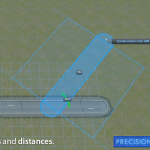
– Adds angle and distance measurements when building roads, train lines, pipes and power lines.
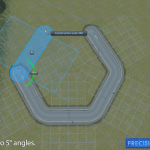
– Hold CTRL to enable snapping to angles (in 5 degree increments).
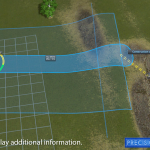
– Hold SHIFT to enable additional information display.
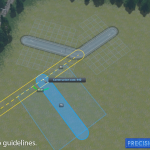
– Hold ALT to enable snapping to guidelines.
– Display height of the road you are placing relative to ground level
– Display height difference between start and end point of a road (when placing, holding SHIFT)
– Does not override the default NetTool, so should be compatible with most other mods.
Can be safely removed at any time. Does not modify your save game file or need to be active when loading a save that previously used this mod.
Revisions:
Old revisions of this mod are available below. Click the link to download.
Precision Engineering
Uploaded · Published February 10, 2016 · Updated May 18, 2021

Author: Simie
Last revision: 27 Feb at 13:23 UTC (2)
File size: 44.03 KB
Description:

Precision Engineering augments Cities: Skylines by adding angle snapping, guidelines and additional information to assist you when building roads, train lines, pipes and power lines.

Click the subscribe button above to install, then enable the mod in the Content Manager on the Cities: Skylines main menu.
– Adds angle and distance measurements when building roads, train lines, pipes and power lines.
– Hold CTRL to enable snapping to angles (in 5 degree increments).
– Hold SHIFT to enable additional information display.
– (NEW) Hold ALT to enable snapping to guidelines.
– Display height of the road you are placing relative to ground level
– Display height difference between start and end point of a road (when placing, holding SHIFT)
– Does not override the default NetTool, so should be compatible with most other mods.
Can be safely removed at any time. Does not modify your save game file or need to be active when loading a save that previously used this mod.
This mod uses the detours library [github.com] created by cope. A big thanks to him for sharing that code, many mods on the workshop would not be possible without it.
– Make sure you have the mod enabled in the Content Manager.
– Bugs/Crashes? Try disabling all other mods and running with just Precision Engineering enabled. If you are sure it is not caused by another mod, please post your logs in this thread and I’ll try and take a look.
– I don’t own any of the DLC so can’t test with them installed. Users report that the mod works fine, however.
Revisions:
Old revisions of this mod are available below. Click the link to download.
Подпишитесь, чтобы загрузить
[DEPRECATED] Precision Engineering 2.0

This mod is no longer necessary, since the original modder has fixed the snapping issue in the original version. Yaaaay! I never actually intended for this mod to get bigger than the original; I’m no C# developer, like I said in the original description. It kinda got a lot more attention than it needed to, I just wanted to have my snapping back.
Anyways, please go back to using the original mod, and thanks for all the fish.
Precision Engineering 2.0
Since the update of April 2020 (for me at least) length snapping of highways, rail, metro and a ton of other networks broke. I cloned the original Precision Engineering and just started messing around in it, when I found something which fixed it for me. I published the fix, some other players tested it and confirmed the fix working. You’ll find the updated source code at https://github.com/tunaflish/PrecisionEngineering.
The fix is basically always returning 1 unit as length snapping. The original mod only allows this snapping for zoneable networks, which is now removed. From my testing I found this works for any road (including highways), railroad and quays.
If you find any issues you can report them, but I’m no C# developer. I might be able to find other problems, but most likely not.
Big thanks to Simie, who built the original mod.
Make sure to unsubscribe the original Precision Engineering! You can do that over here: https://steamcommunity.com/sharedfiles/filedetails/?id=445589127
Precision Engineering augments Cities: Skylines by adding angle snapping, guidelines and additional information to assist you when building roads, train lines, pipes and power lines.
Key Features
— Adds angle and distance measurements when building roads, train lines, pipes and power lines.
— Hold CTRL to enable snapping to angles (in 5 degree increments).
— Hold SHIFT to enable additional information display.
— Hold ALT to enable snapping to guidelines.
— Display height of the road you are placing relative to ground level
— Display height difference between start and end point of a road (when placing, holding SHIFT)
— Does not override the default NetTool, so should be compatible with most other mods.
Can be safely removed at any time. Does not modify your save game file or need to be active when loading a save that previously used this mod.
Precision Engineering


Precision Engineering
Precision Engineering augments Cities: Skylines by adding angle snapping, guidelines and additional information to assist you when building roads, train lines, pipes and power lines.
Click the subscribe button above to install, then enable the mod in the Content Manager on the Cities: Skylines main menu.
– Adds angle and distance measurements when building roads, train lines, pipes and power lines.
– Hold CTRL to enable snapping to angles (in 5 degree increments).
– Hold SHIFT to enable additional information display.
– (NEW) Hold ALT to enable snapping to guidelines.
– Display height of the road you are placing relative to ground level
– Display height difference between start and end point of a road (when placing, holding SHIFT)
– Does not override the default NetTool, so should be compatible with most other mods.
Can be safely removed at any time. Does not modify your save game file or need to be active when loading a save that previously used this mod.
[www.paypal.com] [github.com] [github.com]
This mod uses the detours library [github.com] created by cope. A big thanks to him for sharing that code, many mods on the workshop would not be possible without it.
– Make sure you have the mod enabled in the Content Manager.
– Bugs/Crashes? Try disabling all other mods and running with just Precision Engineering enabled. If you are sure it is not caused by another mod, please post your logs in this thread and I’ll try and take a look.
– I don’t own any of the DLC so can’t test with them installed. Users report that the mod works fine, however.
Do you like the mod? Buy me a coffee as thanks!
[ko-fi.com]
If you haven’t heard about the Cities: Skylines Mods, it’s definitely the time to be introduced. These additional files provide a gamer with extra features which are not originally included to the game. Cities: Skylines Mods free files are costless and can accessed by everyone who is interested. The Cities: Skylines Mods download can be completed easily without putting much effort. All you need to do is save the file to your PC and follow the instructions. There should be any problem with that, so no worries. Huge mass of players is using Cities: Skylines Mods around the world, so you shouldn’t stay behind – just click on Cities: Skylines Mods download button and go for the amazing upgrade! The Cities: Skyline game will change massively and it’s all for the best. Who could refuse adding useful functionality to the game? Definitely not you! So complete Cities: Skylines Mods download and take a look at the new version of the game made exactly by you. Sounds fascinating, isn’t it? But it’s better seeing yourself and fulfilling your craziest ideas. We bet there is bunch of them! Express your creativity and make it as useful as never before. It’s definitely a chance to take!
Моды геймплей для CITIES SKYLINES
Моды геймплей для CITIES SKYLINES. Данные моды меняют возможности редактора и улучшают игровой процесс.

Мод Zoom It! — расширенное масштабирование для Cities: Skylines
Это очень простой мод для настройки минимального и максимального уровня масштабирования в игре. Теперь нет границ в приближении или отдалении

Мод First Person Camera — камера от первого лица для Cities: Skylines
Данный мод позволяет переключить камеру в режим от первого лица и посмотреть на свой город как житель. Для переключения просто

Мод Zone It! для Cities: Skylines
Этот мод позволяет изменить размер блока зоны. Можно настроить радиус зоны на 0, 1, 2, 3 или 4, вместо того,

Мод Precision Engineering — точное дорога строение для Cities: Skylines
Мод расширяет возможности Cities: Skylines, добавляя угловые привязки, которые помогут вам при строительстве дорог, железнодорожных линий, трубопроводов и линий электропередач.

Мод Smart Intersection Builder для Cities: Skylines
Мод позволяет размещать готовые перекрестки и автодороги поверх существующих дорог без необходимости предварительно очищать территорию. Старые дороги будут удалены, а

Мод Historical Districts — исторические районы для Cities: Skylines
Данный мод позволяет с легкостью установить или снять исторический статус для всех зданий в районе. Небольшой мод добавляет две кнопки

Мод More Advanced Toolbar — продвинутая панель инструментов для Cities: Skylines
Вы можете использовать этот мод для изменения положения и размера панели инструментов в игре. У вас будет выбор между обычной

Мод контроля общественного транспорта — Improved Public Transport 2 для Cities: Skylines
Также известный как IPT2. Обеспечивает улучшенный контроль общественного транспорта. Это исправленная версия оригинального IPT, который был оставлен его автором. Характеристики Добавить или

Мод Ploppable RICO для Cities: Skylines
Этот мод позволит вам строить здания, которые функционируют как: Жилые Промышленные Офисные Коммерческие Ploppable Rico mod преобразует любой совместимый ploppable

Мод Real Time для CITIES: SKYLINES
Мод Real Time кардинально меняет правила игры и может привести к дисбалансу в существующих городах, поскольку меняется поведение граждан. Вы

Мод Electric Roads Mod — электрифицированные дороги для CITIES: SKYLINES
Мод Electric Roads Mod превращает все дороги в городе в своего рода электрические проводники. Таким образом, вам больше не нужно

Мод Building Anarchy — строим здания где хотим в Cities: Skylines
Мод Building Anarchy позволят вам строить здания почти на любом участке вашей карты. Вы можете размещать здания перед тем как

Мод Forest Brush — садим лес в CITIES SKYLINES
Мод Forest Brush позволяет с легкостью и удобством рисовать разнообразные леса, луга, сады или просто участки растений в нужных участках