
ENB and SweetFX for Duke Nukem Forever addon
Duke Nukem Forever
Gearbox Software | 2K Games | Released 2011
Duke Nukem will bring his signature brand of babe-lovin’, cigar-smoking, beer-chugging and ass-kicking action as he once again saves the Earth and our babes from hordes of invading aliens. next year.
Location
Filename
Category
Licence
Uploader
Added
Updated
Downloads
MD5 Hash
Embed Button
Embed Widget
ENB and SweetFX for Duke Nukem Forever. This is a Place and Play, no adjustments required.
To Install: File updated for Win10 compatibility.
Download and extract to the following location :
C:\Program Files (x86)\Steam\steamapps\common\Duke Nukem Forever\System.
To Uninstall:
Remove the same files.
Adjustments made to files as shown in below video. New version updated with changes.
Additional Setup:
Nvidia Users. Enable DSR in your Nvidia control panel (as shown here), under the global settings. (I checked all the boxes to allow for all the resolutions).
ATI Users: Enable VSR here.
If game appears dark.
Just make this alteration to Duke Nukem Forever.txt in the sweetFX\Preset folder. Change the define USE_SMAA_ANTIALIASING to 0.
If game has performance issues or microstutters.
Also, open enbseries.ini in the Duke Nukem Forever\System folder and change the line under [GLOBAL] AllowAntialias=1 to AllowAntialias=0.
Mod Information.
This is meant to enhance the overall game.
Use the Sweetfx/Presets/Duke Nukem Forever.txt file to alter settings.
To make adjustments to ENB, alter the enbseries.ini configuration settings file, found in the main folder.
Use PauseBreak to enable/disable effects.
Using the Printscreen, will generate ingame screenshots.
They can be found placed in the game folder, where the files were placed.
Use FastStone Image Viewer, to convert them to jpg or other formats.
Alter ENB and SweetFX settings as you like.
Full ENB Download available here.
Full Sweetfx Download available here.
For further information check here.
Trouble Shooting: Mod
Install the DX9 final release if you haven’t done so previously. DX9 Final Release June2010
DX install: Download and run the file, tell it to extract to c:\dx, then after goto c:\dx and run the dxsetup file.
Check to make sure you are using the newest graphics drivers.
Try disabling any turbo or overclocking software.
If you experience issues with the ENB D3D9 try this: CTD, Graphics issues.
Replace the d3d9.dll with one of the alternates provided.
Updated version contains altd3d9 folder with alternate ENB launchers included.
Nvidia users can also use this mod (Thanks to khalilsm) to allow the game to run if you have any issues.
Rename the ENB d3d9.dll that came with this mod to d3d9orig.dll and place the d3d9.dll from that mod with it in the game folder.
Thanks to Christian Jensen (CeeJay.dk) and Crosire for reshade and sweetfx.
Thanks for enb by Boris Vorontsov.
I hope you find these programs and adjustments helpful at making your game more enjoyable.
Thanks also to Mod DB and the Mod DB Community.
Duke Nukem 3D «High Resolution Pack Build 27-04-2007»
Последний на данный момент релиз High Resolution Pack’a для замечательной игры Duke Nukem 3D, полностью преобразовывающий старую добрую стрелялку :).
— highres\skyboxes: 89, 99 (pal24)
— highres\screen\fonts: 2822-2879/2881/2883/2884/2912/2914/2915 (pal0/10-16/21/23)
— highres\screen\menu: 2505, 3292 (with babe model, improved lighting/Duke hair)
— highres\sprites\characters: 603 (hanging babe), 1294 (pod babe), 1323 (impaled babe),
1324 (bloody pole), 1334 (crouching babe),
1335 (babe podest), 1352 (monk), 1405,
1520/1528/1536 (Duke gibs), 4590 (skin update)
— highres\sprites\effects: 1890-1910 (explosion2 fix)
— highres\sprites\firstperson: 2558 (Expander crystal color)
— highres\sprites\monsters: 490 (Cycloid Emperor hologram), 679 (Battlelord hologram),
1550 (shark with red eyes), 2000 (skin update),
2630 (Battlelord), 2710 (Cycloid Emperor),
2760 (Moon Overlord), 4740 (Alien Queen)
— highres\sprites\pickups: 51 (healthbox), 52 (health bottle), 55 (Steroids)
— highres\sprites\projectiles: 1360-1379 (Octabrain mindblast), 1641-1643 (color correction)
— highres\sprites\props: 538 (slimepipe), 544 (ironbar), 551 (domelight), 571 (stall), 602,
669 (vacuum), 689 (IV unit), 904 (wooden horse), 914 (woodfence),
919 (electric meter), 976 (ventshaft), 991 (shower head),
1006 (bar stool), 1238 (exploding barrel), 1358/1359 (fetus),
3426 (pirate flag)
— highres\sprites\props\bottles: 954/1012/1013 (bottle1/5/6 sprite placeholders)
— highres\sprites\signs: 601, 721, 826, 964, 984/985, 1007, 4362, 4558, 4559, 4579, 4880
— highres\textures: 89, 203, 218, 220, 238-240, 247, 285, 286, 312-315, 317, 318,
325, 326, 329, 330, 367-369, 371, 372, 376, 377, 465, 466, 468,
474, 734, 755, 756, 866*, 1102, 3370-3372, 3384-3387, 3405, 3406,
4104, 4169, 4172-4175, 4180, 4182*, 4303, 4319, 4320 [* 1024×1024 res]
Duke Nukem Forever 2013 mod
Duke Nukem Forever 2013
Duke Nukem 3D mod | Released 2013
The game that was meant to be. As the 2001 trailer showed us. Released. Check download sections, ladies!
Motorbike´s Speedometer Fix
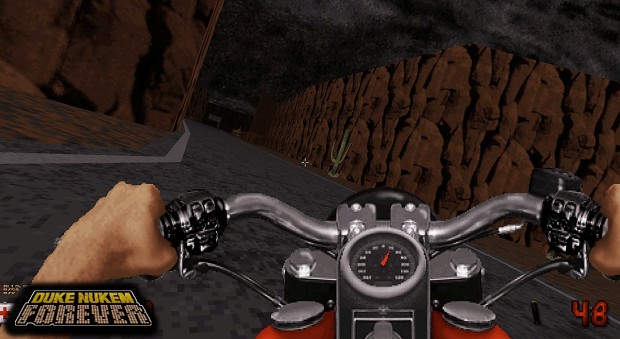
A new patch has been released:
This file fixes the motorbike´s speedometer. Simply unpack it in your DNF 2013 folder and enjoy, while we work on the big ass update that is gonna move Earth from its axis.
This update has been done a few years ago but I forgot to add it.
It removes those stray needles at the right side and replace them with a proper speedometer needle. Credits to Deeperthought.
Unpack the content of the rar file inside the same folder where your DNF 2013 is installed. You will be asked to replace an older file, which you have to accept.
Who said we were dead?
After four years of silence: The dream team comes again with some updates!

Fan made trailer by Maxwolf Goodlife
Maxwolf Goodlife has made three fan trailer for our mod, we have chosed this one because of its originality. Give it a look and well. Vote us! 🙂

Duke Nukem Forever is getting bigger.
Yeah we´re trying to make some hype, to stay on the lines of the game 😀
Duke Nukem Forever´s first DLC is out!
Davox and Micky C have released a three-map episode for our mod!
More articles >>
No articles were found matching the criteria specified. We suggest you try the article list with no filter applied, to browse all available. Join now to share your own content, we welcome creators and consumers alike and look forward to your comments.
Duke Nukem Forever 2013 1.0 version
Install in an empty folder. Put a duke3d.grp copy inside and run DNF.BAT. Software mode is recommended but Polymost is also supported. Do not replace.
Motorbike´s Speedometer Fix
This file fixes the motorbike´s speedometer. Simply unpack it in your DNF 2013 folder and enjoy!
First DLC Level Pack
This is a three level pack by Davox and Micky C, with new music and weapon.
No files were found matching the criteria specified. We suggest you try the file list with no filter applied, to browse all available. Join now to share your own content, we welcome creators and consumers alike and look forward to your comments.

My game crashes on e1l2 when I get to «exit,» but it’s actually a trap. How do I prevent this?
vn1ghostz I haven´t heard of a crash like that before. Make sure you are running the mod on its intented condition, launching dnf.bat, with the provided _eduke32.exe, and running Software mode.

Will this also work with Duke Nukem 3D: 20th Anniversary World Tour?

I second this. It seems to glitch up a bit when I tried it

I played the mod from start to finish and its DLC and it is really awesome I hope this mod will keep getting new updates for it somewhere in the future those screen shots of the boat section look awesome never thought the Build engine is capable of doing so much cool things.

Found out what’s the deal. For anyone wondering, the devs are currently working with Voidpoint on the expansion for Ion Fury, so do not expect anything on DNF 2013 for now.

Did something happen to the mod recently? I’m no longer able to change renderers unless I turn fullscreen off, and I only get the 32 bit or software option. 16bit seems to have disappeared.
Are there still any plans to give this more content? It’s been so long since we got anything.

Would this work with the PS Vita port of eDuke32 somehow?

Have a question, How accurate will this be to the old alpha duke nukem?
This is a fan reconstruction of what´s been seen in the trailers, on the Build engine. I´d say it wont be very accurate, but it will be fun and enjoyable.
My game crashes on e1l2 when I get to «exit,» but it’s actually a trap. How do I prevent this?
You’re sorta late on that, just saying.


shut up, just saying

Developer
Contact
Homepage
Release date
Mod watch
Share
197 votes submitted.
Highest Rated (10 agree) 10/10
This was amazing! The first level starts off a bit slow, and besides the new art and a few references played like an ordinary Duke 3D level (although the view from the top of the lady killer is stunning) and there’s good atmosphere. After you get the bike, there’s a bit of a turning point and gameplay starts becoming more ambitious and interesting, plus all the references, both in-your-face and the smaller ones, and the obvious/exact replicas as well as ideas/locations etc which are only loosely…
Duke nukem forever моды на графику



REQUIRES JEWEL OF THE NILE DLC!
Hail To The King Baby!
the following mod changes part of the weapons into DNF one’s.
weapons changed:
Pistol
Shotgun
Assault Rifle
Rocket Launcher
Devastator
Minigun
SledgeHammer
C4
LaserGun
Sniper

This mod replaces the Big Biomechanoid with the Cycloid from Duke Nukem Forever. Find all Duke Nukem mods in this collection: http://steamcommunity.com/sharedfiles/filedetails/?id=150409788
This model features custom DNF sounds provided by Biomechanoid.
This mod replaces the Kleer with the Elite Pigcop from Duke Nukem Forever. Find all Duke Nukem mods in this collection: http://steamcommunity.com/sharedfiles/filedetails/?id=150409788
This model features custom DNF sounds provided by Biomechanoid.
This mod replaces the Gnaar with the Pigcop from Duke Nukem Forever. Find all Duke Nukem mods in this collection: http://steamcommunity.com/sharedfiles/filedetails/?id=150409788
This model features custom DNF sounds provided by Biomechanoid.
This mod replaces the Beheaded Rocketman with the Alien Assault Trooper from Duke Nukem Forever. Find all Duke Nukem mods in this collection: http://steamcommunity.com/sharedfiles/filedetails/?id=150409788
This model features custom DNF sounds provided.
This mod replaces the Kleer Skull in the Intro Sequence with a Pigcop Skull from Duke Nukem Forever. For that extra bit of Immersion!
This mod replaces the Small Biomechanoid with the Enforcer from Duke Nukem Forever. Find all Duke Nukem mods in this collection: http://steamcommunity.com/sharedfiles/filedetails/?id=150409788
This model features custom DNF sounds provided by Biomechano.
This mod replaces Khnum with the Battlelord from Duke Nukem Forever. Find all Duke Nukem mods in this collection: http://steamcommunity.com/sharedfiles/filedetails/?id=150409788
This model features custom DNF sounds provided by Biomechanoid.
This mod replaces the Witch-Bride with the Octaking from Duke Nukem Forever. Find all Duke Nukem mods in this collection: http://steamcommunity.com/sharedfiles/filedetails/?id=150409788
This model features custom DNF sounds provided by Biomechanoid.

This mod replaces the sounds of the Scrapjack with sounds of the Assault Commander from Duke Nukem Forever.
Credits:
— 3D Realms for the sounds.
This adds in a player model called Doug Huggem; the more friendly version of Duke Nukem. Includes custom player sounds.
Additionally, this player model has the ability to «taunt». To taunt, switch to the hands and press the fire button (or right mouse b.
This mod replaces the Small Spiders with Pregnators from Duke Nukem Forever. Find all Duke Nukem mods in this collection: http://steamcommunity.com/sharedfiles/filedetails/?id=150409788
This model features custom DNF sounds provided by Biomechanoid.
This mod replaces the Spaceship with the Alien Mothership from Duke Nukem Forever. Find all Duke Nukem mods in this collection: http://steamcommunity.com/sharedfiles/filedetails/?id=150409788
This mod was made possible by Noam2000, who hooked up all the.
This mod replaces the Harpy with the Octabrain from Duke Nukem Forever.
Find all Duke Nukem mods in this collection: http://steamcommunity.com/sharedfiles/filedetails/?id=150409788
Octabrain Soundclips provided by Biomechanoid.
This mod replaces the Werebull with a ‘roided up Pig from Duke Nukem Forever.
Find all Duke Nukem mods in this collection: http://steamcommunity.com/sharedfiles/filedetails/?id=150409788
Model and Textures extracted from the game and modified by me.
T.
The mod adds the Holsom Twins from Duke Nukem Forever as player models.
Models and Textures are from Duke Nukem Forever,I do not take any credit for them.
This mod changes the Big Arachnoid into Dr. Proton from Duke Nukem Forever! Model and textures provided by Noam2000.
Tired of Sams dinky beater? Ride in style in Duke Nukem Forevers Mighty Foot Monstertruck! Please note that it simply replaces the car in the campaign, it is not actually drivable. Sorry 😉
Duke Nukem Forever → Оптимизация для слабых ПК
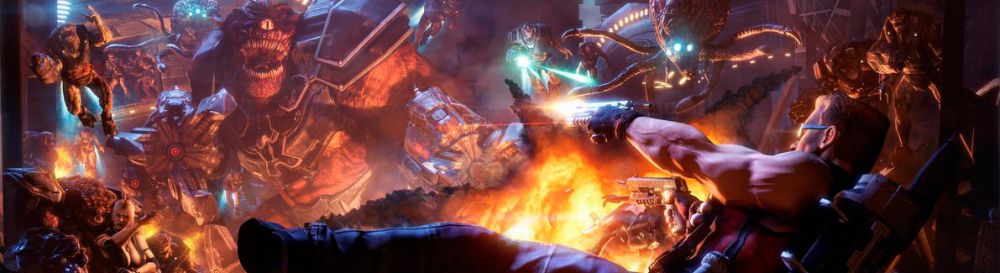
Duke Nukem Forever — продолжение легендарного шутера с видом от первого лица в научно-фантастической серии игр о Дюке Нюкеме. Кровожадные. Подробнее
Оптимизация для слабых ПК Duke Nukem Forever
Существует много способов улучшить работу игр на не самом слабом компьютере. Далее мы рассмотрим их в порядке от простых к сложным и расскажем, что делать, если Duke Nukem Forever тормозит.

Простое решение тормозов в Duke Nukem Forever
Освободить место на диске
Прежде чем переходить к активным действиям нужно убедиться, что на компьютере есть хотя бы 10-15 Гб свободного места на жестком диске, на который установлена операционная система.
Обычно это диск «C». Этот минимальный запас необходим для того, чтобы система могла без каких-либо проблем создавать временные хранилища файлов Duke Nukem Forever, кэши и так далее.
Посмотрите системные требования Duke Nukem Forever и убедитесь, что на вашем жестком диске достаточно места для нормальной работы игры.
Отключить ненужные программы
Каждая программа, которая запущена в ОС, занимает определенный процент оперативной памяти и загружает процессор. Убедиться в этом легко, достаточно просто открыть диспетчер задач с помощью сочетания клавиш Ctrl+Alt+Del:

Если в компьютере установлен не самый мощный процессор, а оперативной памяти меньше 8-16 Гб, то перед запуском Duke Nukem Forever нужно отключить ненужные программы. Например, Skype, Discord, Telegram, Google Chrome и так далее.
Отключить оверлеи
Речь идет о тех программах, которые способны отображать свой интерфейс поверх игры. Часто на компьютере есть такие — Fraps, Steam, Origin и так далее. Даже когда оверлей скрыт, он обрабатывается компьютером, снижая FPS в Duke Nukem Forever.
Поэтому все оверлеи нужно отключить. Почти всегда это можно сделать в настройках программы без необходимости ее удаления. Например, оверлей Steam, легко отключается через меню:

Обновить драйвера видеокарты, скачать драйвера для Duke Nukem Forever
Вне зависимости от того, какая видеокарта стоит в системном блоке, ее драйвера нужно поддерживать в актуальном состоянии. Поэтому перед запуском Duke Nukem Forever следует зайти на сайт производителя и проверить, не вышли ли новые драйвера:
После установки драйвера следует перезагрузить компьютер, чтобы исключить возможность сбоев. Также стоит учитывать, что для многих старых видеокарт новые драйверы уже не выходят.

Изменить параметры электропитания
По умолчанию в компьютере установлен сбалансированный режим электропитания, который, а в некоторых ноутбуках, в целях увеличения времени работы, и вовсе установлена экономия энергии.

Это не дает компьютеру раскрыть свой потенциал в Duke Nukem Forever полностью, поэтому первым делом нужно открыть панель управления, которую можно найти с помощью поиска. После нужно сделать следующее:
Включить режим производительности Nvidia
После установки драйвера для видеокарты от компании Nvidia можно ускорить работу Duke Nukem Forever с помощью режима производительности. Это немного упростит графику в игре, но повысит FPS. Обратите внимание, что этот метод доступен только в случае, если у вас видеокарта с чипом от Nvidia. Вот как это сделать:

Далее необходимо запустить Duke Nukem Forever и убедиться, что все отображается корректно. Если возникают проблемы, то нужно вместо «Пользовательские настройки с упором на:» выбрать «Настройки согласно 3D-приложению».
Отключить эффекты Windows
Если Duke Nukem Forever работает не в полноэкранном режиме, а в окне, в том числе и без рамки, то повысить FPS можно, если отключить эффекты Windows. Для этого нужно проделать следующие действия:

При необходимости на последнем шаге можно выбрать опцию «Особые эффекты». В таком случае можно самостоятельно выбрать, какие эффекты оставить, а какие — отключить.
Увеличить файл подкачки, если не хватает оперативной памяти для Duke Nukem Forever
Чтобы компенсировать недостаток оперативной памяти, можно увеличить файл подкачки. Это позволит системе хранить часть необходимых Duke Nukem Forever данных прямо на жестком диске. Вот что нужно сделать:
Например, если в системном блоке установлена «плашка» на 4 Гб, то есть 4192 Мб, в поля выше нужно вписать число 2048. Можно сделать файл подкачки больше, но никакого прироста это не даст.

Следует понимать, что файл подкачки эффективен только тогда, когда системе не хватает оперативной памяти. Если компьютер имеет 8-16 Гб, то файл подкачки практически не используется. А при использовании SSD-диска в качестве системного наличие файла подкачки и вовсе может замедлить производительность Duke Nukem Forever, поэтому не следует бездумно задавать большое значение файла подкачки.
Если Duke Nukem Forever запускается, но сильно тормозит, то перед началом всех процедур следует снизить графику до минимума через настройки игры. Если это не помогло, то придется прибегнуть к помощи сторонних программ для настройки видеокарты:
Загрузив программу, запускаем ее. В случае с NVIDIA Inspector нужно запускать файл nvidiaProfileInspector.exe, а не nvidiaInspector.exe. Сверху, в строке «Profiles:» можно выбрать любую игру, которая поддерживается драйверами Nvidia.

Ниже представлены все доступные настройки. Их много, но для того, чтобы ухудшить графику в игре до «картофельной», вполне достаточно всего нескольких, которые находятся в разделе «Antialiasing».
Наибольший прирост производительности дает изменение этих двух параметров:
Каждая из этих настроек имеет разные значения. Некоторые из них могут делать картинку в Duke Nukem Forever неудобоваримой, поэтому следует попробовать разные комбинации значений, которые дают более-менее сносное играбельную картинку.

В случае с RadeonMod все аналогично: нужно найти настройки, отвечающие за отображение текстур и снижать их до тех пор, пока FPS в игре не станет достаточно высоким.
Как разогнать видеокарту для Duke Nukem Forever
Все, что связано с «разгоном», направлено на увеличение производительности, но это довольно обширные темы, о которых в двух словах рассказать сложно. К тому же это всегда довольно рисковое дело. Если что, мы вас предупредили.
Чтобы добиться большего значения FPS в Duke Nukem Forever, сначала можно попробовать разогнать видеокарту. Самый простой способ сделать это — воспользоваться встроенными функциями ПО от производителя видеокарты.

Например, в комплекте с некоторыми видеокартами от GIGABYTE поставляется программа Graphics Engine, в которой есть несколько уже готовых профилей разгона. Это позволяет выжать из видеокарты 5-10 дополнительных кадров в секунду.
Если программы от производителя нет, то всегда можно воспользоваться универсальным решением — MSI Afterburner. Это одна из лучших программ для разгона, в ней множество разных настроек.

Но тут придется все настраивать вручную. Повышать следует в первую очередь частоту самого видеочипа («Core Clock») и частоту памяти видеокарты («Memory Clock»). Слева находятся базовые значения этих параметров. Справа отображаются температура и увеличение вольтажа — эти характеристики позволяют следить за «здоровьем» видеокарты.
При повышении частоты возрастает нагрев видеокарты. Если температура переходит отметку в 85 градусов, то следует увеличить скорость оборотов вентиляторов («Fan Speed»). Если температура повысилась до 100 градусов, то следует немедленно прекратить разгон, иначе чип может расплавиться. Мощный «разгон» требует водяного охлаждения, поэтому не следует повышать частоты более чем на 10%.
Разогнать процессор
В то время как «разгон» видеокарты вполне осуществим прямо в Windows, для того, чтобы улучшить работу процессора и тем самым увеличить быстродействие Duke Nukem Forever, придется лезть в «Биос».
Геймерский «разгон» процессора обычно предполагает увеличение процессорного множителя (Core Ratio). Сделать это можно далеко не на каждом процессоре, а только на том, где этот множитель разблокирован. Обычно такие процессоры помечаются особым образом. Например, компания Intel использует маркировки «K» и «X‘. То есть, например, i7-4790 нельзя разогнать с помощью множителя, а вот i7-4790K — вполне.

Но как узнать точное название модели процессора? Проще всего воспользоваться программой CPU-Z. Запустив ее, нужно открыть вкладку «CPU» и посмотреть на самую первую строчку — «Name». Это и есть название процессора. Кстати, там же можно увидеть из сам множитель. Он в разделе «Clocks», в строке «Multiplier». Если процессор поддерживает «разгон», то этот множитель можно изменить.
Чтобы изменить коэффициент Core Ratio, нужно сначала попасть в оболочку BIOS. Для этого нужно нажать особое сочетание клавиш во время загрузки компьютера (до того, как появится экран Windows).

Сочетание может различаться в зависимости от материнской платы. Часто BIOS можно вызвать с помощью клавиши «F8» или «Del». На экране «Биоса» нужно найти раздел, посвященный процессору. Тут тоже все сложно, так как оболочек у BIOS много. Практически каждый производитель материнский плат использует свою собственную, поэтому без знания английского языка найти нужное место не так-то просто.
Изменять множитель нужно постепенно, повышая его на 2. После каждого изменения следует перезапускать компьютер и тщательно проверять работоспособность и температуру процессора. Если она становится выше 80 градусов во время игры, то нужно немедленно выключить Duke Nukem Forever, перезагрузить компьютер, зайти в BIOS и снизить значение Core Ratio. Иначе процессор может сгореть.