
Dust to the end моды





This guide is intended to provide official, base level information that will be helpful for you to begin modding. If you’d like to contribute to this official guide, please contact us or leave your message. Thank you for your contribution!
HOW TO TURN MODS ON/OFF IN THE GAME:
① Subscribe to any mods you wish
② Launch the game
③ Select the «Mods» option in the start page
④ After opening the Mods interface, you can tick the Mods and activate them.
⑤ Mods at the top of the list take priority
⑥ After closing the Mods page, the game will restart, and the ticked mods will take effect in the game.
Dust to the End’s CSV files can be edited in EXCEL or Notepad++ ( saved in UTF-8 format), we’ll highlight some of the recommended software that can be used. Please note that, of this list, only DragonBones is absolutely necessary for skeleton editing or creation.
Since most of the numerical and editing files are in CSV format, we recommend using EXCEL(or WPS), another fantastic editor is Notepad++ due to its versatility, functionality, and availability. You’ll have access to many unique and helpful features, and all for free.
Dust to the End uses DragonBonesPro to create skeletons and animations for characters.
Perhaps the most featureful and powerful photo editor is one of the best ways you can jump into editing or creating art assets for Dust to the End.
You can subscribe to weapon sample / character sample for reference, they contain all files that can be added/replaced currently.
Add the basic information of the item in bigtableConfig.csv under the Configs folder
Add item price information to bigtablePriceConfig.csv in the Configs folder
① ID, must be unique and the same as the item ID of bigtableConfig.csv
② Item standard price (kPirce), fill in the basic price of the item, the basic price will participate in the calculation of the purchase/sale price of the item
③ The selling price percentage of the goods in each town (bigtablePriceConfig.csv), selling price = base price * selling percentage, the selling price percentage must be less than the buying price percentage in bigtableConfig.csv and 3% less than it
The same operations as adding items in the previous chapter
To edit the Equipments skeleton, you can subscribe to the weapon sample and refer to the weapon skeleton animation in the Equipments folder
①Animation size
Please refer to the following weapon skeleton animations to ensure that the object presents the appropriate size in the game:
weapon9001
weapon9002
② Armature(skeleton setup)
· Weapon attack effects and weapon textures are all in the weapon skeleton animation.
· In order to play the animation correctly, please name each weapon’s appearance map, and edit the Appearance (View) column in the EquipmentConfig.csv table (for example: 10504).
· The origin of the animation is the weapon holding point.
· If you need to adapt to the original character actions in the game, you need to reserve the character’s hands to hold points when drawing remote weapons.
· The index finger of the character’s left hand is the weapon holding point (ie the origin of the weapon skeleton animation), and the holding point is 82-134 pixels to the left of the holding point and 0-20 pixels above it.
· For details, please refer to weapon skeleton animation weapon3, the blue box is the grip point of both hands.
③Animation production
In order to ensure that the character animation plays correctly, please refer to the following animation naming rules:
Take weapon9001 as an example:
weapon9001_idle (standby)
weapon9001_attack1 (attack)
Take weapon9002 as an example:
weapon9002_idle (standby)
weapon9002_attack1 (attack)
· There is no time limit for each action, but if you want to fit the original character animation, please show the attack action and special effects at the beginning of the weapon attack animation. The duration of the attack action and special effects should not exceed 0.83 seconds.
④ File naming
Please refer to the following rules for naming:
weapon+ weapon number
The first letter is lowercase, there is no space or symbol between the letter and the number
For example: weapon1025;weapon9007
· In order to avoid conflicts or overwriting with other workshop documents, please try to name the number with four digits or more.
Equip relevant information in the EquipmentConfig.csv under the Configs folder. The modified/added weapon can appear in the black market of the corresponding town or in the drop of a specified monster (the drop configuration will be explained in Adding a monster)
Edit character skeleton, you can subscribe to character sampleRefer to the character skeleton animation in the characters folder
① Animation size
Please refer to the following standard body animation to ensure that the object appears in the game with the right size:
Mercenary_MineOwnCraft_1 (big guy)
Mercenary_MineOwnCraft_2 (standard female)
Mercenary_MineOwnCraft_3 (standard male)
Enemy_MineOwnCraft_4 (Hyena)
Enemy_MineOwnCraft_5(Insect Beast)
· The PNG image in the corresponding animation file contains an undivided standard body shape for reference. You can also create body shape and bone animations yourself.
② Armature (skeleton setup)
· Add weapon bones to the character’s hand. The mouth (or other suitable parts) of hyenas and beasts. Please follow the naming rules below to ensure that the weapons can be retrieved and displayed correctly:
weapon1_back (range weapon_standby)
weapon1_hand (range weapon_attack)
weapon2_back (melee weapon_standby)
weapon2_hand (melee weapon_attack)
weapon3_back (dagger_standby)
weapon3_hand (dagger_attack)
· If the character does not have a corresponding attack method (for example, the hyena has no long-range attack), you still need to add the above weapon bones to ensure that the animation plays correctly, but you can hide the weapon bones that do not need to be displayed.
· If you need a character to randomly replace multiple sets of clothing or appearances, when adding textures to each bone, please add them in the order of the suits, for example:
When the clothes and arms need to be replaced in sets (to avoid the sleeve and body color styles are different), when the bone body is under the map sequence:
1.body_red
2.body_green
3.body_blue
Then the texture order under the arm bone l_arm1 should also be:
1.l_arm1_red
2.l_arm1_green
3.l_arm1_blue
· In order to display the suit replacement effect correctly, or present a richer suit, you also need to edit the corresponding table, please refer to the PlayerHeadConfig.csv table editing document.
③ Animation production
In order to ensure that the character animation plays correctly, please refer to the following animation naming rules:
idle (melee_standby)
idle2 (remote_standby)
idle3 (remote no ammunition_standby, that is, standby with a dagger)
attack1 (range_attack)
attack2 (melee_attack)
attack3 (range no ammunition_attack, that is, dagger attack)
hurt (melee_ hit)
hurt2 (remote_ hit)
· If the character does not have a corresponding attack method (for example, the hyena does not have a long-range attack), you still need to add the above animation to ensure that the character’s actions are played correctly (you can just copy the melee attack of the hyena). Please edit the MonsterConfig.csv table to equip the character with corresponding weapons.
There is no time limit for each action, but in order to fit the frame event (and the corresponding special effect playback time), please launch the attack action at the beginning of the attack animation, instead of attacking after the forward swing action (but you can have a back swing action)
Please pay attention to the display timing of the texture under the weapon bones to ensure that the weapon standby animation corresponds to the character standby animation (the same is true for the attack animation)
④ File naming
· In order to avoid conflicts with other creative workshop works, resulting in file reading errors or being overwritten, please try to adopt a personalized naming method, such as:
· When you create a new enemy, it should be Enemy_25 in order. You can name it Enemy_MineOwnCraft_10025 etc.
Add relevant information in PlayerHead.csv under Configs folder
Fill in the monster-related values in MonsterConfig.csv under the Configs folder (fill in by adding a new monster)
① ID (uiid), must be unique and not repeatable
② The name key (mNameKey), the added name will index the corresponding value of the same ID in the Languageconfig.csv file
③ Initial character preset (mPrefab), fill in the corresponding ID configured in the PlayerHead.csv file
④ Scale (mScale), the standard size is 1
⑤ Initial secondary attributes (mSecondAttrs), the order is: life; attack; defense; hit; attack speed; crit; dodge, separated by «;»
⑥ Initial second-level added attributes (mSecondAddAttrs), additional attributes added according to the level, such as the attack of a third-level monster = initial second-level attack attributes + 3* initial second-level added attributes, the same order as the initial second-level attributes
⑦ Weapon ID (WeaponID), fill in the weapon ID in the EquipmentsConfig.csv file, the weapon ID determines which weapon the model holds in battle
⑧ Drop ID (DropID), fill in the edited ID in the DropConfig.csv file
⑨ Drop Chance (DropChance), 100 means 100% drop
Fill in the monster team data in MonsterTeam.csv under the Configs folder. Currently, only the monster team in the game can be replaced, and the replaced model will appear in the monster in the corresponding area. Underground Ruins. In battles such as plot battles
① ID, must be unique and not repeatable
② Team name (Name), the filled-in name will be indexed by the corresponding value of the same ID in the Languageconfig.csv file. The filled-in name will display the model when the monster moves on the big map
③ Sight (Sight) determines the field of vision of the monster when it moves on the big map. The more likely the field of vision is to lock the player and its hostile units
④ Appearance (Prefab), fill in MapUnit_0 for neutral units and Enemy_0 for monster units
⑤ Speed, which determines the speed of the monster when it moves on the big map
⑥ Level (level), the monster is random among the filled levels
⑦ The number of people in the front row (level) and the number of people in the back row (Back), random between the filled numbers
⑧ Front ID (FrontID), Back ID (BackID), fill in the ID in MonsterConfig.csv
⑨ FrontChance and BackChance, which determine the probability that the filled-in front and rear IDs will be brushed out, and the number of probabilities must correspond to the ID
⑩ FrontSort (FrontSort) and BackSort (BackSort), if you fill in the sort, the fixed random probability of the station position will not take effect. The number must be corresponding to the ID, [0] [1] [2] corresponds to [上] [] [Down] Position
⑪ Faction ID (GuildID), you can customize the camp ID of the monster group and fill in the enemy ID (AgainstID) and cold ID (ColdID) columns of other monster groups
Edit the drop group of the monster in DropConfig.csv under the Configs folder
① ID, must be unique and not repeatable, configured in the drop ID (DropID) column of MonsterConfig.csv
② Item ID (ItemID), fill in the ID in bigtableConfig.csv, you can fill in multiple items separated by » ; «
③ Item Num (ItemNum), fill in the quantity after the item ID is brushed out, and it needs to correspond to the filled ID
④ Item Chance (ItemChance), fill in the probability that the item ID is brushed out, which needs to correspond to the filled ID
① The replaced png file with a size of 1024*1024
② After editing the name of the new portrait (please find the number in the figure below), put it in the Portrait folder
③The image of the character corresponding to the speaker id
Once your mod is ready to go, follow this procedure:
① Place your mod folder under this path:
② Open the game and enter the Mods page
③ Click the button“Upload Mod” in the lower right corner, select the mod to be uploaded in the list, and click Upload.
Глючит или не запускается Dust to the End? Решение есть! Постоянные лаги и зависания — не проблема! После установки мода Dust to the End начала глючить или НПС не реагируют на завершение задания? И на этот вопрос найдется ответ! На этой странице вы сможете найти решение для любых известных проблем с игрой и обсудить их на форуме.

Игра не запускается
Игра вылетает на рабочий стол без ошибок.
О: Скорее всего проблема в поврежденных файлах игры. В подобном случае рекомендуется переустановить игру, предварительно скопировав все сохранения. В случае если игра загружалась из официального магазина за сохранность прогресса можно не переживать.
Dust to the End не работает на консоли.
О: Обновите ПО до актуальной версии, а так же проверьте стабильность подключения к интернету. Если полное обновление прошивки консоли и самой игры не решило проблему, то стоит заново загрузить игру, предварительно удалив с диска.
Ошибка 0xc000007b.

О: Есть два пути решения.
Первый — полная переустановка игры. В ряде случаев это устраняет проблему.
Второй состоит из двух этапов:
Ошибка 0xc0000142.
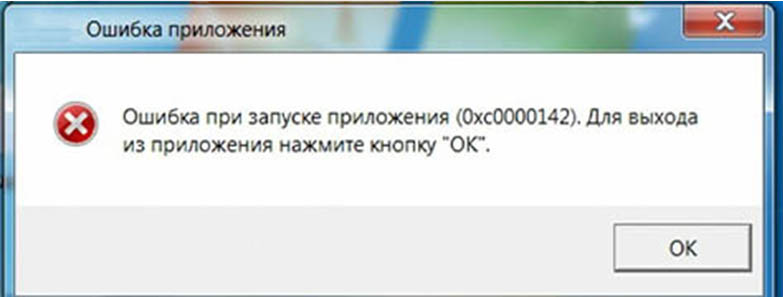
О: Чаще всего данная ошибка возникает из-за наличия кириллицы (русских букв) в одном из путей, по которым игра хранит свои файлы. Это может быть имя пользователя или сама папка в которой находится игра. Решением будет установка игры в другую папку, название которой написано английскими буквами или смена имени пользователя.
Ошибка 0xc0000906.
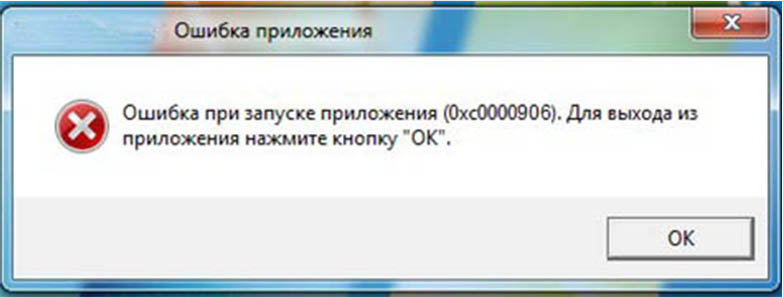
О: Данная ошибка связана с блокировкой одного или нескольких файлов игры антивирусом или “Защитником Windows”. Для её устранения необходимо добавить всю папку игры в исключени. Для каждого антивируса эта процедура индивидуально и следует обратиться к его справочной системе. Стоит отметить, что вы делаете это на свой страх и риск. Все мы любим репаки, но если вас часто мучает данная ошибка — стоит задуматься о покупке игр. Пусть даже и по скидкам, о которых можно узнать из новостей на нашем сайте.
Отсутствует msvcp 140.dll/msvcp 120.dll/msvcp 110.dll/msvcp 100.dll
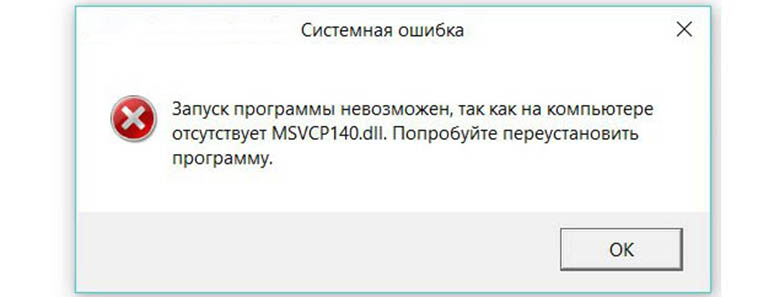
О: Ошибка возникает в случае отсутствия на компьютере корректной версии пакета Microsoft Visual C++, в который и входит msvcp 140.dll (и подобные ему). Решением будет установка нужной версии пакета.
После загрузки и установки нового пакета ошибка должна пропасть. Если сообщение об отсутствии msvcp 140.dll (120, 110, 100) сохраняется необходимо сделать следующее:
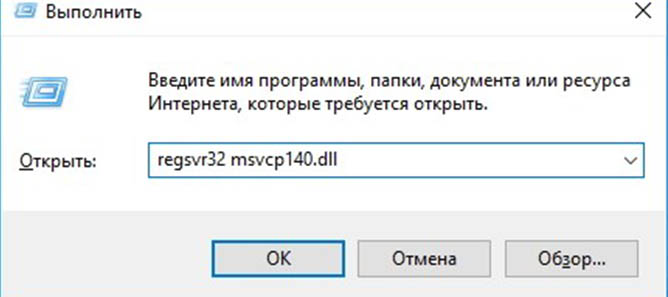
Ошибка 0xc0000009a/0xc0000009b/0xc0000009f и другие
О: Все ошибки начинающиеся с индекса 0xc0000009 (например 0xc0000009a, где на месте “а” может находиться любая буква или цифра) можно отнести к одному семейству. Подобные ошибки являются следствием проблем с оперативной памятью или файлом подкачки.


Размер файла подкачки должен быть кратен 1024. Объём зависит от свободного места на выбранном локальном диске. Рекомендуем установить его равным объему ОЗУ.
Если ошибка 0xc0000009а сохранилась, необходимо проверить вашу оперативную память. Для этого нужно воспользоваться функциями таких программ как MemTest86, Acronis, Everest.
Игра тормозит и лагает
Скорее всего данная проблема носит аппаратный характер. Проверьте системные требования игры и установите корректные настройки качества графики. Подробнее об оптимизации игры можно почитать на форуме. Также загляните в раздел файлов, где найдутся программы для оптимизации Dust to the End для работы на слабых ПК. Ниже рассмотрены исключительные случаи.
Появились тормоза в игре.
О: Проверьте компьютер на вирусы, отключите лишние фоновые процессы и неиспользуемые программы в диспетчере задач. Также стоит проверить состояние жесткого диска с помощью специализированных программ по типу Hard Drive Inspector. Проверьте температуру процессора и видеокарты —возможно пришла пора обслужить ваш компьютер.
Долгие загрузки в игре.
О: Проверьте состояние своего жесткого диска. Рекомендуется удалить лишние моды — они могут сильно влиять на продолжительность загрузок. Проверьте настройки антивируса и обязательно установите в нём “игровой режим” или его аналог.
Dust to the End лагает.
О: Причинами периодических тормозов (фризов или лагов) в Dust to the End могут быть запущенные в фоновом режиме приложения. Особое внимание следует уделить программам вроде Discord и Skype. Если лаги есть и в других играх, то рекомендуем проверить состояние жесткого диска — скорее всего пришла пора заменить его.
Проблемы с модами
Ошибки загрузки/обновления
Проверьте стабильность подключения к интернету, а также скорость загрузки. При слишком высоком пинге или низкой пропускной способности обновление может выдавать ошибки.
Если магазин или лончер Dust to the End не завершает обновления или выдает ошибки, то переустановите саму программу. При этом все скачанные вами игры сохранятся.
Запустите проверку целостности данных игры.
Проверьте наличие свободного места на том диске, на котором установлена игра, а также на диске с операционной системой. И в том и в другом случае должно быть свободно места не меньше, чем занимает игра на текущий момент. В идеале всегда иметь запас около 100Гб.
Проверьте настройки антивируса и “Защитника Windows”, а также разрешения в брандмауэре. Вполне возможно они ограничивают подключение к интернету для ряда приложений. Данную проблему можно решить и полной переустановкой магазина или лончера т.к. большинство из них попросит предоставить доступ к интернету в процессе инсталляции.
О специфических ошибках связанных с последними обновлениями можно узнать на форуме игры.
Вопросы по прохождению
Ответы на все вопросы касающиеся прохождения Dust to the End можно найти в соответствующих разделах Wiki, а также на нашем форуме. Не стесняйтесь задавать вопросы и делиться своими советами и решениями.
Dust to the end моды

In this Q&A session, Barry and Steven told us all about the team behind Dust to the End, the origin of the project, its development process and the challenges they had to overcome, and finally the future of the project (and maybe other new projects?). We also talked about the gaming industry at large, and answered some questions that the viewers asked through the Twitch live chat.
As the event lasted around one hour, we’ve transcripted the whole interview down here! We hope you find all that Barry told us very interesting.
GURJIV JAITLA (2P GAMES): How did you live the full release? Was it as good as expected?
BARRY (HAOJOY GAME): After the update from March to July, it’s generally OK. In particular, it has been understood and affirmed by many players.
G: How many people have been working on it?
B: We are five people, including a producer, a game designer, two art designers, and a programmer.
G: Is it the first game you make together?
B: Yes, it’s our first one. Only two of us knew each other before founding HaoJoy Game to do something cool, and we became good friends with the rest during the development.
G: What is so attractive about developing adventures in post-apocalyptic settings? Do you devs enjoy destroying the world a little bit?
B: We wished that players could imagine the experience of starting from zero in a difficult situation like this. You know, it’s not easy to rebuild a whole civilization in such a hostile environment like the one you find in Dust to the End.
G: Did other movies or games inspired you to create Dust to the End?
B: Long story short, history itself inspires us. One day, we started talking about a famous man named Fidel Castro and the Cuban Missile Crisis. It made us think about a post-apocalyptic world and how our human beings could live in it. With a little help from other fiction works such as Mad Max and the first Fallout games, Dust to the End was born.
G: What makes Dust to the End unique compared to other strategy and management games set in a post-apocalyptic world future? Tell us something special about it!
B: In Dust to the End, players can build some industries in the city, and the supply and demand of these industries influence the output and prices of commodities. Players can arrange these industrial systems according to their own preferences. In essence, you run the economy by controlling the supply and demand.
 G: I’m sure that your workflow changed a lot when the pandemic got worse, and it forced everyone to stay at home. How did this event affect your way of working?
B: It took us about four months to adapt to this new routine and figure out how to get the most out of working from home, but after that everything was smooth.
G: What are the biggest challenges/problems you faced during the development, and how did you overcome them?
B: The formulation of the art style. To be honest, we have changed at least two versions, yes, all overturned the re-established. We tried some styles and also spent more time in art design than we had first scheduled. After all, it’s a post-apocalyptic world and it was very important for us that the players could feel like they were living in that world.
G: More and more developers are encouraging themselves to launch early versions of their games, so the community can help them to test advanced features or create a balanced combat system. How did this model help you? Would you use it in your future projects?
G: How much has the game changed from your first idea until now?
B: Very much! In its earliest version, the game was very demanding. For example, you had to abandon your vehicle in the middle of the desert when you ran out of fuel. Of course, this is how it works in the real world but it’s a very inconvenient solution in a game where you just try to have fun.
B: Did you know that Dust to the End was originally a trading game? The combat system is not such critical. The first lesson we want our players to learn is that, in this world, you need to earn everything by yourself. So you may eat worms or drink some expensive but dirty water to survive. When you get more money, spend more time, you could then work as a caravan having some adventure knowing the outside world, but also make some money by trading. As the key features for us are trading and going on adventures, the old version of Dust to the End didn’t include the combat scenes you enjoy today; it worked like “Enemy show up!”, and then “you win!”, without any combat footage.
G: Trade is very dynamic in the game, with prices constantly changing according to supply and demand. From a game design point of view, how does the game tackle this in a realistic (but manageable) way?
B: Industrial system. Every city has its own industry, and players can build new ones or upgrade existing ones. Every industry has output and demand.
G: But this is not the only complex system we find in the game. Like it happens in any other society, players can establish friendly, neutral, or antagonistic relationships with other human groups. It must have been extremely complicated to perform since it has many consequences for the people living in the wastelands.
B: This is the choice we leave to players. Players will encounter many cities, gangs, and many events will be triggered. For example, if you have established a friendly relationship with civilians, you may not be able to get valuable rewards. But your team’s mood will get better. Later, you will discover how important this is.
G: Are these systems also affected by events where the player doesn’t take part? Like conflicts between human settlements…
B: If the player does not participate, then these events are meaningless, so we like it when players join them and feel them. So, not now. Maybe in the future, they will.
B: We want the players to focus on growing their team in trading and social relationships so that they get more powerful in battle, but not overemphasizing the battle skills themselves. In most games, players can fight many enemies, just like that, without considering the context, character knowledge, and their teams. This is fun, but it’s not true. We prefer to let players experience that you have no opportunity to fight against an AK with a simple knife.
G: What comes now for Dust to the End? As complex as it is, the game still has a lot of room for growth with new mechanics, locations, characters.
B: This is something we’d rather do in a brand new game. Maybe adding characters, cities, or events without further innovation could make players feel that the game is too repetitive.
G: Is there any other project in development we should know about?
B: There is! It is entirely different from Dust to the End. I can tell only two words today: simulation and real history.
 G: There’s been some controversy these past days regarding the Steam Refund Policy and short games. Their policy allows players to refund games if they’ve played them for less than 2 hours, but this is a problem for short games, as some players use this to play and finish the games for free. What’s your opinion on this topic?
B: At the beginning, I agreed with that requirement very much. I thought of it as a kind of protection for players until I played FAR: Lone Sails, which is a very short game I loved it so much! I think steam should also consider protecting these excellent games.
G: What do you think could be a good solution for that? As you said, there needs to be a kind of “protection” for customers, but in this case, this is affecting a specific type of product, which are short indie games. What do you think could be done in order to cover both issues?
B: A good solution would be to use the Achievements system. There could be a condition that you cannot refund a game if you’ve gotten the achievement that indicates that you completed the game, so that this kind of dishonest player wouldn’t use this trick to complete indie short games for free.
G: What other issues do you believe that need to be improved/addressed in the indie industry?
B: I hope that many more players find their way to indie games in the future and learn to love them. And, of course, every industry has something that needs to be improved. But we are enjoying it, right?