
Спутниковая карта Содружества / Satellite World Map
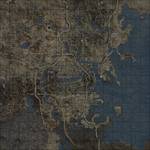
Данный мод является реплейсером обычной карты мира в Пип-бое, на улучшенную карту в качестве 4к и 8к с высоты птичьего полета, как бы это выглядело в реале. Новый реплейсер карты также расширяет границы карты Пип-боя, показывая часть ландшафта, который находится за пределами игровой зоны.
Подробнее:
— Мод поставляется в двух вариантах качества текстур в 4к и 8к
— Мод поставляется в двух вариантах как полностью цветная и монохромная.
— Детальное отображение зданий, дорог, объектов, рек, водоемов, зданий.
— Не должно быть какого-либо заметного влияния на производительность при использовании любой версии качества карты в 4к или 8к.
Требования:
Fallout 4
Установка:(можно вручную или через NMM менеджер)
1. Выберите один из 4-х вариантов мода в качестве 4к или 8к в цветном или монохромном исполнении.
2. Поместить папку Data из архива в папку с игрой (Data не внутрь Data, а поверх), подтвердить слияние папок и активировать файл SatelliteWorldMap.esp.
— Чтобы не было никаких багов с кривым отображением карты или локаций на карте или других причуд, ставьте мод в самом конце списка всех модов, в самом низу!
3. Как устанавливать и активировать моды читаем в данной теме.
ВАЖНО.
— Для варианта мода «Монохромная карта» никаких танцев с бубном не нужно делать, просто установите и активируйте, цвет карты Пип-боя можно менять.
— Для варианта мода «Цветная карта» вам потребуется сделать несколько дополнительных изменений в файле Fallout4Custom.ini: (находится в Мои документы/My Games/Fallout4, если нет, то создайте) и впишите следующее: Эти правки сделают цвет текста в Пип-бое белым, который раздражает, но, к сожалению, это неизбежно, так как изменение цвета Пип-боя не будет настраиваться. Ваш цвет HUD останется прежним, хотя. В общем впишите это:
[Display]
fPipboyScreenEmitIntensityPA=1.25
fPipboyScreenDiffuseIntensityPA=0.15
Например у меня в файле выглядит вот так:
[Archive]
bInvalidateOlderFiles=1
sResourceDataDirsFinal=
[Display]
iLocation X=0
iLocation Y=0
fPipboyScreenEmitIntensityPA=1.25
fPipboyScreenDiffuseIntensityPA=0.15
Спутниковая карта Содружества / Satellite World Map
Данный мод является реплейсером обычной карты мира в Пип-бое, на улучшенную карту в качестве 4к и 8к с высоты птичьего полета, как бы это выглядело в реале. Новый реплейсер карты также расширяет границы карты Пип-боя, показывая часть ландшафта, который находится за пределами игровой зоны.
Подробнее:
— Мод поставляется в двух вариантах качества текстур в 4к и 8к
— Мод поставляется в двух вариантах как полностью цветная и монохромная.
— Детальное отображение зданий, дорог, объектов, рек, водоемов, зданий.
— Не должно быть какого-либо заметного влияния на производительность при использовании любой версии качества карты в 4к или 8к.
Требования:
Fallout 4
Установка:(можно вручную или через NMM менеджер)
1. Выберите один из 4-х вариантов мода в качестве 4к или 8к в цветном или монохромном исполнении.
2. Поместить папку Data из архива в папку с игрой (Data не внутрь Data, а поверх), подтвердить слияние папок и активировать файл SatelliteWorldMap.esp.
— Чтобы не было никаких багов с кривым отображением карты или локаций на карте или других причуд, ставьте мод в самом конце списка всех модов, в самом низу!
3. Как устанавливать и активировать моды читаем в данной теме.
ВАЖНО.
— Для варианта мода «Монохромная карта» никаких танцев с бубном не нужно делать, просто установите и активируйте, цвет карты Пип-боя можно менять.
— Для варианта мода «Цветная карта» вам потребуется сделать несколько дополнительных изменений в файле Fallout4Custom.ini: (находится в Мои документы/My Games/Fallout4, если нет, то создайте) и впишите следующее: Эти правки сделают цвет текста в Пип-бое белым, который раздражает, но, к сожалению, это неизбежно, так как изменение цвета Пип-боя не будет настраиваться. Ваш цвет HUD останется прежним, хотя. В общем впишите это:
[Display]
fPipboyScreenEmitIntensityPA=1.25
fPipboyScreenDiffuseIntensityPA=0.15
Например у меня в файле выглядит вот так:
[Archive]
bInvalidateOlderFiles=1
sResourceDataDirsFinal=
[Display]
iLocation X=0
iLocation Y=0
fPipboyScreenEmitIntensityPA=1.25
fPipboyScreenDiffuseIntensityPA=0.15
Please log in or register
To enjoy the benefits of Nexus Mods, please log in or register a new account
Satellite World Map
File information
Last updated
Original upload
Created by
Uploaded by
Virus scan
Tags for this mod
About this mod
A high resolution world map made using in-game distant land assets.
Author’s instructions
File credits
This author has not credited anyone else in this file
Donation Points system
This mod is not opted-in to receive Donation Points
A replacer for the pip-boy World Map, available in 8k resolution, that gives an aerial view of the Commonwealth as it looks in game. Made using the game’s LoD meshes and textures, among other things. It also extends the boundaries of the pip-boy map, showing some of the landscape that lies outside of the playable area.
The mod is available in both full colour and monochrome versions, and there are optional files using a 4k texture rather than 8k. While these are lower quality they allow you to zoom out further on the world map. It’s mainly a personal preference, as there shouldn’t be any noticeable performance impact when using either version.
Extract the contents of the zip file to your Fallout4/data folder.
Enable SatelliteWorldMap.esp using a mod manager or manually.
Ensure these lines appear in either your Fallout4Prefs.ini or Fallout4Custom.ini:
[Archive]
bInvalidateOlderFiles=1
sResourceDataDirsFinal=
For the colour version, you’ll need to make a few additional edits to your Fallout4Custom.ini:
This will force your pip-boy text colour to white, which is annoying but sadly unavoidable. Your HUD colour will stay the same, though.
Please log in or register
To enjoy the benefits of Nexus Mods, please log in or register a new account
Satellite World Map
File information
Last updated
Original upload
Created by
Uploaded by
Virus scan
Tags for this mod
About this mod
A high resolution world map made using in-game distant land assets.
Author’s instructions
File credits
This author has not credited anyone else in this file
Donation Points system
This mod is not opted-in to receive Donation Points
A replacer for the pip-boy World Map, available in 8k resolution, that gives an aerial view of the Commonwealth as it looks in game. Made using the game’s LoD meshes and textures, among other things. It also extends the boundaries of the pip-boy map, showing some of the landscape that lies outside of the playable area.
The mod is available in both full colour and monochrome versions, and there are optional files using a 4k texture rather than 8k. While these are lower quality they allow you to zoom out further on the world map. It’s mainly a personal preference, as there shouldn’t be any noticeable performance impact when using either version.
Extract the contents of the zip file to your Fallout4/data folder.
Enable SatelliteWorldMap.esp using a mod manager or manually.
Ensure these lines appear in either your Fallout4Prefs.ini or Fallout4Custom.ini:
[Archive]
bInvalidateOlderFiles=1
sResourceDataDirsFinal=
For the colour version, you’ll need to make a few additional edits to your Fallout4Custom.ini:
This will force your pip-boy text colour to white, which is annoying but sadly unavoidable. Your HUD colour will stay the same, though.
Please log in or register
To enjoy the benefits of Nexus Mods, please log in or register a new account
Pip World Map
File information
Last updated
Original upload
Created by
Uploaded by
Virus scan
Tags for this mod
About this mod
Credits and distribution permission
Author notes
This author has not provided any additional notes regarding file permissions
File credits
Donation Points system
This mod is opted-in to receive Donation Points
This is a combo world map for the Pip-Boy, for the main game only, doesn’t cover
Far Harbour or Nuka world
It combines 2 maps, the coloured political map from koolkyle802 on reddit
and the terrain map from Reptileye on worldofmods , which, as far as I can tell
are free to use.
I just squished ’em together, aligned them and ran a Photoshop filter over ’em.
Map is 4096 only, not gonna change it as the print looses too much definition.
Usage requires editing Fallout4.ini to include
Be aware that adding this line will render all computer screen in-game in black and white, including pip menus.
This is not a problem in a normal game as they are easily readable, but if you’re using an ENB or Reshade
with too high a white balance the glare could be terrible, so you’d either have to edit it or turn the ENB/Reshade off when using a computer.
Also, the map appears faded when in Power Armor, nothing I can do.