
Данный мод «G2M-Workshop» добавляет и расширяет возможности строительства в игре Fallout 4, путем добавления нового меню «Мастерская G2M» с тонной разнообразных предметов для строительства и декораций.
Обновление:6.1.2
* Дождь больше не будет проникать сквозь стеклянный потолок и окна! может быть, немного, но если вы найдете мод, который работает лучше моего, дайте мне знать.
* Кому-то нужна более яркая подвесная лампа, теперь у нее больше возможностей.
Журнал изменения:
Все изменений предыдущих версий читайте в ридми в архиве.
Требования:
Fallout 4 версии 1.7 и выше
Automatron
Wasteland Workshop
Far Harbor
Contraptions Workshop
Vault-Tec Workshop
Nuka World
* Есть вариант мода не требующий эти DLC. но он старый и больше не обновляется.
Совместимость:
Functional Displays (v0.2.9.2 BETA и выше)
Snap’n Build by ad3d0 (v1.9 и выше)
Thematic and Practical (vAlpha 1.3 и выше)
Start Me Up
Snappable Junk Fences by DarthWayne (ver 1.3) Необходимо нагрузить перед G2M-мастерской.
Craftable Balcony Supports by DarthWayne (ver 1.2) Необходимо нагрузить перед G2M-мастерской.
Auto Doors by Wenderer:(version 2.8) g2m-Мастеркая отключит функцию «закрытия дверей», если у вас есть мод Auto Doors.
Reneer’s Close That Door by Reneer: (ver 2.2)
Workshop Rearranged by d81 (v0.6.10) WR сломает функцию «автоматического закрытия дверей» и несколько точек соединения, но вы можете загрузить G2M после WR, чтобы исправить эту проблему.
Valdacil’s Item Sorting (ver 9.03)
*** Если вы не видите меню моего мода в Мастерской, это вероятно потому, что игровая система слишком загружена, и пропускает некоторые команды скриптов (по крайней мере, я так думаю).
Решение:
1. Убедитесь что мой мод активирован, в игре если нет меню мода то сохраниться, выйти из игры.
2. Загрузитесь с сделанного сохранения.
3. Вы должны увидеть меню моего мода.
Snappable Junk Fences (v1.3 и выше)
Craftable Balcony Supports (v1.2 и выше)
*** Эти моды должны быть в порядке модов перед моим модом G2M-Workshop.
Несовместимость:
По какой-то причине мой мод g2m-workshop не совместим со следующими модами и у меня нет планов по созданию совместимых патчей:
Clean Wasteland Workshop (новые текстуры не будут работать).
Vanilla Extensions (некоторые точки привязки не будет работать).
4. Если вы устанавливаете мод вручную для «G2M-Workshop for Fish Farm», просто установите файлы мода в папку Data в игре, а затем переименуйте файлы:
FAQ:
Вопрос: не отображается меню мода g2m.
Ответ: это вероятно потому, что игровая система слишком загружена, и пропускает некоторые команды скриптов.
Решение №1:
1. включите этот мод.
2. Сохраните игру.
3. Загрузите эту сохраненную игру.
4. вы должны увидеть меню.
Данный мод «G2M-Workshop» добавляет и расширяет возможности строительства в игре Fallout 4, путем добавления нового меню «Мастерская G2M» с тонной разнообразных предметов для строительства и декораций.
Обновление:6.1.2
* Дождь больше не будет проникать сквозь стеклянный потолок и окна! может быть, немного, но если вы найдете мод, который работает лучше моего, дайте мне знать.
* Кому-то нужна более яркая подвесная лампа, теперь у нее больше возможностей.
Журнал изменения:
Все изменений предыдущих версий читайте в ридми в архиве.
Требования:
Fallout 4 версии 1.7 и выше
Automatron
Wasteland Workshop
Far Harbor
Contraptions Workshop
Vault-Tec Workshop
Nuka World
* Есть вариант мода не требующий эти DLC. но он старый и больше не обновляется.
Совместимость:
Functional Displays (v0.2.9.2 BETA и выше)
Snap’n Build by ad3d0 (v1.9 и выше)
Thematic and Practical (vAlpha 1.3 и выше)
Start Me Up
Snappable Junk Fences by DarthWayne (ver 1.3) Необходимо нагрузить перед G2M-мастерской.
Craftable Balcony Supports by DarthWayne (ver 1.2) Необходимо нагрузить перед G2M-мастерской.
Auto Doors by Wenderer:(version 2.8) g2m-Мастеркая отключит функцию «закрытия дверей», если у вас есть мод Auto Doors.
Reneer’s Close That Door by Reneer: (ver 2.2)
Workshop Rearranged by d81 (v0.6.10) WR сломает функцию «автоматического закрытия дверей» и несколько точек соединения, но вы можете загрузить G2M после WR, чтобы исправить эту проблему.
Valdacil’s Item Sorting (ver 9.03)
*** Если вы не видите меню моего мода в Мастерской, это вероятно потому, что игровая система слишком загружена, и пропускает некоторые команды скриптов (по крайней мере, я так думаю).
Решение:
1. Убедитесь что мой мод активирован, в игре если нет меню мода то сохраниться, выйти из игры.
2. Загрузитесь с сделанного сохранения.
3. Вы должны увидеть меню моего мода.
Snappable Junk Fences (v1.3 и выше)
Craftable Balcony Supports (v1.2 и выше)
*** Эти моды должны быть в порядке модов перед моим модом G2M-Workshop.
Несовместимость:
По какой-то причине мой мод g2m-workshop не совместим со следующими модами и у меня нет планов по созданию совместимых патчей:
Clean Wasteland Workshop (новые текстуры не будут работать).
Vanilla Extensions (некоторые точки привязки не будет работать).
4. Если вы устанавливаете мод вручную для «G2M-Workshop for Fish Farm», просто установите файлы мода в папку Data в игре, а затем переименуйте файлы:
FAQ:
Вопрос: не отображается меню мода g2m.
Ответ: это вероятно потому, что игровая система слишком загружена, и пропускает некоторые команды скриптов.
Решение №1:
1. включите этот мод.
2. Сохраните игру.
3. Загрузите эту сохраненную игру.
4. вы должны увидеть меню.
Данный мод «G2M-Workshop» добавляет и расширяет возможности строительства в игре Fallout 4, путем добавления нового меню «Мастерская G2M» с тонной разнообразных предметов для строительства и декораций.
Обновление:6.1.2
* Дождь больше не будет проникать сквозь стеклянный потолок и окна! может быть, немного, но если вы найдете мод, который работает лучше моего, дайте мне знать.
* Кому-то нужна более яркая подвесная лампа, теперь у нее больше возможностей.
Журнал изменения:
Все изменений предыдущих версий читайте в ридми в архиве.
Требования:
Fallout 4 версии 1.7 и выше
Automatron
Wasteland Workshop
Far Harbor
Contraptions Workshop
Vault-Tec Workshop
Nuka World
* Есть вариант мода не требующий эти DLC. но он старый и больше не обновляется.
Совместимость:
Functional Displays (v0.2.9.2 BETA и выше)
Snap’n Build by ad3d0 (v1.9 и выше)
Thematic and Practical (vAlpha 1.3 и выше)
Start Me Up
Snappable Junk Fences by DarthWayne (ver 1.3) Необходимо нагрузить перед G2M-мастерской.
Craftable Balcony Supports by DarthWayne (ver 1.2) Необходимо нагрузить перед G2M-мастерской.
Auto Doors by Wenderer:(version 2.8) g2m-Мастеркая отключит функцию «закрытия дверей», если у вас есть мод Auto Doors.
Reneer’s Close That Door by Reneer: (ver 2.2)
Workshop Rearranged by d81 (v0.6.10) WR сломает функцию «автоматического закрытия дверей» и несколько точек соединения, но вы можете загрузить G2M после WR, чтобы исправить эту проблему.
Valdacil’s Item Sorting (ver 9.03)
*** Если вы не видите меню моего мода в Мастерской, это вероятно потому, что игровая система слишком загружена, и пропускает некоторые команды скриптов (по крайней мере, я так думаю).
Решение:
1. Убедитесь что мой мод активирован, в игре если нет меню мода то сохраниться, выйти из игры.
2. Загрузитесь с сделанного сохранения.
3. Вы должны увидеть меню моего мода.
Snappable Junk Fences (v1.3 и выше)
Craftable Balcony Supports (v1.2 и выше)
*** Эти моды должны быть в порядке модов перед моим модом G2M-Workshop.
Несовместимость:
По какой-то причине мой мод g2m-workshop не совместим со следующими модами и у меня нет планов по созданию совместимых патчей:
Clean Wasteland Workshop (новые текстуры не будут работать).
Vanilla Extensions (некоторые точки привязки не будет работать).
4. Если вы устанавливаете мод вручную для «G2M-Workshop for Fish Farm», просто установите файлы мода в папку Data в игре, а затем переименуйте файлы:
FAQ:
Вопрос: не отображается меню мода g2m.
Ответ: это вероятно потому, что игровая система слишком загружена, и пропускает некоторые команды скриптов.
Решение №1:
1. включите этот мод.
2. Сохраните игру.
3. Загрузите эту сохраненную игру.
4. вы должны увидеть меню.
Please log in or register
To enjoy the benefits of Nexus Mods, please log in or register a new account
Workshop Plus
File information
Last updated
Original upload
Created by
Uploaded by
Virus scan
Tags for this mod
About this mod
Flight, Undo Buttons, Layers, Cloning Tools, Free Build Mode, and more!
Nexus requirements
Mods requiring this file
Credits and distribution permission
Author notes
This author has not provided any additional notes regarding file permissions
File credits
This author has not credited anyone else in this file
Donation Points system
This mod is opted-in to receive Donation Points
Translations available on the Nexus
Version 1.1.10a
Version 1.0.9
Version 1.0.6
Version 1.0.5
Version 1.0.4
Version 1.0.3
-Fixed an issue that could cause log spam about being unable to call Stop() on a None.
-The vanilla keyword ActorPreventSubsegmentDamage can be added to objects to prevent them from being added to layers when built.
-Objects being added to a layer will now flash purple for a moment. Previously these were flashing green which is used for several other actions. Going forward, distinct highlight colors will be used for various actions.
-Added support for Blueprints. Blueprinting allows you to create a copy of a layer that you store as an object. You can then build copies of that layer in any settlement.
—You can build a Blueprint Controller from the Special menu.
—After building a Blueprint Controller you will be presented with a menu with several options.
—The options will allow you to organize your blueprints, create a new blueprint, or build an existing blueprint.
—Creating a blueprint involves scanning a particular layer and generating an inventory object you can name and use later to build a copy of that blueprint.
—When building a blueprint, the Blueprint Controller is used as the center point. All objects in the blueprint will be created around it in the same relative positions they were in your original design. All items are then attached to the Blueprint Controller so you can easily fine tune the position after it finishes building by just picking up the controller and moving/rotating it around.
—Building the Blueprint Controller again will move it so you can fine tune the angle you are moving and rotating the items from.
—Blueprints are stored in your inventory at first. They are weapon records so you can rename them. After creating one you will be offered an invisible weapons workbench to name your blueprint immediately.
—It’s important you name each blueprint so they don’t ever stack together. Though it will cycle through 10 different names in case you forget to name one and will TRY to warn you if you make it through all of the default names.
—If you drop a blueprint on the ground it will be transported to a free storage space that the Blueprint Controller can always see and access. This way you don’t have to keep them in your inventory after naming them.
—All blueprints in your inventory are also automatically moved to Blueprint Storage after you start construction of a blueprint.
-Added new Hotkey to toggle the “Auto Change Layers On Move” setting. This setting makes it so that each item picked up in workshop mode is added to the active layer.
-Added new section to the top of the Layer HUD panel to display certain settings that are toggled on.
—Currently this only shows one, but will be expanded in the future. This is the “Auto Change Layers On Move” setting will show a “plus” symbol when enabled, so you know at a glance if things you pick up are going to be moved.
-Your footstep sounds are now muted when flying in Workshop Mode.
-Invulnerability now includes protecting you from Rads as well.
Version 1.0.2
-Fixed a bug with Clear Highlighting on Workshop Exit that made it not work at all, nor would the settings change save.
-Greatly improved the layer duplication code. Should be substantially faster, and will no longer back up the script queue.
-WS+ will now post a warning pop-up if you forget to update Workshop Framework to the version it requires.
-Undo/Redo will now support undoing/redoing cloning a group of objects via the Layer Handles or Duplicate Layer functionality.
Items created via bulk cloning (duplicate layer/cloning a layer handle) will become disconnected from the bulk undo possibility if you move or scrap them independently. This may change in the future, but tracking this is quite complex and can result in potential memory leaks if not done correctly.
—Just like other Undo/Redo actions, the bulk undo/redo stack is cleared when you enter a new settlement.
—WARNING: Undo/Redo does not currently work with moving objects via a Layer Handle, but that is planned for a future update.
-Added proper messages to Undo/Redo instead of relying on Debug messages. This is in preparation for a future update where support for Undo/Redo is added to Xbox.
Version 1.0.1a
Version 1.0.1
-Fixed an issue where fall damage could be permanently disabled for your character after entering Workshop mode. If you find Fall Damage is still off after this patch, unequip any item that affects fall damage (such as the Free Fall legs), then toggle in and out of workshop mode and wait about 15 seconds.
-The Prevent Fall Damage setting will be ignored if you have equipment that modifies fall damage, this will prevent a bug where it can essentially make your armor’s fall damage ability useless until you enter/exit workshop mode without it.
-Fixed an issue where various items that were in your settlement the first time you visited it after installing WS+ could end up hidden until you toggled the default layer.
-Fixed a bug with the option to only use the Layer HUD in workshop mode (previously the setting would not toggle correctly).
-Will now attempt to detect if the player has a jetpack equipped, and automatically avoid toggling on Flight if so. Flight is not supported while a jetpack is equipped, and can result in controls not working correctly until you reload.
-Added Freeze Time in Workshop Mode option. This will drop the time scale and AI/Animation time to a fraction of what it normally is while in Workshop Mode (disabled by default).
-Added Toggle Freeze Time hotkey option to MCM.
-Added Unlimited Carry Weight in Workshop Mode option. This will virtually remove your carry weight limit while in Workshop Mode, this will allow you to keep moving at full speed when you arrive at your settlement.
-Renamed Toggle Active Layer Highlighting to Toggle Automatic Layer Highlighting, to help differentiate it from Toggle Layer Highlighting which responds to a hotkey vs the Automatic which happens when you change the current active layer.
-Converted the Unlink/Relink and Highlight/Unhighlight into toggles to reduce the number of hotkeys you’d need to make use of all of the features. If you had previously hotkeyed any of those, you’ll need to reset them as the hotkey signatures have changed.
-Fixed a bug where the Remove All Layers tool would end up leaving a pink highlight on all items until you cleared it with a hotkey call.
If you start the game in a settlement the first time you load up WS+, it will now scan that settlement and prepare the Undo feature. You will receive a message in the corner that says “[WSPlus] Undo support ready.” when it finishes.
-Xbox players will now correctly receive the “[WSPlus] Undo support ready.” message.
Straight donations accepted
TLDR; Placing down full buildings or creating a bed from cigarette wrappers isn’t realistic or immersive anyway, so let’s go all out and turn this into a proper tool. Workshop Mode becomes more like a creative tool, letting you move around freely and take advantage of tons of hotkeys to enhance your building experience.
Some Features Require: Mod Configuration Menu*
Now open source! If you’d like to contribute to the mod or get some ideas of how you can tap into Workshop Framework (which was used as the foundation for WS+) head to the Github repository!
God Simulator
Workshop Plus will turn you into an invisible hand in the game world while you are in workshop mode. All of the options below can be turned off.
— Flight: You actually fly while in Workshop Mode, no tcl necessary. This means you can still interact with things over and over without having to toggle tcl on and off.
— Super Speed: You move incredibly fast while in Workshop Mode, to quickly get to the sections of the settlement you want to work on. Can be set to +50%, +100%, or +200%.
— Invisibility: You will be completely ignored by NPCs while in Workshop Mode, so you can focus on your building. This also gives you the power to convert the game into full blown Tower Defense with the appropriate mods.
— Free Build: No more building materials required to build and bypasses perk requirements on workshop objects (they will still show the lock icon but can be built anyway). This option defaults to OFF because it prevents scrapping from returning resources which would be confusing.
Hotkeys (Require MCM)
— Undo/Redo: Over 1000 levels of undo support! Set up hotkeys and you can undo movements, placements, and scrapping with the press of a button.
Layers allow you to separate items and quickly hide or even duplicate them! This gives you the power of programs like Photoshop in your settlement.
— Multiple Layers: Up to 16 layers per settlement (1 is the default layer)
— Duplication: Entire Layers can be duplicated, allowing you to create a structure, make a copy, and then thanks to the toggle Display/Linking move your copy all at once anywhere you want in your settlement!
— Deletion: Transfer items between layers or even scrap them all in one go!
— Visual HUD: HUDFramework integration to provide a visual module to help you use the Layers system.
— Toggle Display: Hide all of the items on a layer instantly, then re-display them again just as quickly.
— Toggle Linking: Unlinked items won’t be picked up by Group Select, so you can separate out your items on to different levels so you can pull out the groups of items you want and move them in a group.
— Highlighting: Highlighting tools and toggles help you quickly identify which of your items are on a given layer.
— Automatically exits you from workshop mode, and then puts you back in when it finishes saving.
— Hotkey available with MCM.
— Autosave option allows you to set a certain amount of time in Workshop mode where the game will automatically save.
The «God Simulator» things will happen automatically when you enter Workshop Mode. To control the options, either access the MCM menu, or if you aren’t using it, go to a Chem Workbench and craft the Workshop Plus Controls holotape under Utility.
To use the Layer system without hotkeys, go to a Chem Workbench and craft the Layer Control Module under Utility. You can Favorite this item and activate it to bring up options.
— Continue to expand on the features available to make Workshop Mode feel more and more like a creative tool.
— Copy layers to other settlements.
— Export layers for importing into different save files.
The Rise of the Commonwealth team for constantly bitching about how bad Workshop Mode is, which inspired me to make this!
Woodfuzzy, Krazyhorse, and Moonbeam for testing the crap out of this so I could feel comfortable releasing it.
Fallout 4 мод g2m workshop
Mister
Локализатор
—>

Добавлено: 21 Декабрь 2015
Просмотров: 22520 | Загрузок: 3273 | Комментарии: 38
Описание:
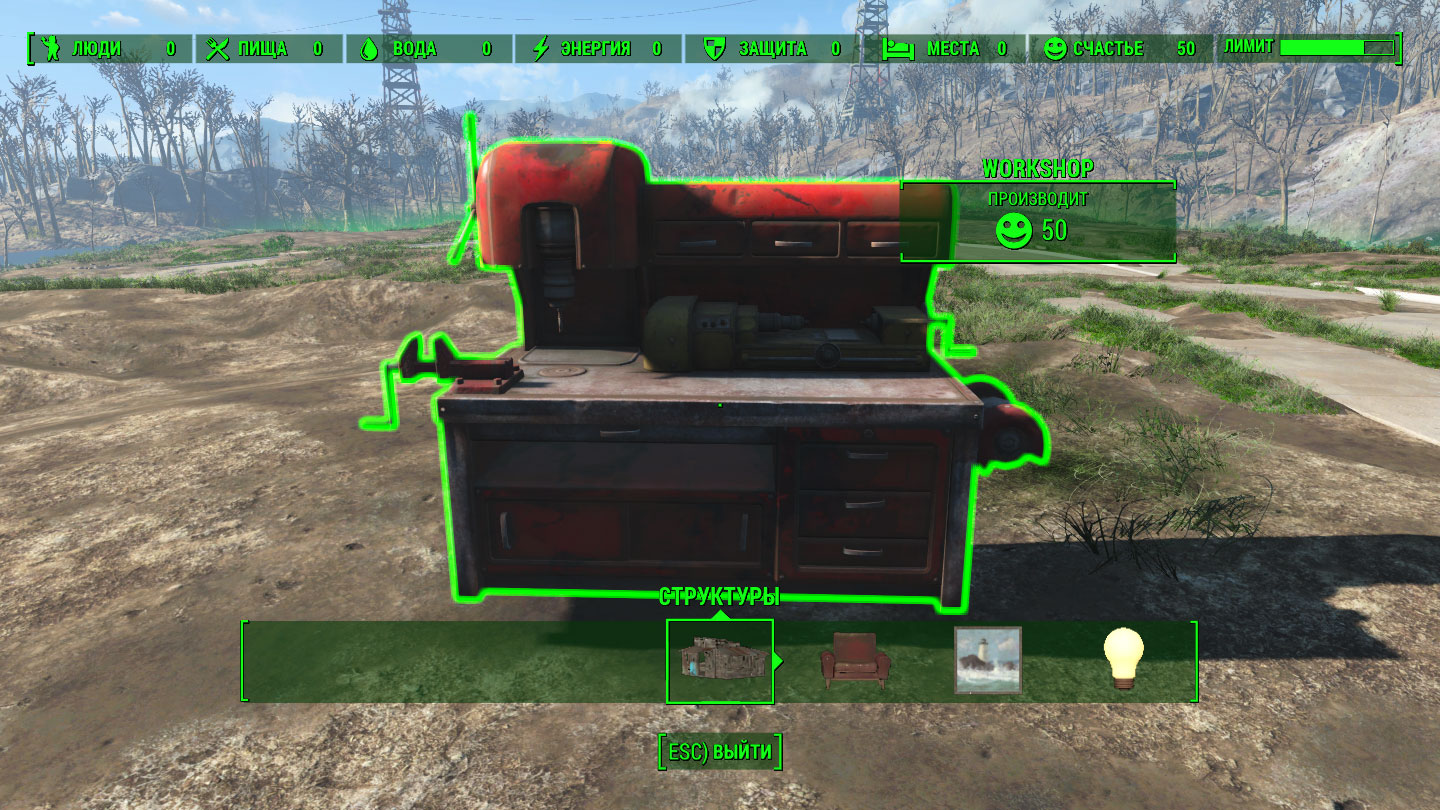
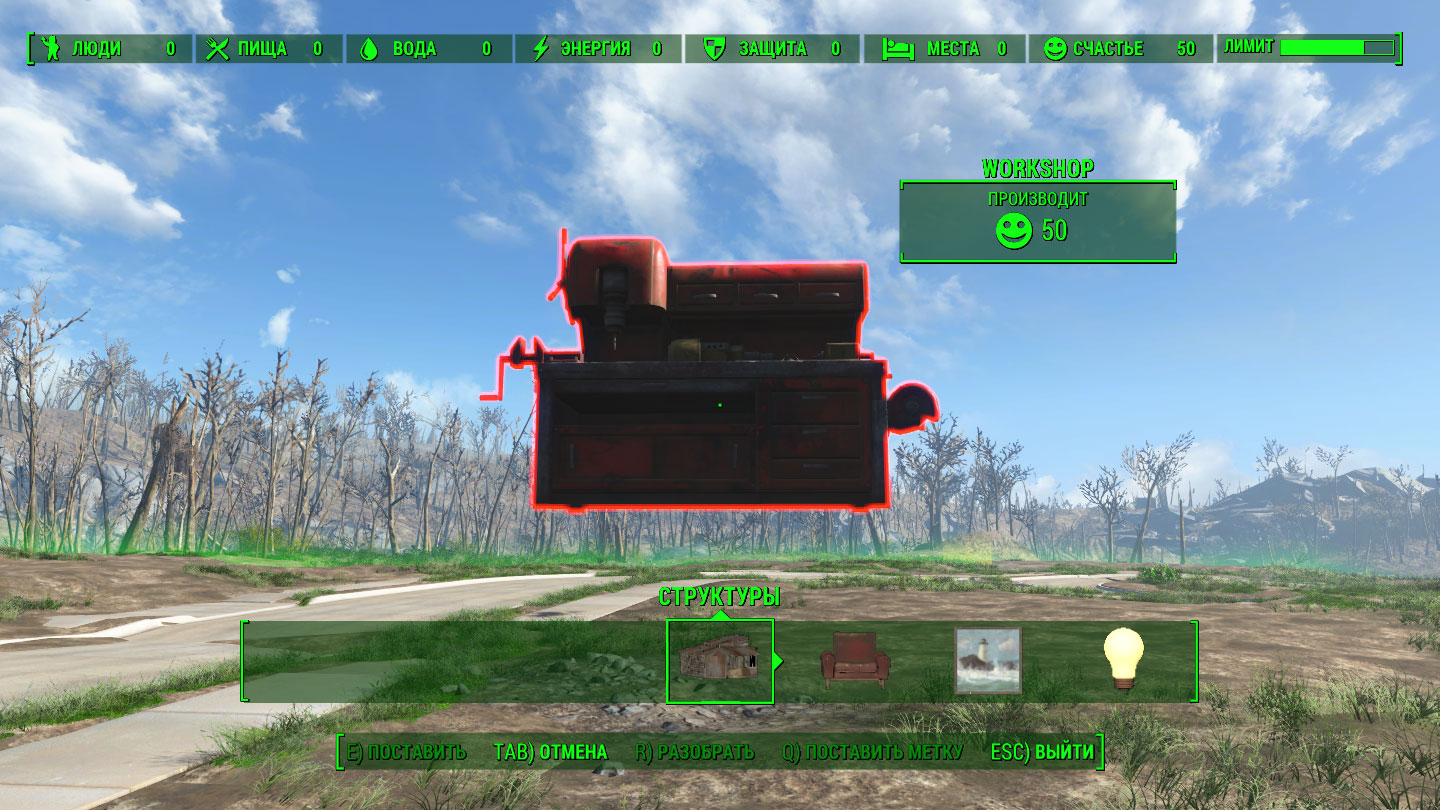
Вас сильно злит, что мастерская в ваших поселениях не передвигается? Не проблема! Данный мод даст вам такую возможность. Мастерскую можно передвинуть в любое место в вашем поселении либо создать. Это то что нужно было каждому! Важная информация:
Мастерскую можно передвигать только внутри радиуса зоны строительства.
Передвигать можно в любом поселении.
Мастерскую можно разбирать и по новой создавать (Не рекомендуется этого делать)
Для передвижения мастерской необходимо нажать на клавишу E
Не ставьте мастерскую рядом с другими объектами.
Версию для тех у кого стоит NoObjectLimit можно Скачать
 Установка:
Версия для тех у кого стоит NoObjectLimit
Скачать плагин и перенести его в Fallout4\Data
Включить в любом менеджере или в этом F4M
Конфликтов с другими модами не было замечено. Проверено мною (Переводчиком)