
Иммерсивные поселенцы / Immersive Settlers
Мод автоматически переименовывает имена поселенцев в игре Fallout 4. Каждый поселенец, новый и старый, получить случайное имя из списка 200 самых популярных имён Бостона. После срабатывания скрипта, имена изменить нельзя.
Скрипт запускается каждый раз, когда вы приближаетесь к поселению. Это означает, что если вы надолго остаётесь в поселение и, в это время, появляются новые поселенцы, имя им сразу не будет предоставлено. Простой способ это исправить, быстрое перемещение в другую локацию и вернуться назад.
Если же поселенец не меняет своего имени, есть два способа это исправить(есть и третий, через консоль, но с переводом будет путаница)
Если не сработает, тогда второй способ
В голодиске «Иммерсивные поселенцы» выбрать «Добавить карабин «Поселенец» и боеприпасы к нему «Добавить шприц переименования». Выстрелить в поселенца.
Требования:
Fallout 4
Совместимость:
Конфликтов не обнаружено
Установка и удаление:
NMM или вручную.
Примечание по удалению:
Если отключили и удалили мод(любой мод, не только этот, который имеет скрипты и заскриптованные объекты), лучше не устанавливать его обратно на сохранение с этим модом, это может привести к багам или полной поломки сохранений. Так же, не забывайте, что Bethesda не поддерживает удаление модов и такого понятие, как «чистое сохранение» не существует, удаление модов посреди игры может создать различные проблемы в будущем.
Не забываем заходить на страницу мода Immersive Settlers и благодарить автора за работу.
Fallout 4 мод unique customizable settlers
21 083 Просмотров
4370 Загрузок
Версия 1.0.0
Размер 49.8 мб
О моде:
Этот мод добавляет в Fallout 4 пятнадцать новых именных поселенцев (среди которых шесть торговцев уровня 4). Прежде чем поселить их в свои угодья, вы должны найти их, а для некоторых придется выполнить некоторые задания различной сложности.
В данном плагине есть три категории поселенцев:
— Простые поселенцы, кроме имени, ничего уникального в них нету. Получить их также просто, нужно всего лишь найти и пригласить в поселение.
— Улучшенные. Для их найма нужно выполнить квесты, которые они дадут. Они дают поселению определенное количество очков счастья, еды и т.п.
— Лучшие. Нанимаются после прохождения квестов в высокоуровневых локациях. Они как раз и являются торговцами 4 уровня.
Где их найти?
Простые поселенцы.
Даймонд Сити, Маркет
Северо-западная лачуга Форпоста «Зимонджа»
Улучшенные поселенцы.
Даймонд Сити, Верхние трибуны
+2 прибыль поселения
Кембридж, Закусочная кампуса
+5 защита поселения
+2 производство пищи в поселении
Лучшие поселенцы.
Релейная башня OMC-810
Следующий разрушенный дом после музея колдовства
Квинси, Полицейский участок
Торговец броней 4 уровень
Добрососедство, Бар «Третий рельс»
Внутри заброшенного дома около Конститьюшина
Торговец вещами 4 уровня
Доки около рыбного завода «Четырехлистник»
Торговец одеждой 4 уровень
Установка: через установщик модов или следуйте инструкции ниже:
1. По пути «Мои документы/My Games/Fallout 4» находим файл Fallout4Prefs.ini и редактируем его: [Launcher] добавьте «bEnableFileSelection=1» (без кавычек)
2. Переходим в папку C:\Users\Имя пользователя\AppData\Local\Fallout4. Открываем plugins.txt. Добавляем в него новую строку с названием «ИМЯ.esp» после «Fallout4.esm» (без кавычек)
3. Сохраните и закройте.
4. Выделяем plugins.txt и правой кнопкой выбираем «Свойства» и отмечаем «только для чтения».
5. Добавляем выбранный вам esp в папку Data, что находится в корне Fallout 4
6. Выполните все, что сказано на странице Настройка fallout4.ini
Не зови меня «Поселенец» / Don’t Call Me Settler
Автор:a1a3a6a9 (ссылка на автора, оригинал мода более не доступен на нексусе)
Версия:1.73
Перевод:arcticsns и SentryNeko
Описание:
Автоматически присваивает реальные имена поселенцам и позволяет легко управлять поселением.
Инструментарий поселения:
Призыв неназначенных поселенцев
— Призвать всех нераспределенных поселенцев в поселении к себе.
Жги! Детка! Жги!
— Сжигает в вашем поселении все трупы, скелеты, норы кротокрысов.
— Все вещи с мертвецов будут помещены в мастерскую.
Сила Генерала
— Назначает нераспределенных поселенцев на нераспределенные ресурсы.
— Приоритеты: Пища> Посты охраны> Магазины> Мастерские.
— Необходимое количество ресурсов вам нужно построить самостоятельно.
— Этот инструмент становится доступен после завершения квеста «Старые пушки».
— Вражда с Минитменами отключает этот инструмент.
Замечен враг!
— Этот инструмент гарантированно завершает квесты типа «Помочь защитить поселение». Зависаний подобных квестов более не будет.
— Автоматически стартует, когда поселение атакуют.
— На вашем Пип-Бое начинает звучать сирена, вы больше не пропустите атаку.
— Ставит метку квеста на врагов, которые атакуют поселение.
Это моя кровать!
— Блокировка / разблокировка кровати в поселении.
— Переселенцы никогда не будут спать на заблокированной кровати кровати
* Если этот инструмент активирован, сон в кровати автоматически заблокирует эту кровать
* Вы можете иметь только одну заблокированную кровать в поселении. Блокировка новой кровати разблокирует предыдущую кровать.
* Привязка поселенца к заблокированной кровати или сохранение кровати в мастерской разблокирует эту кровать.
* Деактивация инструмента разблокирует все заблокированные кровати.
Отслеживание поломки вещей
— Отмечает все поломанные вещи в поселении квестовыми метками до тех пор, пока они не будут починены.
Рай для животных
— Поселение с уровнем счастья меньше 80 может привлекать собак и кошек.
— Эта особенность не имеет требований.
— Максимальное количество животных можно настроить в Пип-Бое.
Смешанная генерация
— Для активации инструмента требуется DLC «Far Harbor».
— Генерирует 12 новых поселенцев из dlc на территории Содружества.
— Генерирует поселенцев из базовой игры в поселениях Фар Харбора.
Имена животных
— Эта особенность активируется установленными клетками из DLC Wasteland Workshop и/или особенностью «Рай для животных».
— Добавляет возможность обмена с названными животными.
— Эриксон из Far Harbor начинает продавать собак.
— Можно активировать/деактивировать в Пип-Бое.
— Нет возможности называть горилл.
Требования:
Важно! Версия игры не ниже 1.6.9.0.1
Поддержка DLC и совместимость с другими модами:
— Мод автоматически включает/отключает некоторые функции в зависимости от того, какие DLC и моды у вас установлены.
— Этот мод не изменяет ванильных записей, и будет работать при любом порядке загрузки. Он берет на себя управление, пока активирован, и будет перезаписывать данные других модов, делающих то же самое.
Установка: (Используйте NMM менеджер)
— Скачиваете у нас архив. В архиве находится оригинал мода версии 1.73 (автор скрыл мод на нексусе из-за большого количества проблем, вызываемых им) и архив с переведенным esp-файлом. Установите оригинал мода через NMM менеджер (рекомендуется) или вручную. Воспользуйтесь картинкой-подсказкой: 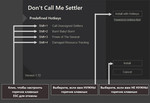
— Далее распакуйте архив с файлом SettlersRename.esp и вручную киньте в папку Data с заменой.
— Как устанавливать моды можно прочитать в данной теме
Please log in or register
To enjoy the benefits of Nexus Mods, please log in or register a new account
Spawnable Unique Settlers
File information
Last updated
Original upload
Created by
Uploaded by
Virus scan
Tags for this mod
About this mod
This mod adds 1000 workshop NPCs (500 male, 500 female). Because each has a unique reference ID, this allows you to modify each of them with the looks menu to customize them to your tastes unlike regular random settlers. There is a Far Harbor version adding another 200 NPCs (100 male, 100 female). ESL Available!
This mod does not have any known dependencies other than the base game.
Mods requiring this file
Author’s instructions
File credits
This author has not credited anyone else in this file
Donation Points system
This mod is not opted-in to receive Donation Points
This mod adds 1000 workshop NPCs (500 male, 500 female). There is a Far Harbor version adding another 200 NPCs (100 male, 100 female). Because each has a unique reference ID, this allows you to modify each of them with the looks menu to customize them to your tastes unlike regular random settlers. They are protected (only you can kill them), can be fully commanded, and use the same workshop script as regular settlers. As such, they should function in every way like regular settlers, except that you can customize them!
Use ESP version if you don’t know what ESL is or how to use it.
Install only one of the main files. There is an ESP and ESL version for each no-DLC and Far Harbor versions. ESP is the normal version and works like all the mods you’re used to installing. The ESL version is the new ‘light archive’ file type and doesn’t count against the 255 ESP file limit. Use ESL if you have tons of mods and know what you’re doing, otherwise, use the ESP version and save yourself trouble. For ESL, you’ll need NMM 63.17 to use ESL files without manually editing the plugins.txt file. That version of NMM has issues, which is why it hasn’t been rolled out yet.
Newly added to Version 1.2
-‘Ghoul’ entries have been changed to race ghoul to fix issues with heads vanishing.
WARNING: If you’ve already placed human NPCs with the ghoul voice set, they will turn into ghouls when you update. If you don’t want them to be ghouls, then you’ll have to remake them as humans. You will want to save presets for those NPCs. Spawn a non-ghoul version to replace them and manually switch the voice to ghoul.
NOTE: I do not know how to reattach heads. This seems to be an issue with the race of the head not change when you use the console command to change races. It turns out that ghouls have special meshes for their heads, not just deformed human heads, even though human heads are easily made to look like ghouls.
————————————————————————————————————-
Newly added to Version 1.1, Far Harbor ‘Maine’ voices!
-Added 200 more unique settlers representing the Maine accent voice sets
-Far Harbor version is a separate download, so you if you don’t have Far Harbor, there is still a file for you
————————————————————————————————————-
New with Version 1.1
-Added 800 more unique settlers representing different voice sets
-Fixed issue with settlers not being very talkative (no passing banter, no shop talk)
-Added ESL version.
————————————————————————————————————-
HOW TO USE
To use these settlers, you’ll have to spawn them via the console.
To get a list of spawnable IDs in game, use these commands (note far harbor voices only available in far harbor versions);
help «Unique Settler M Normal» 4
help «Unique Settler F Normal» 4
help «Unique Settler M Boston» 4
help «Unique Settler M Ghoul» 4
help «Unique Settler M Rough» 4
help «Unique Settler M Old» 4
help «Unique Settler F Boston» 4
help «Unique Settler F Ghoul» 4
help «Unique Settler F Rough» 4
help «Unique Settler F Old» 4
help «Unique Settler M Far» 4
help «Unique Settler F Far» 4
M is male. F is female. The last part designates the assigned voice.
You’ll need to run one of those help commands to get the mod’s ID (first two digits)
From there, you’ll need to spawn one, example;
player.placeatme xx000FFD 1 (where xx is the mod’s ID)
There are 1000 currently with ID ranging (note far harbor voices only available in far harbor versions);
(ESP VERSION)
xx000F99 to xx000FFC Male w/ Eventone ‘Normal’ Voice
xx000FFD to xx001060 Female w/ Eventone ‘Normal’ Voice
xx001061 to xx0010C4 Male w/ Boston Voice
xx0010C5 to xx001128 Male Ghoul (Race is ghoul! voice is ghoul!)
xx001129 to xx00118C Male w/ Rough Voice
xx00118D to xx0011F0 Male w/ Old Voice
xx0011F1 to xx001254 Female w/ Boston Voice
xx001255 to xx0012B8 Female Ghoul (Race is ghoul! voice is ghoul!)
xx0012B9 to xx00131C Female w/ Rough Voice
xx00131D to xx001380 Female w/ Old Voice
xx001381 to xx0013E4 Male w/ Maine (Far Harbor) Voice
xx0013E5 to xx001448 Female w/ Maine (Far Harbor) Voice
(ESL VERSION)
xx000A00 to xx000A63 Male w/ Eventone Voice
xx000A64 to xx000AC7 Female w/ Eventone Voice
xx000AC8 to xx000B2B Male w/ Boston Voice
xx000B2C to xx000B8F Male Ghoul (Race is ghoul! voice is ghoul!)
xx000B90 to xx000BF3 Male w/ Rough Voice
xx000BF4 to xx000C57 Male w/ Old Voice
xx000C58 to xx000CBB Female w/ Boston Voice
xx000CBC to xx000D1F Female Ghoul (Race is ghoul! voice is ghoul!)
xx000D20 to xx000D83 Female w/ Rough Voice
xx000D84 to xx000DE7 Female w/ Old Voice
xx000DE8 to xx000E4B Male w/ Maine (Far Harbor) Voice
xx000E4C to xx000EAF Female w/ Maine (Far Harbor) Voice
Once spawned, you can customize the settler by clicking on it in the console (be careful to have the settler selected with a proper ID showing. It should start with FF. Get a good camera view of the NPC and entering these commands;
tai (‘toggle ai’ freezes settler in place by stopping the brain)
slm xxxxxxxx (enter the ID you see in the console after selecting the settler)
Aftwards, free the settler with;
tai (restores settler’s brain)
Be sure to go into build mode and send the settler to the settlement! Settler will not function until assigned a settlement!
All of the customize-able settlers will have a variant of the name «Unique Settler». There is a great mod ‘Rename Anything’ that will allow you to change this and name each settler almost anything you want!
If you want the settler to be a ghoul, spawn the settler from either the male or female ghoul entries in the lists above. If you want to use human hair types, you can transform the ghoul into a human, adjust the hair, then transform back into a ghoul using the setrace commands;
setrace human
setrace ghoul
If you want a human with a ghoul voice or a ghoul with a human voice, see how to do so with the information below.
CHANGE VOICE ON A SPAWNED NPC
I was digging through papyrus scripts and had a bit of breakthrough on changing voices in-game. I found a way to change voices with a console command! This would negate the need for most of the voice type options I made, but there isn’t much point in retroactively removing those. If you end up using all 100 of a voice type, you can convert another IF it is one of the normal settler voices (excluding Far Harbor voice, as that gets more complicated)
So here it is (select the settler in console first),
cf «ObjectReference.SetOverrideVoiceType» VOICEID
Where VOICEID is the base ID of the voice type. You can search for those in game like
help «Male» 4 VTYP
help «Female» 4 VTYP
The basic settler voices are
MaleBoston 23323
MaleEvenToned 13AD2
MaleGhoul l23321
MaleOld CEAA3
MaleRough 2D
FemaleBoston 23324
FemaleEvenToned 13ADD
FemaleGhoul 23322
FemaleOld CEAA2
FemaleRough 2E
You could search for a voice specifically like;
help «FemaleBoston» 4 VTYP
An example of changing a settler to that would be (23324 is the VOICEID for FemaleBoston);
cf «ObjectReference.SetOverrideVoiceType» 23324
Note that there are a great many voice types and I doubt any except those listed above will work for basic settler NPCs. The reason for that is that the voice type is only half the story. You also need the right dialogue factions. For some reason, the game uses factions to determine how and when NPCs talk. If you want a settler to use the voice of a particular unique NPC, you would also need to figure out what dialogue factions they’re in and make sure the the settler NPC is assigned to those factions. This isn’t very useful for settlers in most cases, as the unique voices don’t have dialogue lines corresponding to settler behavior, although it should be possible to get basic greetings working with any voice you want if you really want to dig into it.
Permissions: If you want to merge this into a bigger package, modify it for your own mod, or use as part of another mod, you’re welcome to do so! Credit would be nice of course. If you do something with it, let me know. I’d love to see it!
Mods used during customization of the settlers in the screenshot (in case anyone is curious)
Please log in or register
To enjoy the benefits of Nexus Mods, please log in or register a new account
Spawnable Unique Settlers
File information
Last updated
Original upload
Created by
Uploaded by
Virus scan
Tags for this mod
About this mod
This mod adds 1000 workshop NPCs (500 male, 500 female). Because each has a unique reference ID, this allows you to modify each of them with the looks menu to customize them to your tastes unlike regular random settlers. There is a Far Harbor version adding another 200 NPCs (100 male, 100 female). ESL Available!
This mod does not have any known dependencies other than the base game.
Mods requiring this file
Author’s instructions
File credits
This author has not credited anyone else in this file
Donation Points system
This mod is not opted-in to receive Donation Points
This mod adds 1000 workshop NPCs (500 male, 500 female). There is a Far Harbor version adding another 200 NPCs (100 male, 100 female). Because each has a unique reference ID, this allows you to modify each of them with the looks menu to customize them to your tastes unlike regular random settlers. They are protected (only you can kill them), can be fully commanded, and use the same workshop script as regular settlers. As such, they should function in every way like regular settlers, except that you can customize them!
Use ESP version if you don’t know what ESL is or how to use it.
Install only one of the main files. There is an ESP and ESL version for each no-DLC and Far Harbor versions. ESP is the normal version and works like all the mods you’re used to installing. The ESL version is the new ‘light archive’ file type and doesn’t count against the 255 ESP file limit. Use ESL if you have tons of mods and know what you’re doing, otherwise, use the ESP version and save yourself trouble. For ESL, you’ll need NMM 63.17 to use ESL files without manually editing the plugins.txt file. That version of NMM has issues, which is why it hasn’t been rolled out yet.
Newly added to Version 1.2
-‘Ghoul’ entries have been changed to race ghoul to fix issues with heads vanishing.
WARNING: If you’ve already placed human NPCs with the ghoul voice set, they will turn into ghouls when you update. If you don’t want them to be ghouls, then you’ll have to remake them as humans. You will want to save presets for those NPCs. Spawn a non-ghoul version to replace them and manually switch the voice to ghoul.
NOTE: I do not know how to reattach heads. This seems to be an issue with the race of the head not change when you use the console command to change races. It turns out that ghouls have special meshes for their heads, not just deformed human heads, even though human heads are easily made to look like ghouls.
————————————————————————————————————-
Newly added to Version 1.1, Far Harbor ‘Maine’ voices!
-Added 200 more unique settlers representing the Maine accent voice sets
-Far Harbor version is a separate download, so you if you don’t have Far Harbor, there is still a file for you
————————————————————————————————————-
New with Version 1.1
-Added 800 more unique settlers representing different voice sets
-Fixed issue with settlers not being very talkative (no passing banter, no shop talk)
-Added ESL version.
————————————————————————————————————-
HOW TO USE
To use these settlers, you’ll have to spawn them via the console.
To get a list of spawnable IDs in game, use these commands (note far harbor voices only available in far harbor versions);
help «Unique Settler M Normal» 4
help «Unique Settler F Normal» 4
help «Unique Settler M Boston» 4
help «Unique Settler M Ghoul» 4
help «Unique Settler M Rough» 4
help «Unique Settler M Old» 4
help «Unique Settler F Boston» 4
help «Unique Settler F Ghoul» 4
help «Unique Settler F Rough» 4
help «Unique Settler F Old» 4
help «Unique Settler M Far» 4
help «Unique Settler F Far» 4
M is male. F is female. The last part designates the assigned voice.
You’ll need to run one of those help commands to get the mod’s ID (first two digits)
From there, you’ll need to spawn one, example;
player.placeatme xx000FFD 1 (where xx is the mod’s ID)
There are 1000 currently with ID ranging (note far harbor voices only available in far harbor versions);
(ESP VERSION)
xx000F99 to xx000FFC Male w/ Eventone ‘Normal’ Voice
xx000FFD to xx001060 Female w/ Eventone ‘Normal’ Voice
xx001061 to xx0010C4 Male w/ Boston Voice
xx0010C5 to xx001128 Male Ghoul (Race is ghoul! voice is ghoul!)
xx001129 to xx00118C Male w/ Rough Voice
xx00118D to xx0011F0 Male w/ Old Voice
xx0011F1 to xx001254 Female w/ Boston Voice
xx001255 to xx0012B8 Female Ghoul (Race is ghoul! voice is ghoul!)
xx0012B9 to xx00131C Female w/ Rough Voice
xx00131D to xx001380 Female w/ Old Voice
xx001381 to xx0013E4 Male w/ Maine (Far Harbor) Voice
xx0013E5 to xx001448 Female w/ Maine (Far Harbor) Voice
(ESL VERSION)
xx000A00 to xx000A63 Male w/ Eventone Voice
xx000A64 to xx000AC7 Female w/ Eventone Voice
xx000AC8 to xx000B2B Male w/ Boston Voice
xx000B2C to xx000B8F Male Ghoul (Race is ghoul! voice is ghoul!)
xx000B90 to xx000BF3 Male w/ Rough Voice
xx000BF4 to xx000C57 Male w/ Old Voice
xx000C58 to xx000CBB Female w/ Boston Voice
xx000CBC to xx000D1F Female Ghoul (Race is ghoul! voice is ghoul!)
xx000D20 to xx000D83 Female w/ Rough Voice
xx000D84 to xx000DE7 Female w/ Old Voice
xx000DE8 to xx000E4B Male w/ Maine (Far Harbor) Voice
xx000E4C to xx000EAF Female w/ Maine (Far Harbor) Voice
Once spawned, you can customize the settler by clicking on it in the console (be careful to have the settler selected with a proper ID showing. It should start with FF. Get a good camera view of the NPC and entering these commands;
tai (‘toggle ai’ freezes settler in place by stopping the brain)
slm xxxxxxxx (enter the ID you see in the console after selecting the settler)
Aftwards, free the settler with;
tai (restores settler’s brain)
Be sure to go into build mode and send the settler to the settlement! Settler will not function until assigned a settlement!
All of the customize-able settlers will have a variant of the name «Unique Settler». There is a great mod ‘Rename Anything’ that will allow you to change this and name each settler almost anything you want!
If you want the settler to be a ghoul, spawn the settler from either the male or female ghoul entries in the lists above. If you want to use human hair types, you can transform the ghoul into a human, adjust the hair, then transform back into a ghoul using the setrace commands;
setrace human
setrace ghoul
If you want a human with a ghoul voice or a ghoul with a human voice, see how to do so with the information below.
CHANGE VOICE ON A SPAWNED NPC
I was digging through papyrus scripts and had a bit of breakthrough on changing voices in-game. I found a way to change voices with a console command! This would negate the need for most of the voice type options I made, but there isn’t much point in retroactively removing those. If you end up using all 100 of a voice type, you can convert another IF it is one of the normal settler voices (excluding Far Harbor voice, as that gets more complicated)
So here it is (select the settler in console first),
cf «ObjectReference.SetOverrideVoiceType» VOICEID
Where VOICEID is the base ID of the voice type. You can search for those in game like
help «Male» 4 VTYP
help «Female» 4 VTYP
The basic settler voices are
MaleBoston 23323
MaleEvenToned 13AD2
MaleGhoul l23321
MaleOld CEAA3
MaleRough 2D
FemaleBoston 23324
FemaleEvenToned 13ADD
FemaleGhoul 23322
FemaleOld CEAA2
FemaleRough 2E
You could search for a voice specifically like;
help «FemaleBoston» 4 VTYP
An example of changing a settler to that would be (23324 is the VOICEID for FemaleBoston);
cf «ObjectReference.SetOverrideVoiceType» 23324
Note that there are a great many voice types and I doubt any except those listed above will work for basic settler NPCs. The reason for that is that the voice type is only half the story. You also need the right dialogue factions. For some reason, the game uses factions to determine how and when NPCs talk. If you want a settler to use the voice of a particular unique NPC, you would also need to figure out what dialogue factions they’re in and make sure the the settler NPC is assigned to those factions. This isn’t very useful for settlers in most cases, as the unique voices don’t have dialogue lines corresponding to settler behavior, although it should be possible to get basic greetings working with any voice you want if you really want to dig into it.
Permissions: If you want to merge this into a bigger package, modify it for your own mod, or use as part of another mod, you’re welcome to do so! Credit would be nice of course. If you do something with it, let me know. I’d love to see it!
Mods used during customization of the settlers in the screenshot (in case anyone is curious)