
Fallout 4 переводчик модов
Для, того, что бы перевести мод, нам потребуется программа «ESP-ESM Translator»:
Скачать её можно: ТУТ
Так же потребуется мышь, рабочий компьютер, и одна рука, желательно правая (на руке должно быть хотя бы 3 пальца). Большой и безымянный, что бы держать мышь и указательный, что бы щелкать мышь. Хорошо, если есть средний, можно будет жать на правую кнопку мыши. Но в принципе сойдет и 1.
И так для начала качаем программу с сайта!

А вот мы на ЯндексДиске

Теперь создаем любую папку где угодно. Ну не в system32 конечно. На любом диске. Туда скидываем всё содержимое архива с программой!
Среди всего мусора, нам понадобится 1 файлик. Думаете какой? Нет, я не буду заставлять вас проходить курсы открытия третьего глаза и экстрасенсорных способностей. Вот он:

Теперь нужно похлопать глазами, сделать круговые движения, поморгать. Встать, сделать гимнастику помахав руками. Все. Что ж, теперь можно продолжать!
И так. Запуская программу. Там на выбор на будет предоставляться язык. Выбираем Иврит. Шучу. Выбираем японский язык и идем проходить курсы открытия экстрасенсорных способностей. Ладно, выбираем Русский.
Теперь, когда вы закончили, можно сходить выпить чайку.

Открываем любой мод, любой. Формата esp/esm и т.д
Там будут указанны, что можно открыть. Но в нашем случае просто мод esp (Это стандартный формат всех обычных модов.)

Вкусный чай? Если да, то идем дальше. Вот наше рабочее окно. Тут все пока на непонятном нам языке.

И так щелкаем 1 раз на фразочку с непонятным языком. И снизу, как на фото в той же колонке, пишем перевод.

И щёлкаем на исходный текст два раза левой мышкой.

Теперь. можно включить какую буть песенку. Можно Ray Smith – Blonde Hair, Blue Eyes например. Весьма веселенькая. И если 1 палец не устал делать все, продолжаем!
Открывается данная табличка. Жмем «Подтвердить текст»!

Вот что мы увидим после нажатия. Всё потемнело! О НЕТ. ЭТО КОНЕЦ СВЕТА.
Нет друзья, всё хорошо. Чай был похоже с галлюциногеном. Ладно. Если там много слов, то жмем следующий. Если нет, то закрываем эту табличку.


Теперь нам нужно сохранить, заменяем, жмём да. Если не хотим заменять оригинал на переведенную версию, просто по другому называем. Только не вздумайте обе версии кинуть потом в папку дата)


Вот и всё друзья мои! Ну уже почти!)
Теперь закрываем и жмём НЕТ не сохранять, мы ж сохранили уже!

Вот и всё! Удачи в переводе и не забываем про СПАСИБО! Всем пока! Пишем, что не знаем.
Fallout 4 переводчик модов




Приветствуем всех начинающих и желающих научиться переводить моды и плагины для игры «Skyrim LE/SE, Fallout 4, Fallout 76»
Объясню вам как можно подробно и понятно, как переводить любой мод для игры Skyrim и предоставляю для скачивания необходимые программы и свои наработки для облегчения вам перевода. Но для начала, поясню базовые понятия модов. И, что каждый важный аспект может из себя представлять.
Пример общих терминов:
Meshes (.NIF) – это в первую очередь 3D модель (сетка) объекта на которую накладываются текстуры. Если увидите такой файл, то сразу сможете понять, что это модель объекта. В переводе он не нуждается, однако есть такие моды, как «реплейсеры» тел, лиц и т.д. Так вот, если вы используете Meshes с одного мода, но не понравились текстуры или модель, то вы можете взять любые текстуры или модели с однотипного мода. И просто заменить с той моделью или текстурами, что вам приглянулись, учитывая названия и путь файлов и получите отличную модель с красивой текстурой и моделью на ваш вкус. Запомните, что Meshes отвечают только за модель отображения, не больше и ни меньше. Если на модели нет текстур, то данная модель будет помечена синим цветом.
Textures (.DDS) – это текстуры, которые не могут работать без Meshes. Текстуры отвечают за отображение той или иной текстуры (предмета, тела и т.д.). Если увидите такой файл, то сразу сможете понять, что это текстуры. Переводу так же не нуждается. С ними вы можете проделывать тоже самое, что и указано о Meshes. Их можно между собой менять, подставлять как душе угодно, что вручную, что в Creation Kit. Если вы решитесь изменить текстуры в моде, то учитывайте обязательно путь, что указан модом и точное название т.к. все моды в данном вопросе, особенно на тела однотипны в пути и названиях.
Для работы через NMM, например, в моде W.A.T.E.R. его содержимое выглядит так:

Необходимые программы для перевода: (устаревшие и не актуальные)
— TESArchive – расположен в папке игры под названием Archive.exe. Он выполняет те же функции, что и BSAopt, но им пользоваться нужно в том случае, если после создания архива на BSAopt возникают проблемы при работе мода. Есть отдельное по нему руководство на которое вам укажу ссылку.
Собственно всё, это единственные программы, с которыми вам предстоит иметь дело. С некоторыми чаще, с другими может реже, зависит от сложности мода. Объяснять, как пользоваться Creation Kit не буду, есть уйма о нём документации и видео, да и в работе он вам не пригодиться.
Рекомендуемая утилита xTranslator для игр Skyrim LE, Skyrim SE, FalloutNV, Fallout 4, Fallout 76
Открываем программу xTranslator.exe и видим: 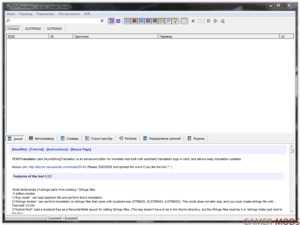
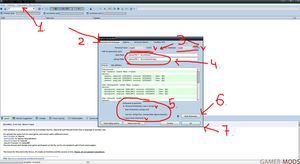
2. изначально все поля будут розового цвета пока не указать путь до Strings папки в Skyrim LE, для Skyrim SE и Fallout 4 пути до папки Strings нет, нужнео просто указать путь до папки Data
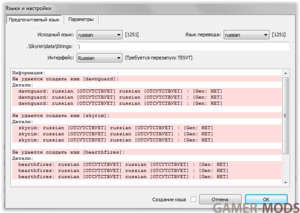
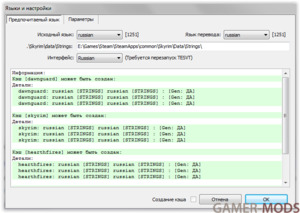
После того как указать путь до Strings файлов или папки Data, программа прочитает все strings и все строки станут зелеными
Если увидите что-то красное, значит какое-то DLC у вас не установлено
3. Теперь приступим к переводу. Нажимаем «Файл» и видим: 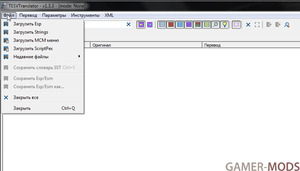
Как видим, визуально ничем не отличается от SSL. Однако, когда вы делаете перевод строки, она помечается синим цветом. Так же когда вы переводите квест, вы увидите полную её связь с другими строками. Если вы переводите диалог, связанный с НПС, то вы её увидите, но не всегда это доступна. Так же, когда вы переводите повторяющее слово, то вам будет предложен вариант заменить одно слово на одно и тоже изменение, но при этом учитывайте, чтобы слово не было связано с ID: FACT.
Например, когда вы хотите перевести, то нажимайте на строку 2 раза левой кнопкой мыши и вам выдаст вот такое окно: 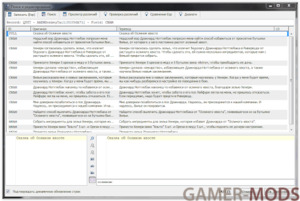
Здесь вы видите, как одна строка связана с другими. Это демонстрация квеста. Обычная строка будет показана только одна. Так же сверху всех строк вы видите их общий EDID (AAEMDonkeyTail) и BaseID (01056A71). По EDID вы легко можете в Creation Kit фильтровать поиск, а по BaseID вы можете узнать в игре RefID объекта. Если видите в разделе строку [NULL]– это значит, что строка пустая и трогать её не нужно. С выбором Strings, меню будет точно такое же.
5. Теперь посмотрим, как выглядит при загрузке MCM. Для демонстрации используем мод «Сырость и холод»: 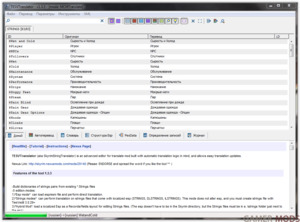
Как видите используется строго один раздел и можно переводить не вскрывая BSA.
6. Теперь посмотрим, как выглядит перевод скриптов. Для пример возьмём мод «Вилья в Скайриме»: 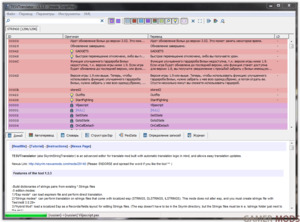
Данный способ декомпиляции скриптов требуется только для игры Skyrim LE, и только в тех случаях, когда при переводе скриптов на русский, в игре вместо русских слов и букв показываются кракозябры, зачастую это в уведомлениях происходит или в окошках уведомлениях с действиями.
4. Переименуйте Viljascript.disassemble в Viljascript. Затем, уже Viljascript.PAS открываем через Noteepad ++ и в вверху есть раздел «Кодировки», нажимаем его и выбираем «Преобразовать в ANSI» (только обязательно «Преобразовать» а не «Кодировать») и сохраняйте, как обычный документ.
Нюанс тут в том, что проблема в кодировках т.к. TesVTranslator или xTranslator сохраняет в UTF8 и при изменении он не будет ничего в МСМ отображать, если имеет зависимость от PSC, но переводя его в кодировке ANSI данная проблема обходиться, но и то не всегда.
Руководство для начинающих переводчиков TES / Fallout (1 просматривает)

Sado Yasashii
Владелец RG
Программы для перевода TES / Fallout
P.S. Я в большей степени специализируюсь по переводам игр TES, потому по Fallout информация будет общая. По Fallout, просьба опытных переводчиков поделиться информацией. Изначально старое руководство было размещено на modgames.net, но я свою поддержку переводов оттуда убрал полностью, как и все свои заметки. Потому меня там многие помнят, как Sadorimatsu. Если будут какие вопросы, то спрашивайте.
По другим играм будут свои отдельные руководства.
Ниже идёт вводная часть нового руководства, обязательно ознакомьтесь!
Вам будет дано предельно подробное описание, как и нюансы для перевода мода любой сложности на примере TES V: Skyrim. Для других частей или для серии игр Fallout различие лишь в редакторах и сторонних инструментах для них. На момент 2020 года, весь инструментарий для всех основных частей собран в “ESP-ESM Translator”, что позволяет проводить переводы почти всех частей. Потому, для перевода, достаточно понимать базовые термины. Сперва пробежимся по небольшой истории софта. После перейдем к реальной практике на текущий день.
Strings – это списки строк, которые игра обрабатывает для вывода текста, которые разделяется на STRINGS (название, имена, обозначения, диалоги от ГГ (главного героя)), DLSTRINGS (Квесты, записки, описание умений и заклинаний) и ILSTRINGS (Диалоги НПС) и они взаимосвязаны с .ESP/.ESM. Эти списки строк являются основой перевода в любом моде.
Раньше скрипты переводились вручную, переконвертируя расширение файла в HEX-редакторе (их несколько видов, выбираете тот, с кем вам удобней работать), но данный метод очень неудобен и накладен именно тем, что необходимо в строке через HEX-редактор, подкорректировать длину строки.
Meshes (.NIF) – это 3D модель у которой есть свойства материала, эффекты и текстуры. В переводе не нуждается. Моды, такие как “текстурные”, “реплейсеры” тел и т.п. в переводе нуждаются, если содержат текст описания и принципа установки.
Textures (.DDS) – это текстуры, которые не могут работать без Meshes (3D модель). Текстуры отвечают за внешний вид потенциально видимого внутриигрового объекта. В переводе иногда необходимы. Например, моды на дорожные знаки, тексты на стенах, обложки книг т.п. В остальном нуждаются только в переводе описания и принципа установки.
Это самые основные понятия, с которыми вы будете наиболее чаще сталкиваться. Если в моде видите каталоги video, music, sound и т.п., то это лишь мелочная составляющая модов на которые вам не стоит обращать внимание и перевода они не касаются.
Важно учитывать, что многие моды адаптируются под быструю установку через файловые менеджеры:
Мод, который поддерживает установку через файловый менеджер должен иметь при себе папку “Fomod”, как показано на примере мода Wet and Cold для обычного TES V: Skyrim:

Собственно всё, это единственный набор, с которым вам чаще всего предстоит иметь дело. С некоторыми чаще, с другими реже, зависит от сложности мода. Для пользования Creation Kit есть уйма документации и видео, да и в переводе он вам может редко понадобиться. Для общего развития можете посмотреть видео уроки на YouTube. По другим программам и инструментам просьба выяснять самим и по возможности делиться информацией для расширения руководства.
Please log in or register
To enjoy the benefits of Nexus Mods, please log in or register a new account
fallout4Translator
File information
Last updated
Original upload
Created by
Uploaded by
Virus scan
Tags for this mod
About this mod
Fallout4Translator is an advanced translation editor (Also works for Skyrim)
Automatic translation. Heuristic suggestions. Extraction/Injection in bsa/ba2. Pex file Decompilation. Quest table, Voice/Fuz map support. Etc.
This mod does not have any known dependencies other than the base game.
Mods requiring this file
Author’s instructions
The home for this tool is http://www.nexusmods.com/, the access is free.
I do not give authorization to upload this tool outside the Nexus site
File credits
Bethesda
Tes5edit team for their work
Alexander Blade for the last fallout4 OpCode in Pex
Internet for the gigantic ressource ^^
Donation Points system
This mod is opted-in to receive Donation Points
Version 1.0beta18a
Version 1.0beta18
Version 1.0beta17
Version 1.0beta16e
version 1.0beta16c/d
-QuestList: More optimizations. Also, the quests and dialogs entries without editable strings are not added to the list.
-QuestList: The Quest/Dialog lists are now not redrawn when it’s unnecessary, and keep the current dialog topic on track correctly
-QuestList: Added Data informations to Quest & Dialog entries (name,category/subtype/KeyWord when relevant).
-QuestList: Added a new DialSubType data file in the fallout4translator\data\[game] folder.
-QuestList: If master esm/esp are also loaded, the relevant Quests and Data informations (like KeyWord/Name) will be used from Masters if necessary.
-OldDialogStyle: the tool now uses override data in priority.
-The Tag/Id filter now correctly sorts Strings with no tag when the Selected tag list is empty.
-Added Strings Status/Tag operation in edit windows through Context Menu, for both Dialog and Record List.
-Updated Chinese UI (credit to Rebya)
version 1.0beta16b
-QuestList: Some optimizations for to avoid lag on very big quests
version 1.0beta16
-Added a Quests panel in the lower section of the main window, to edit specific quests dialogs. Dbl-click to edit the given quest
-Added a Dialog SubList related to the parent quest in the dialog panel. Dbl-click to edit the given dialog.
-Added filter by Tag/Id: Use Left-Click to change the filter status and Right-click to change the selected Tag/Id.
-Added an option to all functions that use a selection of items to restrict the field of application to visible items only (through the current applied search/filter). So you can combine any tags with string status.
-Added an option to import only Tag/Id from SSTimport.
-Added some derived text suggestions (for example: [TestString] will automatically add: TestString (without bracket) in suggestion list)
-Changed the «search in» (source/dest etc.) group buttons to a single dropDown, for clarity.
-Added Zoom+/zoom-/Restore option menus to resize Font in List. (Note: the font name can be edited in the commonPrefs.ini file, if needed)
-Added an option for to use only strings files from the \strings folder (as loose files) instead of trying to extract them from bsa/ba2 archives while generating dictionaries.
-Fix: Manually applying direct translation does not reset tag/ID anymore
-Improved/Fixed various minor UI stuff.
Version 1.0beta16d
version 1.0beta16c
-QuestList: More optimizations. Also, the quests and dialogs entries without editable strings are not added to the list.
-QuestList: The Quest/Dialog lists are now not redrawn when it’s unnecessary, and keep the current dialog topic on track correctly
-QuestList: Added Data informations to Quest & Dialog entries (name,category/subtype/KeyWord when relevant).
-QuestList: Added a new DialSubType data file in the fallout4translator\data\[game] folder.
-QuestList: If master esm/esp are also loaded, the relevant Quests and Data informations (like KeyWord/Name) will be used from Masters if necessary.
-OldDialogStyle: the tool now uses override data in priority.
-The Tag/Id filter now correctly sorts Strings with no tag when the Selected tag list is empty.
-Added Strings Status/Tag operation in edit windows through Context Menu, for both Dialog and Record List.
-Updated Chinese UI (credit to Rebya)
version 1.0beta16b
-QuestList: Some optimizations for to avoid lag on very big quests
version 1.0beta16
-Added a Quests panel in the lower section of the main window, to edit specific quests dialogs. Dbl-click to edit the given quest
-Added a Dialog SubList related to the parent quest in the dialog panel. Dbl-click to edit the given dialog.
-Added filter by Tag/Id: Use Left-Click to change the filter status and Right-click to change the selected Tag/Id.
-Added an option to all functions that use a selection of items to restrict the field of application to visible items only (through the current applied search/filter). So you can combine any tags with string status.
-Added an option to import only Tag/Id from SSTimport.
-Added some derived text suggestions (for example: [TestString] will automatically add: TestString (without bracket) in suggestion list)
-Changed the «search in» (source/dest etc.) group buttons to a single dropDown, for clarity.
-Added Zoom+/zoom-/Restore option menus to resize Font in List. (Note: the font name can be edited in the commonPrefs.ini file, if needed)
-Added an option for to use only strings files from the \strings folder (as loose files) instead of trying to extract them from bsa/ba2 archives while generating dictionaries.
-Fix: Manually applying direct translation does not reset tag/ID anymore
-Improved/Fixed various minor UI stuff.
Version 1.0beta15c
version 1.0beta15a
-Fixed an issue with the personal dictionary.
Version 1.0beta14
Version 1.0beta13b
version 1.0.0beta13
-Added VMAD (script property) analysis. This option is in Beta, and disabled by default (go in option to enable it). Please report any issue.
WARNING: editing wrong strings can break your mod, so use with caution. Auto-translations tools are disabled for such strings.
They appear in yellow (locked) with a specific icon after each loading and you have to unlock them (with F1, F2 or F4, depending on what you want) to use tools on them. Also, only strings that are *not* in Yellow (locked) are updated in the esp when exported.
When you edit a VMAD string, you can see in the edit window which script and property it belongs to.
If you want to reimport a translation saved in a dictionary on VMAD strings: select the string you want to translate, hit F2 to tag them in purple, then use the applySST tool with «string only» on «Partial String», once it’s done, validate them (F1) after controlling everything is OK.
NOTE: VMAD analysis only works on delocalized esp.
-If an esp requires another workspace (ie: the current game workspace is not the right one), and if there are no other files loaded at that moment, then you can choose to restart the tool automatically for the right workspace. The esp will be loaded directly.
-Updated UI for Chinese & Japanese (credit to Rebya & Kuroko137)
Version 1.0beta12
Version 1.0beta11
Version 1.0beta10
version 1.0.0beta9d
-StreamLined the internal call to sound converter.
version 1.0.0beta9b
-The ‘generate fuz map’ button has been removed: The Fuz map in now automatically generated the first time you click on the Play fuz audio button for a given loaded esp/esm.
-TopicINFO with missing fuz file are now flagged (they can be filtered with the ‘warning’ filter)
-Fixed an issue where fuz files could be associated to a string if they both share the same Base formId but not the same MasterID.
-Added an icon to female NPC_
-Added emote info to the topicINFO comment section
-Updated strings warning datas
-Various optimizations in the fuz map generation
version 1.0.0beta9d
-StreamLined the internal call to sound converter.
version 1.0.0beta9b
-The ‘generate fuz map’ button has been removed: The Fuz map in now automatically generated the first time you click on the Play fuz audio button for a given loaded esp/esm.
-TopicINFO with missing fuz file are now flagged (they can be filtered with the ‘warning’ filter)
-Fixed an issue where fuz files could be associated to a string if they both share the same Base formId but not the same MasterID.
-Added an icon to female NPC_
-Added emote info to the topicINFO comment section
-Updated strings warning datas
-Various optimizations in the fuz map generation
-Load an esm with some recorded dialog
-Edit a dialog
-go to the last Tab of edit window called ‘dialog and topic’
-at the bottom of the topic list, click on the button ‘generate fuz map’.
-now you can see the associated fuz, and you can click on the (play) button to listen it.
version 1.0.0beta8c
-Fixed the damn strings issue for real (hopefully 😉 )
Version 1.0beta8a
-Fixed an issue with the spellcheck menu.
Version 1.0.0beta7
-Revamped the dictionaries options, and added an advanced dictionary cache generator for the game files. It’s taking a bit more time to generate (10-30 sec depending of your system) but, it’s highly recommanded to use them and skip the old cache files system.
-Added an option to load delocalized esp/esm in a single list view (*Off* by default).
-Added a button toggle in the main toolbar to switch on the fly between the single-list and the three-lists view.
-Added widgets in the listViewHeaders that show the state of the current translation
-Because it’s confusing, the GlobalSpellCheck doesn’t switch the search filter itself.
-Added the response ID and the internal Dialog commentary in the DIAL and Topic tab in the Edit Windows
-Added an option to auto switch between DIAL and Record Tab while editing, (*On* by default)
-Added options to choose which strings to use when launching a global heuristic translation
-The cache builder now tries to use strings from BSA/BA2 in first place.
-Improved heuristic suggestions for shorts strings.
-Improved the startup initialization.
-The spellChecker is now not enabled by default.
-Updated few Hint texts for clarification.
version 1.0beta4
-Updated the SpellCheck, improved ‘underline’ visual, and added Hunspell API support that uses the free OpenOfice/mozilla dictionaries(please refer to the article: http://www.nexusmods.com/fallout4/articles/255/?)
-Fixed some minor stuff in the UI
version 1.0beta2
-Improved the BSA/BA2 browser with faster list support, and quick filter
-Fixed an access violation error: the PexData viewer content is now correctly discarded when closing all pex files.
-Minor UI improvements
version 1.0beta1 :
Big changes in this version and a lot of internal code refactoring. This version is in BETA. Any feedback welcome!
Main Feature:
Fallout4translator can now open more than one file at a time. This is opening some big new perpectives.
-You can now copy paste text between files/check a whole folder(the only limit is the system memory 😉 )
-You can select more than one files in the loading files dialog or in the bsa/ba2 browser. Very effective when looking for scripts to translate in a complete archive, (by default, script without text to translate are discarded).
-When exporting a Translated Pex file in a BA2 (BSA injection still in Todo list), you can choose to also inject all opened PEX files that belong to the same BA2 *and* are translated (meaning: without red/pink string)
-You can navigate between files by using the top right ComboList or the shortcuts: Ctrl-Tab/Ctrl-shif-Tab.
-Improved Undo: each file has it’s own undo.
-Improved internal heuristic caching, which is now generated on the fly.
-Added a reverse String tool (menu tool->language specific) for testing purpose (farsi/arabic).
-A lot of small fixes/improvement in various modules.
Version 0.9.9b
version 0.9.9
-Added a new tag for strings, for to indicate strings that don’t need translation (Yellow/ hotkey: F3). Like the WorkInProgress (Pink/F2) tag, those strings are not added to the cache.
-When editing a string, you can now use F1, F2, arrow keys up and down, to validate changes and navigate through fields of the current record.
-Added some XML export options
-Updated import XML, SST, espCompare options.
-Updated XML version export (with backward compatibility) for to fix some of the new XML import options. Legacy (default) options are not changed and work as before.
-Updated general performance and decreasing memory usage while loading big files
-oldDialogStyle: new option to add the original text as prefixe for all strings
-oldDialogStyle: when using prefixe it’s now possible to set a different replacing string: for example, use: Sarcastic=Sarcasm to search for Sarcastic and replace by Sarcasm. (not a mandatory, you can keep only one word). Note: the search is case sensitive.
-Updated some internal code
Version 0.9.8c
version 0.9.8b
-Fixed an issue with the word-splitter heuristic
-Added Undo/CtrlZ. All direct operations can be ‘undone’ except global functions. Undo/Ctrl-Z can be called more that once in a row.
Undo works on: direct translations, validation, copy paste, heuristic search, search and replace, regex, value fixes etc.
Undo doesn’t work on: Full reset, Compare, new dialog or AddId tool can’t be undone
-Streamlined options in SST and XML import with different scenarii/cases
-Updated SST format a slightly. New SST can’t be used in previous version of fallout4translator
version 0.9.8
-Greatly improved the heuristic speed, threshold and results.
-Translations validated in the edit windows are now dynamically added to the current vocabulary without the need to save/reload the cache.
-Added options to XML import.
-Applying changes to «selection only» is now restricted to the current list view
-Updated default regEx for fixNumber/Alias.
-Added vocabulary entry cache for the upcoming new DLC
Version 0.9.7b
version 0.9.7a
-Added a copy/paste directly through the lists. (Ctrl-C, Ctrl-V). (see article on Nexus)
-Added a Quick Numeric Regex Replace function. (Ctrl-N, or context menu): numbers from source strings will automatically replace numbers in destination string (in same order) (see article on Nexus)
-SpellCheck is now enabled by default if MSWord is found on the system.
-Added an option to keep the ForceUtf8 on Load/Save. (Not recommanded however, it’s better to set the right codepage in the codepage.txt file and use the right source/dest languages to avoid translation mixup)
-XML export when using same language as source and dest now ignores strings that have the same source and dest content. That way you can export same language corrections more easily.
Version 0.9.6b
Version 0.9.6a
-String status is now reset when applying an SST on the fly
-Autotrim string function is ‘not enabled’ by default
-RegEx now works with multilines entries
-Xml export now excludes blank and null strings
Version 0.9.5b
Version 0.9.4
Version 0.9.3
Version 0.9.2
Version 0.9.1
Version 0.9
Version 0.8.2
Version 0.8.1
Version 0.8
Version 0.7b
Version 0.7a
Version 0.7
Version 0.6
Version 0.5b
Version 0.5a
Version 0.5
Version 0.4a
Version 0.4
Version 0.3alpha
Version 0.2alpha
Version 0.1alpha
Version
version 1.0beta15a
-Fixed an issue with the personal dictionary.
Straight donations accepted
Important Update information:
It’s really time consuming to maintain multiple pages so, all new updates will be at the sseTranslator page.
Previous releases has been also deleted from here because it’s very hard to provide support for outdated version of the tool.
Thank you for your understanding.
===========================================================================================
This software is an advanced tool for to translate Skyrim, SkyrimSE and Fallout4 mods from a language to another one.
it’s actually the same tool for each game, and comes with a different name:
-tesvTranslator for Skyrim
-sseTranslator for Skyrim SpecialEdition
-fallout4Translator for Fallout4
-falloutNVTranslator for FalloutNV
You can choose and change your game workspace on the fly, so it’s not needed to get it from every pages.
Important:
If the translator doesnt seem to start, you have probably an outdated version of Avast antivirus.
Solution: Update Avast
—————————————————————————————-
The home for this tool is the Nexus, it’s made on freetime and the access is free. Please, do not upload it elsewhere.
—————————————————————————————-
Important: This translator is *not* a tool for to localize/delocalize *.esp/*.esm file. Use xEdit to perform this kind of task.
Special thanks to
Bethesda
Tes5edit team for their work
Alexander Blade for the last fallout4 OpCode in Pex
Internet for the gigantic ressource ^^
Note on extra Components used by this Tool:
-SynEdit: https://github.com/SynEdit/SynEdit
-VirtualStringTree: written by Mike Lischke (www.soft-gems.net).
-Diff: Search Heuristic compare is using the Diff Unit http://www.angusj.com/delphi/textdiff.html credit to Angus Johnson
-HtmlViewer: https://github.com/BerndGabriel/HtmlViewer
-ZLibex: 1.2.3 http://www.dellapasqua.com and xEdit https://github.com/TES5Edit
-LZ4 https://github.com/atelierw/LZ4Delphi and xEdit https://github.com/TES5Edit
-Part of the code for Bsa/ba2/Stream loading from xEdit https://github.com/TES5Edit
-OmniXML: https://github.com/mremec/omnixml
-PCRE Regex library: http://www.regular-expressions.info/delphi.html (unicode version)
-Hunspell Module is distributed under the Mozilla Public License Version 1.1 https://github.com/hunspell/hunspell/releases
-xmw to wav converter: xWMAEncode.exe from directX SDK/microsoft
-Madshi exception handler [non commercial version] (http://www.madshi.net/)
Online translation support, the tool can also use:
YandexAPI (https://translate.yandex.com/) Powered by Yandex
MsTranslator (http://www.bing.com/translator) Powered by Microsoft
History
version 1.0.1c (release)
-UI:The main form now regains focus correctly after editing string if the advanced search windows is opened
-UI/Search: Fixed an issue where non translated strings tagged with a collabID would stay hidden after a dictionary save
-Internal: The derived strings are now correctly generated again after saving a dictionary
-Corrected Japanese UI (credit and thx to Kuroko137)
version 1.0.1b (release)
-Minor UI fix
-Updated Japanese UI (credit and thx to Kuroko137)
version 1.0beta21e
-Internal: Another (bigs) optimizations when drawing Treeview and computing big strings.
-Updated Italian UI (credits and thanks to alfx3)
version 1.0beta21d
-Misc/UI: using arrowkeys works again to browse the INFO:NAM1 list in the main window
-Misc/UI: improved progressbar feedback when generating fuzMap and opening BSA/BA2
-Internal: Some optimizations when drawing Treeview.
-Internal: Updated few components (VirtualTreeView and SynEdit)
-Misc: Updated Madshi exception handler settings. In case of errors, the log can be found in the xTranslator Folder (xTranslator_bugreport.txt).
-Updated Chinese and Japanese UI (credits and thanks to Rebya and Kuroko137)
-Added Italian UI (credits and thanks to alfx3)
version 1.0beta21c
-Fixed Minor issue with npc/fuzMap tab
version 1.0beta21b
-NPCmap/FUzMap: Merged FuzMap and NPCmap panels.
Note1: To generate the maps, you need to go to open Fuzmap/NpcMapPanel first.
Note2: you can still load masters on demand and refresh the NPCMap if needed.
-SST: In the vocabulary tab it’s possible to generate a «reverse» sst dictionary (en->fr to fr->en for example). Note: only fully validated strings are taken in account.
-Misc: Reduced the default Undo count limit and added an option for to raise it. (Note: some mass operations are always limited for faster workflow)
-Misc: Added a quick memory audit: while in the main windows, hit Ctrl-shift-F12 to print a memory feedback in the log. (note: the process memory represent the memory blocks allocation)
-Misc: Added Madshi exception handler [non commercial version] (http://www.madshi.net/)
version 1.0beta21a
-NPCMap: Added Dynamic ObjReferences detection (REFR) (Found a way to deal with this against a reasonable amount of memory).
-NPCMap: Added a NPClist in the NPCMap panel to see the Speaker(s) for the selected dialog while navigating in the main list.
-NPCMap: Improved accuracy detection and analysis
-NPCMap: Fixed issue with override data references
-LoadMaster: Fixed an issue where a master could be loaded again if it has been manually loaded before.
-Updated the Japanese UI (credits to Kuroko137)
version 1.0beta21
-NPCMap: the NPC map can be generated on the fly. Just click the Orange Button and get the map in a snap ;).
Almost all dialogs/NPC are mapped, there are few limitations: Dynamic REFR and conditional KYWD references are skipped for now. 99% of the time, they are not really needed (since they are usually not specific NPC, but faction or situational). Also when loading esp with master, partial QUST form are not supported yet.
Usually the fuz map + npc map are covering everything, but you can still load a map from the xEdit scripts alike before, if you really need the missing data.
-Master Support: Added a function to load all masters esm for the current mod ([game]\data folder is the default path).
-FuzMap: Some optimizations.
-Misc:You can use Escape to abort big esm/esp loading
-Misc: Internal data analysis framework greatly optimized
-Misc: Optimization when loading esp/esm (up to 15% faster)
-Updated the Chinese UI (credits to Rebya)
version 1.0beta20d
-Fixed an issue with the ba2 (fallout4) script reinjection for uncompressed data.
-Small optimizations for NPCMap
-Some internal change for data analysis.
-Updated the Japanese UI (credits to Kuroko137)
version 1.0beta20c
-TranslatorAPIs: fixed some minors issues.
-Added NPCmap import from xEdit: Most NPC data are already available through the fuzMap/VoiceType filter which is generated on the fly. You can also now import a npcMap from xEdit to be able to filter dialog by NPC. Please read this article (http://www.nexusmods.com/skyrimspecialedition/articles/78/) on nexus for more information. It’s mainly a workaround for those who asked me for Npc support, until I can find the time to adapt the framework to do this internally on the fly.
-Updated UI and some icons
version 1.0beta20b
-TranslatorAPIs: It’s now possible to use the TranslateAPI on the main list. You can send up to 200 selected lines in a row (for a grant total of
10000 characters with Yandex / MSTranslate only).
-TranslatorAPIs: Redesigned the options pages for Api, so it’s much more streamlined for eventual additions in the future. Enter your key values next to the relevant KeyNames for the Api you want to use.
-TranslatorAPIs: Added support for Yandao and Baidu Api also added the completely free «Transltr» Api, which is really raw but can help on some short sentences
-TranslatorAPIs: In the edit window, if no text is selected then the whole text is sent to the translationAPI, otherwise only the selected section will be sent (and replaced). Moved the api access from the context menu to a more efficient UI.
-TranslatorAPIs: Some internal optimization/improvements
-SpellCheck: The underline process has been optimized to avoid lag with big texts full of spelling mistakes
-Codepage/Language: Added mirror menu for language preset in the main toolbar (next to the Force codepage button)
-Updated Japanese/Chinese UI (credit to Rebya and Kuroko137)
version 1.0beta20a
-TranslatorAPIs: Added an option to set the MStranslate TimeOut session (max/default 540s = 9mn), set to 0 to force credentials query at each translation request (but this is slower)
-TranslatorAPIs: Added a visual feedback when the Api Translation process is running and the correct Api credit is now shown properly as it should.
-TranslatorAPIs: The menu now also shows the used languages [source->dest].
version 1.0beta19
-UI/Codepage:Added a new comboList in the main bar that allows to adjust the codepage on the fly for a loaded Esp/Esm, without having to reload it, so you can quickly adjust the right source codepage if it’s necessary.
-Workflow improvement: It’s now possible to change the languages source and/or dest on the fly, without the need of reloading the currently loaded mods. If the source language is changed, all source strings will also be automatically updated with the default codepage used by the new source language (for esp/esm). This works with the language presets too.
-Workflow improvement: Added some options to skip some warnings (VMAD, Wrong WorkSpace, Codepage warning on export)
-UI: added a button in option to reset the recent list.
-FuzMap/UI: it’s possible to set a data folder specifically for the fuz map in advanced options. (by default it’s the game data folder)
-UI: Added a way to adjust BSA definition and BSA Alias for strings in archive. Default values should work as they are without editing. I just wanted to not have this hardcoded, just in case.
-UI: added some sorting in the internal BSA browser, by clicking on the list headers.
version 1.0beta18e
-sseTranslator now allows the possibility to open a mod in a workspace it doesn’t belong to (Like Skyrim mod in SkyrimSE workspace). This should help with the codepage confusion.
When an esp is loaded in a wrong workspace, you will have to enter the codepage to use on load (please refer to the codepage used in the legit workspace. If you get weird characters you probably didnt choose the right codepage, so close and reload the mod). Also, the listview borders will be colored in green to remind you that you are not using the right workspace.
-EspCompare: Default encoding is now based on the default Destination encoding (instead of source)
version 1.0beta18d
-Menu Options->ForceCodepage: The Utf8 menu has been replaced by a ForceCodepage setting, that allows to force a given codepage on load and/or save. This can be used to easily convert the codepage of a mod.
For example, to convert a French esp from ansi1252 to utf8, set your source and dest language as French, then set the force codepage to 1252 (source) and utf8 (dest), then load your esp, and finalize it.). Since these settings are mostly situational it’s not recommended to save them between sessions (but you can).
-SkyrimSE: new BSA injection in now working for pexfile (Beta)
-SkyrimSE: Added a formVersion consistency check for SE mods
-XMLImport: forced default encoding to utf8 for XML, so old xml dictionaries without codepage data can be loaded correctly
-EditWindow/Search: Added a button to search only in the current mod vocabulary (Toggle shortCut: F8 while in the edit window)
-EditWindow/Search: Fixed the sorting by ID in the search result
-Updated Japanese UI. Credits to Kuroko137
version 1.0beta18c
-Fixed an issue where some files could not be found in the new BSA while using directHash check.
-Updated Chinese UI credit to Rebya
version 1.0beta18b
-Added an option in EspCompare Tool and Load StringAsdest Tool, for to choose a different codepage for the compared esp/Strings.
That allows the possibility to compare esp and import strings from different games (like Skyrim vs SkyrimSE) where the codepage is different for the same language.
version 1.0beta18a
-SkyrimSE: fixed default path for embedded strings for the game masters esm
-SkyrimSE: changed default encoding to utf8 for all languages, since this seems to be the default used codepage, at least for the european release. (Known Isssue: EspCompare may not use the correct encoding if you try to compare a SkyrimSE mod to a Skyrim mod. This will be fixed later)
-SkyrimSE: fixed an issue when playing fuz file from the new BSA archives.
version 1.0beta18
-renamed the main executable with a generic name (xTranslator.exe)
-Added SkyrimSE Game support
-Added SkyrimSE BSA support (injection is not ready yet)
-Espcompare is now not strict to a specific game, so it’s possible to compare skyrimSE with Skyrim mods for example.
-Updated OmniXML component, fixed an issue with empty/spacechar strings in XML
-When exporting XML, it’s now possible to include FuzData if the fuzmap has been generated.
-Minor fix/improvements in UI
-Updated Japanese UI/Tutorial/manual: Credit to Kuroko137
version 1.0beta16c/d
-QuestList: More optimizations. Also, the quests and dialogs entries without editable strings are not added to the list.
-QuestList: The Quest/Dialog lists are now not redrawn when it’s unnecessary, and keep the current dialog topic on track correctly
-QuestList: Added Data informations to Quest & Dialog entries (name,category/subtype/KeyWord when relevant).
-QuestList: Added a new DialSubType data file in the fallout4translator\data\[game] folder.
-QuestList: If master esm/esp are also loaded, the relevant Quests and Data informations (like KeyWord/Name) will be used from Masters if necessary.
-OldDialogStyle: the tool now uses override data in priority.
-The Tag/Id filter now correctly sorts Strings with no tag when the Selected tag list is empty.
-Added Strings Status/Tag operation in edit windows through Context Menu, for both Dialog and Record List.
-Updated Chinese UI (credit to Rebya)
version 1.0beta16b
-QuestList: Some optimizations for to avoid lag on very big quests
version 1.0beta16
-Added a Quests panel in the lower section of the main window, to edit specific quests dialogs. Dbl-click to edit the given quest
-Added a Dialog SubList related to the parent quest in the dialog panel. Dbl-click to edit the given dialog.
-Added filter by Tag/Id: Use Left-Click to change the filter status and Right-click to change the selected Tag/Id.
-Added an option to all functions that use a selection of items to restrict the field of application to visible items only (through the current applied search/filter). So you can combine any tags with string status.
-Added an option to import only Tag/Id from SSTimport.
-Added some derived text suggestions (for example: [TestString] will automatically add: TestString (without bracket) in suggestion list)
-Changed the «search in» (source/dest etc.) group buttons to a single dropDown, for clarity.
-Added Zoom+/zoom-/Restore option menus to resize Font in List. (Note: the font name can be edited in the commonPrefs.ini file, if needed)
-Added an option for to use only strings files from the \strings folder (as loose files) instead of trying to extract them from bsa/ba2 archives while generating dictionaries.
-Fix: Manually applying direct translation does not reset tag/ID anymore
-Improved/Fixed various minor UI stuff.
version 1.0beta15c
-Added a warning to the oldDialogStyle tool if the process requires a master file loaded.
-Added more Tag/ID entries (1-88) to collaborative framework. Also, tags that have been already set at least once to an item are shown in the Apply Tag Dialogbox.
-Just a typo but I changed ‘CollabId’ to ‘Tag/Id’.
version 1.0beta15a
-Fixed an issue with the personal dictionary.
version 1.0.0beta13b
-Fixed some issues when exporting VMAD strings. Please discard any VMAD changes you might have exported with the previous beta13 version
-Pure strings dictionaries should also not try to auto-translate locked VMAD strings.
version 1.0.0beta13
-Added VMAD (script property) analysis. This option is in Beta, and disabled by default (go in option to enable it). Please report any issue.
WARNING: editing wrong strings can break your mod, so use with caution. Auto-translations tools are disabled for such strings.
They appear in yellow (locked) with a specific icon after each loading and you have to unlock them (with F1, F2 or F4, depending on what you want) to use tools on them. Also, only strings that are *not* in Yellow (locked) are updated in the esp when exported.
When you edit a VMAD string, you can see in the edit window which script and property it belongs to.
If you want to reimport a translation saved in a dictionary on VMAD strings: select the string you want to translate, hit F2 to tag them in purple, then use the applySST tool with «string only» on «Partial String», once it’s done, validate them (F1) after controlling everything is OK.
NOTE: VMAD analysis only works on delocalized esp.
-If an esp requires another workspace (ie: the current game workspace is not the right one), and if there are no other files loaded at that moment, then you can choose to restart the tool automatically for the right workspace. The esp will be loaded directly.
-Updated UI for Chinese & Japanese (credit to Rebya & Kuroko137)
version 1.0.0beta12
-Full unification between Fallout4Translator and TesvTranslator. It’s not necessary to rename the executable anymore.
-Added support for FalloutNewVegas. (BETA, Experimental!). Please report any issue. Note: Fuz (ogg) mapping doesn’t not work for FalloutNV yet.
-Fallout4 beta 1.7 strings files can now be properly extracted from ba2 while loading Fallout4.esm and generating dictionaries
-Added a menu to restart the tool for alternate games and to set the startup behavior
-Changing the UI language will automatically restart the tool when closing preferences.
-Improved the utf8detection check to get rid of false-positives.
-Search results are now sorted by string length by default to improve readability.
-The null filter is now working again properly.
-Fixed an (harmless) UI error when the last file opened was closed.
version 1.0.0beta10
-Added a fuzMap panel in the main windows. The fuz file can be played with the ‘play’ button, shortcut: f11 or by double-clicking an item on the list.
-The regEx tool has been reworked. The test UI and selections have been streamlined. Also, the current regEx template can be saved through the list-contextMenu on the right. Double-Click on a list item to load the saved setting, drag and drop items to sort the list.
-Fixed an issue with Undo not being properly applied after regEx.
-Various internal minor changes/optimizations.
version 1.0.0beta9b
-The ‘generate fuz map’ button has been removed: The Fuz map in now automatically generated the first time you click on the Play fuz audio button for a given loaded esp/esm.
-TopicINFO with missing fuz file are now flagged (they can be filtered with the ‘warning’ filter)
-Fixed an issue where fuz files could be associated to a string if they both share the same Base formId but not the same MasterID.
-Added an icon to female NPC_
-Added emote info to the topicINFO comment section
-Updated strings warning datas
-Various optimizations in the fuz map generation
version 1.0.0beta7
-Revamped the dictionaries options, and added an advanced dictionary cache generator for the game files. It’s taking a bit more time to generate (10-30 sec depending of your system) but, it’s highly recommanded to use them and skip the old cache files system.
-Added an option to load delocalized esp/esm in a single list view (*Off* by default).
-Added a button toggle in the main toolbar to switch on the fly between the single-list and the three-lists view.
-Added widgets in the listViewHeaders that show the state of the current translation
-Because it’s confusing, the GlobalSpellCheck doesn’t switch the search filter itself.
-Added the response ID and the internal Dialog commentary in the DIAL and Topic tab in the Edit Windows
-Added an option to auto switch between DIAL and Record Tab while editing, (*On* by default)
-Added options to choose which strings to use when launching a global heuristic translation
-The cache builder now tries to use strings from BSA/BA2 in first place.
-Improved heuristic suggestions for shorts strings.
-Improved the startup initialization.
-The spellChecker is now not enabled by default.
-Updated few Hint texts for clarification.
version 1.0.0beta4
-Updated the SpellCheck, improved ‘underline’ visual, and added Hunspell API support that uses the free OpenOfice/mozilla dictionaries(please refer to the article: http://www.nexusmods.com/fallout4/articles/255/?)
-Fixed some minor stuff in the UI
version 1.0.0beta3
-Fixed a nasty issue where fallout4Translator would have crashed at start if MSword is not found on the system (for SpellCheck). Thx to pokara06 for the report ^^.
version 1.0.0beta2
-Improved the BSA/BA2 browser with faster list support, and quick filter
-Fixed an access violation error: the PexData viewer content is now correctly discarded when closing all pex files.
-Minor UI improvements
version 1.0.0beta1 :
Big changes in this version and a lot of internal code refactoring. This version is in BETA. Any feedback welcome!
Main Feature:
Fallout4translator can now open more than one file at a time. This is opening some big new perpectives.
-You can now copy paste text between files/check a whole folder(the only limit is the system memory 😉 )
-You can select more than one files in the loading files dialog or in the bsa/ba2 browser. Very effective when looking for scripts to translate in a complete archive, (by default, script without text to translate are discarded).
-When exporting a Translated Pex file in a BA2 (BSA injection still in Todo list), you can choose to also inject all opened PEX files that belong to the same BA2 *and* are translated (meaning: without red/pink string)
-You can navigate between files by using the top right ComboList or the shortcuts: Ctrl-Tab/Ctrl-shif-Tab.
-Improved Undo: each file has it’s own undo.
-Improved internal heuristic caching, which is now generated on the fly.
-Added a reverse String tool (menu tool->language specific) for testing purpose (farsi/arabic).
-A lot of small fixes/improvement in various modules.