
Удаление маловажных объектов / Insignificant Object Remover
Автор: akkalat85
Версия: 1.0
Перевод: не требуется
Описание:
Этот мод удаляет случайно генерируемый мусор, веточки, камешки. Точнее, он не «удаляет» их, а снижает частоту их генерации до 0.
Для отключения фейкового освещения на персонажах, воспользуйтесь этой инструкцией.
Что именно убирает этот мод:
Процедурную «траву», которая на самом деле не трава. Эти объекты случайно генерируются с различной частотой определенном радиусе вокруг игрока при загрузке местности. Это мелкие камни, обломки, бетонный мусор, подводные растения, веточки. Скорее всего, вы даже не обращаете на них внимание при игре. Он не затрагивает улучшения, добавленные для пользователей NVIDIA (PhysX/FleX) в патче 1.3.x. Вы можете выбрать один из четырех вариантов мода, каждый из которых удаляет разные типы объектов. Читайте раздел «Установка».
Совместимость:
Мод должен быть совместим со всем.
Установка:(можно через NMM менеджер или вручную)
Пройдите по ссылке на страницу мода на Нексусе, далее в раздел Files и скачайте архив мода. Не забудьте нажать ENDORSE, если мод вам понравился (так вы говорите спасибо автору).
Распакуйте нужную версию esp-файла в папку Data. Вам нужно установить только один вариант мода!
Как устанавливать моды читайте в данной теме
Пример небольших камней: 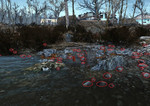
Пример обломков кирпичей: 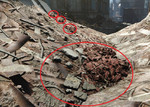
Пример подводных растений: 
Разбираем всё / Scrap Everything
Данный мод исправляет вопиющую оплошность, допущенную Бетесдой, когда они решили сделать утилизируемой лишь малую часть объектов. С модом «Разбираем всё» за вами, Пользователь, остаётся последнее слово в том, что разобрать, а что оставить. Хотите разобрать ваше поселение до основания, оставив лишь пустую землю, чтобы быть ближе к дикой природе? Сделано. Хотите разобрать такие вещи, как мусор, ветки, кусты и даже мёртвых животных, людей и машины, но оставить здания и деревья? Сделано. Этот мод позволяет разобрать буквально всё в каждом из ваших поселений, если вы того пожелаете. Авторы мода продолжают работают над расширением, чтобы в конце концов можно было разбирать почти всё во всей игре (за несколькими исключениями, такими как загрузочные двери).
От локализаторов:
Просьба, так как в моде в общей сложности свыше 15.000 строк с названиями предметов в игре, пришлось нелегко в плане локализации, поэтому могут быть какие то недочёты или несоответствия в переводе, в случае чего, пишите в коментариях к моду или в личку, будем учитывать недочеты и править перевод. Всем заранее спасибо!
Спасибо MORAKS, положившему начало этому переводу.
Разрешение от авторов мода:
Пользователи могут изменять, добавлять, удалять и т. д. все что они хотят в моде, с условием что все будет сделано для личного использования. Если вы хотите загрузить модифицированную версию или перевод, вы должны сначала получить мое разрешение! Этот мод не может быть размещен на любом другом сайте без моего разрешения, за исключением специализированных сайтов.
Разбираем всё / Scrap Everything
Данный мод исправляет вопиющую оплошность, допущенную Бетесдой, когда они решили сделать утилизируемой лишь малую часть объектов. С модом «Разбираем всё» за вами, Пользователь, остаётся последнее слово в том, что разобрать, а что оставить. Хотите разобрать ваше поселение до основания, оставив лишь пустую землю, чтобы быть ближе к дикой природе? Сделано. Хотите разобрать такие вещи, как мусор, ветки, кусты и даже мёртвых животных, людей и машины, но оставить здания и деревья? Сделано. Этот мод позволяет разобрать буквально всё в каждом из ваших поселений, если вы того пожелаете. Авторы мода продолжают работают над расширением, чтобы в конце концов можно было разбирать почти всё во всей игре (за несколькими исключениями, такими как загрузочные двери).
От локализаторов:
Просьба, так как в моде в общей сложности свыше 15.000 строк с названиями предметов в игре, пришлось нелегко в плане локализации, поэтому могут быть какие то недочёты или несоответствия в переводе, в случае чего, пишите в коментариях к моду или в личку, будем учитывать недочеты и править перевод. Всем заранее спасибо!
Спасибо MORAKS, положившему начало этому переводу.
Разрешение от авторов мода:
Пользователи могут изменять, добавлять, удалять и т. д. все что они хотят в моде, с условием что все будет сделано для личного использования. Если вы хотите загрузить модифицированную версию или перевод, вы должны сначала получить мое разрешение! Этот мод не может быть размещен на любом другом сайте без моего разрешения, за исключением специализированных сайтов.
Please log in or register
To enjoy the benefits of Nexus Mods, please log in or register a new account
Cleaner Lived-In Settlements
File information
Last updated
Original upload
Created by
Uploaded by
Virus scan
Tags for this mod
About this mod
Cleaner Lived-In Settlements is a lore-friendly settlement mod that removes most of the unwanted trash from all surfaces. It also makes many lore-friendly and opinionated trash objects scrappable in workshop mode, plus has a few more features to make them even more «lived-in».
DLC requirements
Mods requiring this file
| Mod name | Notes |
|---|---|
| Red Sanctuary Vault Wall (formerly Sanctuary Rocket Wall) | optional but recommended |
| Ultimate starlight | very useful for removing objects and interference |
Credits and distribution permission
Author notes
This author has not provided any additional notes regarding file permissions
File credits
— Nexus Mods: Hosting mod
— Bethesda: Literally everything
— Ghozt03: Creating the mod
Donation Points system
This mod is opted-in to receive Donation Points
Version 2.5.5
(view the infosheets through the articles page link for a full list of supported elements)
Version 2.5.4
(view the infosheets through the articles page link for a full list of supported elements)
Version 2.5.3
(view the infosheets through the articles page link for a full list of supported elements)
Version 2.5.2
(view the infosheets through the articles page link for a full list of supported elements)
Version 2.5.1
(view the infosheets through the articles page link for a full list of supported elements)
Version 2.5
(view the infosheets through the articles page link for a full list of supported elements)
Version 2.4
(view the infosheets through the articles page link for a full list of supported elements)
Version 2.3
(view the infosheets through the articles page link for a full list of supported elements)
Version 2.2.2
(view the infosheets through the articles page link for a full list of supported elements)
Version 2.2.1
(view the infosheets through the articles page link for a full list of supported elements)
Version 2.2
(view the infosheets through the articles page link for a full list of supported elements)
Version 2.1.0
(view the infosheets through the articles page link for a full list of supported elements)
Version 2.0.2
(view the infosheets through the articles page link for a full list of supported elements)
Version 2.0.1
(view the infosheets through the articles page link for a full list of supported elements)
Version 2.0
(view the infosheets through the articles page link for a full list of supported elements)
Version 1.9
(view the infosheets through the articles page link for a full list of supported elements)
Version 1.8
(view the infosheets through the articles page link for a full list of supported elements)
Version 1.7
(view the infosheets through the articles page link for a full list of supported elements)
Version 1.6
(view the infosheets through the articles page link for a full list of supported elements)
Version 1.5
(view the infosheets through the articles page link for a full list of supported elements)
Version 1.4
(view the infosheets through the articles page link for a full list of supported elements)
Version 1.3
(view the infosheets through the articles page link for a full list of supported elements)
Version 1.2
(view the infosheets through the articles page link for a full list of supported elements)
Version 1.1
(view the infosheets through the articles page link for a full list of supported elements)
Version 1.0
(view the infosheets through the articles page link for a full list of supported elements)
Premium membership donations accepted

* Link to info-sheets

Cleaner Lived-In Settlements is a lore-friendly settlement mod that removes most of the unwanted debris, trash, papers, stains, and ugly plants from all surfaces. It makes many lore-friendly and opinionated trash objects scrappable in workshop mode, adds trash collections to scrap multiple pieces at once, cleans debris off shelves and tables, and cleans surfaces of rust and stains. All of this is done while optimizing precombines so that game performance is not sacrificed!
*Only objects inside the settlements’ borders are affected, not the entire cells. Objects outside the settlements’ borders are already added to the scrap-list, so mods that increase the settlements’ borders will allow you to reach and scrap these objects in workshop mode.
This is intended to give a more «lived-in» atmosphere, only cleaning up useless trash-like objects from the settlements. As you would most likely do if you planned on living there for quite some time. People normally want their residence to look nice, if not decent.

Keywords are used to locate objects inside the settlement’s cells, then trash-like objects are removed from inside the settlement’s borders. Immersion trash-like objects are left alone and added to the scrap list to be scrapped from the workshop mode in-game. Large piles of debris are grouped together, allowing for easier and less arduous scrapping. Debris-filled shelves and tables are swapped out for debris-less versions. Rust, moss, dirt, stain, blood, and indoor water decals are removed from structures and objects.
*Precombines are optimized. Most are still intact, but some are altered to remove debris objects while maintaining performance. For precombines that are altered, new precombine data is generated.

Currently, all 30 base game settlements, along with 6 DLC settlements (excluding Mechanist’s Lair) are supported. As well as 1409 newly scrappable objects.*
*To view a full list of supported settlements and newly scrappable objects, click here.

It’s compatible with other settlement-altering mods, just load this mod after them.
It’s sorta compatible with other scrapping mods.* Scrapping mods that alter the same objects will cause a soft-conflict due to the objects most-likely having a different component list. The game will use the scrapping mod’s component list that is last in your load order.
*This will not cause any game-crashing or performance issues, only the components you receive upon scrapping the objects.
*If you have any questions, feel free to ask on the «posts» page or email me at [email protected]

If you have a request for this mod or another, feel free to message me.
To give the best sense of immersion, install this mod after you’ve discovered all or most of the settlements.
This will give you an immersive role-playing feeling that you and your settlers cleaned up the place, rather than first discovering it that way.
Please log in or register
To enjoy the benefits of Nexus Mods, please log in or register a new account
Spring Cleaning
File information
Last updated
Original upload
Created by
Uploaded by
Virus scan
Tags for this mod
About this mod
Clean up your settlements with or without the hassle of cell resets.
This mod does not have any known dependencies other than the base game.
Mods requiring this file
Author’s instructions
File credits
This author has not credited anyone else in this file
Donation Points system
This mod is not opted-in to receive Donation Points
Version 2.05
Additions:
-Bunker Hill finally added (I recommend not removing the Junk Walls, they will cause LOD/Culling Issues.)
Scrap List:
-Added Metal Burning Barrels to optional Lantern List.
-Added missing lit oil lantern to optional Lantern List
-Added Rope Lights
-Added Scaffolding
-Added Wrought Iron Fence
-Added Rubber Floor Mats
-Added lots of Junk Walls (Parts of Bunker Hill, recommend not scrapping)
Version 2.04
Version 2.03
Version 2.02
Version 2.01
Version 1.07
Version 1.06
Version 1.05
Version 1.04
Version 1.03
Version 1.02
Version 1.01
Version 1.0
Update 2.05
Tested and working with Latest Fallout 4 Beta Patch.
Bug Fixes:
-Removed Master Dependency on optional scrap list plugins.
Additions:
-Bunker Hill finally added (I recommend not removing the Junk Walls, they will cause LOD/Culling Issues.)
Scrap List:
-Added Metal Burning Barrels to optional Lantern List.
-Added missing lit oil lantern to optional Lantern List
-Added Rope Lights
-Added Scaffolding
-Added Wrought Iron Fence
-Added Rubber Floor Mats
-Added lots of Junk Walls (Parts of Bunker Hill, recommend not scrapping)
Install Spring Cleaning and Activate the plugin(s)
**Does not work if upgrading from past INI versions**
1) Uninstall Spring Cleaning
2) Start Fallout 4, Load a save game
3) Move to interior cell
4) Save the game, exit the game
5) Install Spring Cleaning and Activate the plugin(s)
6) Load save from step 4
1) Sprinting will not work in settlement cells unless you use the fix that comes with the mod.
2) Some pre-existing buildings have issues placing furniture, I recommend downloading the Homemaker mod as it fixes the majority of these issues.
3) The objects removed from settlements while using version 2.01 or lower will return the first time Spring Cleaning 2.02 or above is installed. This is the last time statics should pop back into existence between updates.
**Incompatible Mods**
Any mod altering Settlement World Space will cause Spring Cleaning to act adversely and undo the fixes in place for the Cell Reset Bug.
**Credit**
-Bethesda (For the game of course)
-Zilav from the xEdit team (for all his help with combined object records)
-xEdit Team (For FO4Edit)
-Scrap Scrap (For the original inspiration, that lead me to making this.)