
Fallout 4 «The Eyes Of Beauty Fallout Edition / Красивые глаза»

Автор: LogRaam
Версия: 1.0
Особенности:
— Новые текстуры для глаз, в основном гетерохромия;
— Эта модификация ЗАМЕНЯЕТ некоторые ванильные текстуры глаз;
— Модификация лорная. Более выразительные глаза для мужчин и женщин.
— Новые текстуры будут добавлены в будущих релизах. не пропустите!
[Archive]
sResourceDataDirsFinal=STRINGS\, TEXTURES\




хорошие текстурки но ты мог бы увеличить размер текстур и побольше глянца с резкостью я ссам бы сделал но не догоняю как добавить текстуры в синима или 3д макс

прикольно, забираю но все-таки поработать есче есть над чем

Нужен (.esp) файл. = =8.01.19—Неужели нету?

а True Eyes нету в закромах? на Ютубе увидел, а на Нэксусе его удалили. Он чуточку поярче этих.
Please log in or register
To enjoy the benefits of Nexus Mods, please log in or register a new account
The Eyes Of Beauty Fallout Edition
File information
Last updated
Original upload
Created by
Uploaded by
Virus scan
Tags for this mod
Documentation
Readme
The Eyes of Beauty (TEOB) for Fallout
KALEIDOSCOPE EDITION README
CONTENTS
Description
Installation
Required INI Edits (thanks Gopher)
Mod Manager
Manual Installation
Recommended Mods
Changing Eyes
Uninstallation
Compatibility
Troubleshooting
Eyes Disappear After Uninstalling
Missing Eyes
Overlapping Textures
Mods That Require TEOB
LongEyeLashes Look Strange
Eyes Too Bright
Eye Not Highlighted in Looks Menu
Can’t Change Combo Eyes (Looking Stranger Issue)
Left Eye Doesn’t Animate (Looking Stranger Issue)
What’s in this file?
TEOB Fallout
TEOB Skyrim
Other Changes
Feedback
Credits
Required INI Edits (thanks Gopher)
4. Add the following line in Fallout4Custom.ini:
[Archive]
bInvalidateOlderFiles=1
sResourceDataDirsFinal=
5. (Optional) Set Fallout4Prefs.ini and Fallout4Custom.ini files to Read Only.
(HIGHLY RECOMMENDED) Because of the number of options in this package, it is highly recommended that you use the FOMOD installer included. The FOMOD installer requires a mod manager. This package was tested with Nexus Mod Manager, Mod Organizer 2, and the Vortex Alpha. If you have issues with the FOMOD installer, please post them on the TEOB Bugs Report page.
Not recommended. DO AT YOUR OWN RISK! The FOMOD Options document included in the README-The Eyes Of Beauty folder describes what happens with each FOMOD option. You can replicate your installation this way. You can simply copy/paste the contents of the file to the Fallout 4\Data directory ONLY if all these criteria apply:
* You are starting a new game or are updating from the Standalone Edition AND
* You want the Looking Stranger standalone plugin AND
* You do NOT want custom lashes AND
* You do NOT use another mod that changes eye parts AND
* You do NOT want to replace any vanilla eyes.
Otherwise, you will have to manually select/edit the installation.
Please install the Eye Normal Map Fix by Mr. Dave.
To change your character’s eyes in game, use the character creation menu; surgery chair; or open the Looks Menu in console by typing (without quotes) *
*, enter, *tfc* to put camera in front of character, and *ShowLooksMenu Player 1.*
It is essential that, before you uninstall, you open the Looks Menu and change your eyes to one of the vanilla eyes (at the top of the list), save your game, exit, and then uninstall. Again, this is essential! Otherwise you will have the Troubleshooting>Missing Eyes issue.
This should be compatible other eye texture mods and backward compatible with previous versions of TEOB. See Troubleshooting>Mods That Require TEOB for more information.
This is a list of the common problems folks have reported and possible fixes.
Eyes Disappear After Uninstalling
Issue
Eyes disappear completely when I uninstall or disable the plugin(s).
Explanation
The game is looking for head parts that no longer exist.
Fix Before uninstalling the plugins, you MUST change your eyes to one of the vanilla eye choices in the Looks Menu. To pull up the Looks Menu use a surgery chair or use console command ShowLooksMenu Player 1. Save your game. Then exit. Then uninstall. See Missing Eyes for other fixes.
Issue
GAH. My character’s eyes look like empty pits from hell and I can’t change them in the Looks Menu!
Explanation
This is what happens if you uninstall an eye mod without changing your eyes to vanilla first! It is because the game cannot find a texture from a previous mod.
Fix #1
Try swapping in and out of the third person view a couple times. Sometimes this resets the eyes.
Fix #2
Using expired6978’s excellent LooksMenu mod (https://www.nexusmods.com/ fallout4/mods/12631):
1. Pull up Looks Menu (surgery chair or console cmd ShowLooksMenu Player 1).
2. Under Face, scroll down to and select Eyes (listed under Neck).
3. Type C to change color > select eye color.
Fix #3
If you had a version of the Eyes of Beauty before, make sure you selected the right version you had earlier in this installer. The Standalone plugins are called *The Eyes Of Beauty.esp* (with spaces) and the All-In-One Experimental Plugin is *TheEyesOfBeauty.esp* (without spaces). Select the *All-In-One Compatibility Plugin* option to install it.
Fix #4
Reinstall the plugin you had before, change your eyes to vanilla eyes, and then uninstall it. Change the eye color through the Looks Menu (surgery chair or console cmd ShowLooksMenu Player 1).
Issue
My character has two pupils, weird looking eyes, or upside-down eyelashes.
Explanation
This is an issue from the vanilla game and appears to occur when you open the Looks Menu through console command for a female character. It also happens with the Looking Stranger meshes on female characters.
Fix
1. Pull up Looks Menu (surgery chair or console cmd ShowLooksMenu Player 1).
2. Resize eyes (type F to pull up face>select Eyes>type S>type up arrow once and down arrow once).
3. Type E to accept (IMPORTANT!).
4. Save change and exit Looks Menu.
Mods That Require TEOB
Issue
Another mod requires TEOB, but I do not know which plugin I should use.
Explanation
Fix If you are unsure, select both the Standalone Plugin and All-In-One Compatibility Plugin options in the FOMOD. This will install two plugins – one that is backward compatible with the Standalone Edition (the plugin is called *The Eyes Of Beauty.esp* (with spaces), and one that is compatible with the All-In-One Experimental plugin (named *TheEyesOfBeauty.esp* (without spaces)). You can try the game with *TheEyesOfBeauty.esp* (without spaces) unchecked first and if you receive an error about missing master, re-select it.
If the Main Plugin and compatibility plugin do not work, use the mod version recommended by the author (still in Old Files on the TEOB page). Please submit a Bug report if you find these compatibility issues. Note: you can run old plugins with the plugins in this package at the same time. The only strange thing will be that your eye list will have the same colors more than once.
LongEyeLashes Look Strange
Issue
HN66s and XAZOMNs Long EyeLashes for FO4 do not look right (https://www.nexusmods.com/fallout4/mods/21978).
Explanation
That mod changes meshes so female eyelashes do not line up the same way.
Fix
Use the No Lash or No Female Lash version of the plugin.
Eyes Too Bright
Issue
Eyes look too bright.
Explanation
You are probably using an ENB or saturation/brightness enhancement mod.
Fix
In a future update, LogRaam plans to publish a low saturated texture kit for ENBs. For now, you’ll have to live with the brightness or shut off either TEOB or ENB.
Eye Not Highlighted in Looks Menu
Issue
After you update from an old version of TEOB, your character’s eyes appear as they did with the old plugin. However, when you pull up the Looks Menu, you will notice that your current eyes are not highlighted in the list to the right.
Explanation
This will happen when you upgrade from versions of TEOB prior to 3.0 and load a save. This is because, although your eyes still exist in the file, they are now hidden in the Looks Menu so that eyes can now be displayed in the order by color.
Fix
Find and select your eyes again. They are still in the current plugin but may have a more specific name and will be among similar colors. To make it easier, use the Eye Chart included in README-The Eyes Of Beauty folder.
Can’t Change Combo Eyes (Looking Stranger 0.3.1 Mesh Issue)
Issue
Unable to select the eyes with the mouse after using the new eye options.
Explanation
This has to do with the custom meshes in Looking Stranger version 0.3.1.
Fix
You can select the eyes with LooksMenu (https://www.nexusmods.com/fallout4/mods/12631):
1. Pull up Looks Menu (surgery chair or console cmd ShowLooksMenu Player 1).
2. Under Face, scroll down to and select Eyes (listed under Neck).
3. Type C to change color > select eye color.
Left Eye Doesn’t Animate (Looking Stranger – 0.3.1 Mesh Issue)
Issue
Left eye doesn’t animate.
Explanation
Unfortunately, this is a limitation with the Looking Stranger 0.3.1 meshes.
Fix
You can check out the newest version of Looking Stranger, which has several packages of non-TEOB eye textures – including the last remnants of the great jimtownirish’s True Eyes mod.
WHAT’S IN THIS FILE?
EVERYTHING TO DATE (TEOB Fallout versions 2.4 or older and TEOB Skyrim v10.0.1 and older) plus some extras. Specifically:
TEOB Fallout
The Main Plugin is backwards compatible with ALL plugins to date on TEOB Fallout:
* Eyes Of Beauty Standalone Edition FIXED CUSTOM LASHES v2.4
* The Eyes Of Beauty Standalone Edition NO CUSTOM LASHES v2.3 (including three versions in the Old Files section)
* TEOB All-In-One v2.3 and v2.3FIXED
FOMOD installer gives you the option to install The Eyes Of Beauty Author’s pick 1 v2.0.
FOMOD installer replaces the vanilla texture replacers from:
* TEOB All-In-One v2.3 and v2.3FIXED
* TEOB Textures Replacer Installer v2.0 and 2.2
TEOB Skyrim
Plugin and FOMOD includes all eye textures from TEOB Skyrim page:
* The Eyes Of Beauty PLAYER v9
* TEOB Special Elves Edition v10.0.1
* Eyes from Skin Texture v1.2
* Eyes from Dawnguard Update v7.1
* Helena eyes texture
* Solaira eyes texture
In addition, this version includes a fix for the corners of the eyes (lacrimal caruncles).
Thank you for using The Eyes of Beauty! Please give us your feedback on the Nexus page (https://www.nexusmods.com/fallout4/mods/133).
* Endorse this if you like it!
* Please report other issues on the Bugs page.
* We LOVE your picks, upload them to Images.
* Post your thoughts to the Posts page.
CREDITS
Author: LogRaam aka Gabriel Mailhot
Contributing artists: Sarinia and Fadingsignal
Contributing modders: HinaNekoL, Shadowvalor, & madduma
And the many folks who submitted pics of their eyes!
Please log in or register
To enjoy the benefits of Nexus Mods, please log in or register a new account
The Eyes Of Beauty Fallout Edition
File information
Last updated
Original upload
Created by
Uploaded by
Virus scan
Tags for this mod
About this mod
Change eyes textures for new high resolution ones. Will work for both gender. New textures will be added so keep in touch!
This mod does not have any known dependencies other than the base game.
Mods requiring this file
Credits and distribution permission
Author notes
You can use, implement as standalone or modify texture for your mods.
BUT, please credit LogRaam or Gabriel Mailhot as the original creator.
Thank You for respecting that.
File credits
This author has not credited anyone else in this file
Donation Points system
This mod is opted-in to receive Donation Points
Translations available on the Nexus
| Language | Name |
|---|---|
| English Author: Rammlog | Eyes of the Underworld |
Version 3.2
Version 3.1
Version 3.0
Both straight donations and premium membership donations accepted

Contributing artist: Sarinia
Contributing modders: HinaNekoL, Shadowvalor & madduma
XBox One Version here: https://bethesda.net/en/mods/FALLOUT4/mod-detail/4047562
See the Docs tab for installation instructions and troubleshooting tips.
Beauty is in the eye of the beholder with this character mod from Lograam. Installing The Eyes of Beauty will give your avatar new, realistic eye textures that greatly improve on the vanilla eyeballs that come free with the game. As you can see in this video, you can swap between quite a few different eye textures and you’ll be able to do this with either male or female characters.
The mod feature textures from eye pictures where some are from medical picture repositories, others are digital paintings and some are from real players that took pictures of their eyes and sent them to me. The textures are 512×512 in resolution, meaning that it’s twice the resolution of Fallout 4 Vanilla’s.
Contributing artist:
———————-
For the first time I welcome an artist into the making of this mod. Her name is Sarinia. She will be contributing by creating new high quality content for this mod.
A request to the community:
———————-
There is a lovely green eye texture included in the mod named Helena, which was created from an actual photo that Helena submitted. If any other members of the community would be interested in submitting a high quality close-up photo of their own eye, we would love to add them to the reference repository. Provided that the iris color is not nearly identical to one of the existing textures, we will create a new texture from it and credit the submitter. While the final textures are 512 x 512, the higher the resolution on the submitted photo, the better. Also, please be sure to have the eye open as much as possible to capture the details of the iris color and pattern. Unfortunately, a photo with an almost closed eye won’t provide enough details to make it usable.
Detailed instructions on how to submit your photo will be added soon. Thank you in advance and we look forward to seeing the beautiful eyes of the community.
But wait! Why 512×512? Why can’t you create 4K textures?
———————————————————————
In fact, we can. But we won’t.
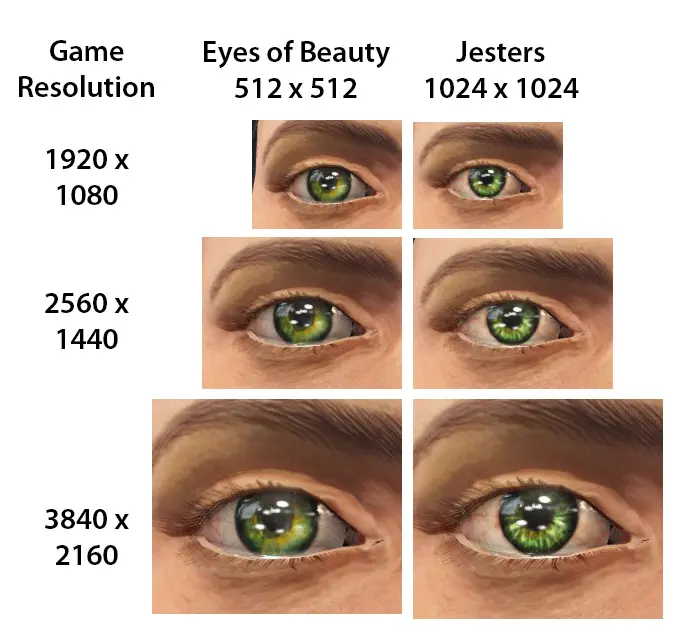
Sarinia has been giving some thought to my observations about the game down-sizing the resolution of the eye textures and whether it actually makes any difference when played at various resolutions of the games, so before diving too far into creating a higher res texture, she spent some time testing it.
She ran the game with The Eyes Of Beauty’s green eye texture at 3 resolutions: 1920 x 1080, 2560 x 1440, and (full 4K) 3840 x 2160.
She took screen shots of the eyes in the character creator at each resolution and then swapped out the eye texture for one of Jesters which has a base texture resolution of 1024 x 1024 to see if it made a difference at any of the resolutions.
Here’s her thoughts about it:
«[. ] You are welcome to use all or part of this sample test as an image on your nexus page to answer those people who ask about resolutions or are not using your mod because they think the 512 base resolution makes a difference. To be honest, after looking over this, I agree with you that it really doesn’t seem to make much difference if the texture is 512 vs. 1024. [. ]»
And here’s the test sample:
Feature:
———-
— New eyes texture, mostly heterochromia;
— This mod will REPLACE some Vanilla eyes for new eyes textures;
— Lore friendly. Brighter unique eyes for men and women;
— New textures will be added in future release. Keep in touch!
KNOWN ISSUE:
—————-
See the Docs tab for more troubleshooting tips.
Issue: sometime the eye texture will overlap the model like if its pasted on top of Vanilla’s. Unfortunately it’s a bug from Fallout.
Solution: just alter the shape of your eyes and it will push back the texture to the right place.
Issue: eyes are too bright!
Solution: probably you are using ENB or saturation/brightness enhancement mod. In a future update, I plan to publish a low saturated texture kit for ENBs. For now, you’ll have to live with or shut either TEOB or ENB.
Eye Normal Map Fix, please install THIS MOD
Notes:
For anyone not familiar with viewing replacement eye textures outside of the game, please note that the images will appear much darker in the selection screen than they appear in game. When they are seen in game, the lighting greatly affects the way you will see them. For examples of how eyes textures look in-game, please see some of the sample images on this mod page.
Please log in or register
To enjoy the benefits of Nexus Mods, please log in or register a new account
The Eyes Of Beauty Fallout Edition
File information
Last updated
Original upload
Created by
Uploaded by
Virus scan
Tags for this mod
About this mod
Change eyes textures for new high resolution ones. Will work for both gender. New textures will be added so keep in touch!
This mod does not have any known dependencies other than the base game.
Mods requiring this file
Credits and distribution permission
Author notes
You can use, implement as standalone or modify texture for your mods.
BUT, please credit LogRaam or Gabriel Mailhot as the original creator.
Thank You for respecting that.
File credits
This author has not credited anyone else in this file
Donation Points system
This mod is opted-in to receive Donation Points
Translations available on the Nexus
| Language | Name |
|---|---|
| English Author: Rammlog | Eyes of the Underworld |
Version 3.2
Version 3.1
Version 3.0
Both straight donations and premium membership donations accepted
Contributing artist: Sarinia
Contributing modders: HinaNekoL, Shadowvalor & madduma
XBox One Version here: https://bethesda.net/en/mods/FALLOUT4/mod-detail/4047562
See the Docs tab for installation instructions and troubleshooting tips.
Beauty is in the eye of the beholder with this character mod from Lograam. Installing The Eyes of Beauty will give your avatar new, realistic eye textures that greatly improve on the vanilla eyeballs that come free with the game. As you can see in this video, you can swap between quite a few different eye textures and you’ll be able to do this with either male or female characters.
The mod feature textures from eye pictures where some are from medical picture repositories, others are digital paintings and some are from real players that took pictures of their eyes and sent them to me. The textures are 512×512 in resolution, meaning that it’s twice the resolution of Fallout 4 Vanilla’s.
Contributing artist:
———————-
For the first time I welcome an artist into the making of this mod. Her name is Sarinia. She will be contributing by creating new high quality content for this mod.
A request to the community:
———————-
There is a lovely green eye texture included in the mod named Helena, which was created from an actual photo that Helena submitted. If any other members of the community would be interested in submitting a high quality close-up photo of their own eye, we would love to add them to the reference repository. Provided that the iris color is not nearly identical to one of the existing textures, we will create a new texture from it and credit the submitter. While the final textures are 512 x 512, the higher the resolution on the submitted photo, the better. Also, please be sure to have the eye open as much as possible to capture the details of the iris color and pattern. Unfortunately, a photo with an almost closed eye won’t provide enough details to make it usable.
Detailed instructions on how to submit your photo will be added soon. Thank you in advance and we look forward to seeing the beautiful eyes of the community.
But wait! Why 512×512? Why can’t you create 4K textures?
———————————————————————
In fact, we can. But we won’t.
Sarinia has been giving some thought to my observations about the game down-sizing the resolution of the eye textures and whether it actually makes any difference when played at various resolutions of the games, so before diving too far into creating a higher res texture, she spent some time testing it.
She ran the game with The Eyes Of Beauty’s green eye texture at 3 resolutions: 1920 x 1080, 2560 x 1440, and (full 4K) 3840 x 2160.
She took screen shots of the eyes in the character creator at each resolution and then swapped out the eye texture for one of Jesters which has a base texture resolution of 1024 x 1024 to see if it made a difference at any of the resolutions.
Here’s her thoughts about it:
«[. ] You are welcome to use all or part of this sample test as an image on your nexus page to answer those people who ask about resolutions or are not using your mod because they think the 512 base resolution makes a difference. To be honest, after looking over this, I agree with you that it really doesn’t seem to make much difference if the texture is 512 vs. 1024. [. ]»
And here’s the test sample:
Feature:
———-
— New eyes texture, mostly heterochromia;
— This mod will REPLACE some Vanilla eyes for new eyes textures;
— Lore friendly. Brighter unique eyes for men and women;
— New textures will be added in future release. Keep in touch!
KNOWN ISSUE:
—————-
See the Docs tab for more troubleshooting tips.
Issue: sometime the eye texture will overlap the model like if its pasted on top of Vanilla’s. Unfortunately it’s a bug from Fallout.
Solution: just alter the shape of your eyes and it will push back the texture to the right place.
Issue: eyes are too bright!
Solution: probably you are using ENB or saturation/brightness enhancement mod. In a future update, I plan to publish a low saturated texture kit for ENBs. For now, you’ll have to live with or shut either TEOB or ENB.
Eye Normal Map Fix, please install THIS MOD
Notes:
For anyone not familiar with viewing replacement eye textures outside of the game, please note that the images will appear much darker in the selection screen than they appear in game. When they are seen in game, the lighting greatly affects the way you will see them. For examples of how eyes textures look in-game, please see some of the sample images on this mod page.