
[Гайд] Команда /gamerule, все её подкоманды
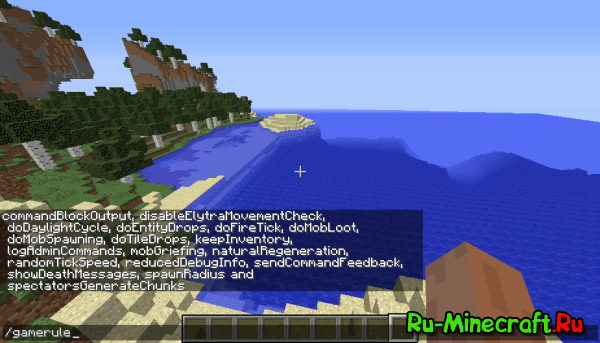
Текст в ‘ ‘ нужно писать обязательно. Вместо него нужно поместить игровое правило без скобок, список игровых правил описан ниже.
‘[true|false]‘, вместо него нужно поместить true или false. true — это правда, false — ложь. Писать так же нужно без скобок.
На момент релиза 1.9.4 существует 18 игровых правил.
commandBlockOutput — Предупреждать ли админов о выполнении команд в командном блоке (по умолчанию true)
disableElytraMovementCheck — Должен ли сервер пропускать проверку скорости игроков с надетыми надкрыльями (не рекомендуется изменять) (работает только на серверах) (по умолчанию false)
doDaylightCycle — Должен ли цикл дня/ночи изменять свой процесс (время также не изменяется во время сна в кровати) (по умолчанию true)
doEntityDrops — Должны ли существа, не являющиеся мобами дропать предметы (такие как падающий песок) (по умолчанию true)
doFireTick — Должен ли огонь тушится ветром или переходить на другие горючие блоки (по умолчанию true)
doMobLoot — Должны ли мобы дропать предметы (по умолчанию true)
dpMobSpawning — Должны ли мобы естественно спаунится (по умолчанию true)
doTileDrops — Дроп предметов после разрушения блоков (по умолчанию true)
keepInventory — Должен ли инвентарь сохранятся после смерти игрока (по умолчанию false)
logAdminCommands — Запись команд администратора в лог сервера (работает только в мультиплеере) (по умолчанию true)
mobGriefing — Должны ли криперы, зомби, эндермены, гасты, иссушители, эндер драконы, овцы, кролики и деревенские жители иметь право изменять блоки и должны ли деревенские жители, зомби, скелеты и зомби-свинолюди поднимать выпавшие предметы (по умолчанию true)
naturalRegeneration — Должен ли игрок естественно регенерировать своё здоровье, если его сытость почти полна (нет эффекта на дополнительную регенерацию, такие как золотые яблоки, эффект регенерации и т. п.) (по умолчанию true)
randomTickSpeed — Как часто должен происходить случайный игровой тик (такие как рост растений, опадение листвы и т. п.) на каждый игровой чанк каждый игровой тик. Значение 0 отключает случайные тики, большие значения увеличивают время между случайными тиками (по умолчанию 3)
reducedDebugInfo — неизвестно, но лучше не включать (по умолчанию false)
sendCommandFeedback — Выводить ли в чат информацию при успешном выполнении команды в чате (по умолчанию true)
showDeathMessages — Должно ли после смерти появляться соответствующее сообщение (по умолчанию true
spectatorsGenerateChunks — Должны ли игроки в режиме наблюдения (/gamemode 3) генерировать новые чанки (по умолчанию true)
Если введено только правило, в чате отобразится его установленное на данный момент значение.
Command tutorial: /gamerule
Hi! Welcome to mu new blog of this serie called command tutorial. In this blog I will explain the command /gamerule.
For what´s serving: With this command you can change a rule of a world like if a mob can edit the terrain by exploding or throwing fire charges.
How it works: Put this command where you chat or in a command block: /gamerule [rulename]
Where you can use it: You can use this command in singleplayer if cheats are enabled or in multiplayer if you are op.
Here is a list of all the available rules. (Respect the capital letters):
1) commandBlockOutput: true: notify the the person who puts the command the command output. False: not notify the person who put the command the command output.
2) doFireTick: true: the fire spread (default). False: the fire doesn´t spread.
3) doMobLoot: true: the mobs drop items (default). False: The mobs doesn´t drop items.
4) doMobSpawning: true: the mobs spawn naturally (default). False: the mobs doesn´t spawn naturally.
5) doTileDrops: true: the blocks have drops while breaking them (default). False: the blocks doesn´t have drops while breaking them.
6) keepInventory: true: the player keep their objects they have in their inventory when they die. False: the players doesn´t keep their objects they have in they inventory when they die (default).
7) mobGriefing: true: the mobs can edit the terrain by exploding, throwing fire charges, etc. (default). False: the mobs can´t edit the terrain by exploding, throwing fire charges, etc.
8) naturalRegeneration: true: the players can regenerate the health naturally if their hunger is at the top (default). False: the players can´t regenerate health naturally if their hunger is at the top.
9) doDaylightCycle: true: the day/night cycle goes normally (default). False: the day/night cycle stps at the moment the command is active.
How to Use the Gamerule Command in Minecraft
This Minecraft tutorial explains how to use the /gamerule command with screenshots and step-by-step instructions.
You can either set or check the value of a game rule using the /gamerule command in Minecraft. Let’s explore how to use this cheat (game command).
Supported Platforms
The /gamerule command is available in the following versions of Minecraft:
| Platform | Supported (Version*) |
|---|---|
 Java Edition (PC/Mac) Java Edition (PC/Mac) | Yes (1.4.2) |
 Pocket Edition (PE) Pocket Edition (PE) | Yes (1.0.5) |
 Xbox 360 Xbox 360 | No |
 Xbox One Xbox One | Yes (1.2) |
 PS3 PS3 | No |
 PS4 PS4 | Yes (1.14.0) |
 Wii U Wii U | No |
 Nintendo Switch Nintendo Switch | Yes (1.5.0) |
 Windows 10 Edition Windows 10 Edition | Yes (1.0.5) |
 Education Edition Education Edition | Yes |
* The version that it was added or removed, if applicable.
NOTE: Pocket Edition (PE), Xbox One, PS4, Nintendo Switch, and Windows 10 Edition are now called Bedrock Edition. We will continue to show them individually for version history.
Requirements
To run game commands in Minecraft, you have to turn cheats on in your world.
Gamerule Command
Gamerule Command in Minecraft Java Edition (PC/Mac)
In Minecraft Java Edition (PC/Mac), the gamerule command has different syntaxes depending on whether you want to set or check the gamerule.
To set the value of a gamerule:
To check the value of a gamerule:
Definitions
value is the value to assign to a rule name. See possible values below.
| Rule | Description | Possible Values | Default Value |
|---|---|---|---|
| announceAdvancements | Whether advancements are announced | true or false | true |
| commandBlockOutput | Whether command blocks notify admins when commands are executed | true or false | true |
| disableElytraMovementCheck | Disables the check in a server whether a player is moving too fast | true or false | false |
| disableRaids | Disables Raids (added in 1.14.3) | true or false | false |
| doDaylightCycle | Whether time advances in the day/night cycle. If set to false, time will stop at the current moment. | true or false | true |
| doEntityDrops | Whether entities should have drops | true or false | true |
| doFireTick | Whether fire should naturally spread and then extinguish | true or false | true |
| doImmediateRespawn | Whether player immediately respawns without seeing the respawn menu (the respawn menu displays the message that you died with the options to respawn or go to the main menu) (added in 1.15) | true or false | false |
| doInsomnia | Whether phantoms will spawn at night if a player hasn’t slept (added in 1.15) | true or false | true |
| doLimitedCrafting | Limit crafting to recipes that are unlocked | true or false | false |
| doMobLoot | Whether mobs should have drops | true or false | true |
| doMobSpawning | Whether mobs should spawn naturally | true or false | true |
| doPatrolSpawning | Whether patrols should spawn (added in 1.15.2) | true or false | true |
| doTileDrops | Whether blocks should have drops | true or false | true |
| doTraderSpawning | Whether wandering traders should spawn (added in 1.15.2) | true or false | true |
| doWeatherCycle | Whether weather changes. If set to false, weather will stop at current cycle. | true or false | true |
| drowningDamage | Whether drowning causes damage (added in 1.15) | true or false | true |
| fallDamage | Whether falls cause damage (added in 1.15) | true or false | true |
| fireDamage | Whether fire causes damage (added in 1.15) | true or false | true |
| KeepInventory | Whether players keep their inventory after dying | true or false | false |
| logAdminCommands | Whether admin commands are added to the server log | true or false | true |
| maxCommandChainLength | Maximum length of command chain | 65536 | |
| maxEntityCramming | Maximum number of entities that can be crammed | 24 | |
| mobGriefing | Whether mobs can pick up items or change blocks | true or false | true |
| naturalRegeneration | Whether players can regenerate health naturally through their hunger bar | true or false | true |
| randomTickSpeed | Sets the speed of how fast things grow or decay (such as the growth of a sapling into a tree). 0 disables the random tick. The higher the value, the faster the random tick. | 3 | |
| reducedDebugInfo | Whether debug screen hides some information | true or false | false |
| sendCommandFeedback | Whether feedback from player commands appears in the chat | true or false | true |
| showDeathMessages | Whether a message appears in the chat when a player dies | true or false | true |
| spawnRadius | Controls how far from the world spawn point you can spawn | 10 | |
| spectatorsGenerateChunks | Whether spectators can generate chunks in the game | true or false | true |
Gamerule Command in Minecraft Pocket Edition (PE)
In Minecraft Pocket Edition (PE), the gamerule command has different syntaxes depending on whether you want to set, check or list the gamerule.
To set the value of a gamerule:
To check the value of a gamerule:
To list all gamerules:
Definitions
value is the value to assign to a rule name. See possible values below.
| Rule | Description | Possible Values | Default Value |
|---|---|---|---|
| commandblockoutput | Whether command blocks notify admins when commands are executed | true or false | true |
| commandblocksenabled | Whether command blocks are enabled in the world | true or false | true |
| dodaylightcycle | Whether time advances in the day/night cycle. If set to false, time will stop at the current moment. | true or false | true |
| doentitydrops | Whether entities should have drops | true or false | true |
| dofiretick | Whether fire should naturally spread and then extinguish | true or false | true |
| doimmediaterespawn | Whether player immediately respawns without seeing the respawn menu (the respawn menu displays the message that you died with the options to respawn or go to the main menu) | true or false | false |
| doinsomnia | Whether phantoms will spawn at night if a player hasn’t slept | true or false | true |
| domobloot | Whether mobs should have drops | true or false | true |
| domobspawning | Whether mobs should spawn naturally | true or false | true |
| dotiledrops | Whether blocks should have drops | true or false | true |
| doweathercycle | Whether weather changes. If set to false, weather will stop at current cycle. | true or false | true |
| drowningdamage | Whether drowning causes damage | true or false | true |
| falldamage | Whether falls cause damage | true or false | true |
| firedamage | Whether fire causes damage | true or false | true |
| functioncommandlimit | Maximum length for function commands | 10000 | |
| keepinventory | Whether players keep their inventory after dying | true or false | false |
| maxcommandchainlength | Maximum length of command chain | 65536 | |
| mobgriefing | Whether mobs can pick up items or change blocks | true or false | true |
| naturalregeneration | Whether players can regenerate health naturally through their hunger bar | true or false | true |
| pvp | Whether players can cause damage to other players | true or false | true |
| randomtickspeed | Random tick speed | 1 | |
| respawnblocksexplode | Whether Respawn Anchors and Beds explode (added in 1.17.30) | true or false | true |
| sendcommandfeedback | Whether feedback from player commands appears in the chat | true or false | true |
| showcoordinates | Whether coordinates should be displayed on the screen | true or false | false |
| showdeathmessages | Whether death messages are displayed in the Chat window | true or false | true |
| showtags | Whether tags (such as «Can place on» and «Can destroy» block lists) should be displayed in item lore | true or false | true |
| spawnradius | Controls how far from the world spawn point you can spawn | 5 | |
| tntexplodes | Whether TNT explodes | true or false | true |
Gamerule Command in Xbox One Edition
In Minecraft Xbox One Edition, the gamerule command has different syntaxes depending on whether you want to set, check or list the gamerule.
To set the value of a gamerule:
To check the value of a gamerule:
To list all gamerules:
Definitions
value is the value to assign to a rule name. See possible values below.
| Rule | Description | Possible Values | Default Value |
|---|---|---|---|
| commandblockoutput | Whether command blocks notify admins when commands are executed | true or false | true |
| commandblocksenabled | Whether command blocks are enabled in the world | true or false | true |
| dodaylightcycle | Whether time advances in the day/night cycle. If set to false, time will stop at the current moment. | true or false | true |
| doentitydrops | Whether entities should have drops | true or false | true |
| dofiretick | Whether fire should naturally spread and then extinguish | true or false | true |
| doimmediaterespawn | Whether player immediately respawns without seeing the respawn menu (the respawn menu displays the message that you died with the options to respawn or go to the main menu) | true or false | false |
| doinsomnia | Whether phantoms will spawn at night if a player hasn’t slept | true or false | true |
| domobloot | Whether mobs should have drops | true or false | true |
| domobspawning | Whether mobs should spawn naturally | true or false | true |
| dotiledrops | Whether blocks should have drops | true or false | true |
| doweathercycle | Whether weather changes. If set to false, weather will stop at current cycle. | true or false | true |
| drowningdamage | Whether drowning causes damage | true or false | true |
| falldamage | Whether falls cause damage | true or false | true |
| firedamage | Whether fire causes damage | true or false | true |
| functioncommandlimit | Maximum length for function commands | 10000 | |
| keepinventory | Whether players keep their inventory after dying | true or false | false |
| maxcommandchainlength | Maximum length of command chain | 65536 | |
| mobgriefing | Whether mobs can pick up items or change blocks | true or false | true |
| naturalregeneration | Whether players can regenerate health naturally through their hunger bar | true or false | true |
| pvp | Whether players can cause damage to other players | true or false | true |
| randomtickspeed | Random tick speed | 1 | |
| sendcommandfeedback | Whether feedback from player commands appears in the chat | true or false | true |
| showcoordinates | Whether coordinates should be displayed on the screen | true or false | false |
| showdeathmessages | Whether death messages are displayed in the Chat window | true or false | true |
| showtags | Whether tags (such as «Can place on» and «Can destroy» block lists) should be displayed in item lore | true or false | true |
| spawnradius | Controls how far from the world spawn point you can spawn | 5 | |
| tntexplodes | Whether TNT explodes | true or false | true |
Gamerule Command in PS4 Edition
In Minecraft PS4 Edition, the gamerule command has different syntaxes depending on whether you want to set, check or list the gamerule.
To set the value of a gamerule:
To check the value of a gamerule:
To list all gamerules:
Definitions
value is the value to assign to a rule name. See possible values below.
| Rule | Description | Possible Values | Default Value |
|---|---|---|---|
| commandblockoutput | Whether command blocks notify admins when commands are executed | true or false | true |
| commandblocksenabled | Whether command blocks are enabled in the world | true or false | true |
| dodaylightcycle | Whether time advances in the day/night cycle. If set to false, time will stop at the current moment. | true or false | true |
| doentitydrops | Whether entities should have drops | true or false | true |
| dofiretick | Whether fire should naturally spread and then extinguish | true or false | true |
| doimmediaterespawn | Whether player immediately respawns without seeing the respawn menu (the respawn menu displays the message that you died with the options to respawn or go to the main menu) | true or false | false |
| doinsomnia | Whether phantoms will spawn at night if a player hasn’t slept | true or false | true |
| domobloot | Whether mobs should have drops | true or false | true |
| domobspawning | Whether mobs should spawn naturally | true or false | true |
| dotiledrops | Whether blocks should have drops | true or false | true |
| doweathercycle | Whether weather changes. If set to false, weather will stop at current cycle. | true or false | true |
| drowningdamage | Whether drowning causes damage | true or false | true |
| falldamage | Whether falls cause damage | true or false | true |
| firedamage | Whether fire causes damage | true or false | true |
| functioncommandlimit | Maximum length for function commands | 10000 | |
| keepinventory | Whether players keep their inventory after dying | true or false | false |
| maxcommandchainlength | Maximum length of command chain | 65536 | |
| mobgriefing | Whether mobs can pick up items or change blocks | true or false | true |
| naturalregeneration | Whether players can regenerate health naturally through their hunger bar | true or false | true |
| pvp | Whether players can cause damage to other players | true or false | true |
| randomtickspeed | Random tick speed | 1 | |
| sendcommandfeedback | Whether feedback from player commands appears in the chat | true or false | true |
| showcoordinates | Whether coordinates should be displayed on the screen | true or false | false |
| showdeathmessages | Whether death messages are displayed in the Chat window | true or false | true |
| showtags | Whether tags (such as «Can place on» and «Can destroy» block lists) should be displayed in item lore | true or false | true |
| spawnradius | Controls how far from the world spawn point you can spawn | 5 | |
| tntexplodes | Whether TNT explodes | true or false | true |
Gamerule Command in Minecraft Nintendo Switch Edition
In Minecraft Nintendo Switch Edition, the gamerule command has different syntaxes depending on whether you want to set, check or list the gamerule.
To set the value of a gamerule:
To check the value of a gamerule:
To list all gamerules:
Definitions
value is the value to assign to a rule name. See possible values below.
| Rule | Description | Possible Values | Default Value |
|---|---|---|---|
| commandblockoutput | Whether command blocks notify admins when commands are executed | true or false | true |
| commandblocksenabled | Whether command blocks are enabled in the world | true or false | true |
| dodaylightcycle | Whether time advances in the day/night cycle. If set to false, time will stop at the current moment. | true or false | true |
| doentitydrops | Whether entities should have drops | true or false | true |
| dofiretick | Whether fire should naturally spread and then extinguish | true or false | true |
| doimmediaterespawn | Whether player immediately respawns without seeing the respawn menu (the respawn menu displays the message that you died with the options to respawn or go to the main menu) | true or false | false |
| doinsomnia | Whether phantoms will spawn at night if a player hasn’t slept | true or false | true |
| domobloot | Whether mobs should have drops | true or false | true |
| domobspawning | Whether mobs should spawn naturally | true or false | true |
| dotiledrops | Whether blocks should have drops | true or false | true |
| doweathercycle | Whether weather changes. If set to false, weather will stop at current cycle. | true or false | true |
| drowningdamage | Whether drowning causes damage | true or false | true |
| falldamage | Whether falls cause damage | true or false | true |
| firedamage | Whether fire causes damage | true or false | true |
| functioncommandlimit | Maximum length for function commands | 10000 | |
| keepinventory | Whether players keep their inventory after dying | true or false | false |
| maxcommandchainlength | Maximum length of command chain | 65536 | |
| mobgriefing | Whether mobs can pick up items or change blocks | true or false | true |
| naturalregeneration | Whether players can regenerate health naturally through their hunger bar | true or false | true |
| pvp | Whether players can cause damage to other players | true or false | true |
| randomtickspeed | Random tick speed | 1 | |
| sendcommandfeedback | Whether feedback from player commands appears in the chat | true or false | true |
| showcoordinates | Whether coordinates should be displayed on the screen | true or false | false |
| showdeathmessages | Whether death messages are displayed in the Chat window | true or false | true |
| showtags | Whether tags (such as «Can place on» and «Can destroy» block lists) should be displayed in item lore | true or false | true |
| spawnradius | Controls how far from the world spawn point you can spawn | 5 | |
| tntexplodes | Whether TNT explodes | true or false | true |
Gamerule Command in Minecraft Windows 10 Edition
In Minecraft Windows 10 Edition, the gamerule command has different syntaxes depending on whether you want to set or check the gamerule.
To set the value of a gamerule:
To check the value of a gamerule:
To list all gamerules:
Definitions
value is the value to assign to a rule name. See possible values below.
| Rule | Description | Possible Values | Default Value |
|---|---|---|---|
| commandblockoutput | Whether command blocks notify admins when commands are executed | true or false | true |
| commandblocksenabled | Whether command blocks are enabled in the world | true or false | true |
| dodaylightcycle | Whether time advances in the day/night cycle. If set to false, time will stop at the current moment. | true or false | true |
| doentitydrops | Whether entities should have drops | true or false | true |
| dofiretick | Whether fire should naturally spread and then extinguish | true or false | true |
| doimmediaterespawn | Whether player immediately respawns without seeing the respawn menu (the respawn menu displays the message that you died with the options to respawn or go to the main menu) | true or false | false |
| doinsomnia | Whether phantoms will spawn at night if a player hasn’t slept | true or false | true |
| domobloot | Whether mobs should have drops | true or false | true |
| domobspawning | Whether mobs should spawn naturally | true or false | true |
| dotiledrops | Whether blocks should have drops | true or false | true |
| doweathercycle | Whether weather changes. If set to false, weather will stop at current cycle. | true or false | true |
| drowningdamage | Whether drowning causes damage | true or false | true |
| falldamage | Whether falls cause damage | true or false | true |
| firedamage | Whether fire causes damage | true or false | true |
| functioncommandlimit | Maximum length for function commands | 10000 | |
| keepinventory | Whether players keep their inventory after dying | true or false | false |
| maxcommandchainlength | Maximum length of command chain | 65536 | |
| mobgriefing | Whether mobs can pick up items or change blocks | true or false | true |
| naturalregeneration | Whether players can regenerate health naturally through their hunger bar | true or false | true |
| pvp | Whether players can cause damage to other players | true or false | true |
| randomtickspeed | Random tick speed | 1 | |
| sendcommandfeedback | Whether feedback from player commands appears in the chat | true or false | true |
| showcoordinates | Whether coordinates should be displayed on the screen | true or false | false |
| showdeathmessages | Whether death messages are displayed in the Chat window | true or false | true |
| showtags | Whether tags (such as «Can place on» and «Can destroy» block lists) should be displayed in item lore | true or false | true |
| spawnradius | Controls how far from the world spawn point you can spawn | 5 | |
| tntexplodes | Whether TNT explodes | true or false | true |
Gamerule Command in Minecraft Education Edition
In Minecraft Education Edition, the gamerule command has different syntaxes depending on whether you want to set, check or list the gamerule.
To set the value of a gamerule:
To check the value of a gamerule:
To list all gamerules:
Definitions
value is the value to assign to a rule name. See possible values below.
| Rule | Description | Possible Values | Default Value |
|---|---|---|---|
| allowdestructiveobjects | Whether destructive objects should be allowed | true or false | true |
| allowmobs | Whether mobs should be allowed | true or false | true |
| commandblockoutput | Whether command blocks notify admins when commands are executed | true or false | true |
| commandblocksenabled | Whether command blocks are enabled in the world | true or false | true |
| dodaylightcycle | Whether time advances in the day/night cycle. If set to false, time will stop at the current moment. | true or false | true |
| doentitydrops | Whether entities should have drops | true or false | true |
| dofiretick | Whether fire should naturally spread and then extinguish | true or false | true |
| doimmediaterespawn | Whether player immediately respawns without seeing the respawn menu (the respawn menu displays the message that you died with the options to respawn or go to the main menu) | true or false | false |
| doinsomnia | Whether phantoms will spawn at night if a player hasn’t slept | true or false | true |
| domobloot | Whether mobs should have drops | true or false | true |
| domobspawning | Whether mobs should spawn naturally | true or false | true |
| dotiledrops | Whether blocks should have drops | true or false | true |
| doweathercycle | Whether weather changes. If set to false, weather will stop at current cycle. | true or false | true |
| drowningdamage | Whether drowning causes damage | true or false | true |
| falldamage | Whether falls cause damage | true or false | true |
| firedamage | Whether fire causes damage | true or false | true |
| functioncommandlimit | Maximum length for function commands | 10000 | |
| globalmute | Whether the world should be muted | true or false | false |
| keepinventory | Whether players keep their inventory after dying | true or false | false |
| maxcommandchainlength | Maximum length of command chain | 65536 | |
| mobgriefing | Whether mobs can pick up items or change blocks | true or false | true |
| naturalregeneration | Whether players can regenerate health naturally through their hunger bar | true or false | true |
| pvp | Whether players can cause damage to other players | true or false | true |
| randomtickspeed | Random tick speed | 1 | |
| sendcommandfeedback | Whether feedback from player commands appears in the chat | true or false | true |
| showbordereffect | Whether border effect should be displayed | true or false | true |
| showcoordinates | Whether coordinates should be displayed on the screen | true or false | false |
| showdeathmessages | Whether death messages are displayed in the Chat window | true or false | true |
| showtags | Whether tags (such as «Can place on» and «Can destroy» block lists) should be displayed in item lore | true or false | true |
| tntexplodes | Whether TNT explodes | true or false | true |
Examples
Example in Java Edition (PC/Mac)
To set the doDayLightCycle gamerule to false and stop time in Minecraft Java Edition (PC/Mac):
To check the value of the KeepInventory gamerule:
Example in Pocket Edition (PE)
To prevent players from taking drowning damage by setting the drowningdamage gamerule to false in Minecraft PE:
To check the value of the dodaylightcycle gamerule:
Example in Xbox One Edition
To freeze time and stop it from advancing in Minecraft Xbox One Edition:
To check the value of the doweathercycle gamerule:
Example in PS4 Edition
To prevent players from taking fall damage by setting the falldamage gamerule to false in Minecraft PS4 Edition:
To check the value of the dodaylightcycle gamerule:
Example in Nintendo Switch Edition
To stop the weather from changing in Minecraft Nintendo Switch Edition:
To check the value of the tntexplodes gamerule:
Example in Windows 10 Edition
To prevent players from causing damage to other players by setting the pvp gamerule to false in Minecraft Windows 10 Edition:
To check the value of the doweathercycle gamerule:
Example in Education Edition
To display your coordinates on the screen in Minecraft Education Edition:
To check the value of the globalmute gamerule:
How to Enter the Command
1. Open the Chat Window
The easiest way to run a command in Minecraft is within the chat window. The game control to open the chat window depends on the version of Minecraft:
2. Type the Command
We will cover examples of how to use the /gamerule command to set a gamerule as well as how to see what the current setting is for a gamerule.
Set the Value of a Gamerule
In the first example, we will show you how to use the /gamerule command to stop time from advancing by setting the doDaylightCycle gamerule to false.
To set the doDayLightCycle gamerule to false and stop time, you would need to type the following command:
Type the command in the chat window. As you are typing, you will see the command appear in the lower left corner of the game window. Press the Enter key to run the command.

This gamerule command would stop time at the current moment. Time would no longer advance. Since we are in daytime, it would remain daytime forever. You can run this command at any time of the day and it will stop time at that moment.
You will see the message » Game rule has been updated » appear in the lower left corner of the game window to indicate that the gamerule command has completed.
Check the Value of a Gamerule
In this next example, we will show you how to check the value of a gamerule for your world.
In this example, we want to see what our KeepInventory gamerule is currently set to. This is the gamerule that allows you to keep your inventory after dying.
To check the value of the KeepInventory gamerule, you would need to type the following command:
Type the command in the chat window and press the Enter key to run the command.
This command would display what the KeepInventory gamerule is currently set to. The value returned is either true or false.
In this example, you will see the message » KeepInventory = false » appear in the lower left corner of the game window. Since the KeepInventory gamerule is set to false, you lose all of your inventory when you die. You can use the gamerule command to set KeepInventory to true to retain your inventory after dying.
Congratulations, you have learned how to use the /gamerule command in Minecraft.
Other Game Commands
You can use other commands and cheats in Minecraft such as: