
Как играть по сети в ХК


Привет, я тут только из-за того что хочу рассказать как играть по сети, возможно останусь :^
Шаг первый: Скачать «Hamachi» вот ссылка https://hamachi-ru.ru/, регистрируемся и создаём сеть,

ваши друзья должны подключится к ней (сообщите им все данные вашей сети)
Далее переходим к МД (мне так проще называть ModLoader (без разницы МД или МИ) )

и указываем путь к этим файлам:

Если вы подключаетесь то выбирайте первый, если вы хост то оба
Вот и всё (далее подключение и хост)
Подключение (выбираете 1 файл): зайти в игру и указать в первом поле IP адрес того кто создаёт
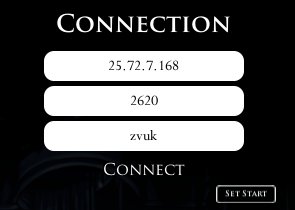
(Он в Hamachi должен видеть свой ip)
Порт не трогайте (это второе поле, у каждого свой P.S на самом деле порт не такой как на картинке но мне лень менять окда?)
Далее ник и всё нажимаем «Connect»
Хост (выбирайте Оба файла):
Вы должен зайти в игру и проделать всё тоже самое, тот же самый ip и нажимаете конект (важно что бы хост зашёл раньше и сделал всё раньше чем клиент) И НЕ СИДЕТЬ НА СКАМЕЙКИ ВО ВРЕМЯ ПОДКЛЮЧЕНИЯ, серьёзно, все допускают эту ошибку, Если перс стоит на месте и не двигается то надо перезапустить HK
Hollow knight кооператив мод





1) Нажимаем windows + R и вводим в строку которая открылась AppData
2) Заходим в папку LocalLow и ищем папку Team Cherry
3) Заходим в папку Team Cherry, затем в папку Hollow knight
5) Копируем файлы в удобную папку (Главное не потерять)
Теперь если сохранение пропадёт то будет возможно восстановить.
Теперь нужно скачать установщик модов.
Ссылка на установщик: https://www.moddb.com/mods/hollow-knight-lightbringer
После открытия установщика откроется окно в котором будет путь установки.
Если путь правильный: С:\Steam/steamapps/common/Hollow knght (у вас может быть немного по другому) тогда нажимаем «Да».
Если путь не правильный, тогда нажимаем «Нет» и выбираем путь к папке Hollow knight (С:\Steam/steamapps/common/Hollow knght)
И так, перейдём к полезным модам.
Мод на показ жизней у мобов
Этот мод показывает жизни у мобов.
Когда вы ударили моба у него над головой появится полоска жизней.
Она не пропадёт пока вы не перезайдёте в комнату или не убьёте моба.
Если у моба много жизней или это босс то полоска появится снизу.
Мод на быстрое перемещение
Этот мод позволяет быстро перемещаться на скамейки. Вы можете переместиться только на скамейку на которой вы сидели.
Debug mod (грубо говоря читы)
При нажатии на F1 открывается консоль.
В консоли можно изменить урон гвоздя, выдать себе все амулеты, способности и предметы.
Подробнее о нём: https://steamcommunity.com/sharedfiles/filedetails/?id=2265925164
Randomizer 3 и Enemy Randomizer
Randomizer 3: этот мод перемешивает комнаты и предметы.
Например вы вошли в забытое перепутье а оказались в городе слёз.
Так можно пройти игру но это будет сложно.
Enemy Randomizer: этот мод перемешивает всех мобов и боссов.
Сним играть не очень удобно потому что все мобы перемешиваются и может вместо жука может появится например полый рыцарь.
Мод на улучшение амулетов
Этот мод улучшает амулеты.
Так же этот мод добавляет побочные эффекты от амулетов.
Например амулет быстрый фокус ускоряет зарядку кристального сердца, а глубокий фокус замедляет зарядку.
Амулет тяжёлый выпад увеличивает урон на 15%.
Амулет ловкач увеличивает скорость ходьбы.
Амулет непоколебимое тело убирает анимацию при падении с высоты.
Как вернуться в ванильную версию?
В установщике есть кнопка Revert back to unmoded. Но. она не работает. Она просто закрывает установщик.
А что бы вернуться в ванильную игру нужно зайти в свойства, во вкладку локальные файлы и нажать на проверку целостности файлов. Steam скачает 1 файл и игра станет нормальной.
Так же моды могут конфликтовать. Поэтому комбинируйте моды на страх и риск.
Hollow knight кооператив мод

What is Hollow Knight Multiplayer?
As the name might suggest, Hollow Knight Multiplayer (HKMP) is a multiplayer mod for the popular 2D action-adventure game Hollow Knight. The main purpose of this mod is to allow people to host games and let others join them in their adventures. A few of the core components of this mod are heavily inspired from an existing implementation found here. However, as it seemed to be discontinued, I decided to rework it entirely and add extra features where possible.
The mod works through the Hollow Knight Modding API (a getting started guide can be found here). After installing the API, this mod can be installed by dropping the compiled DLL into your mods folder, which can be found in your Steam installation: (Beware that these are the default locations. Your install maybe on the D: drive, in that case change your path accordingly.)
Linux:
The latest version of the compiled DLL can be found on the releases page.
The main interface of the mod can be found in the pause menu in-game. There is an option to host a game on the entered port and an option to join a game at the entered address and entered port. Playing multiplayer with people on your LAN is straightforward, but playing over the internet requires some extra work. Namely, the port of the hosted game should be forwarded in your router to point to the device you are hosting on. Alternatively, you could use software to facilitate extending your LAN, such as Hamachi.
The interface can also be hidden by pressing a key-bind (right ALT by default). This key-bind can be changed in the config for the mod, which can be found at the following locations depending on OS:
/.config/unity3d/Team Cherry/Hollow Knight/HKMP.GlobalSettings.json
The key-binds are stored in integer form, to find which key corresponds to which integer, please consult this list.
The interface of the mod also contains a client and server settings menu
The client settings contain the following entries:
Note that this menu is entirely server-sided, only the player hosting the server will be able to alter the settings. Moreover, the settings will only update server and client-side once the «Save settings» button is pressed.
An explanation of the settings can be found below (in brackets their internal names for use in standalone server):
Skins can be installed by dropping a folder into the skins directory ( /Hollow Knight/hollow_knight_Data/Managed/Mods/HKMP/Skins ). If this directory structure is not present yet, it should be generated once you have launched the game at least once with HKMP installed. This folder can be named anything, but should at least contain a Knight.png and a Sprint.png file. These files should be a texture sheet that Hollow Knight also normally uses. After running the game with skins installed, each of these skin directories should have a corresponding id.txt file generated. This ID file contains a single integer representing the ID of that skin. This ID can then be used in-game to select the skin from the client settings menu. Normally, these IDs start at 1 and incrementally increase the more skins you use, but it is possible to manually edit the ID files to use other IDs.
This section contains a list of mods that are incompatible with HKMP to various degrees.
You can also join the Discord server for the mod. There you can also leave your suggestions and bug reports or generally talk about it. Moreover, the latest announcements will be posted there.
HKMP can also be built from scratch. This requires a few dependencies from the Hollow Knight game and the modding API. Namely, the following dependencies should be added as referenced assemblies from the modding API:
And the following assemblies should be added as references from the Hollow Knight game/Unity:
All the files here should be in the directory:
Linux:
After this the source code can be compiled into DLL, and you should be good to go!
If you have any suggestions or bug reports, please leave them at the issues page. Make sure to label the issues correctly and provide a proper explanation. Suggestions or feature requests can be labeled with «Enhancement», bug reports with «Bug», etc.
If you like this project and would like to donate, you can do so via Paypal. Please only donate if you really want to, there’s no obligation in doing so.
Hollow knight кооператив мод






After downloading Hamachi, the host must create a network (Host clicks «Create new network» and enters a name with a password)
To play multiplayer, you need to install it. The multiplayer itself is a mod for Hollow Knight. But to install this mod we need ModInstaller. Download and install: https://gamebanana.com/tools/6899
We go into the previously installed ModInstaller and select the folder with the game in order to import the necessary files into the game.
When ModInstaller is installed, click Manually Install Mods and select multiplayer mods (link to mods below) to install them.
https://drive.google.com/drive/folders/1cYuiVU1MeosxjrEwe4zZgmXezyu8nG4f
This is a link to 2 mods. The most important thing is that the host installs both, and those who connect should only download MultiplayerInstaller.dll
Also, do not forget to enable downloaded mods in ModInstaler before entering the game.
We go to Hollow Knight, select the save in which you will play with your friends. Open the menu, enter your IPv4 from hamachi and name. Click connect. Thus, we connect to ourselves, or if in another way, we create a local server.
The most important thing is not to sit on a bench when someone connects to you or when you open a server.
Downloading Hamachi
http://hamachi-pc.ru/
After that, we ask the host to send the ID (name) and password from the created network to Hamachi.
Install ModInstaller: https://gamebanana.com/tools/6899
Import the ModInstaller files into the game folder (just open ModInstaller and select the game files).
Install the mod (download only MultiplayerClient.dll):
https://drive.google.com/drive/folders/1cYuiVU1MeosxjrEwe4zZgmXezyu8nG4f
In ModInstaller, click on Manually Install Mods and select the mod itself.
Go to Hollow Knight, select your save, pause and enter the IP address of the host from Hamachi in the upper left corner, do not touch the port. Click Connect.
Hollow knight кооператив мод
Что делает хост (человек, создающий сервер):
После того, как скачали Hamachi, хост (человек запускающий сервер) должен создать сеть (Хост нажимает «Создать новую сеть» и вводит имя с паролем)
Чтобы играть в мультиплеер, нужно его установить. Сам мультиплеер является модом для Hollow Knight. Но чтобы установить этот мод нам требуется ModInstaller. Скачиваем и устанавливаем: https://gamebanana.com/tools/6899
Заходим в ранее установленный ModInstaller и выбираем папку с игрой, чтобы импортировать нужные файлы в игру.
Когда ModInstaller установлен, нажимаем Manually Install Mods и выбираем моды на мультиплеер (ссылка на моды ниже) чтобы установить их.
https://drive.google.com/drive/folders/1cYuiVU1MeosxjrEwe4zZgmXezyu8nG4f
Это ссылка на 2 мода. Самое главное, чтобы хост установил оба, а те, кто подключается, должны скачать только MultiplayerInstaller.dll
Так же не забудьте включить скачанные моды в ModInstaler перед заходом в игру.
Заходим в Hollow Knight, выбираем сохранение, в котором будете играть с друзьями. Открываете меню, вводите свой IPv4 из хамачи и имя. Нажимаем connect. Таким образом мы подключаемся к самому себе, или если по-другому, мы создаем локальный сервер.
Самое главное, не сидеть на лавочке, когда к вам подключаются или когда вы открываете сервер.
Скачиваем Hamachi
http://hamachi-pc.ru/
После этого просим хоста отправить Идентификатор (имя) и пароль от созданной сети в Hamachi.
Устанавливаем ModInstaller: https://gamebanana.com/tools/6899
Импортируем файлы ModInstaller в папку игры (просто откройте ModInstaller и выберите файлы игры).
Устанавливаем мод (скачиваем только MultiplayerClient.dll):
https://drive.google.com/drive/folders/1cYuiVU1MeosxjrEwe4zZgmXezyu8nG4f
В ModInstaller нажимаем на Manually Install Mods и выбираем сам мод.
Заходим в Hollow Knight, выбираем свое сохранение, ставим на паузу и в правом верхнем углу вводим IP адрес хоста из Hamachi, порт не трогаем. Нажимаем Connect.