
Hollow knight мод инсталлер





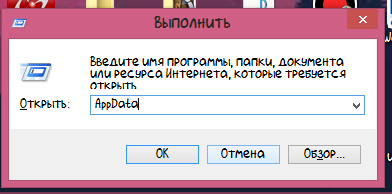
1) Нажимаем windows + R и вводим в строку которая открылась AppData
2) Заходим в папку LocalLow и ищем папку Team Cherry
3) Заходим в папку Team Cherry, затем в папку Hollow knight
5) Копируем файлы в удобную папку (Главное не потерять)
Теперь если сохранение пропадёт то будет возможно восстановить.
Теперь нужно скачать установщик модов.
Ссылка на установщик: https://www.moddb.com/mods/hollow-knight-lightbringer
После открытия установщика откроется окно в котором будет путь установки.
Если путь правильный: С:\Steam/steamapps/common/Hollow knght (у вас может быть немного по другому) тогда нажимаем «Да».
Если путь не правильный, тогда нажимаем «Нет» и выбираем путь к папке Hollow knight (С:\Steam/steamapps/common/Hollow knght)
И так, перейдём к полезным модам.
Мод на показ жизней у мобов
Этот мод показывает жизни у мобов.
Когда вы ударили моба у него над головой появится полоска жизней.
Она не пропадёт пока вы не перезайдёте в комнату или не убьёте моба.
Если у моба много жизней или это босс то полоска появится снизу.
Мод на быстрое перемещение
Этот мод позволяет быстро перемещаться на скамейки. Вы можете переместиться только на скамейку на которой вы сидели.
Debug mod (грубо говоря читы)
При нажатии на F1 открывается консоль.
В консоли можно изменить урон гвоздя, выдать себе все амулеты, способности и предметы.
Подробнее о нём: https://steamcommunity.com/sharedfiles/filedetails/?id=2265925164
Randomizer 3 и Enemy Randomizer
Randomizer 3: этот мод перемешивает комнаты и предметы.
Например вы вошли в забытое перепутье а оказались в городе слёз.
Так можно пройти игру но это будет сложно.
Enemy Randomizer: этот мод перемешивает всех мобов и боссов.
Сним играть не очень удобно потому что все мобы перемешиваются и может вместо жука может появится например полый рыцарь.
Мод на улучшение амулетов
Этот мод улучшает амулеты.
Так же этот мод добавляет побочные эффекты от амулетов.
Например амулет быстрый фокус ускоряет зарядку кристального сердца, а глубокий фокус замедляет зарядку.
Амулет тяжёлый выпад увеличивает урон на 15%.
Амулет ловкач увеличивает скорость ходьбы.
Амулет непоколебимое тело убирает анимацию при падении с высоты.
Как вернуться в ванильную версию?
В установщике есть кнопка Revert back to unmoded. Но. она не работает. Она просто закрывает установщик.
А что бы вернуться в ванильную игру нужно зайти в свойства, во вкладку локальные файлы и нажать на проверку целостности файлов. Steam скачает 1 файл и игра станет нормальной.
Так же моды могут конфликтовать. Поэтому комбинируйте моды на страх и риск.
Hollow knight мод инсталлер
Do you enjoy the HK base game, but wish there was support for a modding community? Did you think some bosses were too easy and want a REAL challenge? Have you heard about various mods being used but have no idea how to get them? (Did you maybe ask too many questions in the HK Discord and made people mad at you because you didn’t know what you were doing?)
This guide will give you a basic overview of some community mods, where to find them, how to install them, and who to ask if you have a specific question about them. Please keep in mind that I am no technical genius and a lot of this information is stuff I’ve gathered from the HK Discord and the modding community there, and the intent of this guide is to compile this information for anyone who wants to try modding their game but doesn’t know how to start.
**Edit 6/22/21: Getting comments that the links are broken, working on a fix now.
To join the official Hollow Knight discord, use this link: https://discord.gg/hollowknight





**Update 6/22/21: Hollow Knight was recently updated to version 1.5! Mods will not work properly unless you downpatch the game to version 1.4.3.2, found in Steam by right-clicking the game > Properties > Betas > choose 1.4.3.2. Modders are currently working on an API that works with 1.5.
Before you do anything, the first thing you’re going to need to do is download and install the modding API. This will handle your mods and allow the game to run them; otherwise it will skip over the mods and run normally.
An easy way to do this is to use the ModInstaller exe provided by the modding team (you will need to join the Discord linked above to access this. The pinned message with links to the exe are in the #modding-help channel.)
The ModInstaller provides a straightforward modding experience, allowing you to download, enable, and disable mods from one screen instead of digging around in your game files, and is the recommended way to enable and play with mods.
If for any reason the program does not work or you would prefer to not use it, read the next section to figure out how to install mods yourself.
If you don’t trust downloads from random Discord servers, you can always just get the mods you want to add from the modding community Google Drive [drive.google.com] and install them yourself.
**Update 6/22/21: I’ve been informed that a lot of the links in this and the following sections are broken. Please bear with me as I go through and update them. Some mods may be unavailable. The link above to the modding drive should provide you with downloads of specific mods.
* NOTE: Some mods may require additional API. Be sure to check the README file of each mod you download to see if additional API are necessary.
To install the API, follow the instructions in the README file. You will need to locate the Hollow Knight game files, which you can do by right-clicking the game in your Steam library > Properties > Local Files > Browse Local Files. Once you copy everything from the folder to your game folder, you can open your game to see if you’ve done it right.
If for any reason you think you may have altered files you shouldn’t have, you can always right-click the game in Steam > Properties > Local Files > Verify integrity of game files. This is a Steam process that checks your game files to make sure nothing the original game needs to play is missing or misplaced. You will need to re-install any mods or modding API you have afterwards.
The great thing about the mod list is that it can be updated constantly, so it’s possible this list will become outdated quickly. If a mod linked here doesn’t work or you have trouble with it, check the modding Drive to see if there is an updated version available.
Note: The mods list contains several mods that are included as memes, gamebreaking jokes, or just things that might not be fun to use for those beginning to mod their game. I will not be including them here, however they can still be found via the main modding Drive.
Second Note: Mods that I use frequently are marked with a *
Bindings: Applies bindings from the Godhome Pantheons to the main game. Link [drive.google.com]
Blackmoth: Changes main mode of attack from nail to shade dash. Some charms’ effects changed as well to affect the dash. Link [drive.google.com]
* Bonfire: Adds upgradeable stat bonuses purchased with geo. Link [drive.google.com]
Charm Overhaul: Rebalances charms to make them stronger. Link [drive.google.com]
Darkness: Renders the Lumafly Lantern useless and makes every room dark, similar to Deepnest without the lantern. Link [drive.google.com]
Dreamshield Co-Op: Adds a controllable Dreamshield for local co-op play. Link [drive.google.com]
Enemy Randomizer: Randomizes enemy spawns (with some limitations), with some adjustability. Link [drive.google.com]
* Exaltation: Overhauls charms, implementing an unused «charm glorification» concept from TC. Charms are buffed by completing Godhome Pantheons, making them much stronger. Link [drive.google.com]
* Fragile Strength for Nail Arts: Fragile/Unbreakable Strength now affects Nail Arts Link [drive.google.com]
Glorious Combos: Nerfs player damage, which increases as the player chains attacks (more hits = increased DPS). Recommended for Godhome only, but can be used in the rest of the game. Link [drive.google.com]
Grimmchild Upgrades: Buffs level 4 Grimmchild and makes it fully customizable.Link [drive.google.com]
Hell Mod: Nerfs the player, buffs the enemies. Link [drive.google.com]
Item Changer: Performs a lot of the same tasks as Randomizer in modifying and creating items, but can now be referenced and used by other mods. Link [drive.google.com]
Lightbringer: Changes nail attack to a ranged lance. Reworks charms and other gameplay features. Link [drive.google.com]
Load Normalizer: Attempts to make loads uniform (used for races). Link [drive.google.com]
ModConsole: Inserts a console into the game for implementing code without having to compile Link [drive.google.com]
NG+: Map changes to increase difficulty. Link [drive.google.com]
* Randomizer: Mixes up items, charms, abilities, spells, etc for new saves. Includes difficulty settings and randomization seeds. Rando 3 includes room settings. (Requires Benchwarp and SeanprCore) Link [drive.google.com]
Random Pantheons: Bosses in Godhome Pantheons appear in random order. Link [drive.google.com]
Redwing: Gives the player firey new attacks, changes character appearance. Optional hard mode. Link [drive.google.com]
The Pain of the Path: Allows the player to complete the Path of Pain backwards. Link [drive.google.com]
*All of these mods significantly buff their respective bosses*
Crystalblobbles: Buffs Oblobbles Link [drive.google.com]
Daughter of Hallownest: Buffs Hornet Sentinel Link [drive.google.com]
Indie Crossover: Integrates Propellor Knight, Fennel, and Cagney Carnation as a boss fight Link [drive.google.com]
* Infinite Grimm: Includes multiple mods for Grimm. Takes place in Dirtmouth Link [drive.google.com]
Inferno King Grimm: NKG buff, requires WeaverCore Link [drive.google.com]
Lifeblood Master: Buffs Hive Knight Link [drive.google.com]
Lost Lord: Buffs Lost Kin Link [drive.google.com]
Mantis Gods: Buffs Mantis Lords Link [drive.google.com]
Pale Champion: Buffs Pale Lurker Link [drive.google.com]
Pale Prince: Buffs Pure Vessel Link [drive.google.com]
Royal Dreamer: Buffs Markoth (I can’t find a link to this one, it may be outdated)
Traitor God: Buffs Traitor Lord Link [drive.google.com]
Tribe of Battle: Take on Mantis Lords and Traitor Lord at the same time Link [drive.google.com]
Ultimatum Radiance: Buffs Absolute Radiance Link [drive.google.com]
Uuwuu: Buffs Uumuu Link [drive.google.com]
(Continued in next section)
I didn’t know these guides had a character limit but I guess it makes sense that they do
InvertKnight: Inverts the colors of The Knight and various abilities. (Cannot find a link, may be outdated).
PaletteSwapper: Randomizes color tints of rooms for each area Link [drive.google.com]
PoorlyTranslated: Game text is run through multiple translations to produce a comedic result Link [drive.google.com]
Redwing Assets: Includes optional cutscenes and assets for the Redwing mod Link [drive.google.com]
TransTrans: Truth is Tiktiks are for transgender Link [drive.google.com]
* Benchwarp: Allows warping to benches, options to deploy benches in custom locations, required for Randomizer Link [drive.google.com]
* BingoUI: Automatic tracking of bingo goals for Randomizer or vanilla bingo speedrun races Link [drive.google.com]
Charm Notch Mod: Automatically grants notches normally purchased from Salubra upon collecting the required number of charms Link [drive.google.com]
* Debug Mod: Allows for debug tools and features like noclip, invincibility, removing and giving items and abilities Link [drive.google.com]
EasyMode: Adds a variety of assisting effects to help new or struggling players. Requires SeanprCore Link [drive.google.com]
Infinite Notches: Player has infinite notches (may mess with existing saves) Link [drive.google.com]
More Saves: Allows for more than 4 save slots, organized into pages Link [drive.google.com]
* Enemy HPBar: Displays a customizable health bar above enemies with a large bar for bosses Link [drive.google.com]
RandoMapMod: Helper for room randomization Link [drive.google.com]
Show Hitboxes: Shows hitboxes Link [drive.google.com]
Spent Geo Tracker: Displays spent Geo Link [drive.google.com]
Unofficial Hollow Knight Patch: Fixes AbsRad hazard spawn bug, sharp shadow fix, and adds new PV statue in the Hall of Gods Link [drive.google.com]
* QoL: Slight improvements to gameplay (skippable cutscenes/credits, 1.2.2.1 menu drop and storage, etc). Requires Vasi Link [drive.google.com]
ModCommon: Helper mod required for some mods to function. Link [drive.google.com]
Player Data Tracker: Keeps tabs on player data (most frequently used to display abilities and charms during Randomizer streams) Link [drive.google.com]
SeanprCore: Helper mod required for Rando 2 and 3 Link [drive.google.com]
Shade Spawn Viewer: Visually indicates boundaries of shade spawn locations in-game. Link [drive.google.com]
SpriteDump: Deposits game sprites into a folder when loaded during play. Link [drive.google.com]
Vasi: Helper mod required for some mods to function. Link [drive.google.com]
WeaverCore: Helper mod required for Inferno King Grimm Link [drive.google.com]
This is by no means a comprehensive guide for how to fiddle your way around Hollow Knight modding. For more information and plenty of people more knowledgeable than I am about this subject, ask the modding team in the Hollow Knight Discord (linked in the first section).
(copied direct from Discord user homothety in #modding-help)
— I am trying to play RANDOMIZER 2 or RANDOMIZER 3, and I get the error «FAILED TO LOAD»
+ Install SeanprCore using ModInstaller, or off of the Google Drive. This is a library dependency for these mods.
— I am trying to play ENEMY RANDOMIZER, and the percentage freezes when trying to load.
+ This is a known issue with the mod, which may occur randomly and is not always fixable. Try the following: get the latest version off of ModInstaller, make sure ModCommon is installed, do not change windows while the enemy randomizer is loading.
— I am trying to set up CUSTOMKNIGHT with the guide, but my appearance doesn’t change.
+ Make sure the CustomKnight folder contains exactly 8 sprite sheets, named «Hud», «Knight», «OrbFull», «Sprint», «VoidSpells», «VS», «Wraiths», and «Geo». Any missing sprite sheets will cause the mod to fail. If you downloaded a sprite pack without all sheets, that means the missing sprite sheets were intended to be loaded unmodified from the CustomKnight folder.
— I am trying to use DEBUGMOD, but I hid the menu and now I can’t find it.
+ The default bind to show the menu is F1. Change binds by clicking the white dot next to each command in the «Binds» menu, and then pressing the new key. Reset all binds by deleting «DebugMod.GlobalSettings» in the save file directory.
— I am trying to play any mod, and MY CONTROLLER doesn’t work.
+ This is a known issue with the Modding API. The most consistent way to fix this is to unplug the controller before starting the game, and plug it in at the title screen.
— My ModInstaller gives me the error «Unable to download mod list.»
+ Delete ModInstaller and download it from the link above. This error occurs in an old version of ModInstaller which was broken by an update.
— My ModInstaller can’t find Hollow Knight.
+ The first time you launch ModInstaller, it will prompt you to set the filepath if it can’t find the game. If you skipped past the prompt before, you can reset the ModInstaller’s settings by deleting the «ModInstaller» folder at %appdata%\..\Local
— How can I remove all mods from my computer?
+ ModInstaller allows you to uninstall mods and remove the Modding API, if originally installed with ModInstaller. Alternatively, you can restore the original game by choosing to Verify Integrity of Game Files in Steam. Once finished, you can simply delete ModInstaller, as it is only an executable.
— I’m trying to install mods on a patch other than 1.4.3.2
+ ModInstaller only supports current patch Hollow Knight. Read the guide for manually installing mods instead.
— I’m using a different program like Crossroads, and I can’t find the mod I’m looking for.
+ The only consistently up-to-date and supported mod installer is the one linked above.
— I bought the game on Windows Store and want to play with mods.
+ Unfortunately, the Windows Store has impossibly restricted file permissions to allow modding. Either buy the game on Steam/GoG, or dual boot with linux.
— Can I install mods on Switch/Xbox/PS?
+ No.
I hope this guide was helpful! If you have any questions, I’d like to say you can comment here and I’ll have an answer, but if it’s very technical I’m afraid I’m out of my depth.
Hollow knight мод инсталлер
0 категорий с 0 модификациями для Hollow Knight
Список лучших модов для Hollow Knight и как их установить
Как установить моды для Hollow knight
Для успешной установки модов нужно скачать специальный софт по ссылке.
Когда установщик откроется важно сверить путь, по которому он будет устанавливаться. Он должен выглядит примерно так: С:/Steam/steamapps/common/Hollow knght.
Самые полезные моды для Hollow knight
Жизни мобов станут видны
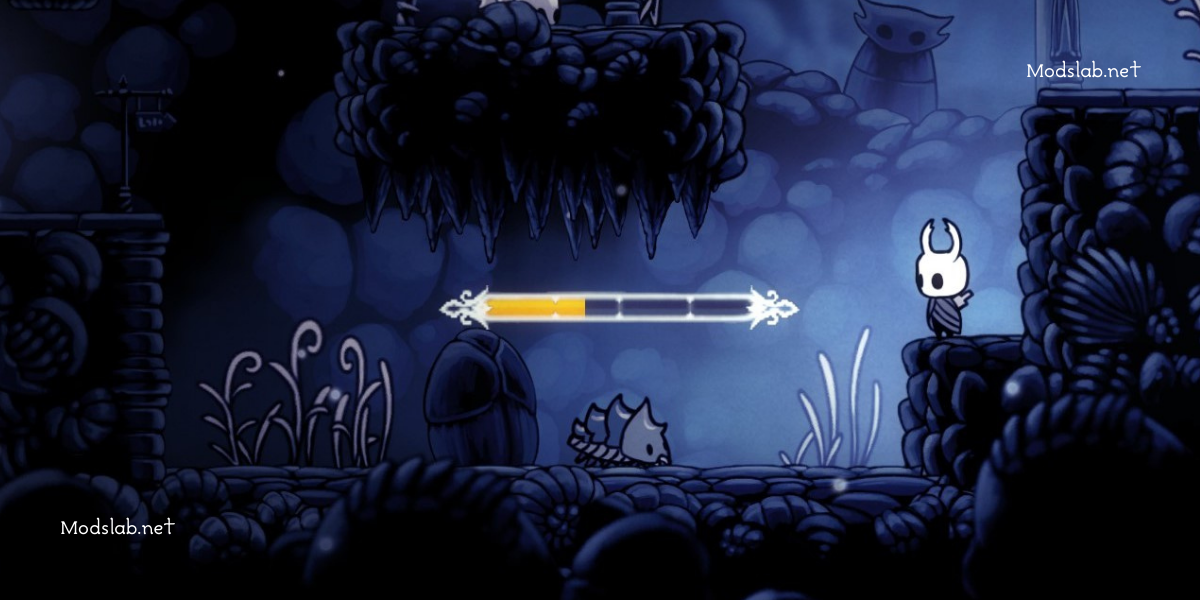
Когда вы вступите в схватку с ботом, у него над головой появится шкала жизней и она не исчезнет, пока вы его не убьете. Если хп много у моба, то шкала будет располагаться снизу.
Универсальный чит код
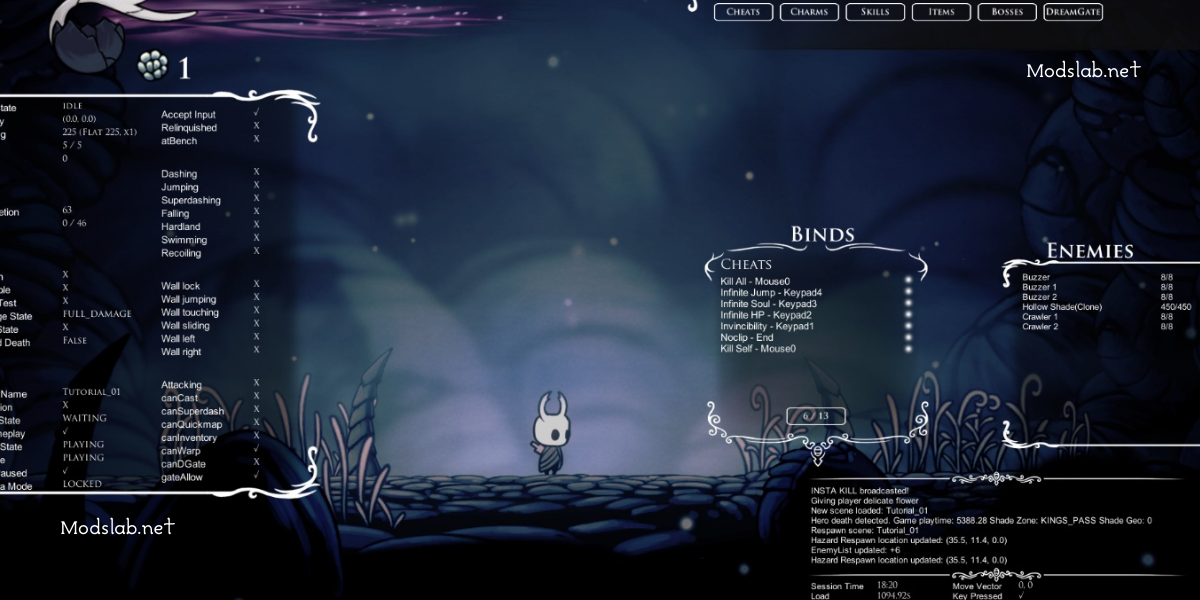
Мод открывает все возможности игры и персонажа сразу. Вы можете пользоваться всем, чем вам только вздумается.
Энеми Рандомайзер и Рандомайзер 3
Первый сбивает порядок городов в игре. К примеру, вы вошли в «Город слез», а оказались в «Забытом перепутье».
Второй делает все то же самое, но с мобами, персонажами и боссами.
Модификация амулетов
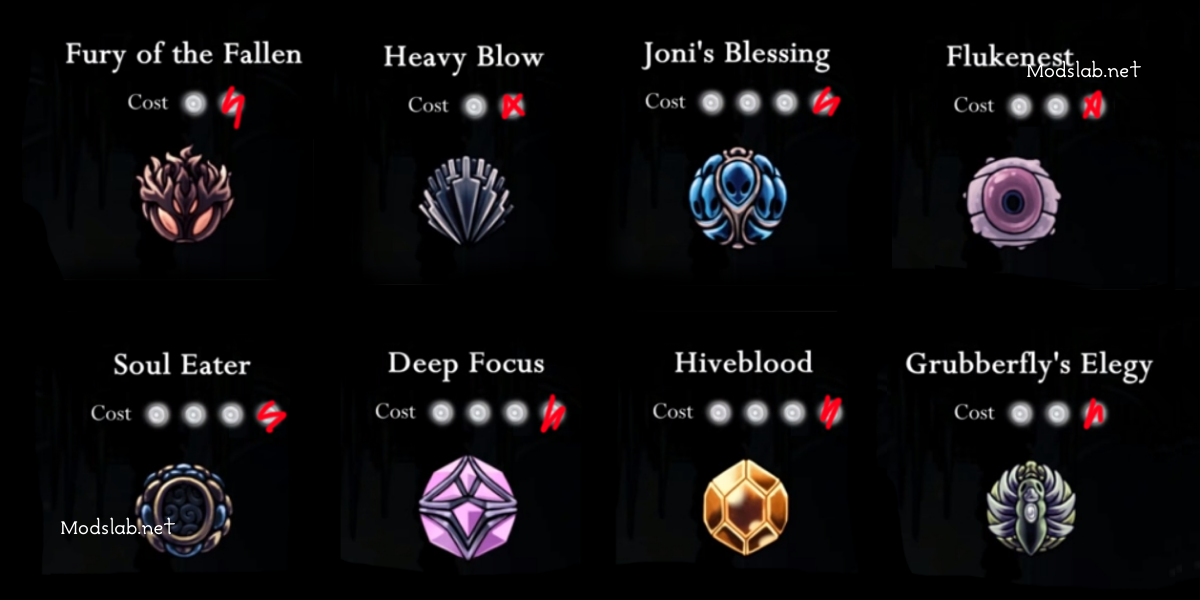
Как вы уже поняли, мод делает определённые улучшения амулетам. Амулет будет занимать на одну ячейку меньше.
Что сделать для отката в изначальное состояние игры?
Есть кнопка «Revert back to unmoded» в установочной папке игры, но она не даст вам никакого результата. Чтобы откатить игру до заводских настроек вам нужно запустить через «Стим» проверку на целостность файла и он сам все восстановит.
Безопасная установка модов
Итак, начнем:
Сочетание клавиш windows + R откроет командную строку, в которую необходимо ввести AppData.
Отыскиваем папку LocalLow и далее нам нужен каталог Team Cherry.
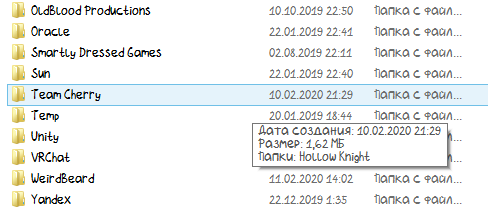
Зашли в Тим Черри? Отлично, теперь наша цель Hollow knight.

Теперь нужно скопировать все файлы в папку, которая будет вам удобна.
ModInstaller file
ModInstaller
Hollow Knight mod | Released 2018
This is a ModInstaller for Hollow Knight containing 20+ mods made by the community! Always updated for the game’s current patch!
Location
Filename
Category
Uploader
Added
Updated
Downloads
MD5 Hash
Embed Button
Embed Widget
Don’t download thisDon’t download thisDon’t download thisDon’t download thisDon’t download thisDon’t download thisDon’t download this
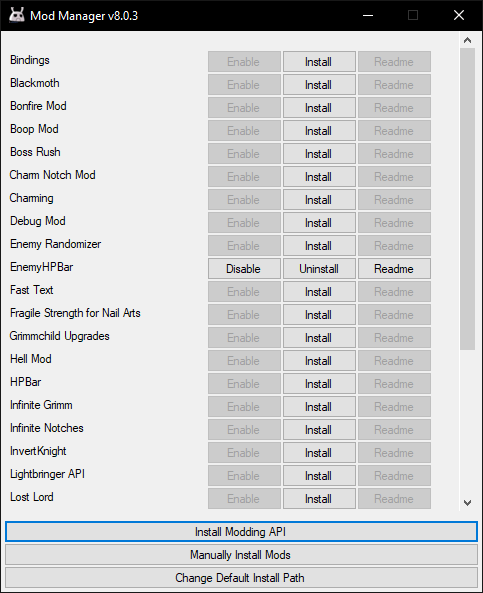

This is amazing, it really works like a charm. Get it?

there is the invencible mod? or it still working?

debug mod has invincibility in the cheats menu

Debugmod allows you to grant invincibility, among many other cheats. The actual invincibility mod is not an API mod and isn’t in the installer because the installer only has API mods.
This is done because the modding API lets you install multiple mods at once and allows modders to make much larger and more powerful mods.

How are we supposed to know what these mods do?

This comment is currently awaiting admin approval, join now to view.

The mod doesn’t work for me. I always get a the «Access to the path ‘. ‘ is denied.» even if I run it as administrator. Redownloading didn’t help, either.

It’s not loading successfully. Using Win10. Any ideas?
This comment is currently awaiting admin approval, join now to view.

This comment is currently awaiting admin approval, join now to view.
This comment is currently awaiting admin approval, join now to view.

how can I procede to download it on mac and does it work if it is non-steam but up to date? thanks
i need a little help, i cant figure out the installation path. anyone got the solution?