
Как играть по сети в ХК


Привет, я тут только из-за того что хочу рассказать как играть по сети, возможно останусь :^
Шаг первый: Скачать «Hamachi» вот ссылка https://hamachi-ru.ru/, регистрируемся и создаём сеть,

ваши друзья должны подключится к ней (сообщите им все данные вашей сети)
Далее переходим к МД (мне так проще называть ModLoader (без разницы МД или МИ) )

и указываем путь к этим файлам:

Если вы подключаетесь то выбирайте первый, если вы хост то оба
Вот и всё (далее подключение и хост)
Подключение (выбираете 1 файл): зайти в игру и указать в первом поле IP адрес того кто создаёт
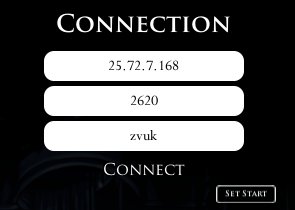
(Он в Hamachi должен видеть свой ip)
Порт не трогайте (это второе поле, у каждого свой P.S на самом деле порт не такой как на картинке но мне лень менять окда?)
Далее ник и всё нажимаем «Connect»
Хост (выбирайте Оба файла):
Вы должен зайти в игру и проделать всё тоже самое, тот же самый ip и нажимаете конект (важно что бы хост зашёл раньше и сделал всё раньше чем клиент) И НЕ СИДЕТЬ НА СКАМЕЙКИ ВО ВРЕМЯ ПОДКЛЮЧЕНИЯ, серьёзно, все допускают эту ошибку, Если перс стоит на месте и не двигается то надо перезапустить HK
Hollow knight мультиплеер мод




Что делает хост (человек, создающий сервер):
После того, как скачали Hamachi, хост (человек запускающий сервер) должен создать сеть (Хост нажимает «Создать новую сеть» и вводит имя с паролем)
Чтобы играть в мультиплеер, нужно его установить. Сам мультиплеер является модом для Hollow Knight. Но чтобы установить этот мод нам требуется ModInstaller. Скачиваем и устанавливаем: https://gamebanana.com/tools/6899
Заходим в ранее установленный ModInstaller и выбираем папку с игрой, чтобы импортировать нужные файлы в игру.
Когда ModInstaller установлен, нажимаем Manually Install Mods и выбираем моды на мультиплеер (ссылка на моды ниже) чтобы установить их.
https://drive.google.com/drive/folders/1cYuiVU1MeosxjrEwe4zZgmXezyu8nG4f
Это ссылка на 2 мода. Самое главное, чтобы хост установил оба, а те, кто подключается, должны скачать только MultiplayerInstaller.dll
Так же не забудьте включить скачанные моды в ModInstaler перед заходом в игру.
Заходим в Hollow Knight, выбираем сохранение, в котором будете играть с друзьями. Открываете меню, вводите свой IPv4 из хамачи и имя. Нажимаем connect. Таким образом мы подключаемся к самому себе, или если по-другому, мы создаем локальный сервер.
Самое главное, не сидеть на лавочке, когда к вам подключаются или когда вы открываете сервер.
Скачиваем Hamachi
http://hamachi-pc.ru/
После этого просим хоста отправить Идентификатор (имя) и пароль от созданной сети в Hamachi.
Устанавливаем ModInstaller: https://gamebanana.com/tools/6899
Импортируем файлы ModInstaller в папку игры (просто откройте ModInstaller и выберите файлы игры).
Устанавливаем мод (скачиваем только MultiplayerClient.dll):
https://drive.google.com/drive/folders/1cYuiVU1MeosxjrEwe4zZgmXezyu8nG4f
В ModInstaller нажимаем на Manually Install Mods и выбираем сам мод.
Заходим в Hollow Knight, выбираем свое сохранение, ставим на паузу и в правом верхнем углу вводим IP адрес хоста из Hamachi, порт не трогаем. Нажимаем Connect.
Hollow knight мультиплеер мод





After downloading Hamachi, the host must create a network (Host clicks «Create new network» and enters a name with a password)
To play multiplayer, you need to install it. The multiplayer itself is a mod for Hollow Knight. But to install this mod we need ModInstaller. Download and install: https://gamebanana.com/tools/6899
We go into the previously installed ModInstaller and select the folder with the game in order to import the necessary files into the game.
When ModInstaller is installed, click Manually Install Mods and select multiplayer mods (link to mods below) to install them.
https://drive.google.com/drive/folders/1cYuiVU1MeosxjrEwe4zZgmXezyu8nG4f
This is a link to 2 mods. The most important thing is that the host installs both, and those who connect should only download MultiplayerInstaller.dll
Also, do not forget to enable downloaded mods in ModInstaler before entering the game.
We go to Hollow Knight, select the save in which you will play with your friends. Open the menu, enter your IPv4 from hamachi and name. Click connect. Thus, we connect to ourselves, or if in another way, we create a local server.
The most important thing is not to sit on a bench when someone connects to you or when you open a server.
Downloading Hamachi
http://hamachi-pc.ru/
After that, we ask the host to send the ID (name) and password from the created network to Hamachi.
Install ModInstaller: https://gamebanana.com/tools/6899
Import the ModInstaller files into the game folder (just open ModInstaller and select the game files).
Install the mod (download only MultiplayerClient.dll):
https://drive.google.com/drive/folders/1cYuiVU1MeosxjrEwe4zZgmXezyu8nG4f
In ModInstaller, click on Manually Install Mods and select the mod itself.
Go to Hollow Knight, select your save, pause and enter the IP address of the host from Hamachi in the upper left corner, do not touch the port. Click Connect.
Hollow knight мультиплеер мод

What is Hollow Knight Multiplayer?
As the name might suggest, Hollow Knight Multiplayer (HKMP) is a multiplayer mod for the popular 2D action-adventure game Hollow Knight. The main purpose of this mod is to allow people to host games and let others join them in their adventures. A few of the core components of this mod are heavily inspired from an existing implementation found here. However, as it seemed to be discontinued, I decided to rework it entirely and add extra features where possible.
The mod works through the Hollow Knight Modding API (a getting started guide can be found here). After installing the API, this mod can be installed by dropping the compiled DLL into your mods folder, which can be found in your Steam installation: (Beware that these are the default locations. Your install maybe on the D: drive, in that case change your path accordingly.)
Linux:
The latest version of the compiled DLL can be found on the releases page.
The main interface of the mod can be found in the pause menu in-game. There is an option to host a game on the entered port and an option to join a game at the entered address and entered port. Playing multiplayer with people on your LAN is straightforward, but playing over the internet requires some extra work. Namely, the port of the hosted game should be forwarded in your router to point to the device you are hosting on. Alternatively, you could use software to facilitate extending your LAN, such as Hamachi.
The interface can also be hidden by pressing a key-bind (right ALT by default). This key-bind can be changed in the config for the mod, which can be found at the following locations depending on OS:
/.config/unity3d/Team Cherry/Hollow Knight/HKMP.GlobalSettings.json
The key-binds are stored in integer form, to find which key corresponds to which integer, please consult this list.
The interface of the mod also contains a client and server settings menu
The client settings contain the following entries:
Note that this menu is entirely server-sided, only the player hosting the server will be able to alter the settings. Moreover, the settings will only update server and client-side once the «Save settings» button is pressed.
An explanation of the settings can be found below (in brackets their internal names for use in standalone server):
Skins can be installed by dropping a folder into the skins directory ( /Hollow Knight/hollow_knight_Data/Managed/Mods/HKMP/Skins ). If this directory structure is not present yet, it should be generated once you have launched the game at least once with HKMP installed. This folder can be named anything, but should at least contain a Knight.png and a Sprint.png file. These files should be a texture sheet that Hollow Knight also normally uses. After running the game with skins installed, each of these skin directories should have a corresponding id.txt file generated. This ID file contains a single integer representing the ID of that skin. This ID can then be used in-game to select the skin from the client settings menu. Normally, these IDs start at 1 and incrementally increase the more skins you use, but it is possible to manually edit the ID files to use other IDs.
This section contains a list of mods that are incompatible with HKMP to various degrees.
You can also join the Discord server for the mod. There you can also leave your suggestions and bug reports or generally talk about it. Moreover, the latest announcements will be posted there.
HKMP can also be built from scratch. This requires a few dependencies from the Hollow Knight game and the modding API. Namely, the following dependencies should be added as referenced assemblies from the modding API:
And the following assemblies should be added as references from the Hollow Knight game/Unity:
All the files here should be in the directory:
Linux:
After this the source code can be compiled into DLL, and you should be good to go!
If you have any suggestions or bug reports, please leave them at the issues page. Make sure to label the issues correctly and provide a proper explanation. Suggestions or feature requests can be labeled with «Enhancement», bug reports with «Bug», etc.
If you like this project and would like to donate, you can do so via Paypal. Please only donate if you really want to, there’s no obligation in doing so.
Hollow knight мультиплеер мод
Do you enjoy the HK base game, but wish there was support for a modding community? Did you think some bosses were too easy and want a REAL challenge? Have you heard about various mods being used but have no idea how to get them? (Did you maybe ask too many questions in the HK Discord and made people mad at you because you didn’t know what you were doing?)
This guide will give you a basic overview of some community mods, where to find them, how to install them, and who to ask if you have a specific question about them. Please keep in mind that I am no technical genius and a lot of this information is stuff I’ve gathered from the HK Discord and the modding community there, and the intent of this guide is to compile this information for anyone who wants to try modding their game but doesn’t know how to start.
**Edit 6/22/21: Getting comments that the links are broken, working on a fix now.
To join the official Hollow Knight discord, use this link: https://discord.gg/hollowknight




**Update 6/22/21: Hollow Knight was recently updated to version 1.5! Mods will not work properly unless you downpatch the game to version 1.4.3.2, found in Steam by right-clicking the game > Properties > Betas > choose 1.4.3.2. Modders are currently working on an API that works with 1.5.
Before you do anything, the first thing you’re going to need to do is download and install the modding API. This will handle your mods and allow the game to run them; otherwise it will skip over the mods and run normally.
An easy way to do this is to use the ModInstaller exe provided by the modding team (you will need to join the Discord linked above to access this. The pinned message with links to the exe are in the #modding-help channel.)
The ModInstaller provides a straightforward modding experience, allowing you to download, enable, and disable mods from one screen instead of digging around in your game files, and is the recommended way to enable and play with mods.
If for any reason the program does not work or you would prefer to not use it, read the next section to figure out how to install mods yourself.
If you don’t trust downloads from random Discord servers, you can always just get the mods you want to add from the modding community Google Drive [drive.google.com] and install them yourself.
**Update 6/22/21: I’ve been informed that a lot of the links in this and the following sections are broken. Please bear with me as I go through and update them. Some mods may be unavailable. The link above to the modding drive should provide you with downloads of specific mods.
* NOTE: Some mods may require additional API. Be sure to check the README file of each mod you download to see if additional API are necessary.
To install the API, follow the instructions in the README file. You will need to locate the Hollow Knight game files, which you can do by right-clicking the game in your Steam library > Properties > Local Files > Browse Local Files. Once you copy everything from the folder to your game folder, you can open your game to see if you’ve done it right.
If for any reason you think you may have altered files you shouldn’t have, you can always right-click the game in Steam > Properties > Local Files > Verify integrity of game files. This is a Steam process that checks your game files to make sure nothing the original game needs to play is missing or misplaced. You will need to re-install any mods or modding API you have afterwards.
The great thing about the mod list is that it can be updated constantly, so it’s possible this list will become outdated quickly. If a mod linked here doesn’t work or you have trouble with it, check the modding Drive to see if there is an updated version available.
Note: The mods list contains several mods that are included as memes, gamebreaking jokes, or just things that might not be fun to use for those beginning to mod their game. I will not be including them here, however they can still be found via the main modding Drive.
Second Note: Mods that I use frequently are marked with a *
Bindings: Applies bindings from the Godhome Pantheons to the main game. Link [drive.google.com]
Blackmoth: Changes main mode of attack from nail to shade dash. Some charms’ effects changed as well to affect the dash. Link [drive.google.com]
* Bonfire: Adds upgradeable stat bonuses purchased with geo. Link [drive.google.com]
Charm Overhaul: Rebalances charms to make them stronger. Link [drive.google.com]
Darkness: Renders the Lumafly Lantern useless and makes every room dark, similar to Deepnest without the lantern. Link [drive.google.com]
Dreamshield Co-Op: Adds a controllable Dreamshield for local co-op play. Link [drive.google.com]
Enemy Randomizer: Randomizes enemy spawns (with some limitations), with some adjustability. Link [drive.google.com]
* Exaltation: Overhauls charms, implementing an unused «charm glorification» concept from TC. Charms are buffed by completing Godhome Pantheons, making them much stronger. Link [drive.google.com]
* Fragile Strength for Nail Arts: Fragile/Unbreakable Strength now affects Nail Arts Link [drive.google.com]
Glorious Combos: Nerfs player damage, which increases as the player chains attacks (more hits = increased DPS). Recommended for Godhome only, but can be used in the rest of the game. Link [drive.google.com]
Grimmchild Upgrades: Buffs level 4 Grimmchild and makes it fully customizable.Link [drive.google.com]
Hell Mod: Nerfs the player, buffs the enemies. Link [drive.google.com]
Item Changer: Performs a lot of the same tasks as Randomizer in modifying and creating items, but can now be referenced and used by other mods. Link [drive.google.com]
Lightbringer: Changes nail attack to a ranged lance. Reworks charms and other gameplay features. Link [drive.google.com]
Load Normalizer: Attempts to make loads uniform (used for races). Link [drive.google.com]
ModConsole: Inserts a console into the game for implementing code without having to compile Link [drive.google.com]
NG+: Map changes to increase difficulty. Link [drive.google.com]
* Randomizer: Mixes up items, charms, abilities, spells, etc for new saves. Includes difficulty settings and randomization seeds. Rando 3 includes room settings. (Requires Benchwarp and SeanprCore) Link [drive.google.com]
Random Pantheons: Bosses in Godhome Pantheons appear in random order. Link [drive.google.com]
Redwing: Gives the player firey new attacks, changes character appearance. Optional hard mode. Link [drive.google.com]
The Pain of the Path: Allows the player to complete the Path of Pain backwards. Link [drive.google.com]
*All of these mods significantly buff their respective bosses*
Crystalblobbles: Buffs Oblobbles Link [drive.google.com]
Daughter of Hallownest: Buffs Hornet Sentinel Link [drive.google.com]
Indie Crossover: Integrates Propellor Knight, Fennel, and Cagney Carnation as a boss fight Link [drive.google.com]
* Infinite Grimm: Includes multiple mods for Grimm. Takes place in Dirtmouth Link [drive.google.com]
Inferno King Grimm: NKG buff, requires WeaverCore Link [drive.google.com]
Lifeblood Master: Buffs Hive Knight Link [drive.google.com]
Lost Lord: Buffs Lost Kin Link [drive.google.com]
Mantis Gods: Buffs Mantis Lords Link [drive.google.com]
Pale Champion: Buffs Pale Lurker Link [drive.google.com]
Pale Prince: Buffs Pure Vessel Link [drive.google.com]
Royal Dreamer: Buffs Markoth (I can’t find a link to this one, it may be outdated)
Traitor God: Buffs Traitor Lord Link [drive.google.com]
Tribe of Battle: Take on Mantis Lords and Traitor Lord at the same time Link [drive.google.com]
Ultimatum Radiance: Buffs Absolute Radiance Link [drive.google.com]
Uuwuu: Buffs Uumuu Link [drive.google.com]
(Continued in next section)
I didn’t know these guides had a character limit but I guess it makes sense that they do
InvertKnight: Inverts the colors of The Knight and various abilities. (Cannot find a link, may be outdated).
PaletteSwapper: Randomizes color tints of rooms for each area Link [drive.google.com]
PoorlyTranslated: Game text is run through multiple translations to produce a comedic result Link [drive.google.com]
Redwing Assets: Includes optional cutscenes and assets for the Redwing mod Link [drive.google.com]
TransTrans: Truth is Tiktiks are for transgender Link [drive.google.com]
* Benchwarp: Allows warping to benches, options to deploy benches in custom locations, required for Randomizer Link [drive.google.com]
* BingoUI: Automatic tracking of bingo goals for Randomizer or vanilla bingo speedrun races Link [drive.google.com]
Charm Notch Mod: Automatically grants notches normally purchased from Salubra upon collecting the required number of charms Link [drive.google.com]
* Debug Mod: Allows for debug tools and features like noclip, invincibility, removing and giving items and abilities Link [drive.google.com]
EasyMode: Adds a variety of assisting effects to help new or struggling players. Requires SeanprCore Link [drive.google.com]
Infinite Notches: Player has infinite notches (may mess with existing saves) Link [drive.google.com]
More Saves: Allows for more than 4 save slots, organized into pages Link [drive.google.com]
* Enemy HPBar: Displays a customizable health bar above enemies with a large bar for bosses Link [drive.google.com]
RandoMapMod: Helper for room randomization Link [drive.google.com]
Show Hitboxes: Shows hitboxes Link [drive.google.com]
Spent Geo Tracker: Displays spent Geo Link [drive.google.com]
Unofficial Hollow Knight Patch: Fixes AbsRad hazard spawn bug, sharp shadow fix, and adds new PV statue in the Hall of Gods Link [drive.google.com]
* QoL: Slight improvements to gameplay (skippable cutscenes/credits, 1.2.2.1 menu drop and storage, etc). Requires Vasi Link [drive.google.com]
ModCommon: Helper mod required for some mods to function. Link [drive.google.com]
Player Data Tracker: Keeps tabs on player data (most frequently used to display abilities and charms during Randomizer streams) Link [drive.google.com]
SeanprCore: Helper mod required for Rando 2 and 3 Link [drive.google.com]
Shade Spawn Viewer: Visually indicates boundaries of shade spawn locations in-game. Link [drive.google.com]
SpriteDump: Deposits game sprites into a folder when loaded during play. Link [drive.google.com]
Vasi: Helper mod required for some mods to function. Link [drive.google.com]
WeaverCore: Helper mod required for Inferno King Grimm Link [drive.google.com]
This is by no means a comprehensive guide for how to fiddle your way around Hollow Knight modding. For more information and plenty of people more knowledgeable than I am about this subject, ask the modding team in the Hollow Knight Discord (linked in the first section).
(copied direct from Discord user homothety in #modding-help)
— I am trying to play RANDOMIZER 2 or RANDOMIZER 3, and I get the error «FAILED TO LOAD»
+ Install SeanprCore using ModInstaller, or off of the Google Drive. This is a library dependency for these mods.
— I am trying to play ENEMY RANDOMIZER, and the percentage freezes when trying to load.
+ This is a known issue with the mod, which may occur randomly and is not always fixable. Try the following: get the latest version off of ModInstaller, make sure ModCommon is installed, do not change windows while the enemy randomizer is loading.
— I am trying to set up CUSTOMKNIGHT with the guide, but my appearance doesn’t change.
+ Make sure the CustomKnight folder contains exactly 8 sprite sheets, named «Hud», «Knight», «OrbFull», «Sprint», «VoidSpells», «VS», «Wraiths», and «Geo». Any missing sprite sheets will cause the mod to fail. If you downloaded a sprite pack without all sheets, that means the missing sprite sheets were intended to be loaded unmodified from the CustomKnight folder.
— I am trying to use DEBUGMOD, but I hid the menu and now I can’t find it.
+ The default bind to show the menu is F1. Change binds by clicking the white dot next to each command in the «Binds» menu, and then pressing the new key. Reset all binds by deleting «DebugMod.GlobalSettings» in the save file directory.
— I am trying to play any mod, and MY CONTROLLER doesn’t work.
+ This is a known issue with the Modding API. The most consistent way to fix this is to unplug the controller before starting the game, and plug it in at the title screen.
— My ModInstaller gives me the error «Unable to download mod list.»
+ Delete ModInstaller and download it from the link above. This error occurs in an old version of ModInstaller which was broken by an update.
— My ModInstaller can’t find Hollow Knight.
+ The first time you launch ModInstaller, it will prompt you to set the filepath if it can’t find the game. If you skipped past the prompt before, you can reset the ModInstaller’s settings by deleting the «ModInstaller» folder at %appdata%\..\Local
— How can I remove all mods from my computer?
+ ModInstaller allows you to uninstall mods and remove the Modding API, if originally installed with ModInstaller. Alternatively, you can restore the original game by choosing to Verify Integrity of Game Files in Steam. Once finished, you can simply delete ModInstaller, as it is only an executable.
— I’m trying to install mods on a patch other than 1.4.3.2
+ ModInstaller only supports current patch Hollow Knight. Read the guide for manually installing mods instead.
— I’m using a different program like Crossroads, and I can’t find the mod I’m looking for.
+ The only consistently up-to-date and supported mod installer is the one linked above.
— I bought the game on Windows Store and want to play with mods.
+ Unfortunately, the Windows Store has impossibly restricted file permissions to allow modding. Either buy the game on Steam/GoG, or dual boot with linux.
— Can I install mods on Switch/Xbox/PS?
+ No.
I hope this guide was helpful! If you have any questions, I’d like to say you can comment here and I’ll have an answer, but if it’s very technical I’m afraid I’m out of my depth.