
Holographic Displays

Плагин Holographic Displays нужен для создания голограм в Майнкрафт. С этим плагином теперь таблички – это прошлый век. На табличках мелкий текст и он самый простой. С помощью голограмм можно привлекать внимание игроков, они гораздо эффектнее табличек.
Возможности:
С помощью команды /hd create test &7&lColor test&r: &uRainbow мы можем получить вот такую голограмму.

Как сделать летающий блок голограмму через Holographic Displays?
С помощью команды /hd create test ICON: diamond мы можем сделать летающий алмаз, также можно сделать с любым предметом в Майнкрафт. Для этого нужно указать его точное название.

Как сделать голограмму из картинки в Holographic Displays?
Вот так выглядит конечный результат из нашей картинки ведра с лавой.

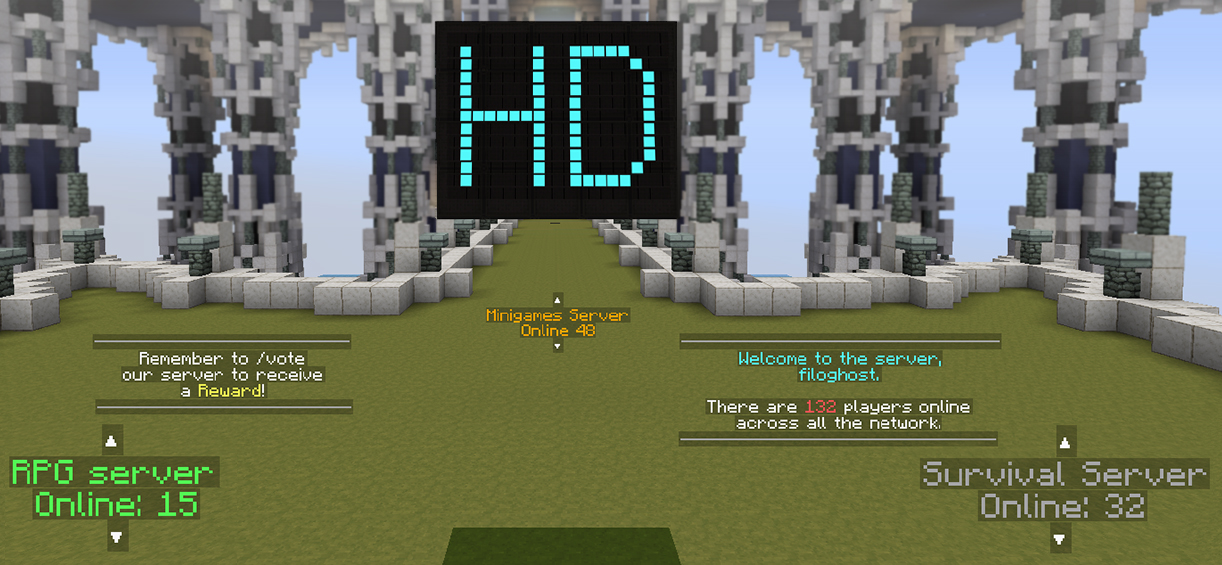
Как вывести онлайн на сервере в голограмме через Holographic Displays?
С помощью команды /hd create test Players online: мы может сделать голограмму, которая будет показывать онлайн на сервере. Вот выглядит голограмма.

Как создать голограмму через плагин Holographic Displays?
Для того, чтобы создать голограмму, мы должны прописать команду:
/hd create название голограммы
Далее прописываем команду /hd edit название голограммы
После этого в чате будут прописаны все нужные команды для редактирования вашей голограммы. Также можете посмотреть видео ниже, в котором я показываю все возможности плагина.
Обновили плагин до версии Holographic Displays 1.16
Bukkit

Holographic Displays
Bukkit Plugins
Holographic Displays
Table of Contents

Features
Preview
Development builds
Development builds of this project can be acquired at the provided continuous integration server.
These builds have not been approved by the BukkitDev staff and may contain major bugs. Use them at your own risk.
Plugins using Holographic Displays
Video
Servers using Holographic Displays
Trusted by over 20.000 servers, including some famous networks:
Minecraft limitations
Credits
Converting from other plugins
If you’re using the plugin Holograms you can use this converter to import the database (credits to saxon12).
Comments section
Comments are enabled just for interacting with other users, you will not receive any official answers. To ask for help or to report bugs please check the FAQ and then, if the problem isn’t solved, open a new issue on the issue tracker (on GitHub).
Comments

Hey, on 1.17+, the armor stands used to display text seem to duplicate during server restarts, and lose their invisibility.
This is how it looks:


https://www.youtube.com/watch?v=li3o—E1HAg Old Video but might help you sorry about my bad voice i sound ugly back then

[1.8-1.17]
=== Holographic Displays ===
Welcome!
This is a Plugin for Spigot Servers.
This Plugin is great!
Like this Plugin, i use it to make Floating Texts on my Public Network Server and so far, its great! I have tested it on 1.13, 1.14, 1.15 and all 1.16 versions. They all still work, and about 1.17, it somehow reads the «Game Response» as an Error Code. It doesn’t show any Response what-so ever.
Supported Versions on Displays for Spigot :
Help & Info
Help: You can use /hd create and then create your Hologram, after it will show a Default message: «This is a Default hologram. Change it with /hd edit » (Input the name of the Hologram.)
Helpful Commands:
Info: This Plugin works best on 1.8, 1.10, 1.11, 1.13, 1.14, 1.15 and 1.16.5. Note that Spigot with a Config file will not work on some servers with Custom Config Managers. Thats how you get no message from using /hd create.
=== Issues & Bugs ===
Reported By: 2010phoenixplays
Important Issues: As of 2021, there are no Issues with the plugin for 1.8 to 1.11. There might be some Bugs with versions 1.12 to 1.14. This might make a lot of things a lot harder to play and to use some other Plugins on your server. So far, use 1.16.1 to 1.16.5 for the best playout.
Bugs: 1.17 does not give a Response in chat but does lag the Console from trying to create a text, this Spams the Console.

I have installed the 1.17 updated version, however the plugin is not working on my spigot server. Whenever I try to create a display I get the message: «An internal error occurred while attempting to perform this command.»

Please update to 1.17
Please update to 1.17

Please update to 1.17

Please update to 1.17


Hey! Please add feature that allows to add a custom player head to the hologram. Also that should support Head Database plugin. I hope i see this feature soon!
Or if there is a already a way how to add custom player head, then please help!

I am trying to display a (non-) player head. I cannot seem to get the NBT right. The details may be found at https://github.com/filoghost/HolographicDisplays/issues/358. Any help (especially a working example) appreciated.
Hello I have a problem I use about 1 week aternos and please advice on how to insert the holographicdisplay plugin into aternos Thank you Z Regards adamek_306

On our Server a lot of players (including me) dont see the the Holographs over the table from the plugin roulette that uses this plugin to have the holograms
We are using a Paper MC 1.16.5 Server


Hey. When loading my bukkit server it says failed to load Holographic displays as i need the new chat api. What should I do?
Also when trying to use any commands it says internal error then in the cmd window it says the plugin is disabled.

i have latest version of hd and i’m using 1.16.5 paper, i think this version is not compile with protocolib

Update to the latest dev build of Protocollib. That’ll fix it 🙂
Bukkit
Holographic Displays
Bukkit Plugins
Holographic Displays
Table of Contents
Features
Preview
Development builds
Development builds of this project can be acquired at the provided continuous integration server.
These builds have not been approved by the BukkitDev staff and may contain major bugs. Use them at your own risk.
Plugins using Holographic Displays
Video
Servers using Holographic Displays
Trusted by over 20.000 servers, including some famous networks:
Minecraft limitations
Credits
Converting from other plugins
If you’re using the plugin Holograms you can use this converter to import the database (credits to saxon12).
Comments section
Comments are enabled just for interacting with other users, you will not receive any official answers. To ask for help or to report bugs please check the FAQ and then, if the problem isn’t solved, open a new issue on the issue tracker (on GitHub).
Comments

I don’t mean to sound obvious, but this is probably an issue with your protocol related plugin(s)
or some versioin of that
Update to the latest dev build of Protocollib. That’ll fix it 🙂
I’m using Bukkit version 1.16.4 and it doesn’t work.
Just tells me this: «An internal error occured while attemting to perform this command»
which has been available for more than 24 hours. See this post.

Can you update the plugin? It’s causing problems with ProtocolLib

facts please update this plugin

it works but when I put papi text it doesn’t work :/

This plugin is really great! I love to use it because it is very easy to use. The creator did a really good job.

Can you make holograms show inside a barrier block?

When I try to make a hologram, I get this error
[craftbukkit.jar:git-Bukkit-3eb7236] at org.bukkit.command.SimpleCommandMap.dispatch(SimpleCommandMap.java:148)
[craftbukkit.jar:git-Bukkit-3eb7236] at org.bukkit.craftbukkit.v1_16_R3.CraftServer.dispatchCommand(CraftServer.java:737)
[craftbukkit.jar:git-Bukkit-3eb7236] at net.minecraft.server.v1_16_R3.PlayerConnection.handleCommand(PlayerConnection.java:1738)
[craftbukkit.jar:git-Bukkit-3eb7236] at net.minecraft.server.v1_16_R3.PlayerConnection.c(PlayerConnection.java:1595)
[craftbukkit.jar:git-Bukkit-3eb7236] at net.minecraft.server.v1_16_R3.PlayerConnection.a(PlayerConnection.java:1548)
[craftbukkit.jar:git-Bukkit-3eb7236] at net.minecraft.server.v1_16_R3.PacketPlayInChat.a(SourceFile:36)
[craftbukkit.jar:git-Bukkit-3eb7236] at net.minecraft.server.v1_16_R3.PacketPlayInChat.a(SourceFile:9)
[craftbukkit.jar:git-Bukkit-3eb7236] at net.minecraft.server.v1_16_R3.PlayerConnectionUtils.lambda$0(PlayerConnectionUtils.java:19)
[craftbukkit.jar:git-Bukkit-3eb7236] at net.minecraft.server.v1_16_R3.TickTask.run(SourceFile:18)
[craftbukkit.jar:git-Bukkit-3eb7236] at net.minecraft.server.v1_16_R3.IAsyncTaskHandler.executeTask(SourceFile:144)
[craftbukkit.jar:git-Bukkit-3eb7236] at net.minecraft.server.v1_16_R3.IAsyncTaskHandlerReentrant.executeTask(SourceFile:23)
[craftbukkit.jar:git-Bukkit-3eb7236] at net.minecraft.server.v1_16_R3.IAsyncTaskHandler.executeNext(SourceFile:118)
[craftbukkit.jar:git-Bukkit-3eb7236] at net.minecraft.server.v1_16_R3.MinecraftServer.bb(MinecraftServer.java:899)
[craftbukkit.jar:git-Bukkit-3eb7236] at net.minecraft.server.v1_16_R3.MinecraftServer.executeNext(MinecraftServer.java:892)
[craftbukkit.jar:git-Bukkit-3eb7236] at net.minecraft.server.v1_16_R3.IAsyncTaskHandler.awaitTasks(SourceFile:127)
[craftbukkit.jar:git-Bukkit-3eb7236] at net.minecraft.server.v1_16_R3.MinecraftServer.sleepForTick(MinecraftServer.java:876)
[craftbukkit.jar:git-Bukkit-3eb7236] at net.minecraft.server.v1_16_R3.MinecraftServer.w(MinecraftServer.java:815)
[craftbukkit.jar:git-Bukkit-3eb7236] at net.minecraft.server.v1_16_R3.MinecraftServer.lambda$0(MinecraftServer.java:155)
[craftbukkit.jar:git-Bukkit-3eb7236] at java.lang.Thread.run(Unknown Source) [?:1.8.0_271]
I have installed the latest dev version of ProtocolLib and HD.
Bukkit
Holographic Displays
Bukkit Plugins
Holographic Displays
Table of Contents
Features
Preview
Development builds
Development builds of this project can be acquired at the provided continuous integration server.
These builds have not been approved by the BukkitDev staff and may contain major bugs. Use them at your own risk.
Plugins using Holographic Displays
Video
Servers using Holographic Displays
Trusted by over 20.000 servers, including some famous networks:
Minecraft limitations
Credits
Converting from other plugins
If you’re using the plugin Holograms you can use this converter to import the database (credits to saxon12).
Comments section
Comments are enabled just for interacting with other users, you will not receive any official answers. To ask for help or to report bugs please check the FAQ and then, if the problem isn’t solved, open a new issue on the issue tracker (on GitHub).
Comments

That’s a minecraft limitation, it’s due to the amount of entities

Pls make a 1.16.1 version
Just give them a few days 1.16.1 just kinda came out

Permissions do not work. I have read the full documentation and have the permission holograms.* added. I can run some commands but not all. I have to be opped to use all the commands. It would be nice if you could address this issue.
It would be helpful to know what versions you are running
— Spigot version (not «latest» but an actual version)
— permissions plugin (same)
Which commands are not working?
Did you test the explicit permissions for those commands?
[07:05:11] [Server thread/INFO]: [HolographicDisplays] Enabling HolographicDisplays v2.4.2
[07:05:11] [Server thread/INFO]:
Holographic Displays does not support this server version.
Supported Spigot versions: from 1.8.3 to 1.15.
This plugin has been disabled.

****************************************************************************
Holographic Displays requires the new chat API.
You are probably running CraftBukkit instead of Spigot.
Whenever I run the server, I get this message. Even though I downloaded the file for bukkit. Downloading Translation API doesn’t solve the problem. I need a little help.

Is there a discord server for HoloGraphicDisplays?
[15:53:21] [Server thread/INFO]: [HolographicDisplays] Enabling HolographicDisplays v2.4.2
[15:53:21] [Server thread/INFO]:
****************************************************************************
Holographic Displays requires the new chat API.
You are probably running CraftBukkit instead of Spigot.

Upgrade to spigot if you haven’t already

This keeps spamming my console, not sure how to fix it :
[28-05-2020 10:13:15] The placeholder
anything i create disappears on server restart?
is there something i can do about that?
okay i checked the documentation but it doesnt say where i can remove/edit the /vote popup on screen same with the 1000 palyers online pop-up above the inventroy
so how do i remove/edit the /vote message and the 200000 players online message
It works fine for me on Spigot 1.15.2 with HD 2.4.2-b121 (and no reason to think it won’t work with previous versions). Perhaps you could post your versions and the relevant section of your database.db, so someone can try to help.
I’m on spigot 1.12.2 and my database is :
I tried to put the &m but it does not work
What does «doesn’t work» mean? It looks exactly as I would expect, given that input. What do you want it to look like?
If you are trying to get a line, without the hyphens (dashes), substitute blank spaces for the dashes.
I want to have a perfect line with graduations (using + and | ). When i say that the &m doesn’t work, I mean that is the same result if I use it and if I don’t use it. It doesn’t modify the text at all, it’s like if it’s not used.
> I want to have a perfect line with graduations (using + and | ).
That isn’t possible in most fonts, and changing fonts in MC isn’t trivial. The problem is that strike-out (&m) does not vertically align with plus (+) or hyphen (-). That is not the fault of HolographicDisplays, but of font design/implementation.
Bukkit
Holographic Displays
Bukkit Plugins
Holographic Displays
Table of Contents
Features
Preview
Development builds
Development builds of this project can be acquired at the provided continuous integration server.
These builds have not been approved by the BukkitDev staff and may contain major bugs. Use them at your own risk.
Plugins using Holographic Displays
Video
Servers using Holographic Displays
Trusted by over 20.000 servers, including some famous networks:
Minecraft limitations
Credits
Converting from other plugins
If you’re using the plugin Holograms you can use this converter to import the database (credits to saxon12).
Comments section
Comments are enabled just for interacting with other users, you will not receive any official answers. To ask for help or to report bugs please check the FAQ and then, if the problem isn’t solved, open a new issue on the issue tracker (on GitHub).
Comments
With The Time Feature:
I Definitely Like The Client Side Computer Time.
Floating items will be awesome.
More variables please like:
I think these are Minecraft client restrictions, you can’t change any of the things you said. 🙁
Idea: Option to make holagram in a fixed direction, so it does not rotate as the player does. Idea2: Change the view distance, you can see hologram from very far away and this sometimes is annoying.
Hi. Could someone make custom hud plugin using this plugin to help with it.. connect a thing to players face and make it so that only they can see it. and you have hud! And you could make like radars and stuff!! add easy commands to move the hud around like move right 1 it moves it right by one character and the distance from the face could be set by a command to modify text size. PLZ make this happen
Idea: Hide And Rebeal Hologram commands, to make the holo appear with commandblock, and hide when you don’t need it, for example.
i have noticed that the permission nodes for this and touchscreen are incorrect, they werent working for me, but when the full stop is removed form the end of the node it works. Not sure if this was intended on the permissions page, but for anyone who cant get the permission to work, now you should be able to.
yeap, scrolling, My English is low, so. sorry C: u understand me
To fix it I have to type: / hd reload

@dread0522 It would be complex and not needed, since 95% of the servers use BungeeCord.