
Installing Mods
Security considerations
Mods on the Mod Releases forum and the ContentDB are verified to be safe by the community. Downloading mods from other sources is not recommended unless they can be trusted. Malicious code can damage your computer, violate your privacy or cause your computer to take part in illegal activities.
Installing a mod
Mods can be installed from the ContentDB using the Content tab’s Browse online content button in versions 5.0 and above. Mods downloaded this way are automatically installed.
Mods are usually distributed in a Zip archive. In order to get the mod running, you have to extract it into one of the folders where Minetest looks for mods. This depends on what Minetest version you have installed.
If one of the below mentioned directories does not exist, create it.
Installing a modpack
A modpack is installed in the same way as a mod, but you are usually not required to change the directory name of the modpack. Just make sure the name does not collide with that of any other installed mod or modpack.
Installation directory
As of 0.4.7, the mods are installed globally and enabled per world.
/.minetest/mods/ in globally installed Minetest versions.
After extracting the mod there you need to enable it for your world. This can either be done in the GUI by clicking on “Configure” in the world selection, or by adding load_mod_ = true in the world.mt file in the world directory.
Note that newly installed mods are disabled for all worlds by default, so you explicitly need to enable them.
Additional install directories (all Minetest versions)
Note that users should generally install mods in the normal install directory and not in the additional ones. Note that having copies of the same mod in different places may easily generate mod conflicts.
Differences between the three kinds of places mods can be loaded from:
In case of «Minetest Game», this could be a sub-folder of /minetest/games/minetest_game/mods or /minetest(or
Mods loaded from such locations are considered to be an essential part of said game and are not togglable. These mods apply to all worlds created with this game but not to any world created by another game (although many games may include the same mods)
Mods in a worldmods folder are not togglable and will run on and only on that specific world, and cannot be accessed from any other world.
Example structure
In this example the mods “ digtron ” and “ tnt ”, and the modpack “ mesecons ” are installed:
Modding Intro
Minetest has a scripting API (Application Programming Interface), which is used to program mods (short for «modifications») for the game, extending its features and adding new items. This API is accessed using an easy-to-use programming language called Lua. More specifically, the version of Lua is 5.1.
The only thing you will need is basic programming knowledge. See Lua for details.
Contents
Documentation
Lua API Reference
The only official Lua API documentation is lua_api.txt. You can find this file in your Minetest installation, in the doc directory. Use this file to look up functions, core features of the Lua API, etc. This file is maintained by the core developers of Minetest and every change to it goes through a quality control process. This document explains everything you need to know about the Lua API in concise form, but may be daunting for newbies to read.
There is also (as of april 2020) a automatically generated version that might be easier to read.
WARNING: A huge amount of pages on this wiki regarding Lua methods and objects are extremely outdated. Ignore them for now, use lua_api.txt instead. It has been proposed to remove those pages as redundant.
Tutorials
There’s also an unofficial guide/tutorial about Minetest modding: The Minetest Modding Book.
A very basic overview is written in Modding Overview.
Mods/ru
Contents

Крупные моды могут нести в себе много нового контента, тогда как более мелкие могут добавить только новые опции настроек, увеличить скорость работы/оптимизировать геймплей или графику Minetest.
Сервер моды или плагины предоставляют сервер-админам больше возможностей, и все моды могут использоваться как в одиночном режиме, так и в мультиплеере.
Несмотря на то, что моды Minetest обычно безопасны для эксплуатации, рекомендуется проявлять осторожность т.к. есть вероятность, что они могут вызвать крах, нестабильность системы или утечку данных игры.
Распространенной практикой обезопасить данные игры от таких проблем считается создание бэкапов (копий) папки Minetest.
Существует много модов и плагинов для просто дополнения оригинала Minetest game или для того, чтобы дать сервер-админам больше возможностей контролировать свои сервера.
Модпакеты
Такое логическое группирование сделано главным образом для удобства.
Однако, в модпаках или в их модах нет ничего специфичного, и они ничем не отличаются от обычных модов. Каждый мод в модпаке также может быть включен и отключен как и разобщенные моды.
Клиент-моды
Клиент мод или мод на стороне клиента (сокращение: “CSM”) мод, кастомизирующий ваш Minetest клиент. Эти моды загружаются, когда игрок соединяется с Minetest сервером.
Клиент-моды требуют минимальную версию 0.4.15-dev от источников, скомпилированных после 1 апреля 2017 года.
Обратите внимание, что API для клиент-модов в настоящее время нестабильный и может измениться.
Установка
Начиная с версии Minetest 5.0.0 Вы можете установить моды из магазина контента (Content DB) в меню Minetest. Перейдите во вкладку «Content» в главном меню, чтобы найти моды, игры и текстурпаки.
Источники модов
Официальные
Неофициальные
Создание модов
Моды пишутся на простом скриптовом языке Луа Lua. Они могут быть созданы теми, кто владеет основными навыками программирования на этом языке и знает API на Луа Minetest`а.
Официальная Луа API документация: lua_api.txt.
Другие важные источники:
Списки модов на серверах
Crafting/ru
Contents
Основы крафта
В этом разделе описываются основы в очень общем виде. Правила, описываемые здесь верны для многих модов.
Сетка для крафта и выходной слот
Для того, чтобы создавать (крафтить), вам нужна сетка для крафта. Крафт-сетка состоит из ряда лотков инвентаря, и вы можете размещать, перемещать и удалять предметы в нем, как и в инвентаре. Для крафта, элементы должны быть расположены определенным образом (см. «Ввод и вывод»). Рядом с сеткой крафта есть один выходной лоток, в котором появляется результат, если расположить вещи в сетке в правильном порядке. Нажмите на этот лоток с помощью левой кнопки мыши, чтобы изготовить предмет один раз. Будут использованы необходимые предметы из сетки крафта. Нажмите на выходной лоток с помощью средней кнопки мыши, чтобы сделать до десяти предметов (в зависимости от того, сколько ингредиентов осталось в сетке крафта). Создание происходит мгновенно, и вы можете использовать полученные вещи немедленно.
Крафт-сетка так-же подходит и для хранения. Сетка в вашем инвентаре может быть использована как дополнительный инвентарь игрока.
В выходной лоток вы не можете ложить вещи. Вы можете лишь брать из него.
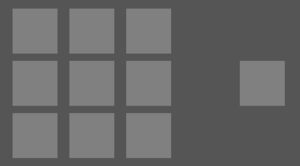
Vanilla Minetest имеет только одну крафт-сетку. Она может быть открыта через меню инвентаря и имеет размер 3×3 слотов.
Моды и мини-игры Minetest могут добавить несколько крафт-сеток в различных местах, а не только в инвентарь. Также возможно, что в меню инвентаря не будет крафт-сетки вообще.
Ввод и вывод
Рецепт крафта состоит по меньшей мере из одного входного предмета и одного изготовленного предмета. Входными могут быть либо конкретные предметы (например, деревянные доски) или предмет, который является членом группы (например, группа дерево, в которую включены деревянные доски и доски дерева джунглей). Если рецепт имеет несколько слотов, которые требуют ту же группу, это не означает, что вы должны поместить тот же элемент во все эти слоты. См. #Крафт рецептов с использованием групп.
vanilla Minetest, другие мини-игры и многие моды широко используют систему групп, понимая, что это важно, чтобы крафтить веселей.
Использование предметов
Обычно, крафт одного предмета удаляет ровно один предмет каждого слота в крафт-сетке.
В рецепте крафта возможно также заменить один предмет другим. В настоящее время это редко используется в модах. В игре vanilla Minetest, ведро с лавой как топливо для печки можно заменить пустым ведром.
Рецепты с определенной формой и без нее
Есть два вида рецептов, с определенной формой и без формы.
Для бесформенного рецепта, необходимые детали могут быть размещены в любой из доступных слотов в крафт-сетке. Укладка нескольких предметов в один и тот-же слот в этом случае не работает.
Большинство рецептов игры vanilla Minetest имеют форму. Если не указано иное, предполагается, крафт с определенной формой. Бесформенные рецепты игры vanilla Minetest позволяют производить бронзовые слитки, шерсть, муку и красители.
Сопутствующее дело
Выплавка и ремонт лишь немного отличаются от крафта, большинство правил, описанные здесь, применяются, тоже. Для выплавки достаточно только 1 × 1 крафт-сетки. Рецепты для ремонта всегда бесформенные, состоящие из двух инструментов одного же типа.
Примеры
Этот раздел содержит обширные примеры основных видов крафта. Примеры здесь все взяты из игры vanille Minetest.
Бесформенные рецепты
Бронзовый слиток является примером бесформенного рецепта. Нужен Слиток стали и Медный слиток. Вы можете поместить их в любом месте в сетке крафта, так что нижеследующие крафты все верны:
Minetest как сделать мод
Adds a mob api for mods to add animals or monsters etc.
3D Armor
stu
Visible player armor & wielded items.
Draconis
ElCeejo
Adds advanced Dragons and powerful equipment.
Mobkit
Termos
Animalia
ElCeejo
Adds useful Animals for food, ambiance, and more
Mesecons
Jeija
Adds digital circuitry, including wires, buttons, lights, and even programmable controllers.
Mobs Animal
TenPlus1
Mob Core
ElCeejo
A Mob API meant to expand upon mobkit and bring easy to use features for creating new Mobs.
i3
jp
A next-generation inventory
Hang-Gliders
Piezo_
Fly around with fully functional hang-gliders!
Nether
PilzAdam
Adds a deep underground realm with different mapgen that you can reach with obsidian portals.
Mobs Monster
TenPlus1
Adds many types of monster.
Water Life
Gundul
new mobs for your river and sea water
Advanced Trains
orwell
Farming Redo
TenPlus1
Adds many plants and food to Minetest
Basic Materials and items
VanessaE
X-Decor
jp
A decoration mod meant to be simple and well-featured.
Homedecor
VanessaE
Feature-filled home decor modpack.
Bonemeal
TenPlus1
Adds bone and bonemeal giving the ability to quickly grow plants and saplings.
SkinsDB
bell07
Custom player skins manager with support for 1.0 and 1.8er skins and inventory skins selector
Petz
runs
Very cute mascots: Kittens, puppies, duckies, lambs. Take care of them!
More Blocks
Calinou
Adds various miscellaneous blocks to the game.
Headanim
Lone_Wolf
Makes player heads follow their look direction
Motorboat
apercy
Adds a craftable motorboat
Dmobs
TenPlus1
Adds new monsters and animals into your world.
WorldEdit
sfan5
In-game world editor. Use it to repair griefing, or just create awesome buildings in seconds.
Super Duck Hydroplane
apercy
Adds a craftable hydroplane
Unified Dyes
VanessaE
Unified Dyes expands the standard dye set from 15 to up to 256 colors (depending on the object to be colored)
Unified Inventory
RealBadAngel
Replaces the default inventory and adds a number of features, such as a crafting guide
Signs Lib
VanessaE
Adds signs with readable text.
Techage Modpack
joe7575
Go through four tech ages in search of wealth and power
Travelnet
Sokomine
Network of teleporter-boxes that allow easy travelling to other boxes on the same network.
Simple Skins
TenPlus1
Mod that allows players to set their individual skins.
Mob Horse
TenPlus1
Adds rideable horse
Protector Redo
TenPlus1
Lets players craft special blocks to protect their builds or disable PVP in areas.
Ethereal NG
TenPlus1
Ethereal mod uses the v7 mapgen to add many new biomes to the world.
Ranged Weapons
davidthecreator
Adds some guns and throwable weapons.
Plantlife
VanessaE
Adds various kinds of plants, fruit bushes, fallen trees, and a whole host of foliage and other ground cover.