
Open Terrain Generator (OpenTerrainGenerator / OTG)
Загрузка
Предыдущие версии
Описание
* ALWAYS BACK UP YOUR FILES BEFORE UPDATING *
1.12.2 v9.0
V9 is the final major version for 1.12.2 and adds the finishing touches to pretty much everything.
— Significant performance improvement for all world types.
— Lots of new and improved features to create a smooth experience for users, content creators and modpack developers.
— Fixed all known critical bugs for 1.12.2. Some non-critical issues remain (see the github), but will not be picked up for 1.12.2.
Update notes
— After updating, if you get an error when loading MC that mentions OTG-Core, delete /mods/1.12.2/OTG-Core.jar, an updated OTG-Core.jar is generated the next time you start MC.
— Some structure data for existing worlds may be abandoned when updating, leading to /otg structure not reporting structure info or some BO4 structures being cut off (Biome Bundle, Biome Bundle ‘O Plenty and Vanilla Vistas do not use BO4 structures so are not affected).
Commands
World and Biome Settings
— For FromImage mode, continuenormal fills gaps in the map, allowing for a basic «hybrid» mode.
— Added custom fog colour and density settings per biome.
— Added BetterSnow setting.
— Makes snow spawn in layers (1-8), thickness depending on temperature (temperature decreases with altitude).
— Leaves can carry max 3 layers, the rest falls through.
— Added FoliageColor2/GrassColor2 for biomes, instead of a single grass/foliage color, uses a 2-color pattern like vanilla swamps, Forge client only.
— Added ImprovedBiomeGroups setting to worldconfig, fixes biome groups not changing with seeds.
— Added ImprovedBiomeBorders setting to worldconfig, fixes borders sometimes spawning in the wrong place / not spawning where they should.
— Added CustomHeightControlSmoothing setting to worldconfig, enables smoothing for CHC.
— Added ImprovedSmoothing setting to worldconfig, enables smoothing for vol1/vol2/maxAvgHeight/maxAvgDepth.
— Added modded sapling support for Forge. Syntax: Sapling(Custom, saplingmaterial, widetrunk, …)
— Added DisableOreGen true/false setting to worldconfig. Disables all Ore, UnderWaterOre and Vein resources in biomes that use any type of ore block.
— Added UnderWaterPlant(), same as Plant but spawns only in water blocks. Use with modded underwater plants like biomesoplenty:coral etc.
— Replaceblocks has been optimised and is applied only to each block placed by OTG when it’s placed, instead of replacing the entire chunk at the end of population.
Dimensions
— New OTG portal blocks and mechanics:
— OTG adds its own portal blocks and doesn’t touch vanilla portals, better mod compatibility.
— Portals don’t disappear on block update.
— Configurable portal colors.
— Configurable portal particles.
— Configurable portal mob spawning.
— OTG portals can tp players in minecarts.
Modpack config
— Removed all existing behaviours for hiding/showing presets in the OTG world creation menu.
— Added ShowInWorldCreationGUI (true/false) field to config.yaml per dimension (invisible in UI). Set to false for dimensions to hide their presets from the OTG world creation UI when creating a new SP world. Any presets used for the overworld in any modpack config are always shown. All presets are always shown in the O menu when editing dimensions (presets already used as dimensions are greyed out).
— If a modpack config is present that uses a non-otg overworld, ShowOTGWorldCreationMenu: true can be set to disable the OTG world creation menu. The modpack config’s dimensions are automatically added when the user creates a non-otg overworld. The O menu still works ingame.
— Dimension id’s are configurable via modpack config and when creating dims
— Added ModPackConfigName and ModPackConfigVersion to config.yaml root, to be updated by modpack creators for each version they release. When an updated modpack config is detected, the config.yaml for an existing world is updated when loaded. Settings like dim id, seed, pregenerationradius etc are not overwritten. Any missing dimensions from the modpack config are added automatically.
BO3 & BO4 changes
Other
— Players should no longer spawn in an ocean or in mid-air.
— Fixes and optimisations for the pregenerator.
— The pregenerator lights and finalises chunks properly, instead of it happening when a pregenerated area is first explored, causing exploration lag. Pregeneration may be slower, but pregenerated terrain is now lag-free.
— Fixed a security issue when using Sponge and Permissions; OTG now has a list of permissions when running Sponge and a permissions plugin.
— Improved stability, fewer crashes, errors are logged and operations aborted/skipped where possible.
— Automatic backup/restore for otg world data files, to recover from crashes.
— Tons of fixes and minor improvements for too many features to list.
This is a condensed list, for a full changelog, see the #otg-dev-releases channel in Discord or the OTG github.
1.12.2 v8.3
Solved several problems with the pregenerator:
— All pregenerated chunks are now fully populated.
— Solved compresscache crash for OTG+ worlds. OTG will try to recover corrupted worlds.
BO4’s:
— Added compression for bo4data files used with OTG+ worlds. Files are much smaller, startup times quicker, less stutter when exploring. Users will have to delete and re-generate their bo4data files.
— Fixed BO3Group setting for BO4’s, used with OTG+ worlds.
1.12.2 v8.2
1.12.2 v8.1
— Fixes a nullpointerexception with FrozenSurfaceHelper (https://github.com/PG85/OpenTerrainGenerator/issues/348)
— Fixes a nullpointerexception with SaplingListener (https://github.com/PG85/OpenTerrainGenerator/issues/361)
— Fixes hopefully the last file path problem for mac/unix.
1.12.2 v8
Major changes
Forge & Spigot
— Dynamic biome id’s: Newly created worlds allocate biome id’s dynamically, which prevents biome id conflicts with other mods.
Forge
— Non-OTG overworlds: Use your existing (non-OTG) worlds with OTG and add OTG worlds as dimensions, no need to start over!
— New UI for world creation, managing OTG presets and editing per-dimension settings (also in-game, via the new «O» menu).
— Dozens of new dimension settings allow you to customise each OTG dimension or overworld with its own game rules and environmental settings (fog, lighting, day/night, weather, gravity, block-protect, add/remove items, respawn rules, join/leave message and many more).
— Lots of fixes and improvements for dimensions and portals. Define portal materials and create/edit/delete OTG dimensions via the in-game «O» menu.
— Lots of mod-compatibility fixes, including support for custom modded cave-gen such as Worley’s and Yung’s. There is still work to be done, but OTG should be a much better citizen in modded ecosystems.
— Lots of performance improvements, OTG should use less memory and generate terrain more quickly. This should be especially noticeable when using the pregenerator.
— OTG-Core fixes: OTG-Core now does nothing when OTG isn’t installed. MC gives a warning if the wrong version of OTG-Core is present in the mods/1.12 folder (delete it manually and restart MC).
— Modpack config allows modpack creators to define an overworld+dimensions with OTG presets for newly created worlds, including seeds, without having to edit any presets. This way, modpack creators can package OTG + OTG presets with their modpack and include a modpack config file to ensure players (as the default settings) create the same worlds/dimensions with the same seeds.
— Improvements for OTG content creators, such as commands, error logging, fewer crashes due to incorrect settings and features for easily packaging and optimising/compressing OTG presets.
Minor changes
GUI and Commands
Note: This page was written for OTG 1.12.2. For 1.16.x, OTG has a new (self-explanatory) world creation GUI. Most commands on this page also exist for 1.16.x, though some of the names/arguments have changed. Documentation for 1.16.x commands does not yet exist, use /otg help, auto-complete or ask on Discord.
Using the OTG World Creation GUI [ ]
This section is written for OTG v8 and above, and is a summary. For more info, or for earlier versions of OTG, see: World Creation GUI
Worlds and dimensions can be created, edited and deleted using the world creation GUI. Press «O» to open the GUI in-game. Creating/editing/deleting dimensions is also possible during the game, no server restarts are required.
When first making a world, you can either press «Create New World» or «Create OTG World». If you create a vanilla world, you can use the GUI in-game to create OTG dimensions you can teleport to. This is useful if you have other mods that need a vanilla overworld, and want to use these worlds alongside OTG.
If making an OTG world, you need to select an installed preset, or make your own preset by pressing «New». Making your own preset can be a lot of work, but is very rewarding. There will eventually be an in-depth tutorial added to the wiki, but for now go to the Discord server for help.
If you’ve selected a preset, you will then be presented with the Dimension Creation screen. This lets you change world settings, like game rules, seed, player game mode, etc. On the left you can add more dimensions to the world, which you can access through portals.
Once in the game, in order to use the menu you need to be OPed on a server, or have cheats enabled in single player. If you created the world and didn’t enable cheats, you can temporarily enable them by using the «Open to LAN» feature. You can change most of the settings from within the game.
Using the map pre-generator [ ]
OTG contains a built in map pre-generator which allows you to generate chunks in a radius around spawn, eliminating world generation related lag. It’s recommended that you pre-generate while not actively playing as running the pregenerator is intensive especially at high speeds (check OTG.ini for speed settings).
For OTG v7 and above, the pregenerator is started by setting a radius in the ‘O’ menu. To stop it, set the radius to 0 chunks.
For OTG v6 and below, see the /otg pregen command below.
Console Commands [ ]
| Command | Description |
|---|---|
| /otg | Show help info |
| /otg biome | Show biome information for the biome at the player’s coordinates. |
Spawns a custom object at the block you are looking at. E.G. /otg spawn PumpkinHead1 Biome Bundle
Teleports the player to the specified dimension or biome.
Requires WorldEdit to be installed!
Exports a WorldEdit section to a BO3 (or BO4) file with a given name.
Sends any ModData() tags in BO3’s within the specified radius in chunks to the specified mod. Some OTG mob spawning commands can be used this way. Be sure to set up ModData() tags in your BO3 to make this work.
Generate a square biome and temperature map in the server’s root of the specified world. It has the following optional arguments:
Output ratio is 1 pixel to 4×4 blocks, like a FromImage input map. If you use /otg map in a FromImage world, it will write part of the same map you used as input, where possible.
Without flags, shows the name and id of the dimension the player is currently in.
The -c flag creates a new dimension with the specified name using a specified installed preset.
The -d flag deletes the dimension with the specified preset. Must be unloaded, which happens automatically when no players are inside.
Sets the pre-generation radius for the player’s current world to chunks in a given dimension. If no dimension given, assumes current. To disable the pregenerator, run the command again with a radius of 0 chunks.
Installing Worlds
Contents
Note: Both servers and clients running OTG will require more memory than vanilla Minecraft. If you are experiencing long/endless world loading times or other performance issues it is recommended you increase Minecraft’s allocated memory to 2gb+.
Installing World Presets (1.16.x) [ ]
Presets are being updated for 1.16.x and will be available on CurseForge as soon as possible. In the mean time, 1.12.2 presets can be used with OTG 1.16.x.
Using 1.12.2 presets with OTG 1.16.x [ ]
This way, 1.12.2 presets can be used with OTG 1.16.5, however presets will need to be updated to make use of all the new features.
Note: When using 1.12.2 presets with OTG 1.16.5, some mods don’t work due to missing biome categories or biome dictionary tags in OTG biomes, configured via the BiomeConfig (.bc) files. Ice and Fire requires the «overworld» tag for example, which is not configured for 1.12.2 OTG presets. Presets are being updated and will be released on CurseForge a.s.a.p, users can also manually add categories/tags to BiomeConfig (.bc) files (BiomeCategory:, BiomeDictTags:).
Installing World Presets (1.12.2) [ ]
Download Links to Team OTG Presets: [ ]
Download Links to community Presets: [ ]
Forge Single Player [ ]
Forge Server [ ]
Note: If you have already generated any chunks with vanilla or other world settings, delete the world folder of your main world to begin generating one with the correct level type.
Spigot Server [ ]
With the following subfolders:
Now go to the server.properties file and ensure that level-name is set to the world you’re using (for instance, «Biome Bundle» without the quotes). Note: If your spigot server uses a web control panel like McMyAdmin or similar, you may have to specify level-name there instead of in server.properties
Add the following to your bukkit.yml to enable Open Terrain Generator and (for example) Biome Bundle for the default world (copy and paste this to get the correct leading spaces):
In the above example Biome Bundle can be replaced with any other preset/world name matching any folder in the OpenTerrainGenerator/worlds folder.
Manually installing a (non-jar) preset [ ]
Generating a default ‘vanilla worldgen’ preset to edit [ ]
If no world preset is installed, when generating a world OTG will generate a set of configs that approximate ‘vanilla’ Minecraft world generation in the /OpenTerrainGenerator/worlds folder (found in either the /mods or /plugins folder depending on platform).
Note: In Single Player (Forge) you can click the ‘New’ button to the right of ‘Clone’ in the world creation GUI to create a set of default configs without affecting any other installed presets.
WorldConfig.ini
Contents
Note: This information is for OTG 1.12.2. For 1.16.x, see WorldConfig.ini 1.16.
The worldconfig contains settings which affect the entire world (biome specific settings can be found in the BiomeConfigs).
The file is located in the OpenTerrainGenerator/worlds/[world name] folder, this file controls biome registration, biome groupings, ocean and land sizes/rarities, river settings, cave and canyon distribution, minecraft structure spawning, sea level, dimension/portal settings and quite a bit more.
To enable documentation (comments) in the worldconfig.ini file itself, change:
SettingsMode: WriteWithoutComments to SettingsMode: WriteAll
World Identity [ ]
Author — Author of this world. Shown in-game when displaying OTG world information in the GUI or console.
Description — A short description of this world. Shown in-game when displaying OTG world information in the GUI or console.
Write Settings [ ]
SettingsMode [ ]
When OTG reads config files it can also write to them to update settings and automatically correct values. With this setting you can change how OTG writes to the config files. Possible modes:
In order to save filesize and loading times, it is recommended to use WriteWithoutComments to make configs smaller before shipping them to users.
Generator Modes [ ]
OTG can function in several different ‘modes’, such as deciding between ‘random’ and ‘from image’ biome generation, some debugging and testing modes and others.
Terrain Modes [ ]
Biome Modes [ ]
Custom Biome ID Registration [ ]
Note: This setting is no longer in use as of OTG v7
You need to register your custom biomes here. This setting will make OTG generate and read the setting files for them. However, it won’t place them in the world automatically. See the settings for your BiomeMode below on how to add them to the world.
This will add two biomes and generate the BiomeConfigs for them. All changes here need a server restart.
The available ids range from 0 to 1023, inclusive. Minecraft uses IDs between the ranges of 0-39 and 129-167. Using those IDs is not possible.
IDs above 255 are virtual biomes, which can not control saplings, mob spawns, weather, or biome colours. You will need to add a ReplaceToBiomeName setting to those biomes.
Settings for Random Generation (BiomeMode:Normal) [ ]
The values in this section only work when BiomeMode is set to Normal or BiomeMode is FromImage and ImageMode is ContinueNormal
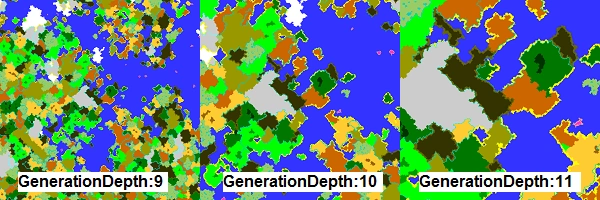
All size settings such as Biome Group Size, RiverSize, LandSize (in the WorldConfig.ini), and BiomeSize (in Biome Configs) must be between 0 (largest) and GenerationDepth (smallest).
For a full explanation of Generation Depth, go here: GenerationDepth
BiomeGroups [ ]
This allows you to group similar biomes together so that they spawn next to each other.
Note: If you’re using BiomeMode: BeforeGroups, only the biomes listed in groups named NormalBiomes and IceBiomes and the size and rarity of the group named IceBiomes will be used. Other groups are ignored. The size and rarity of the NormalBiomes group is ignored as well, use LandSize and LandRarity instead.
Biome Lists [ ]
Not all biomes spawn as part of a group. Some biomes spawn as isles in other biomes, or as borders on other biomes.
Note: Isle biomes’ sizes must be smaller (higher BiomeSize number) than the biome they are inside.
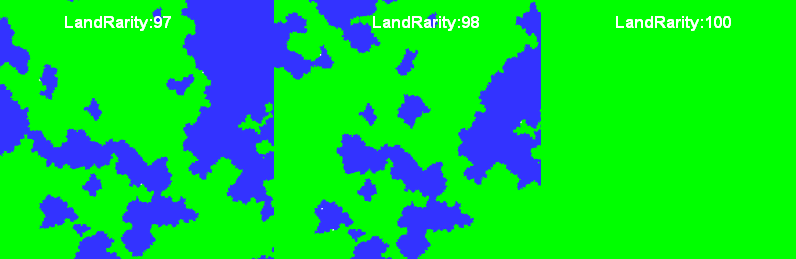
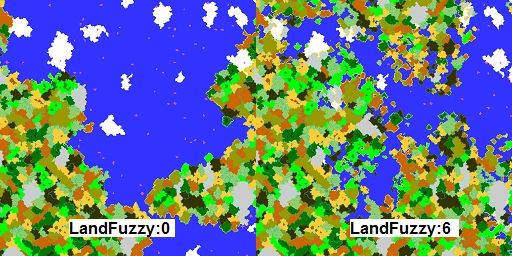
Landmass Settings [ ]
Ice Area Settings [ ]
River Settings [ ]
Settings for generating a biome distribution from an image (BiomeMode:FromImage) [ ]
The values in this section only work when BiomeMode is set to FromImage.
Image Mode [ ]
Defines what to do when terrain is generated outside the boundaries of the image:
| Repeat | Repeats the image |
| Mirror | Mirrors the image |
| ContinueNormal | Continues with random generation |
| FillEmpty | Fills the space with one biome (defined below) |
Note that when using ContinueNormal, any holes in the map (pixels with colours that don’t correspond to a biome) will use the underlying normal terrain generation. This can give interesting effects, but should be used with care and it recommended to surround any such holes with a border biome to ensure a smoother transition. This is also unpredictable, and each hole will have different biomes depending on the seed.
The Image File [ ]
The image which will provide the Biomes must be a PNG file without transparency, once placed in the same folder as WorldConfig.ini OTG will use it as a reference for the Biomes generation. Usually the map spawn location is considered to be the center of the image (but you can change this behaviour with the ImageXOffset/ImageYOffset settings.
The map must be drawn with a pixel perfect brush (means without AntiAliasing) often called as the Pencil tool in many image editors. Each color (expressed as an hexadecimal value) represent a Biome where the Biome Color association is made in each biome configuration file Biome.cfg, a map can be as simple as few colors or articulated and complex as the one shown below.
When drawing your map keep in mind the size you want your map to be and that each pixel is mapped as a surface of 4×4 blocks. Based on your OTG settings the transition from biome to biome can be more or less smooth. You can also set what biome should spawn in the unlikely case you forgot to draw an area or used a color not associated to any biome.
Closeup of the Map file

Example Biome map courtesy of the Dregora OTG presets (MIT).
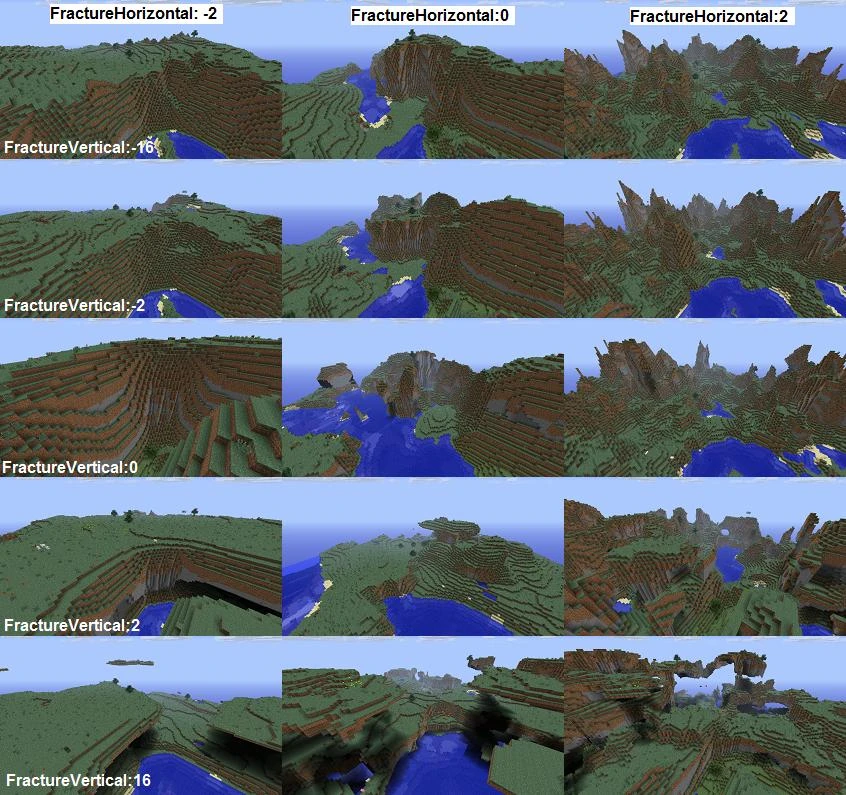
Terrain Height and Volatility [ ]
Blocks [ ]
PopulationBoundsCheck — When set to true this setting ensures all objects generate in the same place no matter the direction in which the terrain was first discovered. If your world has many large objects and you do not mind that your world may look slightly different depending on the direction you explored in, set this setting to false.
Technical explanation: Terrain generation is split in two steps, chunk generation and population. During terrain population Minecraft guarantees that a 2×2 square of chunks is generated so that population of a chunk can extend into neighbouring chunks. Depending on the direction you explored in, other chunks may also be loaded. However, you usually don’t want population to affect those chunks too, as that would cause terrain object generation to be dependant on the direction you explored in. The 2×2 chunk restriction makes it impossible to spawn CustomObject() BO2s and BO3s larger than 32×32 blocks.
ResourcesSeed — Allows you to use another seed for the resources (ores, trees, etc) than the world seed, so that the resources are generated in a different place. This can be useful if you are frequently regenerating areas (mining areas, minigames): just change the ResourcesSeed and the ores, trees and structures will have a new position. Players won’t be able anymore to write down the coordinates of where ores will regenerate.
Water and Ice [ ]
WaterLevelMin / Max — These two variables control the water level. Every empty block between these two values will be flooded with the WaterBlock (caves are exempt). For biome specific water settings you can override all water values in the biome configs by enabling UseWorldWaterLevel:false there.
WaterBlock — Block id used as water in WaterLevel. Accepts Minecraft numerical IDs or Spigot block names.
IceBlock — Block id used as ice.
Structures [ ]
Note: The ‘generate-structures’ setting in the server.properties file is ignored by Terrain Control. Use these settings instead.
Strongholds [ ]
StrongholdsEnabled — Whether the strongholds are enabled.
StrongholdCount — The number of strongholds in the world (default is 128).
StrongholdDistance — Determines how far strongholds are from the spawn and other strongholds (minimum is 1.0, default is 32.0)
StrongholdSpread — Determines how concentrated strongholds are around the spawn (minimum is 1, default is 3). Lower number, lower concentration.
Villages [ ]
VillagesEnabled — Whether the villages are enabled for the world.
VillageSize — The size of the village. Larger is bigger. Normal worlds have 0 as default, superflat worlds 1.
VillageDistance — The minimum distance between the village centers in chunks. Minimum value is 9.
Rare Buildings [ ]
RareBuildingsEnabled — Whether rare buildings (Desert temples, witch huts) are enabled.
MinimumDistanceBetweenRareBuildings — The minimum distance between rare buildings in chunks.
MaximumDistanceBetweenRareBuildings — The maximum distance between rare buildings in chunks.
Ocean Monuments [ ]
OceanMonumentsEnabled — Whether ocean monuments are enabled. A setting with the same name can also be found in the BiomeConfigs. When at least one of the two it set to false, the ocean monument won’t spawn. In other words: setting this to false in the WorldConfig will disable ocean monuments in all biomes, regardless of the value of the setting in the biomes.
OceanMonumentGridSize — Ocean monuments are placed on the corners of a grid, with a random offset added to each corner. This setting represents the size of the grid in chunks. Setting this to 8 will give a grid with cells of 8×8 chunks.
OceanMonumentRandomOffset — Random offset from each corner of the grid defined by OceanMonumentGridSize in chunks, on both the x and z axis. May not be smaller than 0, and may not be larger than OceanMonumentGridSize.
Custom Structures [ ]
MaximumCustomStructureRadius — Affects the CustomStructure resource (see biome configuration files) maximum radius of custom structures in chunks. The more chunks are searched, the larger a structure can be, but the slower structure generation becomes. The radius is of a square, so a radius of 5 allows custom structures to be up to 10×10 chunks.
Setting your MaximumCustomStructureRadius to a high number will decrease performance even when there are no customstructure entries in your biome configs.
Other Structures [ ]
MineshaftsEnabled — Whether the underground abandoned mineshafts are enabled.
NetherFortressesEnabled — Whether the Nether fortresses are enabled.
World Visual Settings [ ]
Note: Values in this section will work only for clients with the singleplayer (forge) version of OTG. Sky, grass and foliage colors are defined inside the biome configs.
WorldFog — World fog color
WorldNightFog — World night fog color
Cave Variables [ ]
caveRarity — This controls the odds that a given chunk will host a single cave and/or the start of a cave system.
caveFrequency — The number of times the cave generation algorithm will attempt to create single caves and cave systems in the given chunk. This value is larger because the likelihood for the cave generation algorithm to bailout is fairly high and it is used in a randomizer that trends towards lower random numbers. With an input of 40 (default) the randomizer will result in an average random result of 5 to 6. This can be turned off by setting the «even cave distribution» setting (below) to true.
individualCaveRarity — The odds that the cave generation algorithm will generate a single cavern without an accompanying cave system. Note that whenever the algorithm generates an individual cave it will also attempt to generate a pocket of cave systems in the vicinity (no guarantee of connection or that the cave system will actually be created).
caveSystemFrequency — The number of times the algorithm will attempt to start a cave system in a given chunk per cycle of the cave generation algorithm (see cave frequency setting above). Note that setting this value too high with an accompanying high cave frequency value can cause extremely long world generation time.
caveSystemPocketChance — This can be set to create an additional chance that a cave system pocket (a higher than normal density of cave systems) being started in a given chunk. Normally, a cave pocket will only be attempted if an individual cave is generated, but this will allow more cave pockets to be generated in addition to the individual cave trigger.
caveSystemPocketMinSize/caveSystemPocketMaxSize — The minimum and maximum size that a cave system pocket can be. This modifies/overrides the cave system frequency setting (above) when triggered.
evenCaveDistribution — Setting this to true will turn off the randomizer for cave frequency (above). Do note that if you turn this on you will probably want to adjust the cave frequency down to avoid long load times at world creation.
Canyon Variables (Ravines) [ ]
canyonRarity — The rarity of ravines, lower number means less ravines
canyonMinAltitude/canyonMaxAltitude — Altitude restrictions for ravine generation.
canyonMinLength/canyonMaxLength — The minimum/maximum length of ravines.
canyonDepth — The depth of ravines.
Other settings [ ]
World Seed — Entering a string here will set a default seed for every world created with the world preset.
Bo3 At Spawn — Enter the name of the object you want to generate at world spawn, the bo3 must be located in the /WorldObjects folder.
Pre-generation Radius — Forge only. The radius in chunks around spawn that you would like to pre-generate by default on world creation. Can be changed in the GUI, and can be stopped by setting to 0.
World Border Radius — Forge only. The radius in chunks around spawn that you would like the worldborder to appear, 0 means no worldborder.
Dimensions Settings (Forge Only) [ ]
These settings allow you to initialize other dimensions alongside this world, have them above or below the overworld, and customise the portal leading to this dimension (materials, mobs, colors, particles).
| Dimensions | Dimensions that should be loaded for this world at world creation. A world/preset directory of the same name must be present in mods/OpenTerrainGenerator/worlds/. |
| DimensionBelow | When a player goes below Y 0, they will be teleported to this dimension (name). The dimension must have been added/registered, either via the Dimensions setting, the world creation GUI, in-game O menu or modpack config. |
| DimensionAbove | When a player goes above Y 255, they will be teleported to this dimension (name). The dimension must have been added/registered, either via the Dimensions setting, the world creation GUI, in-game O menu or modpack config. |
| DimensionPortalMaterials | A comma seperated list of blocks, dimension portals made of one or more of these blocks will lead to this world. For blocks that have rotation such as stairs be sure to add all rotations (0,1,2,3,4,5,6,7), for instance: QUARTZ_STAIRS:0, QUARTZ_STAIRS:1, QUARTZ_STAIRS:2 etc. For blocks that have rotation such as QUARTZ_STAIRS, «QUARTZ_STAIRS» is the same as «QUARTZ_STAIRS:3». See Spigot material names for a list of valid materials. Example: DimensionPortalMaterials: DIRT |
| PortalColor | The color of OTG portal blocks, «default» by default.Colors: beige, black, blue, crystalblue, darkblue, darkgreen, darkred, emerald, flame,gold, green, grey, lightblue, lightgreen, orange, pink, red, white, yellow, default. |
| PortalParticleType | The type of particles spawned by OTG portal blocks, «portal» by default. For a list of particles, use /otg particles |
| PortalMobType | The type of mobs spawned by OTG portal blocks, «zombie_pigman» by default. For a list of mobs, use /otg entities |
| PortalMobSpawnChance | The mob spawn chance for OTG portal blocks, 2000 by default, lower value means higher chance. Mob spawn chance also depends on difficulty level. |
| TeleportToSpawnOnly | If set to true, when a player enters this world via a portal it will always spawn them at the world spawn point. |
Game rules (dimensions only, Forge only)
Game rules for dimensions. Since /gamerule only affects the overworld, these settings can be used to change game rules for OTG dimensions. These settings can also be configured via the in-game O menu.
| CommandBlockOutput | Whether command blocks should notify admins when they perform commands. |
| DisableElytraMovementCheck | Whether the server should skip checking player speed when the player is wearing elytra. Often helps with jittering due to lag in multiplayer, but may also be used to travel unfairly long distances in survival mode (cheating). |
| DoDaylightCycle | Whether the day-night cycle and moon phases progress. |
| DoEntityDrops | Whether entities that are not mobs should have drops. |
| DoFireTick | Whether fire should spread and naturally extinguish. |
| DoMobLoot | Whether mobs should drop items. |
| DoMobSpawning | Whether mobs should naturally spawn. Does not affect monster spawners. |
| DoTileDrops | Whether blocks should have drops. |
| DoWeatherCycle | Whether the weather will change. |
| KeepInventory | Whether the player should keep items in their inventory after death. |
| LogAdminCommands | Whether to log admin commands to server log. |
| MaxEntityCramming | The maximum number of other pushable entities a mob or player can push, before taking 3 doublehearts suffocation damage per half-second. Setting to 0 disables the rule. Damage affects survival-mode or adventure-mode players, and all mobs but bats. Pushable entities include non-spectator-mode players, any mob except bats, as well as boats and minecarts. |
| MobGriefing | Whether creepers, zombies, endermen, ghasts, withers, ender dragons, rabbits, sheep, and villagers should be able to change blocks and whether villagers, zombies, skeletons, and zombie pigmen can pick up items. |
| NaturalRegeneration | Whether the player can regenerate health naturally if their hunger is full enough (doesn’t affect external healing, such as golden apples, the Regeneration effect, etc). |
| RandomTickSpeed | How often a random block tick occurs (such as plant growth, leaf decay, etc.) per chunk section per game tick. 0 will disable random ticks, higher numbers will increase random ticks. |
| ReducedDebugInfo | Whether the debug screen shows all or reduced information; and whether the effects of F3+B (entity hitboxes) and F3+G (chunk boundaries) are shown. |
| SendCommandFeedback | Whether the feedback from commands executed by a player should show up in chat. Also affects the default behavior of whether command blocks store their output text. |
| ShowDeathMessages | Whether death messages are put into chat when a player dies. Also affects whether a message is sent to the pet owner when the pet dies. |
| SpawnRadius | The number of blocks outward from the world spawn coordinates that a player will spawn in when first joining a server or when dying without a spawnpoint. |
| SpectatorsGenerateChunks | Whether players in spectator mode can generate chunks. |
World provider settings (dimensions only, Forge only)
World provider settings for dimensions. These settings can also be configured via the in-game O menu, though some can only be changed during world creation.
| WelcomeMessage | A message to display to the user when they transfer to this dimension. |
| DepartMessage | A Message to display to the user when they transfer out of this dimension. |
| HasSkyLight | A boolean that tells if a world has a sky or not. Used for calculating weather and skylight. Also affects GetActualHeight(), hasSkyLight = false worlds are seen as 128 height worlds, which affects nether portal placement/detection. |
| IsSurfaceWorld | Returns ‘true’ if in the «main surface world», but ‘false’ if in the Nether or End dimensions. Affects: Clock, Compass, sky/cloud rendering, allowed to sleep here, zombie pigmen spawning in portal frames. |
| CanRespawnHere | True if the player can respawn in this dimension (true = overworld, false = nether). |
| DoesWaterVaporize | True for nether, any water that is placed vaporises. |
| DoesXZShowFog | Returns true if the given X,Z coordinate should show environmental fog. True for Nether. |
| UseCustomFogColor | Set this to true if you want to use the fog color settings below. |
| FogColorRed | |
| FogColorGreen | |
| FogColorBlue | |
| IsSkyColored | Is set to false for End (black sky?) |
| CloudHeight | Height clouds appear at, this may be changed by other mods. |
| CanDoLightning | |
| CanDoRainSnowIce | |
| IsNightWorld | If true then the sky will be locked at midnight with the moon and stars above but the world will be lit as if it were day time. Useful for space dimensions. |
| VoidFogYFactor | A double value representing the Y value relative to the top of the map at which void fog is at its maximum. The default factor of 0.03125 relative to 256, for example, means the void fog will be at its maximum at (256*0.03125), or 8. |
| GravityFactor | A value above 0.0, defaults to 0.08. Affects entities jumping and falling. 0.04 would result in half the gravity and falling damage. |
| ShouldMapSpin | Determine if the cursor on the map should pin’ when rendered, like it does for the player in the nether. |
| CanDropChunk | Called to determine if the chunk at the given chunk coordinates within the provider world can be dropped. Used in WorldProviderSurface to prevent spawn chunks from being unloaded. |
| RespawnDimension | Dimension that players respawn in when dying in this dimension, defaults to 0, only applies when canRespawnHere = false. |
| MovementFactor | The dimension’s movement factor. Whenever a player or entity changes dimension from world A to world B, their coordinates are multiplied by worldA.provider.getMovementFactor() / worldB.provider.getMovementFactor(). Example: Overworld factor is 1, nether factor is 8. Traveling from overworld to nether multiplies coordinates by 1/8. |
| ItemsToAddOnJoinDimension | Similar to the /give command, gives players items when they enter a dimension/world. |
| ItemsToRemoveOnJoinDimension | The opposite of the /give command, removes items from players inventories when they enter a dimension/world. |