
Please log in or register
To enjoy the benefits of Nexus Mods, please log in or register a new account
Puppeteer Master
File information
Last updated
Original upload
Created by
Uploaded by
Virus scan
Tags for this mod
About this mod
Allows you to control all NPCs in the world, including player, and make them play different animations, scenes, override AI, change facial expressions and more.
Credits and distribution permission
Author notes
This author has not provided any additional notes regarding file permissions
File credits
This author has not credited anyone else in this file
Donation Points system
This mod is not opted-in to receive Donation Points
Version 1.6
Version 1.5.5
Version 1.5.1
Version 1.5
Version 1.2
Version 1.1
Version 1.0
Ever dreamed of being a Puppeteer, able to control your little submissive dolls?
You designed a great scene, a stage play, in your mind, but never was able to actually see it in action?
Or maybe you simply wanted to created some awesome screenshot, but you cannot set your hero in any cool looking pose?
Dream no more! This mod brings you a possibility to control yourself and any NPC into brainless puppet doing anything you want.
Currently mod offers you over 400 animations (including paired, combat and furniture), facial expressions, scenic abilities and AI overriding.
Just think of the screenshoting possibilities!
After you start the game, you should recieve spell and items. Their purpose is described below:
When the flag is on, you can change paired actors and keep playing paired animations.
To set the flag back off, select ‘Paired flag’ button again. The actors will still be marked though,
so you can set the flag back on and play paired anim without setting actors again.
When playing paired killing blows, please make sure the actors are close to each other and the killer is in combat mode (Combat->Misc->Start), or the animation may fail/look strange.
Also keep in mind that playing killing blow animation will kill the victim and is treated as crime.
Full how-to is show in the video.
The last version brings you the ability to create scenes. This means that up to 20 animations can be played at the same time or with delays. Each actor can be selected more than once, and every delay can be set separately.
How to create scene (scenic options are located in Misc->Scene):
Repeat until you have everything set. To play, hit ‘Play’ button. To reset actors animation state, hit ‘Reset’. To clear all scene actors and timing, hit ‘Clear’.
Full how-to is shown in the video.
Facial expressions are placed in Misc->Facial. They will override any facial expressions of selected actor (even in dialogue) until you reset it.
You can also change the facial expression power by buttons POWER+ and POWER-, their value change by 10% each from 0% to 100% (default).
You have to reselect facial expression to see the power change. I know what you think, it’s not handy.
On the other hand, however, you can set facial expressions with different power on actors on the same time. So it’s not a bug, it’s a feature! 😉
To mark animation/facial expression (expression ‘reset’ works too) as favorite for easier use, follow these steps:
For those who need to play actions quickly, without using menus, there are special items waiting in chest located in Puppeteer Room. There are 8 favorities and so there are 8 items. First four works for player (slots 1 to 4), the other four works for active actor (slots 5 to 8).
For example, if you’ve stored some action in slot 8, it is possible to replay it for active actor by using object «Puppeteer Favorite 8». If you need to quickly play the same action on player, you have to use slots 1-4 and corresponding item.
Also keep in mind that although you can’t use slots 5-8 on player and 1-4 on NPC by using items, you can still activate actions stored there by using normal menu.
Latest update brings you possibility to override NPC’s AI. You can select up to 15 NPCs and then make them:
— travel in 4 different styles (walk, run, sneak, sneak run) to marker placed before
— pretend talking (moving their lips till infinity)
— stay still and do nothing (do not react to player, other NPCs, combat, anything)
When you set travel to some NPC, each time you move the marker he will travel there without selecting travel again. Also keep in mind that there is only ONE marker, so you cannot make each of 15 NPCs travel to different location, they will all travel to one if more than one is selected to travel.
Standing and talking don’t have that limitations.
You can also select where actor should be looking. When you select that option, a skull will appear floating in sky in front of actor. When you activate it, it’s ragdoll will reactivate. Grab and move it to make actor look in different directions. Releasing skull will make it float in sky again. To disable skull but keep actor looking in that direction, activate it while sneaking.
Each NPC can look at different skull.
The menu is by default in wide mode, for users with screen 16:9 or 16:10. If you have smaller screen (4:3 or 5:4), select Misc->Screen to select narrow menu mode. To set it back to wide, select it again.
Using figurine can show either main menu or the last menu used. It can by changed by Misc->Last.
You can replay last used animation/facial expression for player and NPC by button in main menu or by items mentioned in BASICS section.
They are stored separately, also keep in mind that using favorites does NOT affect it.
Upgrading:
Copy the ‘Data’ folder to your Skyrim folder
(should be something like » \steamapps\common\skyrim\»).
Uninstalling by-hand:
Remove ‘Puppeteer Master.esp’, all the scripts starting with ‘JBPuppet’ or ‘JBAnim’, and the folder ‘Voice\Pupetteer Master.esp’.
Q: I have the items and the spell, but when I use them, nothing happens! How to fix that?
A: Check your game version (you can find it in lower left corner of the in-game system menu). The mod requires patch 1.6 or later (my exact game version is 1.7.7).
Also make sure you upgraded properly from previous version if you happened to have one (step-by-step tutorial can be found above).
Q: I haven’t received the spell and the items/I recieved only the spell! What’s wrong?
A: Check if you have the same issue on clean save (saved without mod). If not, please make sure you upgraded properly.
If so, check if:
— mod was installed properly and is checked on list
— open console and type help «puppet». If you recieve no results, something is wrong. PM me with the details.
Q: I’ve lost in some way my items or spell. How can I get new?
A: Either type help «puppet» and add items/spell by hand, or type ‘coc JBPuppeteerRoom’ and take items from chest that’s in there. You can fast travel from that cell.
Q: I made PC/NPC to play animation, but it gets interrupted by his AI packages/combat. What should I do?
A: You can fix that by using AI overriding (described above)
Other solution is to open console and type tai without anything selected. It turnes all AI off, but still allows actors to recieve damage/be activated etc. To turn combat AI off, type tcai. Re-type to turn them back on.
Q: Ok, now my NPC plays animation properly, but what if I want to stop him in certain position and set other actors?
A: Select him in console (click on him), him reference number should appear on the top of the sceen. Type tai to freeze/unfreeze him.
Q: When I play some of the killing animations (like dragon rodeo), I die! What the hell?
A: Some animations are supposed to be played as paired and if not played like that, they sometimes work wrong.
The issue with killing animations is that they are supposed to, well, KILL someone.
If no target is set, game sometimes think «hey, why not kill the user?».
If you set the paired animation properly, however, everything should be fine.
Q: How do I play paired animations or create scenes?
A: See descriptions above or watch videos.
1.0
-Initial release
1.1
-Added compatibility for non-widescreen players
-Removed sounds from spell
-Changed ingredients needed to craft items for those easier to find
-Changed spell settings, now it is casted instantly (you can simply press mouse button, no need to charge)
-Spell now travels extremely fast and has great range (you can affect people moving on the other side of town with no problem)
-Equip/Unequip weapon now works properly on NPCs, also added animation for reading bow
-Killing blows now work also on NPCs
1.2
-Added paired animations
-Unified wide/narrow versions into one esp, type can be changed via menu
-Added dying animations
-Added facial animations
-Added possibility to favorite anims for quick access
-Item and spell are now added when you start the game, no need to craft them
1.5
-Adjusted to 1.6 game version
-Changed the way of playing animations on NPCs. Now it’s easier and faster
-Added the ability to replay last animation on PC/NPC by either menu or item
-Added the ability to create scenes
-Added new facial expressions
-Fixed some minor bugs
-Rearranged some menus
-Added 2 mounted combat animations (there are only 2, really!)
1.6
-NPC selector is now Lesser Power, not spell
-Added AI overriding
-Removed facial expressions working only on males
-Can toggle if using item shows last shown or main menu
-Major fixes in scripts and mod structure, should work more smoothly
-Killing blows are now in ‘Combat’ section
-Made some menus smaller in narrow mode
-Restored facial expression power changing ability
Please log in or register
To enjoy the benefits of Nexus Mods, please log in or register a new account
The Puppet Master Complete
File information
Last updated
Original upload
Created by
Uploaded by
Virus scan
Tags for this mod
About this mod
Finally The Puppet Master Is Completed! New Dwelling, New Bosses, Good Loot!
Credits and distribution permission
Author notes
This author has not provided any additional notes regarding file permissions
File credits
This author has not credited anyone else in this file
Donation Points system
This mod is not opted-in to receive Donation Points
Update 2.1*
Extended the dwelling abit and placed a new companion mage Zen to the exit of the extended dwelling! She will lvl up with you up to lvl 80. Also extended lair is a place you can use as a house very convenient, Keep in mind this is still being extended and I will be implementing more fixes. PLEASE ENDORSE THIS FILE IF YOU ENJOY IT!
Be Wary Traveler’s The Daedric Gods are pissed off and unleashing more Demon’s in Skyrim.
Puppets this time around and I don’t mean toys! These puppets mean business and the Puppet Master is sitting back and laughing as they wreak havok on Skyrim.
Features
*New Bosses
*New Mobs
*New Dwelling
*GOOD loot
I suggest to be at or around at least lvl 20 to attempt this boss.
The Puppet’s Lair is on a small island just outside of Solitude see pics for map!
Let me know your thoughts or any bugs you may find. I do not suggest using any kind of Manniquin mods with this mod! If you enjoy it please Endorse me and Vote, I will create much more mods in future if i see people care.
This is my newest boss mod check it out!
http://skyrim.nexusmods.com/downloads/file.php?id=10970
Кукловод / Puppeteer Master v1.2
Описание:
Вы наверняка мечтали иметь в любимой игре свой маленький кукольный театр, где смогли бы контролировать ваших подопечных? Или, может, хотели сделать красивый скриншот, но никак не могли поставить своего героя в подходящую позу? Хватит это терпеть! Этот мод позволит вам использовать заклинания, которые превратят НПС в глупых кукол с анимацией, какой только захотите! В настоящее время мод предлагает около 400(!) анимаций на выбор. Только задумайтесь, какие возможности скриншотинга открываются перед вами!
Для получения заклинания/руны (фигуры) зайдите в любую кузницу и создайте их.
Чтобы проиграть анимацию на вашем герое, используйте Статую («Puppeteer Figurine»), после крафта она будет добавлена в инвентарь в раздел «Одежда». Вы можете добавить статую в «Избранное». При использовании она не заменяет ни один слот одежды.
Если флажок установлен, вы сможете менять парных персонажей и продолжать играть парные анимации. Чтобы снять флажок, выберите снова (Misc->Set paired).
Персонажи все еще будут отмечены, таким образом вы сможете установить флажок на место и играть парные анимации без повторного выбора персонажей.
Пожалуйста убедитесь, что «актеры» находятся близко друг к другу, а «убийца» в боевом режиме. (Combat->Misc->Start), иначе анимация может не сработать. Также имейте в виду, что, воспроизведя анимацию добивающего удара, вы убиваете «жертву», а это рассматривается как преступление.
Меню мода стандартное для пользователей с диагональю экрана 16:9 или 16:10. Если у вас экран меньше (4:3 или 5:4), выберете Misc->Change screen чтобы выбрать узкое меню мода.
Puppet master skyrim мод
Информация о моде
Изменение с использованием алмазов не уменьшает его!
Оригинальное описание приложения
Поиграй в гнусное привидение! Овладевай людьми и контролируй их, заставляй их совершать веселые проделки над самими собой и другими в любом из сотни разных уровней, доступных в игре! У тебя есть вся необходимая власть, чтобы веселиться столько, сколько захочешь! Это твой мир, а другие, что ж, они просто живут в нем!Будучи невидимым и озорным привидением, ты можешь хитростью заставлять людей делать все, что тебе придет в голову! Просто используй свое воображение и дай ему полную и безудержную свободу. Придумывай самые веселые проказы и смотри, как люди склоняются к ним, не раздумывая ни секунды! Но не забудь о Подрывниках привидений — это парни, которые ловят привидений, так что ты не захочешь быть найденным ими!Особенности:• Овладевай всеми, кем захочешь! Исследуй более сотни уникальных уровней.• Веселые проказы! Единственный предел — это предел твоего воображения!• Подрывники привидений! Используй свои тайные умения, чтобы избежать поимки.Начинай игру и повеселись сегодня!Посети https://lionstudios.cc/contact-us/, если у тебя есть какие-либо отзывы, нужна помощь в прохождении уровня или у тебя есть какие-нибудь классные идеи, которые ты хотел бы увидеть в игре!От студии, которая создала Mr. Bullet, Happy Glass, Ink Inc и Love Balls!Подпишись на нас, чтобы получать новости о наших других отмеченных наградами играх:https://lionstudios.cc/Facebook.com/LionStudios.ccInstagram.com/LionStudiosccTwitter.com/LionStudiosCCYoutube.com/c/LionStudiosCC
PuppetMaster 3D – жуткий пранк Мод APK v(1.25)
PuppetMaster 3D – жуткий пранк Мод APK v(1.3)
Puppeteer Master для TES V: Skyrim
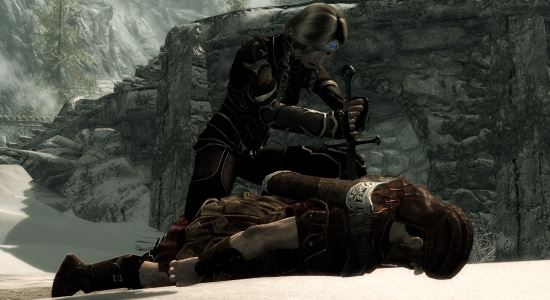
Вы наверняка мечтали иметь в любимой игре свой маленький кукольный театр, где смогли бы контролировать ваших подопечных?
Или, может, хотели сделать красивый скриншот, но никак не могли поставить своего героя в подходящую позу?
Хватит это терпеть! Этот мод позволит вам использовать заклинания, которые превратят НПС в глупых кукол с анимацией, какой только захотите! В настоящее время мод предлагает около 400(!) анимаций на выбор. Только задумайтесь, какие возможности скриншотинга открываются перед вами!
Используйте заклинание так же, как любое другое. «Атакуйте» НПС заклинанием и выберите подходящее действие. Некоторые из них требуют особых условий.
Например, если вы хотите использовать анимацию питания на стуле, НПС должен находиться в сидячем положении.
Чтобы проиграть анимацию на вашем герое, используйте Статую («Puppeteer Figurine»), после крафта она будет добавлена в инвентарь в раздел «Одежда». Вы можете добавить статую в «Избранное». При использовании она не заменяет ни один слот одежды.
Установка:
Установка стандартная. Скопируйте папку Data в папку с игрой и подключите ‘Puppeteer Master.esp’ в лаунчере игры.
Известные проблемы:
Иногда во время проигрывания анимации на НПС могут возникнуть различного рода баги.
Совместимость:
Должен быть совместим со всеми модами.
Лицевые анимации:
(Misc->Facial) Если вы хотите, чтобы это работало, будьте уверены в том, что цель не разговаривает. Лицевые эмоции будут сброшены в следующий раз, когда «жертва» заговорит.