
Альтернативная установка модов Kane’s Wrath, Tiberium Wars и Red Alert 3

Крайне простой и безотказный способ — если стандартные методы по какой-то причине не работают.
Казалось бы — в стандартном способе установки модов на TW и RA3 нет ничего сложного, но всё равно встречаются случаи, когда он отказывается работать.
Kane’s Wrath же вообще официально моды не поддерживает, что требует установки стороннего лаунчера (а с ним проблемы возникают у каждого третьего).
Это всё и побудило написать данный небольшой гайд.
1. Скачиваем необходимый мод
Все моды состоят из 2 типов файлов: .big и .skudef. Поместите папку мода с этими файлами в любое удобное для вас место.

У разных игр они называются по разному:
Если данного файла нет — обновите игру до последней версии.
Если игра в Стиме и вы не знаете пути к игре — в библиотеке нужно зайти в Свойства игры → Локальные файлы.
Рекомендуется перед этим сделать копию данного файла
Для этого нажимаем по файлу правой кнопкой → Открыть с помощью → выбираем Блокнот.

4. Вставляем в Блокнот путь к моду
А именно — путь к файлу .scudef мода из первого пункта — по следующему шаблону:
В итоге получится вот так:

5. Сохраняем изменения
Всё, теперь можно запускать игру обычным способом — она будет запускаться сразу с модом.
Чтобы вернуть все обратно — удалите добавленную в Блокноте строчку или замените изменённый файл изначальным, который вы скопировали.
C&C 3, Red Alert 3: Установка модов и карт

За время существования третьих частей свет увидело немалое количество хороших модов, проходить мимо которых фанату серии никак нельзя. Если же вы не знаете, что делать с теми непонятными файлами, что скачали, или даже не знаете, где их найти, то написанное ниже вам может помочь.
Если инструкция не помогла, то есть другой способ запуска модов.
Также настоятельно рекомендуем запустить игру хотя бы 1 раз, чтобы в реестре прописались все необходимые ключи, а также, если вы пират, рекомендуем ставить сборку от R. G. Механики, а не xatab’a.
Установка карт и модификаций на Tibеrium Wars и Rеd Alert 3 почти идентична, поэтому разберём сразу оба случая:
Установка модов
Шаг 1. Сперва мод нужно где-то взять. Есть два варианта:
Шаг 2. Скачанный мод может быть либо в виде архива с файлами .big и .skudef, либо в виде установщика .exe.
Во втором случае программа установки сама закинет файлы куда надо и даст перейти к следующему шагу.
В первом же случае папку, содержащую вышеупомянутые файлы, нужно переместить в следующую директорию:
Если папка Mods отсутствует, то её необходимо создать.
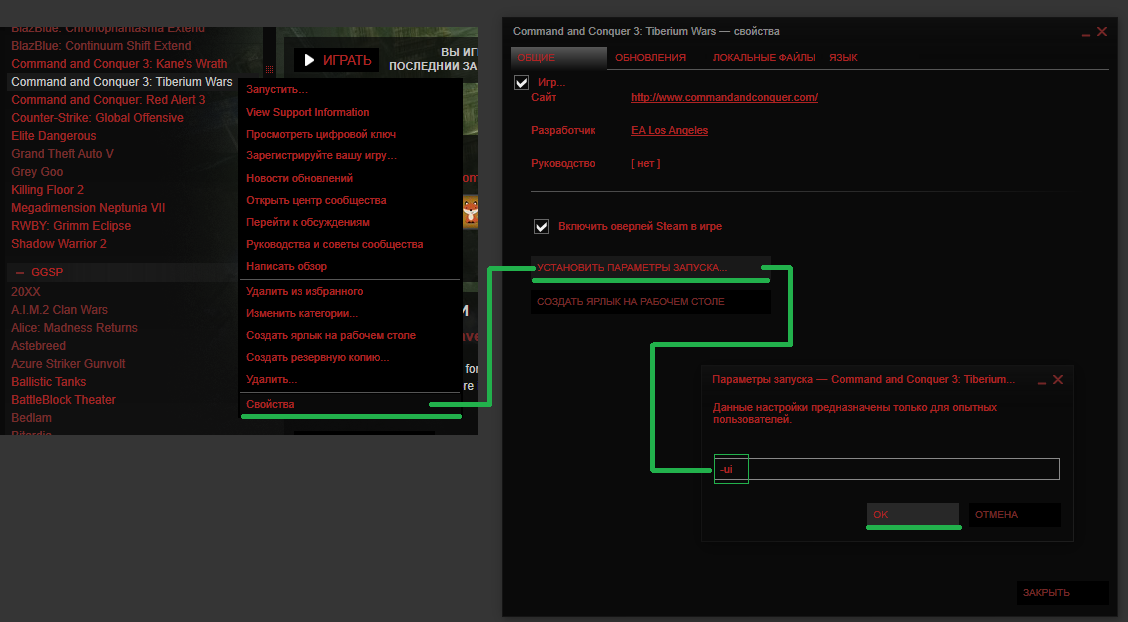
Шаг 3. Тут будет небольшая разница у версии Steam и пиратской/дисковой/Origin версий
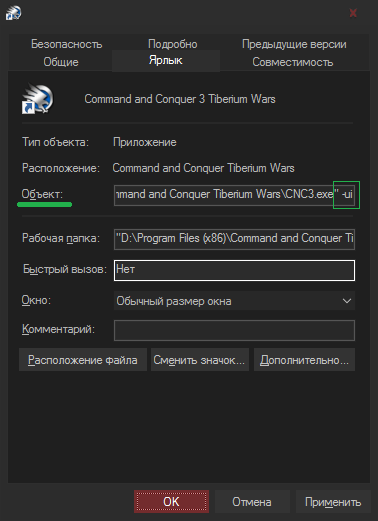
P.S. Обладатели пираток — удостоверьтесь в том, что у вас стоит последняя версия игры.
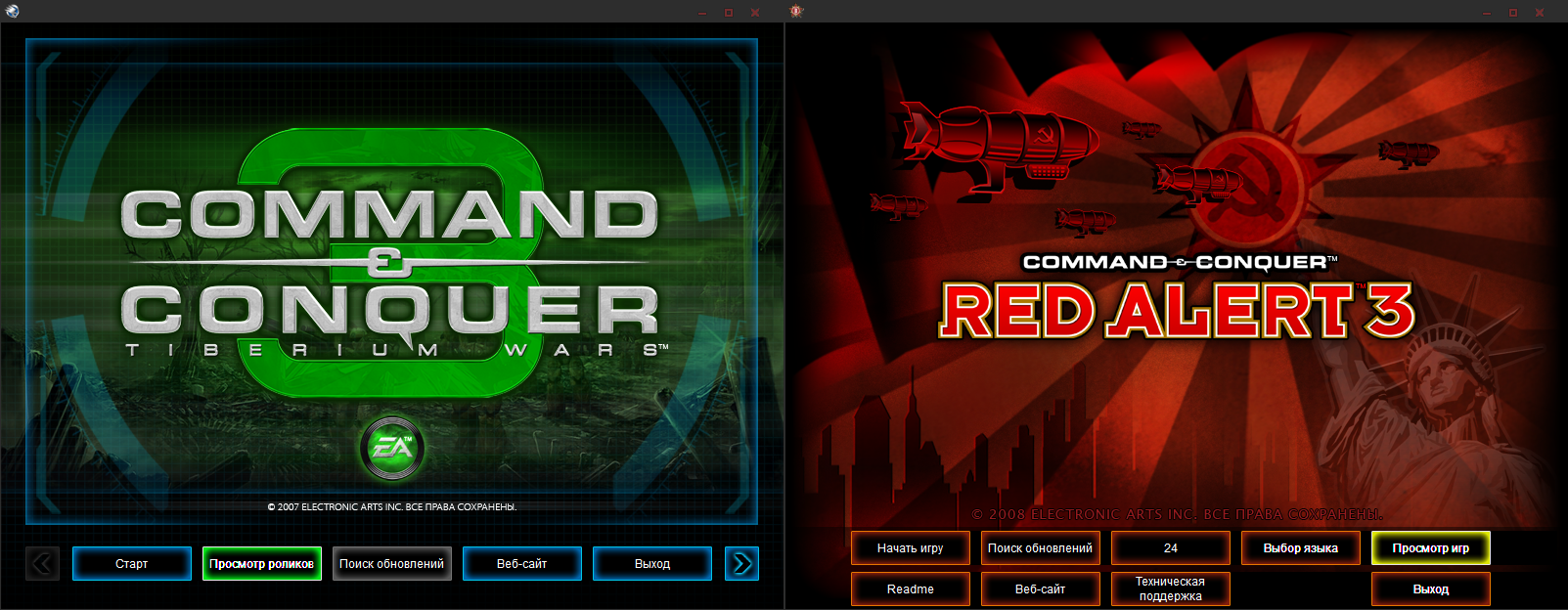
Шаг 4. Запускаем игру — попадаем в лаунчер. Нажимаем на «Просмотр роликов» или «Просмотр игр» соответственно:
P.S. Любой мод можно запустить с поддержкой серверов Реворы, используя C&C Online.
Проблемы
Если при попытке подключения происходит разрыв соединения, то необходимо выполнить следующее.

Используйте редактор реестра Windows, чтобы добавить недостающий ключ.
1) Введите “regedit” в поле поиска в меню “Пуск” и нажмите клавишу enter;
2) Перейдите к следующему разделу: HKEY_LOCAL_MACHINE\SOFTWARE\Wow6432Node\Electronic Arts\Electronic Arts\;
3) Затем, ниже, перейдите к каждой строчке для каждой игры (“Command and Conquer 3”, “Red Alert 3”, “Red Alert Uprising”);
4) Под каждой из игр должна присутствовать запись с именем “UseLocalUserMaps” типа “REG_DWORD” со значением “0” (ноль);
5) Если UseLocalUserMaps отсутствует, создайте его, выбрав следующий пункт меню: Edit > New > DWORD (32-разрядный)
ценность. Назовите новую запись “UseLocalUserMaps” и нажмите enter или нажмите что-нибудь еще, чтобы сохранить ее;
6) Повторите описанный выше шаг для каждой из игр под клавишей “Electronic Arts”.
Установка карт
Тут всё просто — папку с картой закидываем в данную директорию:
Для CnC3 — C:\Users (Пользователи)\(Имя пользователя)\ AppData\Roaming\Command & Conquer 3 Tiberium Wars\Maps
Для RA3 — C:\Users (Пользователи)\(Имя пользователя)\ AppData\Roaming\Red Alert 3\Maps
После этого карта сразу появится в игре.
Папка AppData у вас может быть скрыта — включить их отображение можно в свойствах папок в панели управления.
Red alert 3 лаунчер для модов
This is a quick guide for those who don’t know how to install or play mods on the steam version of RA3. If you have any trouble, leave a comment and I will try to help you with your problem. Don’t forget to share with your friends.
If you’re looking for bug fixes and anything like that check out this guide on the topic made by some very helpful fellow C&C players
https://steamcommunity.com/sharedfiles/filedetails/?id=505554580
Русский перевод не очень хорош, потому что я не говорю по-русски и использую google, поэтому российские игроки могли понять это руководство. Я постараюсь помочь с любой проблемой при установке




CHAPTER 1
The first step to installing a mod is to go get a mod. I like to go to ModDB, found here. Once you’ve selected the mod you want to play, you’ll have to put it in the mods folder
If you don’t have a Red Alert 3 folder, make one. when you open it, it might look something like this
If not, that’s okay. All you need to do is make a folder titled «Mods» and follow the «Readme» file that’s inside the mod you downloaded, that’ll tell you how they want you to install it into the folder.
Usually the process will have you extract the files into your mod folder
The path to the folder should look like this:
C:\Users\Admin\Documents\Red Alert 3\Mods
Do note that the name after \Users\ may or may not be «Admin». It is just the username for the account you are on on your computer.
Once all this is done, move to chapter 2, and we can talk about playing the mod you just installed.
Chapter 2
Now that we have installations out of the way, we can get serious. The first step to playing your new mods is to open the Red Alert 3 Control Center. To do this, all we need to do is add in a certain command argument into the launch sequence. To do this, we need to right click on Red Alert 3 and go to «properties» in the steam drop down.
Then set launch options
And then we add «-ui» into the empty space like so. (Don’t put the quotation marks in there)
Now you want to launch your game, and I’ll meet you over in chapter 3
CHAPTER 3
This chapter is just a quick tutorial on where to go in the new launcher that has popped up.
It will look like the one below. You’ll want to hit «Game Browser».
Once in there, you just click on Mods, pick the one you want, and hit launch game.
Now your game should have launched and your mod should be working. This is the end of the RA3 mod install/play guide, now go out their and defend freedom, fight for the glory of Japan, or for glorious Motherland.
GOOD LUCK COMMANDER
Если у вас нет папки Red Alert 3, сделайте ее. когда вы его открываете, он может выглядеть примерно так
Если нет, все в порядке. Все, что вам нужно сделать, это создать папку под названием «Моды» и следовать файлу «Readme», находящемуся в загруженном вами мод, который расскажет вам, как они хотят, чтобы вы установили его в папку
Как только все это будет сделано, перейдите к главе 2, и мы можем поговорить о том, как играть в мод, который вы только что установили.
Глава 2
Теперь, когда у нас есть установки, мы можем стать серьезными. Первым шагом к воспроизведению ваших новых модов является открытие Центра управления Red Alert 3. Чтобы сделать это, все, что нам нужно сделать, это добавить в последовательность запуска определенный аргумент команды. Для этого нам нужно щелкнуть правой кнопкой мыши по Red Alert 3 и перейти к «свойствам» в паре.
Затем задайте параметры запуска
И тогда мы добавляем «-ui» в пустое пространство так. (Не помещайте там кавычки)
Теперь вы хотите запустить игру, и я встречу вас в главе 3
Когда-то там вы просто нажимаете «Моды», выбираете тот, который хотите, и запускаете стартовую игру.
Теперь ваша игра должна быть запущена, и ваш мод должен работать. Это конец руководства по установке / воспроизведению мод RA3, теперь выходят и защищают свободу, сражаются за славу Японии или за славную Родину.


I’ve hit a solid brick wall with trying to install mods, and it is as follows- there is no folder for Command and Conquer 3: Red Alert in my PC Documents folder. My best explanation for this is that I have Steam on an external drive (PC Docs is on the local, Steam and thus the RA3 info on the external) because it has way more space for me to play games (1 terabyte on the external vs 237 gigs on the local). The issue with this explanation, though, is that when I installed Uprising I got a folder in my documents just fine.
C&C: Red Alert 3
Electronic Arts | Released 2008
Location
Filename
Category
Uploader
Added
Downloads
MD5 Hash
Embed Button
Embed Widget
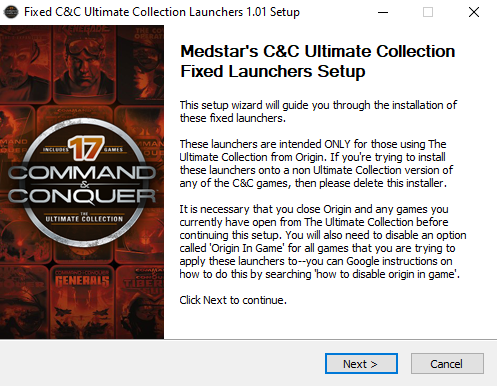
Fixed launchers for the games in Origin’s Command and Conquer: The Ultimate Collection. Re-enables command-line parameters for the games, adds in some missing registry keys, and adds in some community patches automatically. These launchers ARE NOT the same as Bibber’s; made with an entirely different programming language, and the functions used in the source are not related to those used in Bibber’s. I made my own launchers for the community to use based on how I think they originally should have worked since Bibber doesn’t want his up anywhere public anymore (his decision, of which I respect). License file included with download. Permissions about redistribution detailed in there. Patch notes included as well. Have fun 😀
Fixed Launchers for Command & Conquer: The Ultimate Collection
>>>PATCH NOTES Advanced Launch Options for Tiberium Wars/Kane’s Wath:
Uninstall
In the Origin desktop app, right-click your games’ portraits and select the “Repair” option.

Nice, been lookin for a new patch.
Well look no more! XD
Just so everyone knows, you can keep track of the progress I have for this project on my GitHub page! Github.com
If you would like to bring an issue to my attention, you can do so here: Github.com
Or, if you would like a certain patch or feature to be implemented, you can also make a new issue on my GitHub with the «Feature Request» label.
Hope everyone enjoys v1.01 of my fixed launchers! More patches and content to come soon!

Hey Medstar, just wanted to say that you’re doing a lot of good for us C&C Community. Hey, I know you addressed why some virus scans are going crazy when it comes to this, but I scanned it on VirusTotal to be safe, and though I have Microsoft Windows Defender as my main setup, VirusTotal has said that 12 out of the 60 engines it uses has detected this as some sort of virus and malware and all that.
I’ll put the link in this so you can see yourself. But still though, glad you’re helping out the C&C community.
Hey there, viperdx! Thanks for the VirusTotal link 🙂
At first glance on what engines are screaming bloody murder, I’m kinda sticking to my initial assumption in that it’s an AutoIT heuristic on their end—i.e. the engines will automatically assume that anything made by AutoIT is a virus. Heck, even two of the noted engines even say «W32/AutoIt.IJ.gen!Eldorado»—that reaffirms my suspicion even more.
I’ll look into it either way. Plus, the noted engines don’t really stand out to me—only one of the bunch (McAfee) I actually know of; and that one in particular I don’t even trust to begin with from my own experiences.
Either way, thanks again! And it is my pleasure to be of service to this awesome community! 😀
I’m glad I could be of help. I’m no modder, coder, or all that. I’m just a fan. But I’m glad I could be of help. The reason I scanned it on VirusTotal was because of other comments that were made, so I wanted to check it out for myself. But again, I’m glad I was able to help.
If I could make a personal recommendation to anyone who uses these fixed launchers, I would personally recommend that after you use these fixed launchers, to make each executable file an exclusion, so that way your anti-virus doesn’t get any ideas. Because that’s what my Windows Security on my computer did to the Red Alert 2 Launcher.
Yes, thank you for that comment (totally forgot about this hitch)—Windows for whatever reason does not like the name «RA2Launcher.exe». I will most likely be rewriting these launchers in a different language as to hopefully make people’s AV’s happier, as computers seem to like C# more than AutoIT.

Hi I just downloaded this mod and it is great, I’ve been having difficulty getting the game to run until now so thank you.
My only issue is that when I install the mod and bring up the game, it is incredibly zoomed in and it mainly focuses on the top right of the screen so I can’t get to the options in the menu. When I change the res in the properties menu it doesn’t fill the screen fully, which I’m fine with, but after a while it changes it so it looks like when you watch an older movie but on a widescreen, the sides are cut off, showing the desktop, and the game screen is really small. Any ideas on how to fix this?
Um. I’m not quite sure that I know what you are talking about? This file is just an installer that replaces your games’ launchers with ones that accept command line parameters—they don’t modify the games in any way other than that. Perhaps you were redirected here from a mod’s instructions?

Hello. I cannot get past the pop up of must have «directX 9» or higher. I’m running directX 12 but will close the game completely.
Try downloading and installing the DirectX 9.0c Redistributable from Microsoft, then reboot your computer afterwards. Some modern PC’s can’t work with these games in full-screen mode—try telling the game to launch in windowed mode with the resolution set to your monitor’s current resolution, and the window position to be at (0,0).
Here’s also a link to an extracted version of the DirectX 9.0c Redistributable: Mega.nz
I think this is a dll problem. Try deleting dbghelp.dll

This comment is currently awaiting admin approval, join now to view.
im trying to install the Fixed Ultimate Collection Launchers v1.01, but my Virus software is prompting that its a virus and not allowing me to install it.
Don’t worry about that. The way this launcher works accidently trips every wire known to man. Windows Defender, McAffee, Avast, etc. all will give you a false positive

I keep getting a virus detected when trying to download this file?
False positive; the language I used to compile the launchers is what’s being flagged. I’ll change that in the next release.

hi! someone may know if this fixed launcher will let me change language? i buyed it on eneba but i got it on english i can read and speak on english but my main language is spanish, also i played this jewel on a old pentium 4 back in day on spanish, so for me its quite great if someone can help me witht that

This comment is currently awaiting admin approval, join now to view.
Hello. Is there a launcher for CNC4? I can’t install it, it can’t be checked in install menu. I’ve installed launchers for all other games, but can’t do it for CNC4. I need it, because i’m having issues with «unable to connect to the internet», and so, i can’t play at all. Thank you.
my data was, of course, changed xD don’t want anyone to hack me ^_^
I hope this helps anyone. Want to post in on as much resouces as possible, including Russian one’s.
UPDATE: I don’t know if you need to turn off the games auto-update and cloud saves on Origin, because in case of CNC 4, we can now launch it without Origin. Of course, that means, game time won’t count in Origin.
I will take note of this; thank you for sharing this info. I may add something in my launchers to allow users to input their credentials right off the bat.
Just noticed how dumb i was; i was writing this post somewhere in 4 at night and forgot to check the description, where it said that it’s only for Origin, which makes all my references in post to Steam useless. lol.
Overminded myself. I thought (idk why) that my post had some references to Steam and it’s users; so i wrote a post that indicates i’m dumb; but i am really dumb, because i just re-read my post and there is no references to Steam at all. Double dumb.
If your game is from The Ultimate Collection, then it should be able to see your installation. If not, then you might try reinstalling your game, as something in your registry might not be set correctly.
Anyway, big thanks to launchers for all other games, helps me a lot 🙂

Can’t get my computer to fully allow me to keep the download of the file. It keeps saying virus detected.
False positive; mainly due to the language I used to make the launchers. I will fix this in the next release.

Thanks for the launcher. I am running the latest windows 10 build, I have CNC 3 TW and KW installed using steam. When I run the Installer, I get all the way to select which launchers to install, then I cannot click on any of them. They are all greyed out. is there a way around this? I have tried launching the installer using elevated command line, setting the app to admin launch and even setting compatibility mode. Is there maybe something I am missing?
These launchers are only for The Ultimate Collection on Origin. They are not needed by Steam installations.
Getting the same issue as luiantonyshyn, says there’s malware and refuses to let it install.
False positive; mainly due to the language I used to make the launchers. I will fix this in the next release.
I must be doing something wrong, but I’ve installed the launchers following all instructions to a T (disabling all the origin crap, installers are going in the right place, mods are properly installed) but I still get the useless technical difficulties crash message.

The installer EXE doesn’t do anything when I click on it. I’m on Windows 10. I added it to my Avast and Malwarebytes exclusion lists, and I also tried turning Avast and Malwarebytes off completely.
However, I was able to run it from the command line (I used PowerShell).
Here’s what I did:
1. Open up PowerShell (right click the Windows logo at bottom left of the screen, then click «Windows PowerShell»).
2. Then run these two commands:
cd «C:\Users\kevin\Downloads\Fixed_TUC_Launchers_v1.01»
& ‘.\Fixed C&C Ultimate Collection Launchers Installer.exe’
When I ran these commands, the launcher started up perfectly and everything works!
Thank you Medstar for this awesome fixed launcher! Now I’m able to run the ShockWave mod 🙂