
Richard burns rally моды
Этапы чемпионатов проводятся с помощью online-плагина на сайте:

Установка автомобиля
Автомобиль в РБР состоит из 2 частей и соответственно устанавливается в 2 этапа:
I. Модель (а так же текстуры и конфигурационные файлы)
Сразу хотим предупредить — в RBR нельзя добавить автомобиль. Его можно только заменить.
Соответствие слотов моделей в файле cars.ini и названий подпапок в файле physics.rbz:
Car00 — c_xsara — заменяет Citroen Xsara
Car01 — h_accent — заменяет Huyndai Accent
Car02 — mg_zr — заменяет MG ZR
Car03 — m_lancer — заменяет Mitsubishi Lancer
Car04 — p_206 — заменяет Peugeot 206
Car05 — s_i2003 — заменяет Subaru Impreza 2003
Car06 — t_coroll — заменяет Toyota Corolla
Car07 — s_i2000 — заменяет Subaru Impreza 2000
Установить автомобиль можно в любой слот (вместо любого автомобиля) за изключением слота Car02. В этот слот желательно устанавливать только переднеприводные автомобили.
I. Установка модели
1. Распакуйте архив

2. Скопируйте папку c моделью автомобиля в папку Cars.


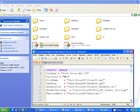
3. Найдите и откройте файл Readme.txt * в архиве с моделью. В нем указаны данные, необходимые для того, что бы игра увидела модель. Это строчки:
Скопируйте их в буфер обмена.

4. Откройте файл Cars.ini и выделите слот, вместо которого хотите установить новый автомобиль, и замените эти данные новыми из Readme.txt.


5. Сохраните изменения в файле Cars.ini.
* Readme.txt образное название текстового файла в котором содержатся данные для новой модели автомобиля. У разных авторов моделей может называться по разному.
CarName = «Название машины англ. буквами»
CarClass = «Название класса англ. буквами»
II. Установка физики
1. Откройте архив с физикой, но не распаковывайте её.

2. Параллельно откройте файл Richard Burns Rally\Physics.rbz с помощью WinRAR.

3. В архиве Physics.rbz найдите папку с названием машины вместо которой вы установили новую модель. Выделите и удалите все файлы из папки.
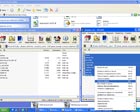
4. Перетащите новые файлы с физикой из открытого архива (п. 1) на место удаленных файлов. Автоматически появится диалоговое окно WinRAR в котором будет указан путь, метод сжатия Оставьте все как есть и нажмите ОК.

? Примечание. В Readme файлах, которые идут с архивом, часто предлагается устанавливать физику путем распаковывания и копирования папки Physics в папку с игрой. Так делать можно, но помните, устанавливая физику таким образом вы не сможете принимать участие в онлайн турнирах на плагине и соответственно на нашем сайте.
kegetys.fi

Richard Burns Rally mods
RBRvr v1.6 – Fix for crash with some controllers
Here is a quick update to RBRvr that should fix crashing that occurs when two VR controllers are present with different models (Like most Oculus headsets). Also the left/right controller assignment for Vivedrive should be fixed.
Download from here. See the readme.txt for instructions and some troubleshooting hints as usual.
RBRvr v1.5 – Fix for latency + camera options
New camera options
Here is another update to RBRvr which should fix the latency issues with rendering introduced in v1.4. It took a long time to find a way to get it working properly, but now it should be a lot more pleasant to look at.
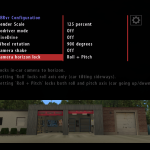
In addition it comes with options to disable the default camera shake in the in-car view and and to lock the camera to the horizon in either roll axis only or roll + pitch.
I did not have time to test it thoroughly so its possible there are some bugs as the RBR camera override is now done in a totally different manner.
Download from here (v1.5). Get the updated v1.6 from here.
See the readme.txt for instructions and some troubleshooting hints. In-game you can also find a quick help sheet from the desk.
RBRvr v1.4 – Fix for crash with the Rift
Here is an update to RBRvr that fixes the random crashing issue with the Oculus Rift, the steering wheel rotation setting not working properly and the virtual VR goggles sometimes appearing when pausing/unpausing the game.
Plugin compatibility has not improved with this version since fixing the Rift issue took quite a lot of time.
Download from here (v1.4). Edit: Get updated version from here.
See the readme.txt for instructions and some troubleshooting hints. In-game you can also find a quick help sheet from the desk.
RBRvr – Richard Burns Rally VR mod for OpenVR
Here’s an update to RBRift, now called RBRvr, that brings support for OpenVR. It should work at least with the HTC Vive, hopefully also with Oculus Rift although as I only have the Vive I haven’t been able to test it on the Rift.
This version also brings other improvements, including ability to drive with the Vive controllers. See the video below.
Download from here (v1.3). Edit: Get the updated version from here.
See the readme.txt for instructions and some troubleshooting hints. In-game you can also find a quick help sheet from the desk.
The default configuration has a render scale of 200%, if you are also using the SteamVR setting to increase the pixel density further you may see some performance problems. The render scale can be changed from the in-game menu or by editing the rbrvr.cfg file.
If you like it you can donate from the button on the right 🙂
Richard Burns Rally Oculus Rift mod update v1.2
Here is another update to RBRift for Richard Burns Rally. Version 1.2 changelog:
RBRift v1.2 with reduced vignette and hidden windshield
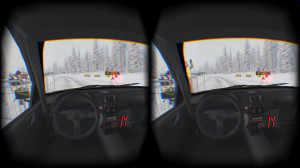
This version has pretty significant changes, like completely re-done stereo rendering implementation, corrected Oculus timing and new vignette reduction feature. It should now work very smoothly and latency free with vsync on, which is also default now.
Windshield hider is a new feature as well, it allows hiding parts of the car windshield which is just a mapped flat texture on the cars and does not appear right with stereo rendering. Also on many mod cars the windshield is too dark. The feature can be toggled with numpad asterisk key.
Clip plane tweaks should fix issues on some tracks where distant terrain got clipped away and improve in-car clipping. In-car views in replays now appear in “VR mode”. The 3D monitor effect from old versions is unavailable unfortunately, its no longer practical due to the different stereo rendering implementation.
Download from here. See the readme for install instructions as usual and some troubleshooting hints.
Richard Burns Rally Oculus Rift mod update v1.1
Here’s an update v1.1 to RBRift for Richard Burns Rally with fixes to some compatibility issues and few improvements. Changelog:
The latency fix should make it useable with vsync enabled, though by default its still disabled in the config. The compatibility fixes hopefully fix the random startup problems and make BTB tracks work that use the rbr_rx plugin.
The new codriver mode allows you to drive from the drivers seat using your standard monitor while a codriver rides with you on the codriver seat wearing the rift. So with it you can take a friend on a virtual rally car ride 🙂 See the readme for instructions how to use it.
See the readme for install instructions as usual and some troubleshooting hints.
Protip: for better immersion you can change the steering wheel rotation degrees the following way:
Oculus Rift mod for Richard Burns Rally (experimental)
I recently got a hold of the Oculus Rift DK2, and decided to try to make Richard Burns Rally work with it using a Direct3D “proxy” DLL. I had actually done it before already when I had access to the DK1 for a few days, but that was very rudimentary and did not really work too well. After some rewriting I got it working quite nicely so its here for anyone to try. It supports:
It does not work with direct-to-rift mode for some reason so even the DK2 needs to be in extended mode. Also by default vsync is disabled since I experience some latency issue with vsync on – you can change the behaviour from the config file.
You need RBR version 1.02 with SSE executable. See the readme file for instructions how to use it and also some troubleshooting hints.
RBRdll v1.3 for RBR
RBRdll is a small program for RBR that adds a “glare” postprocessing effect, enables minihud during replays, allows time acceleration/deceleration during replays, adds an FPS meter and allows to force the game to run in a windowed mode.
Version 1.3 supports RBR version 1.02 (SSE optimized executable only), adds mod directory support and individual car setup slots for each rally.
Version 1.2 adds a pacenote editor and fixes some bugs. The pacenote editor looks like this
Version 1.1 adds fixed framerate AVI recording feature, and some new camera views.
RBRdll 1.3 requries version 1.02 of Richard Burns Rally to work. Because of the way RBRdll works, its likely that there are compatibility problems with some system configurations.
To see what the glare effect looks like in game, look at these screenshots:
Japan 1: Glare on / Glare off
Japan 2: Glare on / Glare off
France 1: Glare on / Glare off
France 2: Glare on / Glare off
USA: Glare on / Glare off
Australia: Glare on / Glare off (Also shows the hud enabled during replay)
Read the readme file in the archive for install and usage instructions.
Download
Troubleshooting
The replay minihud/time controls dont work.
Make sure you have the 1.01 patch for RBR installed (shows v0.75 in the profile screen). The features most likely wont work with any other version executable, different localized versions(other than english) propably don’t work either.
Postprocessing doesn’t work.
Make sure you dont have antialiasing enabled from your video card settings, as the postprocessing effects do not work properly with it. Also try adjusting the blur size from the RBRdll config.
How do I capture the debug output that can be enabled from the config?
The debug output uses Windows standard OutputDebugString function, it can be captured with DebugView for example.
RBRdll crashes!
Try looking at the debug output for hints on what might be wrong. Try different settings for RBRdll and in the RBR graphics options to find a possible cause.
I made much better notes to stage X, how can I give the notes to other people to use?
The notes are saved in maps/track_XX-X.dls files. You can see the exact filename when saving/reloading the notes in the pacenote editor. You can distribute that file to distribute your pacenotes for that stage.
Stage X doesn’t work anymore after using the pacenote editor!
RBRdll should make backups of the original pacenote files to RBRdll/backups directory. Copy the files from there to your RBR maps directory.
Numeric Pacenotes for RBR
Numnotes replaces the default english pacenotes from RBR with numeric versions. It has two versions, ‘increasing’ and ‘decreasing’.
The increasing version replaces the pacenotes as:
flat – one
easy – two
fast – three
medium – four
K – five
The decreasing version replaces the pacenotes as:
flat – six
easy – five
fast – four
medium – three
K – two
The new pacenote sounds are a bit shorter than the default ones, so rapid notes should get called a bit faster. For a sample of what is sounds like, check out this video (5MB xvid avi).
Do a backup of your original audio.dat before installing!
The installer doesn’t work.
First, Make sure you have the latest version (1.02) installed. It is also possible that the installer doesn’t work at all in Windows 9x/ME based operating systems. If the installer doesn’t work, you can do a “manual” install by extracting the RBR audio.dat with DATtool or some other tool, and replacing the files in the ‘C:\Projects\Rally_7\TargetMedia_Develop\Pc\Debug\World\Audio\Speech\PaceNote’ directory with samples from the ‘increasing’ or ‘decreasing’ directories from Numnotes, and then repacking the audio.dat.
I don’t like it, how do I get the original pacenotes back?
Replace the audio.dat file with the backup you made before installing Numnotes.
How can I switch between ‘increasing’ and ‘decreasing’ versions?
Just run the installer batch file again for the version you want to use.
Where did you get the samples?
The notes are made by taking the numbers from ’200′, ’300′, etc. notes, and the ‘left’ and ‘right’ from the normal notes.
DATtool v1.01
DATtool can be used to extract and repack the DAT files (like audio.dat) from Richard Burns Rally.
DATtool is a command-line application, so it can be easily used to do automated installations. It also supports Windows Explorer “drag and drop” use.
To use from Windows Explorer, just drag a DAT file over the DATtool.exe icon to extract it. ‘audio.dat’ would be extracted to a directory named ‘audio’. To repack the directory to a DAT file, just drag the directory icon over the DATtool.exe icon.
Note that DATtool overwrites all files without asking, so make sure you know what you are doing and always make backups of the original game files when doing modifications.
RBRtimes v1.10
RBRtimes exports all stage records from Richard Burns Rally to a HTML file, that looks like this.
It can also export the results to a plaintext file, and by uploading the HTML records file to a website you can compare your stage records with other people.
To use it, simply put the RBRtimes.exe into your Richard Burns Rally directory and run it. It should create a file named “Records.html” which contains all the stage records. The exe also outputs the records in plaintext to stdout, so by running it from the command line or by piping the output to a file, with “RBRtimes.exe >records.txt” for example, you can get your results in a format that you can easily “copy-paste” anywhere.
Note that if you haven’t driven any stage records yet, all records will be held by Richard Burns.
Richard burns rally моды

Пожалуй начнем и начнем с того, что вам нужно скачать и сделать для того, чтобы принять участие в чемпионате.
2. Мод RSRBR2015 Edition и все нужные для него компоненты можно скачать либо с французского оф. сайта http://forum.rallyesim.fr/viewforum.php?f=65&sid=.., либо с рутрекера http://rutracker.org/forum/viewtopic.php?t=4911644 тут уже собраны ПОЧТИ все паки, что непременно очень удобно.
3. Особенности установки данной версии мода под Windows Vista / 7
взято с рутрекера=)
4. Если у вас ранее уже стоял чистый РБР или с установленными уже устаревшими версиями RSRBR, то попрошу выполнить следующее! (Если же вы ставите РБР впервые, перейдите сразу к пункту 5.!)
Перед тем, как удалить РБР, вам потребуется для начала сохранить некоторые важные файлы, которые впоследствии вы сможете использовать на версии RSRBR’15 (при желании конечно же)
г. Если приборы нестандартные, скопируйте папку Gauges, Misc и файл d3d9.dll
д. Настройки на машины под разные моды лежат в папке SavedGames, так же можете их скопировать.
После проделанных действий, перейдем к удалению:
1. запускаем unins001.exe
2. потом запускаем unins000.exe
И в конце чистим реестр!
5. Ну и наконец установка.
6. После установки всех компонентов, зайдите в RSCenter Menu (ярлык есть в папке с игрой). Там выберете пункт Register и создайте аккаунт, который впоследствии активируйте через письмо полученное на вашу электронную почту.
Ну вот и все, если возникнут вопросы, пишите в данной теме ниже=)
RALLYESIM Richard Burns Rally Live 2010
Раллийный симулятор Richard Burns Rally, выпущенный в 2004 году всё еще является одним из самых популярных автомобильных симуляторов, мод RSRBR 2010 позволит усовершенствовать игру главным образом привнеся в неё улучшенные текстуры, новые машины, более точную физику, интегрированный «ночной мод» и многое другое.
Если у вас завалялся диск с Richard Burns Rally, то это самое время вновь установить игру себе на компьютер, благодаря модерам гоночный симулятор пятилетней давности все еще пользуется огромной популярностью у виртуальных гонщиков.
Следом за модом RSRBR 2009, пожалуй самым популярным модом для РБР, Rallysim предоставляет новую версию RSRBR 2010.
Так как при установке мода RSRBR 2009 иногда возникали проблемы, то рекомендуется устанавливать мод RSRBR 2010 на чистую версию игры.
Напомним основные особенности мода RSRBR 2009:
— Обновленные текстуры для трасс: Франция Tarmac & Snow, Финляндия Tarmac, Англия “Tarmac”, MineShaft “Gravel”.
— Интегрирован «Ночной мод»
— Модифицирован грип (сцепление колес с дорогой) для большей реалистичности
— Приблизительно на 90% модифицирована физики машин (для большей реалистичности)
— Устранение повреждений (накопление повреждений между двумя этапами чемпионата)
— Интегрирована машина Opel Corsa s1600
— Интегрирована машина Citroen C4 2008
— Новые 3D модели для машин: 207 s2000 и Lancer EVO9
— Обновленная версия Скин-Менеджера с возможностью извлечения архивов со скинами
— Новый интерфейс для (RSCenter)
— Новая трасса SS18
kegetys.fi
Richard Burns Rally mods
RBRvr v1.6 – Fix for crash with some controllers
Here is a quick update to RBRvr that should fix crashing that occurs when two VR controllers are present with different models (Like most Oculus headsets). Also the left/right controller assignment for Vivedrive should be fixed.
Download from here. See the readme.txt for instructions and some troubleshooting hints as usual.
RBRvr v1.5 – Fix for latency + camera options
New camera options
Here is another update to RBRvr which should fix the latency issues with rendering introduced in v1.4. It took a long time to find a way to get it working properly, but now it should be a lot more pleasant to look at.
In addition it comes with options to disable the default camera shake in the in-car view and and to lock the camera to the horizon in either roll axis only or roll + pitch.
I did not have time to test it thoroughly so its possible there are some bugs as the RBR camera override is now done in a totally different manner.
Download from here (v1.5). Get the updated v1.6 from here.
See the readme.txt for instructions and some troubleshooting hints. In-game you can also find a quick help sheet from the desk.
RBRvr v1.4 – Fix for crash with the Rift
Here is an update to RBRvr that fixes the random crashing issue with the Oculus Rift, the steering wheel rotation setting not working properly and the virtual VR goggles sometimes appearing when pausing/unpausing the game.
Plugin compatibility has not improved with this version since fixing the Rift issue took quite a lot of time.
Download from here (v1.4). Edit: Get updated version from here.
See the readme.txt for instructions and some troubleshooting hints. In-game you can also find a quick help sheet from the desk.
RBRvr – Richard Burns Rally VR mod for OpenVR
Here’s an update to RBRift, now called RBRvr, that brings support for OpenVR. It should work at least with the HTC Vive, hopefully also with Oculus Rift although as I only have the Vive I haven’t been able to test it on the Rift.
This version also brings other improvements, including ability to drive with the Vive controllers. See the video below.
Download from here (v1.3). Edit: Get the updated version from here.
See the readme.txt for instructions and some troubleshooting hints. In-game you can also find a quick help sheet from the desk.
The default configuration has a render scale of 200%, if you are also using the SteamVR setting to increase the pixel density further you may see some performance problems. The render scale can be changed from the in-game menu or by editing the rbrvr.cfg file.
If you like it you can donate from the button on the right 🙂
Richard Burns Rally Oculus Rift mod update v1.2
Here is another update to RBRift for Richard Burns Rally. Version 1.2 changelog:
RBRift v1.2 with reduced vignette and hidden windshield
This version has pretty significant changes, like completely re-done stereo rendering implementation, corrected Oculus timing and new vignette reduction feature. It should now work very smoothly and latency free with vsync on, which is also default now.
Windshield hider is a new feature as well, it allows hiding parts of the car windshield which is just a mapped flat texture on the cars and does not appear right with stereo rendering. Also on many mod cars the windshield is too dark. The feature can be toggled with numpad asterisk key.
Clip plane tweaks should fix issues on some tracks where distant terrain got clipped away and improve in-car clipping. In-car views in replays now appear in “VR mode”. The 3D monitor effect from old versions is unavailable unfortunately, its no longer practical due to the different stereo rendering implementation.
Download from here. See the readme for install instructions as usual and some troubleshooting hints.
Richard Burns Rally Oculus Rift mod update v1.1
Here’s an update v1.1 to RBRift for Richard Burns Rally with fixes to some compatibility issues and few improvements. Changelog:
The latency fix should make it useable with vsync enabled, though by default its still disabled in the config. The compatibility fixes hopefully fix the random startup problems and make BTB tracks work that use the rbr_rx plugin.
The new codriver mode allows you to drive from the drivers seat using your standard monitor while a codriver rides with you on the codriver seat wearing the rift. So with it you can take a friend on a virtual rally car ride 🙂 See the readme for instructions how to use it.
See the readme for install instructions as usual and some troubleshooting hints.
Protip: for better immersion you can change the steering wheel rotation degrees the following way:
Oculus Rift mod for Richard Burns Rally (experimental)
I recently got a hold of the Oculus Rift DK2, and decided to try to make Richard Burns Rally work with it using a Direct3D “proxy” DLL. I had actually done it before already when I had access to the DK1 for a few days, but that was very rudimentary and did not really work too well. After some rewriting I got it working quite nicely so its here for anyone to try. It supports:
It does not work with direct-to-rift mode for some reason so even the DK2 needs to be in extended mode. Also by default vsync is disabled since I experience some latency issue with vsync on – you can change the behaviour from the config file.
You need RBR version 1.02 with SSE executable. See the readme file for instructions how to use it and also some troubleshooting hints.
RBRdll v1.3 for RBR
RBRdll is a small program for RBR that adds a “glare” postprocessing effect, enables minihud during replays, allows time acceleration/deceleration during replays, adds an FPS meter and allows to force the game to run in a windowed mode.
Version 1.3 supports RBR version 1.02 (SSE optimized executable only), adds mod directory support and individual car setup slots for each rally.
Version 1.2 adds a pacenote editor and fixes some bugs. The pacenote editor looks like this
Version 1.1 adds fixed framerate AVI recording feature, and some new camera views.
RBRdll 1.3 requries version 1.02 of Richard Burns Rally to work. Because of the way RBRdll works, its likely that there are compatibility problems with some system configurations.
To see what the glare effect looks like in game, look at these screenshots:
Japan 1: Glare on / Glare off
Japan 2: Glare on / Glare off
France 1: Glare on / Glare off
France 2: Glare on / Glare off
USA: Glare on / Glare off
Australia: Glare on / Glare off (Also shows the hud enabled during replay)
Read the readme file in the archive for install and usage instructions.
Download
Troubleshooting
The replay minihud/time controls dont work.
Make sure you have the 1.01 patch for RBR installed (shows v0.75 in the profile screen). The features most likely wont work with any other version executable, different localized versions(other than english) propably don’t work either.
Postprocessing doesn’t work.
Make sure you dont have antialiasing enabled from your video card settings, as the postprocessing effects do not work properly with it. Also try adjusting the blur size from the RBRdll config.
How do I capture the debug output that can be enabled from the config?
The debug output uses Windows standard OutputDebugString function, it can be captured with DebugView for example.
RBRdll crashes!
Try looking at the debug output for hints on what might be wrong. Try different settings for RBRdll and in the RBR graphics options to find a possible cause.
I made much better notes to stage X, how can I give the notes to other people to use?
The notes are saved in maps/track_XX-X.dls files. You can see the exact filename when saving/reloading the notes in the pacenote editor. You can distribute that file to distribute your pacenotes for that stage.
Stage X doesn’t work anymore after using the pacenote editor!
RBRdll should make backups of the original pacenote files to RBRdll/backups directory. Copy the files from there to your RBR maps directory.
Numeric Pacenotes for RBR
Numnotes replaces the default english pacenotes from RBR with numeric versions. It has two versions, ‘increasing’ and ‘decreasing’.
The increasing version replaces the pacenotes as:
flat – one
easy – two
fast – three
medium – four
K – five
The decreasing version replaces the pacenotes as:
flat – six
easy – five
fast – four
medium – three
K – two
The new pacenote sounds are a bit shorter than the default ones, so rapid notes should get called a bit faster. For a sample of what is sounds like, check out this video (5MB xvid avi).
Do a backup of your original audio.dat before installing!
The installer doesn’t work.
First, Make sure you have the latest version (1.02) installed. It is also possible that the installer doesn’t work at all in Windows 9x/ME based operating systems. If the installer doesn’t work, you can do a “manual” install by extracting the RBR audio.dat with DATtool or some other tool, and replacing the files in the ‘C:\Projects\Rally_7\TargetMedia_Develop\Pc\Debug\World\Audio\Speech\PaceNote’ directory with samples from the ‘increasing’ or ‘decreasing’ directories from Numnotes, and then repacking the audio.dat.
I don’t like it, how do I get the original pacenotes back?
Replace the audio.dat file with the backup you made before installing Numnotes.
How can I switch between ‘increasing’ and ‘decreasing’ versions?
Just run the installer batch file again for the version you want to use.
Where did you get the samples?
The notes are made by taking the numbers from ’200′, ’300′, etc. notes, and the ‘left’ and ‘right’ from the normal notes.
DATtool v1.01
DATtool can be used to extract and repack the DAT files (like audio.dat) from Richard Burns Rally.
DATtool is a command-line application, so it can be easily used to do automated installations. It also supports Windows Explorer “drag and drop” use.
To use from Windows Explorer, just drag a DAT file over the DATtool.exe icon to extract it. ‘audio.dat’ would be extracted to a directory named ‘audio’. To repack the directory to a DAT file, just drag the directory icon over the DATtool.exe icon.
Note that DATtool overwrites all files without asking, so make sure you know what you are doing and always make backups of the original game files when doing modifications.
RBRtimes v1.10
RBRtimes exports all stage records from Richard Burns Rally to a HTML file, that looks like this.
It can also export the results to a plaintext file, and by uploading the HTML records file to a website you can compare your stage records with other people.
To use it, simply put the RBRtimes.exe into your Richard Burns Rally directory and run it. It should create a file named “Records.html” which contains all the stage records. The exe also outputs the records in plaintext to stdout, so by running it from the command line or by piping the output to a file, with “RBRtimes.exe >records.txt” for example, you can get your results in a format that you can easily “copy-paste” anywhere.
Note that if you haven’t driven any stage records yet, all records will be held by Richard Burns.