
Подпишитесь, чтобы загрузить
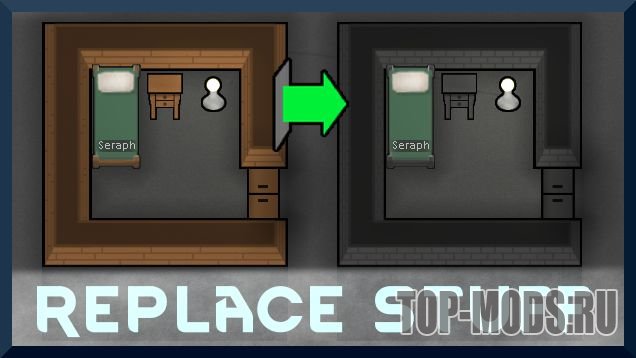
Replace Stuff


Place buildings anywhere, on top of existing things, and the game will handle it
Minor improvements:
— Corner walls are buildable and mineable from inside. Now you can finish that cave-tunneled room.
— Pawns don’t block construction.
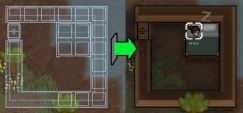
Use the new Replace tool in the «Architect/Structure» menu to replace any building’s materials. Or place a building with new stuff over an old building. New stuff is even applied to blueprints and frames.
Because Replace Stuff doesn’t break down the existing building, this means:
Upgrading walls doesn’t break the room, and keeps freezers indoors and cold.
Replacing workbenches keeps the bill list.
Replacing beds preserves their owner.
Probably more useful things I haven’t thought of.
Upgrading buildings means you can build the new building over the old version, and it will keep the old one in place until the construction is done, and the new one should keep settings.
The list of Buildings that can be upgraded:
-Walls, doors, auto-doors
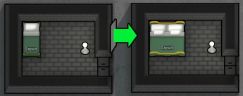
-Beds to other beds
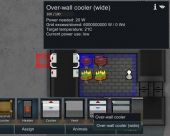
-Coolers to other coolers (i.e. make your over-wall coolers into wide coolers)
-Fueled Stove/Tailoring bench to electric versions
-Fences from the fences mod (Anything in the Designation Category «Fences»)
-Tables
-RimFridges (3rd party mod)
This type of replacement does destroy/create the thing, so certain internal data structures are re-built, but things like temperature of rooms are retained. The upgrade process has to be defined for each type, so the list is just what I thought to do.
Again, the settings saving process has to be defined for each type, so the list is just what I thought to do.
Place blueprints over water, and a job to build a bridge will be created so the building can be placed.
You can build in undiscovered areas (but after revealing a new area, invalid blueprints are canceled, often due to terrain)
The new over-wall cooler and vents behave exactly like normal coolers, but do not act as walls, and must be placed on top of walls (Which means adding a cooler doesn’t break the walls).
Does NOT work over mountain rock. Rocks aren’t walls. Smooth it into a wall first.
(I’d really like to make the base coolers work this way, but there is a lot of stuff preventing that, and then it would not work with current games since there isn’t a wall under them)
In the settings, you can disable either vanilla or over-wall coolers/vents from showing up in your build menu.
And, why not, you can place coolers/vents even if the hot/cold tiles are blocked, because you can later remove the blockage.
Replacing stuff:
-The goal for the mod is to remain the same as vanilla deconstruction/reconstruction without the hassle of empty holes or moving parts around.
—Work Needed to build is the same as normal deconstruction and construction.
—Materials Needed is just the stuff to be replaced. (Some buildings require something like wood and your choice of another material: This keeps the wood, replaces the other stuff)
—The materials left behind is only the replaced stuff at the normal deconstruction amount (usually 75%)
—The material that didn’t get replaced is preserved in the building, so you don’t lose any, nor need any. (This is technically a slight buff to normal deconstruction/reconstruction, but with the idea you’re not deconstructing it for good, this is how it’ll work)
-Buildings with quality are assigned a new quality level. (as if it were reconstructed)
-Damage done is reset (as normal deconstruction/reconstruction would reset the HP).
-Buildings generally can’t be used when being replaced. (a tricky thing to handle)
-Replacement jobs can fail just like normal construction can fail, which loses 50% materials and resets work done.
—Replacement failure does account for the fraction of work that is deconstruction work, so it doesn’t fail on the first part and doesn’t reset work done past that mark.
Rock replacement:
-When building over rock, miners and builders will both mine away the rock to make way for the building. If it’s valuable ore, your builders who are unskilled miners will lose potential ore. You may want to cancel your building projects until the skilled miners do their job.
-Resources are delivered to frames blocked by mountain rock (otherwise clearing out one rock tile for a wall would make you deliver only to that frame, so now it delivers to all wall frames even if they are not yet cleared for building)
Bridges over water
-Building things that needs a bridge will show the bridge cost
-Removing that auto-placed bridge blueprint will remove the blueprint above it
This doesn’t need a new save, but this will affect saves of course, if you have the new coolers or replacing jobs in progress. Remove those before removing the mod.
Don’t use Better Coolers/Better Vents. It breaks replacing walls with doors. It only adds the same over-wall coolers anyway.
ED’s Reverse Cycle Coolers changes the vanilla Cooler and re-writes a bunch of code so it’s 100% not compatible with other mods.
Последнее обновление: 08.09.21.
Причина: Мод обновлен до версии 05.09.21
Мод Replace Stuff для Rimworld — позволяет заменить тип материала, из которого сделан объект. При этом, сам объект не разрушается, а только изменяется материал. Свойства комнаты, температура и другие параметры на момент замены не будут затронуты.
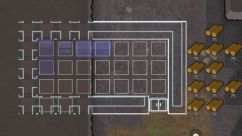
Для того, чтобы установить мод для игры Rimworld необходимо скопировать папку из скачанного архива по пути Путь к установленной игре\Rimworld\mods и включить мод в меню.
Рекомендуем ознакомиться с полным руководством на тему: «Как установить моды для Rimworld?»
Информация о файле
- Добавил: Den Martin Автор: Uuugggg Формат файла: ZIP Размер: 0.7 mb Источник: Перейти
Вы можете войти в свой аккаунт или зарегистрироваться на сайте, чтобы скачивать моды без ожидания.
ТОП группа по RimWorld
Помощь по игре и масса полезного контента. Подписывайся!
Подпишитесь, чтобы загрузить
Replace Stuff


Place buildings anywhere, on top of existing things, and the game will handle it
Minor improvements:
— Corner walls are buildable and mineable from inside. Now you can finish that cave-tunneled room.
— Pawns don’t block construction.
Use the new Replace tool in the «Architect/Structure» menu to replace any building’s materials. Or place a building with new stuff over an old building. New stuff is even applied to blueprints and frames.
Because Replace Stuff doesn’t break down the existing building, this means:
Upgrading walls doesn’t break the room, and keeps freezers indoors and cold.
Replacing workbenches keeps the bill list.
Replacing beds preserves their owner.
Probably more useful things I haven’t thought of.
Upgrading buildings means you can build the new building over the old version, and it will keep the old one in place until the construction is done, and the new one should keep settings.
The list of Buildings that can be upgraded:
-Walls, doors, auto-doors
-Beds to other beds
-Coolers to other coolers (i.e. make your over-wall coolers into wide coolers)
-Fueled Stove/Tailoring bench to electric versions
-Fences from the fences mod (Anything in the Designation Category «Fences»)
-Tables
-RimFridges (3rd party mod)
This type of replacement does destroy/create the thing, so certain internal data structures are re-built, but things like temperature of rooms are retained. The upgrade process has to be defined for each type, so the list is just what I thought to do.
Again, the settings saving process has to be defined for each type, so the list is just what I thought to do.
Place blueprints over water, and a job to build a bridge will be created so the building can be placed.
You can build in undiscovered areas (but after revealing a new area, invalid blueprints are canceled, often due to terrain)
The new over-wall cooler and vents behave exactly like normal coolers, but do not act as walls, and must be placed on top of walls (Which means adding a cooler doesn’t break the walls).
Does NOT work over mountain rock. Rocks aren’t walls. Smooth it into a wall first.
(I’d really like to make the base coolers work this way, but there is a lot of stuff preventing that, and then it would not work with current games since there isn’t a wall under them)
In the settings, you can disable either vanilla or over-wall coolers/vents from showing up in your build menu.
And, why not, you can place coolers/vents even if the hot/cold tiles are blocked, because you can later remove the blockage.
Replacing stuff:
-The goal for the mod is to remain the same as vanilla deconstruction/reconstruction without the hassle of empty holes or moving parts around.
—Work Needed to build is the same as normal deconstruction and construction.
—Materials Needed is just the stuff to be replaced. (Some buildings require something like wood and your choice of another material: This keeps the wood, replaces the other stuff)
—The materials left behind is only the replaced stuff at the normal deconstruction amount (usually 75%)
—The material that didn’t get replaced is preserved in the building, so you don’t lose any, nor need any. (This is technically a slight buff to normal deconstruction/reconstruction, but with the idea you’re not deconstructing it for good, this is how it’ll work)
-Buildings with quality are assigned a new quality level. (as if it were reconstructed)
-Damage done is reset (as normal deconstruction/reconstruction would reset the HP).
-Buildings generally can’t be used when being replaced. (a tricky thing to handle)
-Replacement jobs can fail just like normal construction can fail, which loses 50% materials and resets work done.
—Replacement failure does account for the fraction of work that is deconstruction work, so it doesn’t fail on the first part and doesn’t reset work done past that mark.
Rock replacement:
-When building over rock, miners and builders will both mine away the rock to make way for the building. If it’s valuable ore, your builders who are unskilled miners will lose potential ore. You may want to cancel your building projects until the skilled miners do their job.
-Resources are delivered to frames blocked by mountain rock (otherwise clearing out one rock tile for a wall would make you deliver only to that frame, so now it delivers to all wall frames even if they are not yet cleared for building)
Bridges over water
-Building things that needs a bridge will show the bridge cost
-Removing that auto-placed bridge blueprint will remove the blueprint above it
This doesn’t need a new save, but this will affect saves of course, if you have the new coolers or replacing jobs in progress. Remove those before removing the mod.
Don’t use Better Coolers/Better Vents. It breaks replacing walls with doors. It only adds the same over-wall coolers anyway.
ED’s Reverse Cycle Coolers changes the vanilla Cooler and re-writes a bunch of code so it’s 100% not compatible with other mods.

Описание мода «Заменяйте Вещи» на русском языке (автоматический перевод)
Размещайте здания где угодно, поверх существующих вещей, и игра справится с этим.
Заменить материал
Используйте новый инструмент Заменить в меню «Строительство/Конструкция», чтобы заменить любые материалы здания. Или поместите здание с новым материалом поверх старого здания. Новый материал даже применяется к чертежам и рамкам.
Поскольку Replace Stuff не разрушает существующее здание, это означает:
Обновление зданий
Обновление зданий означает, что вы можете построить новое здание поверх старой версии, и оно будет сохранять старое на месте до завершения строительства, а новое должно сохранять настройки.
Список зданий, которые можно обновить:
Этот тип замены разрушает/создает вещь, поэтому некоторые внутренние структуры данных перестраиваются, но такие вещи, как температура помещений, сохраняются. Процесс обновления должен быть определен для каждого типа, поэтому список — это то, что я и думал.
Автоматическое восстановление настроек с сохранением
Вещи, которые запоминают настройки при автоматическом восстановлении:
Опять же, процесс сохранения настроек должен быть определен для каждого типа, поэтому список — это то, что я и думал.
Строить над камнями/водой/туманом
Поместите чертежи на горную скалу, и будет создана работа по очистке скалы, чтобы здание можно было разместить.
В правом нижнем углу экрана есть переключатель, чтобы отключить добычу камня при размещении чертежей — поэтому, если вы добавляете этажи в горные комнаты, они не будут вырезать горные стены)
Поместите чертежи над водой, и будет построено задание, чтобы построить здание.
Вы можете строить в неоткрытых областях (но после открытия новой области, недействительные чертежи отменяются, часто из-за местности)
Настенные кулеры
Новый настенный кулер и вентиляционные отверстия ведут себя точно так же, как и обычные кулеры, но не выступают в качестве стен и должны быть размещены поверх стен (что означает, что добавление кулера не разрушает стены).
НЕ работает над горным камнем. Скалы не стены. Сначала выровняй это в стену.
Также — Новые двухстенные кулеры для толстостенных морозильных камер (в выпадающем меню при выборе кулеров).
(Мне бы очень хотелось, чтобы базовые кулеры работали таким образом, но есть много вещей, препятствующих этому, и тогда это не будет работать с текущими играми, поскольку под ними нет стены).
В настройках вы можете отключить показ ванильных или настенных кулеров/вентиляционных отверстий в меню сборки.
И, почему бы и нет, вы можете разместить кулеры/вентиляционные отверстия, даже если горячие/холодные плитки заблокированы, потому что позже вы сможете устранить засорение.
Некоторые подробности
Замена материалов
Замена камня
Мосты над водой
Хорошо, может быть, не где-нибудь — этот мод позволяет вам размещать здания в местах, которые вы, вероятно, хотите, но не буквально где угодно. В предыдущем списке функций вы теперь можете размещать здания, но это не значит, что вы можете поместить стену над башней, и будет решено разобрать башню, чтобы освободить место.
Это не требует нового сохранения, но это, конечно, повлияет на сохранение, если у вас есть новые кулеры или выполняется замена рабочих мест. Удалить те, прежде чем удалить мод.
Проблемы совместимости
Видео
Description of the mod in English
Place buildings anywhere, on top of existing things, and the game will handle it
Replace Stuff
Use the new Replace tool in the «Architect/Structure» menu to replace any building’s materials. Or place a building with new stuff over an old building. New stuff is even applied to blueprints and frames.
Because Replace Stuff doesn’t break down the existing building, this means:
Upgrade Buildings
Upgrading buildings means you can build the new building over the old version, and it will keep the old one in place until the construction is done, and the new one should keep settings.
The list of Buildings that can be upgraded:
This type of replacement does destroy/create the thing, so certain internal data structures are re-built, but things like temperature of rooms are retained. The upgrade process has to be defined for each type, so the list is just what I thought to do.
Auto-rebuild settings saving
Things that remember settings when auto-rebuilt:
Again, the settings saving process has to be defined for each type, so the list is just what I thought to do.
Build over rocks/water/fog
Place blueprints over mountain rock, and a job to clear the rock will be created so the building can be placed.
Place blueprints over water, and a job to build a bridge will be created so the building can be placed.
You can build in undiscovered areas (but after revealing a new area, invalid blueprints are canceled, often due to terrain)
Over-wall coolers
The new over-wall cooler and vents behave exactly like normal coolers, but do not act as walls, and must be placed on top of walls (Which means adding a cooler doesn’t break the walls).
Does NOT work over mountain rock. Rocks aren’t walls. Smooth it into a wall first.
Also — New Double-width over-wall coolers for your two-wall thick freezers. (In a drop-down menu when you select coolers)
(I’d really like to make the base coolers work this way, but there is a lot of stuff preventing that, and then it would not work with current games since there isn’t a wall under them).
In the settings, you can disable either vanilla or over-wall coolers/vents from showing up in your build menu.
And, why not, you can place coolers/vents even if the hot/cold tiles are blocked, because you can later remove the blockage.
Some details
Replacing stuff
Rock replacement
Bridges over water
* Okay maybe not anywhere — This mod lets you place buildings in places you probably want to, but not literally anywhere. The previous list of features is where you can now place buildings, but it’s not like this lets you place a wall over a turret and it’ll decide to deconstruct the turret to make room.
Notes
This doesn’t need a new save, but this will affect saves of course, if you have the new coolers or replacing jobs in progress. Remove those before removing the mod.
Compatibility issues:
Video
Подпишитесь, чтобы загрузить
Replace Stuff
Place buildings anywhere, on top of existing things, and the game will handle it
Minor improvements:
— Corner walls are buildable and mineable from inside. Now you can finish that cave-tunneled room.
— Pawns don’t block construction.
Use the new Replace tool in the «Architect/Structure» menu to replace any building’s materials. Or place a building with new stuff over an old building. New stuff is even applied to blueprints and frames.
Because Replace Stuff doesn’t break down the existing building, this means:
Upgrading walls doesn’t break the room, and keeps freezers indoors and cold.
Replacing workbenches keeps the bill list.
Replacing beds preserves their owner.
Probably more useful things I haven’t thought of.
Upgrading buildings means you can build the new building over the old version, and it will keep the old one in place until the construction is done, and the new one should keep settings.
The list of Buildings that can be upgraded:
-Walls, doors, auto-doors
-Beds to other beds
-Coolers to other coolers (i.e. make your over-wall coolers into wide coolers)
-Fueled Stove/Tailoring bench to electric versions
-Fences from the fences mod (Anything in the Designation Category «Fences»)
-Tables
-RimFridges (3rd party mod)
This type of replacement does destroy/create the thing, so certain internal data structures are re-built, but things like temperature of rooms are retained. The upgrade process has to be defined for each type, so the list is just what I thought to do.
Again, the settings saving process has to be defined for each type, so the list is just what I thought to do.
Place blueprints over water, and a job to build a bridge will be created so the building can be placed.
You can build in undiscovered areas (but after revealing a new area, invalid blueprints are canceled, often due to terrain)
The new over-wall cooler and vents behave exactly like normal coolers, but do not act as walls, and must be placed on top of walls (Which means adding a cooler doesn’t break the walls).
Does NOT work over mountain rock. Rocks aren’t walls. Smooth it into a wall first.
(I’d really like to make the base coolers work this way, but there is a lot of stuff preventing that, and then it would not work with current games since there isn’t a wall under them)
In the settings, you can disable either vanilla or over-wall coolers/vents from showing up in your build menu.
And, why not, you can place coolers/vents even if the hot/cold tiles are blocked, because you can later remove the blockage.
Replacing stuff:
-The goal for the mod is to remain the same as vanilla deconstruction/reconstruction without the hassle of empty holes or moving parts around.
—Work Needed to build is the same as normal deconstruction and construction.
—Materials Needed is just the stuff to be replaced. (Some buildings require something like wood and your choice of another material: This keeps the wood, replaces the other stuff)
—The materials left behind is only the replaced stuff at the normal deconstruction amount (usually 75%)
—The material that didn’t get replaced is preserved in the building, so you don’t lose any, nor need any. (This is technically a slight buff to normal deconstruction/reconstruction, but with the idea you’re not deconstructing it for good, this is how it’ll work)
-Buildings with quality are assigned a new quality level. (as if it were reconstructed)
-Damage done is reset (as normal deconstruction/reconstruction would reset the HP).
-Buildings generally can’t be used when being replaced. (a tricky thing to handle)
-Replacement jobs can fail just like normal construction can fail, which loses 50% materials and resets work done.
—Replacement failure does account for the fraction of work that is deconstruction work, so it doesn’t fail on the first part and doesn’t reset work done past that mark.
Rock replacement:
-When building over rock, miners and builders will both mine away the rock to make way for the building. If it’s valuable ore, your builders who are unskilled miners will lose potential ore. You may want to cancel your building projects until the skilled miners do their job.
-Resources are delivered to frames blocked by mountain rock (otherwise clearing out one rock tile for a wall would make you deliver only to that frame, so now it delivers to all wall frames even if they are not yet cleared for building)
Bridges over water
-Building things that needs a bridge will show the bridge cost
-Removing that auto-placed bridge blueprint will remove the blueprint above it
This doesn’t need a new save, but this will affect saves of course, if you have the new coolers or replacing jobs in progress. Remove those before removing the mod.
Don’t use Better Coolers/Better Vents. It breaks replacing walls with doors. It only adds the same over-wall coolers anyway.
ED’s Reverse Cycle Coolers changes the vanilla Cooler and re-writes a bunch of code so it’s 100% not compatible with other mods.