
BodySlide and Outfit Studio (Skyrim SE)
Как настроить тело CBBE (и другие пресеты тела) и сделать адаптацию одежды в игре Skyrim SE читаем здесь
Более подробная инструкция и туториалы смотрите в Wiki (но на английском все, поэтому самый лучший вариант, установить в браузер онлайн транслятор-переводчик, перевод получается на лету очень хороший, доступный и понятный).
Обновление:5.4.2
* Исправления:
BodySlide: исправлена ошибка когда данные настройки ползунков тела не применялись после применения кнопки «Build» без открытия окошка предварительного просмотра.
Outfit Studio: исправлено удаление неиспользуемых узлов.
Outfit Studio: исправлен сбой из-за выхода данных ползунка за пределы определенных ссылочных данных.
Outfit Studio: исправлена проверка максимального количества вершин/треугольников при импорте OBJ.
Outfit Studio: исправлено отображение координат выделенной точки (вершина под кистью).
Журнал изменений:
— Список всех изменений предыдущих версия читайте в ридми в архиве.
BodySlide
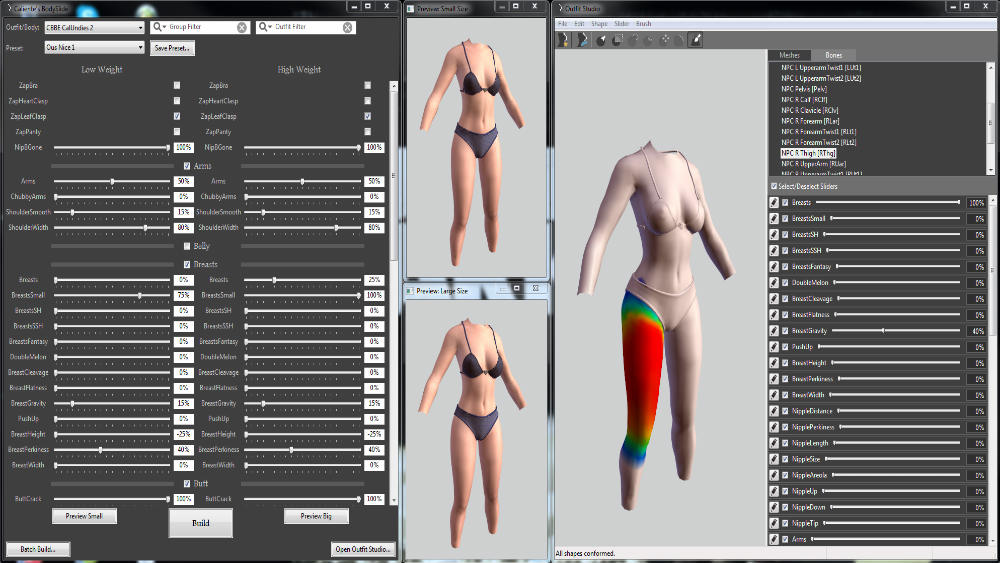
— Подгоняет одежду/броню и формы тела без необходимости редактирования meshes файлов!
— Используйте ползунки, чтобы создать свои личные формы фигуры тела.
— Необычная фильтрация одежды быстро показывает Вам наряды, которые вы хотите изменить, а текстурированные окна предварительного просмотра, показывают вам то, что вы получите в итоге.
Требования:
Skyrim SE 1.5.39.0.8 и выше
CBBE (SE)
Примечание: начиная с версии 3.8 требуется OpenGL 3.3 и выше. Если ваша видеокарта не поддерживает OpenGL 3.3 и выше, вы не должны обновлять BodySlide, пока не заимеете лучшую карту. Для тех у кого старая видеокарта и не поддерживает OpenGL 3.3 и выше, можете скачать и установить эмулятор OpenGL.
Вопрос: Почему я получаю сообщение об ошибке «OpenGL не в порядке» для Outfit Studio или в окна предварительного просмотра тела?
Ответ: Это означает, что драйвер используемого графического чипа, то есть видеокарты не поддерживает требуемую версию OpenGL. Обязательно обновите все ваши графические драйверы. Если в ваш компьютер встроено несколько графических карт, настройте BodySlide на работу только с рабочим на данный момент.
BodySlide and Outfit Studio (Skyrim LE)
Обновление:5.4.2
* Исправления:
BodySlide: исправлена ошибка когда данные настройки ползунков тела не применялись после применения кнопки «Build» без открытия окошка предварительного просмотра.
Outfit Studio: исправлено удаление неиспользуемых узлов.
Outfit Studio: исправлен сбой из-за выхода данных ползунка за пределы определенных ссылочных данных.
Outfit Studio: исправлена проверка максимального количества вершин/треугольников при импорте OBJ.
Outfit Studio: исправлено отображение координат выделенной точки (вершина под кистью).
Журнал изменений:
— Список всех изменений предыдущих версий читайте в ридми в архиве
Возможности:
— Создание собственных тел и форм тела на основе имеющихся
— Возможность подгружать слайдеры настроек для новых тел (если авторы тела озаботятся этим)
— Подгонка любой игровой брони под любое тело, включая броню из модов
— Поддержка физики тела BBP/TBBP/HDT (требуется совместимый скелет XP32 или XPMS)
— Всё наглядно видно в редакторе в реальном времени
Внимание:
Браться за программу стоит тем, кто хоть отдалённо понимает, что к чему лежит в папке DATA и за что отвечает
При обновлении с 2.7h до 4.8.0 и выше:
— Удалите файлы локализации ползунков в папке translations по адресу Data/interface/translations если такие имеются: RaceMenuMorphsUUNP_russian.txt и RaceMenuMorphsCBBE_russian.txt и все остальные языковые файлы такого же типа (RaceMenuMorphsCBBE_spanish.txt, RaceMenuMorphsCBBE_english.txt и так далее по тому же адресу Data/interface/translations)
Вопрос: Почему я получаю сообщение об ошибке «OpenGL не в порядке» для Outfit Studio или в окна предварительного просмотра тела?
Ответ: Это означает, что драйвер используемого графического чипа, то есть видеокарты не поддерживает требуемую версию OpenGL. Обязательно обновите все ваши графические драйверы. Если в ваш компьютер встроено несколько графических карт, настройте BodySlide на работу только с рабочим на данный момент.
Skyrim LE «BodySlide and Outfit Studio [RU]»
Обновление: v5.3.0
Общие: Добавлена возможность для моддеров блокировать отдельные нормали через NiIntegersExtradata «LOCKEDNORM» в NIF.
Outfit Studio: добавлен слайдер-фильтр (панель поиска).
Outfit Studio: добавлены «Взвешенные по маске вершины» для выбранных в данный момент костей на вкладке костей.
Outfit Studio: добавлен рендеринг базовых узлов (костей или других NiNodes). Может быть активирован на панели инструментов.
Outfit Studio: добавлен базовый рендеринг пола. Может быть активирован на панели инструментов.
Outfit Studio: добавлена кнопка для постоянного применения позы к мешам.
Outfit Studio: добавлен фильтр экипировки / проекта в диалоговые окна Group Manager и Pack Projects.
Outfit Studio: добавлена возможность копировать шейдерные / текстурные контуры / альфа-свойства из другой формы в свойствах формы.
Outfit Studio: добавлено предупреждение при превышении количества вершин или треугольников при импорте OBJ / FBX.
Outfit Studio: изменен импорт OBJ, чтобы всегда запускать как статические меши. Копирование или раскрашивание утяжелителей снимут с них кожу.
Outfit Studio: теперь каждая кисть запоминает собственные настройки x-mirror.
Outfit Studio: изменен параметр «Сбросить преобразования», чтобы применить глобальное преобразование, чтобы предотвратить смещение некоторых фигур.
Рендеринг: исправлены некоторые текстуры, некорректно повторяющиеся для координат вне диапазона 0-1.
Outfit Studio: исправлены редкие сбои при чистке и отмене.
Outfit Studio: исправлено удаление / разделение вершин по ссылке, не делающее данные ползунка локальными (поврежденные ползунки).
Outfit Studio: исправлена неправильная установка скинов при экспорте только выбранных фигур после удаления вершин.
Outfit Studio: исправлены дублированные / разделенные формы, не использующие недавно нарисованные или скопированные веса источника.
Outfit Studio: ограничение обновления нормалей при чистке для повышения производительности на более медленных системах.
Outfit Studio: исправлены пробелы в сегментах, из-за которых сегментация применялась неправильно (FO4).
Outfit Studio: исправлена ошибка, из-за которой невозможно было правильно ввести путь к файлу SSF с клавиатуры (FO4).
Outfit Studio: исправлены некоторые редкие преобразования, приводящие к появлению невидимых мешей.
Возможности:


Браться за программу стоит тем, кто хоть отдалённо понимает, что к чему лежит в папке DATA и за что отвечает
Что в архиве:
Версия от 19 января. 2021
Установка:
BodySlide and Outfit Studio (Skyrim LE)
Обновление:5.4.2
* Исправления:
BodySlide: исправлена ошибка когда данные настройки ползунков тела не применялись после применения кнопки «Build» без открытия окошка предварительного просмотра.
Outfit Studio: исправлено удаление неиспользуемых узлов.
Outfit Studio: исправлен сбой из-за выхода данных ползунка за пределы определенных ссылочных данных.
Outfit Studio: исправлена проверка максимального количества вершин/треугольников при импорте OBJ.
Outfit Studio: исправлено отображение координат выделенной точки (вершина под кистью).
Журнал изменений:
— Список всех изменений предыдущих версий читайте в ридми в архиве
Возможности:
— Создание собственных тел и форм тела на основе имеющихся
— Возможность подгружать слайдеры настроек для новых тел (если авторы тела озаботятся этим)
— Подгонка любой игровой брони под любое тело, включая броню из модов
— Поддержка физики тела BBP/TBBP/HDT (требуется совместимый скелет XP32 или XPMS)
— Всё наглядно видно в редакторе в реальном времени
Внимание:
Браться за программу стоит тем, кто хоть отдалённо понимает, что к чему лежит в папке DATA и за что отвечает
При обновлении с 2.7h до 4.8.0 и выше:
— Удалите файлы локализации ползунков в папке translations по адресу Data/interface/translations если такие имеются: RaceMenuMorphsUUNP_russian.txt и RaceMenuMorphsCBBE_russian.txt и все остальные языковые файлы такого же типа (RaceMenuMorphsCBBE_spanish.txt, RaceMenuMorphsCBBE_english.txt и так далее по тому же адресу Data/interface/translations)
Вопрос: Почему я получаю сообщение об ошибке «OpenGL не в порядке» для Outfit Studio или в окна предварительного просмотра тела?
Ответ: Это означает, что драйвер используемого графического чипа, то есть видеокарты не поддерживает требуемую версию OpenGL. Обязательно обновите все ваши графические драйверы. Если в ваш компьютер встроено несколько графических карт, настройте BodySlide на работу только с рабочим на данный момент.
Please log in or register
To enjoy the benefits of Nexus Mods, please log in or register a new account
BodySlide and Outfit Studio
File information
Last updated
Original upload
Created by
Uploaded by
Virus scan
Tags for this mod
3459 comments

Check out the official documentation and guides here on the Wiki.
Check out my Discord server for BodySlide, Outfit Studio, CBBE stuff and more!
Improvements:
— General: Added French translation by Hana.
— BodySlide: Load slider data when preview is opened only (performance improvement).
— BodySlide CLI: /gbuild command can now contain multiple group names separated by a comma.
— BodySlide CLI: /targetdir was missing the last backslash on Windows (escaping issue).
— BodySlide CLI: UI and last active outfit aren’t loaded anymore before building via CLI.
— Outfit Studio: Redesign brush settings as a popup window (shortcut ‘Space’ key).
— Outfit Studio: Added unsaved changes indicator and warning dialog.
— Outfit Studio: Respect mask on reference shape when conforming sliders.
— Outfit Studio: Added shortcuts ‘1’ to ‘5’ to the UV editor.
— Outfit Studio: Highlight UV seam edges while the UV editor is open.
— Outfit Studio: Remember last used standard tool when switching tabs.
— Outfit Studio: Added labels showing total and selected shapes bone counts.
— Outfit Studio: Added button to open slider properties in slider edit.
— Outfit Studio: Added undo/redo buttons to the toolbar.
— Outfit Studio: «Move/Rotate/Scale Shape» and moving a vertex with ‘V’ are now undoable.
— Outfit Studio: Added origin selection to «Rotate/Scale Shape» dialogs.
— Outfit Studio: «Rotate Shape» dialog can now be used on slider data.
— Outfit Studio: Added X/Y/Z mirror to the «Move Shape» dialog.
— Outfit Studio: Allow saving to sub dirs of «SliderSets» with the save project dialog.
Fixes:
— Outfit Studio: Fixed rig for FBX exports (orientation = YZX).
— Outfit Studio: Fixed some rotations not being rendered correctly.
— Outfit Studio: Rendering fixes for alpha blending and culling.
— Outfit Studio: Fixed DEL key not working in some text fields.
— Outfit Studio: Sync mirror states of the main brushes.
— Outfit Studio: Fixed «Move Vertex» function for X axis values in slider edit.
— Outfit Studio: Fixed multiple zaps getting created with multiple shapes selected.
— Outfit Studio: Fixed «Mask Affected» crash when slider data mismatches vertex count.
— Outfit Studio: Prevent using transform tool with non-zero sliders outside of slider edit.
— Outfit Studio: Improve handling of seam/lock normals checkboxes for shape multi-select.
Other Changes:
— Outfit Studio: Changed «Show Nodes» shortcut to ‘Shift+N’.
— Outfit Studio: Changed shape visibility shortcut from ‘G’ to ‘E’ and added floor grid shortcut ‘G’.
— Outfit Studio: Moved «Apply to Mesh» pose button and added more confirmation dialogs.
— Outfit Studio: Added confirmation dialogs for unapplied changes in partition/segment tab.

Note: We ignore all comments that are covered by the mod description. Read that before commenting.
For those who have an empty BodySlide when using Vortex:
1. Make sure you’ve followed the instructions. Do not open BodySlide from Vortex’s mod folder. You’re meant to open it from your actual game folder.
2. Make sure you’ve installed a compatible body mod, such as CBBE.
Yes, it’s rather wordy, but make sure you read it all through once before following it. Guide has ‘CBBE’ as the default body as that is what I use. See the mod description for other compatible body mods. Scroll to the bottom if you just want to know about the in-game sliders.
1. Install BodySlide according to the installation instructions for your mod manager (see mod description).
2. Install CBBE and the body/outfit BodySlide files that come with it. Installation instructions are in its description.
a. (Optional) Install other BodySlide-compatible outfit mods if you want them to fit your preset (Check CBBE mod list).
3. Launch BodySlide. Go to Skyrim Special Edition/Data/CalienteTools/BodySlide. Double-click on BodySlide.exe/BodySlide x64.exe to open the utility. If using Vortex, you should also open from this location through your manager.
4. At the top, in ‘Outfit/Body’ select one of the bodies. CBBE Body/CBBE Body Physics are ‘nude’. The CBBE NeverNude/CBBE Underwear bodies have underwear meshes covering all nudity. Ensure you have installed XPMSSE if you use the CBBE Body Physics body.
6. Click on ‘Preview’ at the bottom to open the preview window. The mesh shape will change as you move/edit sliders. The bar at the top of the preview window reflects the shape you’ll get with the in-game weight slider. You can right-click-and-drag the model to rotate it, and left-click-and-drag to move it around the window without rotating. Scroll-wheel to zoom also works.
7. Once you’re happy, click on ‘Save As’ next to the Preset drop-down. ‘Save’ will overwrite the current preset selected. Warning: You can not ‘undo’ Save. If you Save by accident, you will need to reinstall the original preset file/you will lose the original preset if it has no backups.
8. Type in a name for your preset in the box that pops up, and check the boxes for what ‘groups’ you want your preset to appear in. Always select the ‘CBBE’ group so it appears for all installed compatible outfits.
9. Click Save. BodySlide will open a window to the BodySlide/SliderPresets directory. Click Save again. You preset will now appear in the ‘Preset’ drop-down menu.
b. (Optional) If your aim is realism and you made a nude body with gravity, make a second preset just for outfits/NeverNude/Underwear, removing any/most gravity from your ‘nude’ preset, and applying cleavage/pushup/flatness etc. You can look at the ‘CBBE Slim (Outfit)’ and ‘CBBE Curvy (Outfit)’ presets made available for all underwear and clothing styles for ideas to make it look realistic for both small and large breast sizes, respectively.
10. (Only one preset? Skip to 11) With CBBE Body/Body Physics/Special selected in the ‘Outfit/Body‘ drop-down menu, and your preset selected in the ‘Preset’ drop-down, click on Build. This will automatically install the unclothed nude body meshes. Make sure you have at least XPMSSE installed if you use the Physics or Special body.
c. (Optional) If you made edits to the wrist/ankle sliders, be sure to build CBBE Feet/Hands/Hands Beast with your preset selected as well.
d. (Optional) If you have a lot of outfit mods installed, and/or only want to see/build meshes for certain ones (such as physics-only meshes), you can use the GroupFilter and OutfitFilter options at the top of BodySlide to narrow down the selection. Just click on the magnifying glass, ‘Choose Groups’, and select what you want. Again, only what is selected will have the option to build meshes for them. Leaving these Filters alone will mean you have the option to build everything.
11. With your (outfit) preset selected, click on BatchBuild. This will allow you to generate multiple meshes instead of the single one that Build creates (just as it says when you hover over it). Uncheck anything you don’t want built (e.g. if you did step 10 above, you don’t want/need CBBE Body/Body Physics). You can right-click this window and choose to Select all/none/invert select if desired. Do not build any Physics meshes if you don’t have at least XPMSSE installed. Note that if there are two or more options for a certain body/outfit (e.g. CBBE Body/Physics/NeverNude/Underwear all change the same thing, the in-game unclothed body), you will get another window listing these meshes to select which options you want generated.
12. Click Build. BodySlide will automatically install the outfit meshes into the correct directories.
Now the outfits will be the shape of your preset.
Note: Pay attention to the tool-tips. If you CTRL+Click the Build button, the meshes will generate inside the BodySlide folder. If you CTRL+Click the BatchBuild button, you can choose a directory to install all of the meshes you generate. You will most likely need to utilise this if you are using a custom race and need to install meshes manually.
In-game sliders/RaceMenu Morphs: When installing CBBE, you will have an option for ‘RaceMenu Morphs’. This allows you to use the BodySlide sliders in-game for your player character only, using RaceMenu, and the RaceMenuMorphs.esp. But, this still requires some use of BodySlide; open BodySlide, select a body/outfit and preset (which NPCs will use, and which will be the starting point of your in-game preset), check the ‘Build Morphs’ box at the bottom of the BodySlide window, and then use the Batch Build option/button to generate all meshes.
OutfitStudio Gurus: I’ve always wondered how to select multiple sliders at once? I tried control-click, ctrl-alt-click, shift-click etc, and that didn’t work
With the advent of bodies with gazillion sliders, I’m getting carpal tunnel clicking checkboxes one at a time.
I wish I can just ‘filter’, then click ‘select all filtered’. or is there a secret function somewhere?
Ah.. thank you so much for replying and clarifying Vyxenne.
Last resort is probably to get to their github and attempt to build it myself.
Or maybe Autohotkey will suffice? ha ha.. just rambling.
Hey not sure this is the right place to ask, but hopefully someone can at least point me in the right direction.
I`ve downloaded the Elysium modpack, and made some changes to it. I added another mod to change the base armor, and also used a body with different physics. I was able to change all the armors included in the remodel mod I downloaded, but now my issue is that this new mod didn`t replace *all* the armors/outfits in my game, so I’m stuck with a bunch of outfits and maybe some armors that don’t use the right physics or the right presets.
I would like to know what to do to figure out what outfits/armors are actually built so that I can fix the older ones I haven’t touched yet.

Hello, new to skyrim modding.
My bodyslide application is blank. The (Outfit/body drop down menu) is empty, as well as the (preset drop down). There are no sliders, nor is there a model in the center of the app. I only have the (preview) and (build) button, and a couple other small buttons.
I first installed bodyslide through MO2 as a mod, and ran the Bodyslide x64.exe. The file structure was Skyrim Special Edition > CalienteTools > Bodyslide.
After no success I uninstalled it. And downloaded it manually, and extracted it in the Data folder. The structure is now Skyrim Special Edition > Data > CalienteTools > Bodyslide. and i’m still having the same problem. I dont know what to do anymore.