
Настраиваемый игровой HUD / Immersive HUD-iHUD
iHUD добавляет возможность изменять внутри игровой интерфейс, компаса, индикаторов, прицела с настройками. В результате iHUD делает элементы интерфейса видимыми когда они нужны и скрывает их когда вы не нуждаетесь в этом.
Обновление:3.0.03 (фикс перевода)
* Сам мод не обновлялся автором, просто я как локализатор сделал откат перевода трех категорий в меню настроек в МСМ «Активация», «Опции» и «Прозрачность» обратно на английский, так как при переводе на русский, ломалось отображение всех остальных опций справа в окне настроек и в этих окнах была пустота. В итоге на английском будут только названиях трех категорий в левой стороне настроек мода.
Обновление:3.0.03
— Исправлена ошибка допущенная в версии 3.0.02, когда индикаторы активных эффектов не скрывались
Обновление:3.0.02
— Исправлено несколько ошибок, которые являлись причиной добавления ошибочных записей в журнал папируса (Papyrus logs)
Журнал изменений:
— Мод вышел из бета стадии и это полный и финальный релиз
— Исправлены и удалены отладочные отчетности в виде уведомлений и для лучше работы мода
— Исправлена ошибка, когда в МСМ меню, опция «Включение индикатора здоровья врага» не запоминалась после перезагрузки игры и сохранения
— Данная версия пока в стадии beta, но она полностью рабочая, сомнений нет, просто автор ждет отчеты тестирования и не более
— Добавлена поддержка для модов которые имеют свои собственные «виджеты», например для мода MoreHUD, iПотребности, SkyUI и так далее.
— В МСМ меню добавлены дополнительные опции «Активных эффектов», а так же опция «Связать все виджеты SkyUI» или сделать их отображение по отдельности
— Исправлена ошибка с быстро исчезающими бар-полосками на выносливость,магию и здоровье,теперь всё работает корректно и можно включить или отключить в любое время
— Исправлена ошибка с прозрачностью бар-полос для здоровья,выносливости и магии,теперь всё работает независимо от других выбранных параметров
— Мелкая корректировка перевода в МСМ меню
— Добавлены опции,чтобы скрыть или показать новые SkyUI виджеты (Активные заклинания,Эффекты и т.д.)
— Теперь перекрестье скрыто при открытии и чтении книги (работает в большинстве случаев)
— Теперь перекрестье скрыто во время фаталити и убийств
— Добавлен ползунок регулировки контроля обновления скрипта в меню SkyUI(в главном меню игры)-Не рекомендуется ставить меньше 0.1
— Теперь прицел (перекрестие) исчезает во время диалогов
— Исправлен индикатор (шкала) здоровья врагов
Требования:
Skyrim LE 1.9.32.0.8
SKSE 1.07.03
SkyUI 4.1 и выше
При обновлении с предыдущей версии до 3.0.03:
— Внимание. В ранней версии 2.4, если у кого то установлена эта версия, я забыл из архива удалить 2 файла iHUD.bak и iHUD.bsl, они для игры не нужны, если вы их установили то удалите из папки Data в вашей игре
— Ничего особенного делать не нужно, просто в МСМ отключите мод и установите новую версию и снова подключите мод в МСМ меню
Установка:
Поместить папку data из архива в папку с игрой, подтвердить слияние папок и файлов и активировать в лаунчере или менеджере модов.
 pix.PlayGround.ru
  pix.PlayGround.ru
  pix.PlayGround.ru
  pix.PlayGround.ru
Размер: 26,68К
Автор мода: Gopher
Перевел: Арсинис
Оригинал: www.nexusmods.com/skyrim/mods/3222/?
Суть iHUD в том, чтобы подарить ощущение погружения в игру, возникающее при отсутствии интерфейса, но в тоже время сохранить полезные стороны оного. Таким образом iHUD временно делает определенные элементы интерфейса видимыми, когда они нужны, и скрывает их, когда в них нет потребности.
ТРЕБОВАНИЯ:
Skyrim, SkSE, SkyUI
Так что же конкретно вы можете?
Что нового в этой версии 3.0b3
Fixed the bug with enemy health option not being remembered when you load your save.
Исправлен баг, когда опция показа вражеского здоровья на запоминалась при загрузке сохранения.
Виджеты SkyUI (активные эффекты и т.д) отделены от остальных.
МКМ подчищено, чтобы быть более понятным.
Индикаторы здоровья / Floating Healthbars
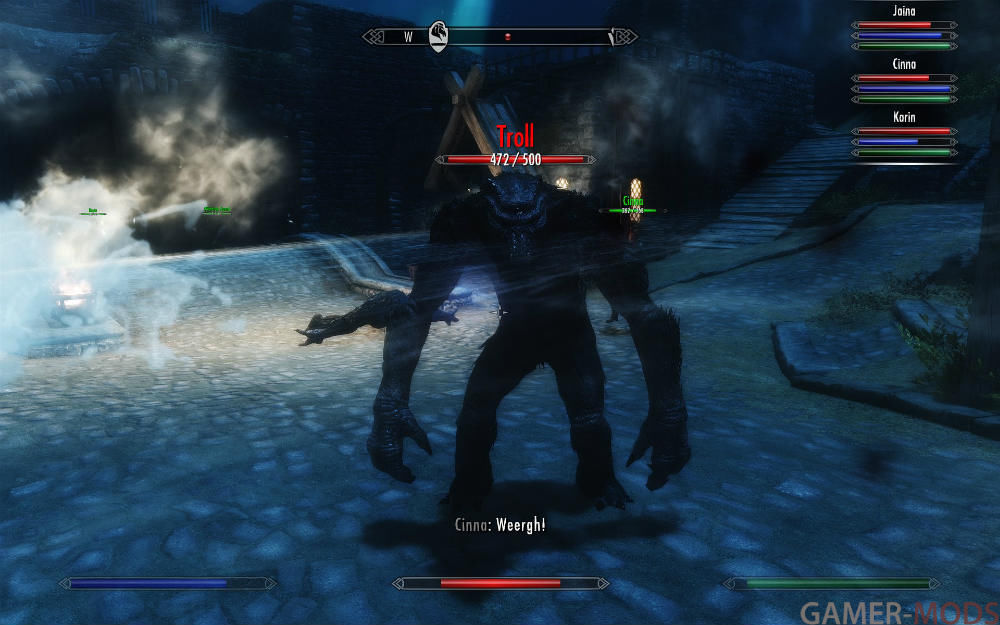
Мод добавляет полосу здоровья для любого NPC участвующего в бою.
Как это работает?
Плагин SKSE добавляет дополнительный «слой» в HUD и регистрирует для него специальный компонент. Когда экран обновляется, он копирует положение головы NPC к позиции шкалы HP, и масштабируется соответственно расстоянию до объекта (Маркеры квестов работают так-же). И направляет полоски перпендикулярно направлению вашего взгляда.
Как изменить цвет?
Это может быть сделано в файле «Data\Interface\Exported\hud_extension_config.txt». Если у цвета значение «-1» то он будет случайный.
Требования:
Skyrim LE 1.9.32.0.8
SKSE 1.07.03 или выше
Установка:
Переместить файлы мода в папку DATA
Удаление:
Удалить файлы, входящие в архив:
Data \ Interface \ Exported \ hud_extension.swf
Data \ Interface \ Exported \ hud_extension_config.txt
Data \ Interface \ Exported \ meter.swf
Data \ SKSE \ Plugins \ hudextension.dll
Известные проблемы:
Если вы сохранитесь во время боя, то после загрузки этого сохранения, полоски здоровья могут исчезнуть.
Вам есть что ещё сказать. NPC есть что ещё сказать. Этот мод добавляет несущественные диалоги уже существующим ванильным NPC.


Please log in or register
To enjoy the benefits of Nexus Mods, please log in or register a new account
Less Intrusive HUD II
File information
Last updated
Original upload
Created by
Uploaded by
Virus scan
Tags for this mod
About this mod
Less Intrusive HUD II allows you to tweak / change pretty much every element in the vanilla HUD.
Nexus requirements
Off-site requirements
Mods requiring this file
Author’s instructions
No uploads in another sites, ask me for permission to do anything with the files.
File credits
SPECIAL THANKS to the authors of the original mods I have used to further tweak the HUD (The optional config files I have included only, the main MOD is entirely my own creation)
LIHUD SkyUI Active Effects Icons:
SkyUI by SkyUI Team
http://skyrim.nexusmods.com/mods/3863/
All the love goes to them for sharing the source files with the community
LIHUD Fertigo/Cheboygan Fonts:
Main Font Replacement by Valistar
http://skyrim.nexusmods.com/mods/95
Alternate Book Fonts by evercharmer
http://skyrim.nexusmods.com/mods/4174
Sexiest fonts for Skyrim out there
LIHUD Favorite Menu Config:
Categorized Favorites Menu by favmenumodder
http://skyrim.nexusmods.com/mods/4862
Such a life saver at the time of using the favorite menu
LIHUD Dialogue Menu Config:
Better Dialogue Controls by ecirbaf
http://skyrim.nexusmods.com/mods/27371
Great for removing all the glitches in the dialogue menus and options
If you DOWNLOAD any of the tweaks / config files I made for those mods, please go to the mod’s author page and download / endorse their files.
Thanks everyone involved in the making of this mod, I’m pretty happy with the outcome, this is the result of several weeks or why not months of hard work using Adobe Flash / Photoshop and Bethesda’s Creation Kit.
I hope you enjoy this mod and if you find it useful, you think it’s so awesome you wanna show your appreciation, do not hesitate to give some love to the VOTE, ENDORSE and DONATE buttons.
Thank you for your support and the nexus for such a great site to share and download all the mods that make Skyrim even a better game than already was at the day of the release.
Donation Points system
This mod is opted-in to receive Donation Points
Translations available on the Nexus
Version 1.1-
Version 1.1
Version 1.0
Both straight donations and premium membership donations accepted

This mod is an overhaul of my previous mod for customizing Skyrim’s HUD.
Less intrusive HUD by Dragonborn77 (me)
http://skyrim.nexusmods.com/mods/23482
OVERVIEW
Less Intrusive HUD II allows you to tweak / change pretty much every element in the vanilla HUD
VERSION 1.1
Changes/Fixes
— Activate button x-axis movement added back
— Enemy health bar x-axis fixed (now moves to the left aswell)
— Crosshair opacity added
— HUD bars visible at all times option
— Compass icons toggleable
— Hotkeys remap option
— Sneak crosshair/Alt crosshair reworked
— HUD Elements rotation fix (now position is saved/restored correctly)
— Other minor bug fixes/tweaks
VERSION 1.0
Tweaks / Changes:
— Magicka / Health / Stamina Bar (Move, Rotate, Resize, Transparency)
— Enchantment Bars (Move, Rotate, Resize, Transparency)
— Compass (Move, Resize, Transparency)
— Enemy Health (Move, Resize)
— Arrows (Move, Resize, Text Alignment, Opacity)
— Stealth Meter (Move, Resize, Hide text, Alternative meter optional)
— Crosshair (Move, Resize, Alternative crosshair optional)
— HUD Messages (Move, Resize)
— Location Text (Move, Resize, Text Alignment)
— Activate Button (Move, Resize, Visibility)
— Item / NPC Name (Move, Resize, Text Linespacing, Text Alignment, Transparency)
— Item Separator (Move, Resize, Transparency)
— Item Info Text (Move, Resize, Text Linespacing, Text Alignment, Transparency)
— Subtitles (Move, Resize, Text Alignment, Transparency)
— Follower Action Back Button (Move, Resize)
— Quest Objectives (Move, Resize)
— Shout Words (Move, Resize)
— Skill Level-up Text (Move, Resize)
— Level-up Progress Meter (Move, Resize)
IMPORTANT NOTE:
SKSE and MCM Menu are required to use this mod.
INCOMPATIBILITIES:
Any mod that modifies the hudmenu.swf/hudmenu.gfx file
Colored markers are ok, as long as the changes are made in map.swf
Still the compass markers are inside the hudmenu file, so colored compass markers is not an option.
Optional Files:
— Favorite menu config (Requires Customized Favorite Menu)
— SkyUI Psychosteve’s active effects icons revamped (Requires SkyUI)
— HUD Fonts (Requires font replacer mod) — Dialogue menu config (Requires EZ2C Dialogue Menu) REMOVED: JUST STICK TO VANILLA DIALOGUE MENU
NOTE: Optional files are config files / tweaks to be used with their original mods installed. Optional files are not required for the MAIN MOD to work, however the original mods are required for this optional files to work properly. See CREDITS section for more info and download links.

USAGE
This mod uses fixed keys for editing the HUD, those keys are all located in the NUMERIC PAD of your keyboard (NUMPAD)
If you don’t have a NUMPAD on your keyboard you wont be able to use this mod properly.
There is a predefined PRESET defined by me that you can use if you don’t wanna mess with every single HUD element yourself. Just go to the menu and select the option LOAD PRESET.
Some other options are self explanatory and are located in the MCM menu, such as transparencies and optional variants of HUD elements.
UNINSTALLATION
Disable the mod in game, save your game and remove all the files installed by this mod
Reload your game and the hud should be back to normal (vanilla)
And of course SkyUI, I don’t think anyone should play Skyrim without it.
SkyUI by SkyUI Team
http://skyrim.nexusmods.com/mods/3863
Another recommended mod:
Compass Marker Range by Xrande
http://skyrim.nexusmods.com/mods/30930
BUGS / ISSUES
Sometimes when you use the alternative sneak crosshair once you load your game, you may notice the crosshair shows up even when not sneaking, to fix that you can simply crouch and stand-up and it will fix itself.
If for any reason the alternative crosshair isn’t showing, try re-checking the option on the MCM menu.
Feel free to drop any suggestions in the comments section, just be kind and constructive, I will IGNORE any other type of comments just to keep my mental state intact.
SPECIAL THANKS to the authors of the original mods I have used to further tweak the HUD (Better Dialogue Options, SkyUI, Main Font Replacer, Customized Favorite Menu)
The MAIN MOD is entirely my own creation.
LIHUD SkyUI Active Effects Icons:
SkyUI by SkyUI Team
http://skyrim.nexusmods.com/mods/3863
All the love goes to them for sharing the source files with the community
LIHUD Fertigo/Cheboygan Fonts:
Main Font Replacement by Valistar
http://skyrim.nexusmods.com/mods/95
Alternate Book Fonts by evercharmer
http://skyrim.nexusmods.com/mods/4174
Sexiest fonts for Skyrim out there
LIHUD Favorite Menu Config:
Categorized Favorites Menu by favmenumodder
http://skyrim.nexusmods.com/mods/4862
Such a life saver when using the favorite menu
LIHUD Dialogue Menu Config:EZ2C Dialogue Menu by Steve40 DEPRECATED: NOT REQUIRED, NOT NEEDED, NOT RECOMMENDED. USE VANILLA DIALOGUE MENU
LIHUD Better Message Box:
Better MessageBox Controls by ecirbaf
http://skyrim.nexusmods.com/mods/28170
Another great mod for removing buggy hotspot buttons in the dialogue and message boxes
Better Dialogue Controls by ecirbaf
http://skyrim.nexusmods.com/mods/27371
Great for removing all the glitches in the dialogue menus and options
If you DOWNLOAD any of the tweaks / config files I made for those mods, please go to the mod’s author page and download / endorse their files.

Thanks everyone involved in the making of this mod, I’m pretty happy with the outcome, this is the result of several weeks or why not months of hard work using Adobe Flash / Photoshop and Bethesda’s Creation Kit.
I hope you enjoy this mod and if you find it useful, you think it’s so awesome you wanna show your appreciation, do not hesitate to give some love to the VOTE, ENDORSE and DONATE buttons.
Thank you for your support and the nexus for such a great site to share and download all the mods that make Skyrim even a better game than already was at the day of the release.
DONATION COUNT: 2!! (very happy to have received my first donation! thank you, very much appreciated! Thanks again!)
SkyHUD (SE) | Улучшенный HUD для Skyrim SE
Обновление:0.90B (повторное обновление)
— Исправлен патч для мода iHUD.
— Обновлен FOMOD установщик.
Журнал изменений:
Список всех изменений от предыдущих версий читайте в ридми в архиве
КАК ЭТО РАБОТАЕТ:
* Выборочная настройка выполняется путем редактирования файла skyhud.txt, расположенного в папке «% SkyrimSE% \ Data \ Interface \ skyhud».
* В настоящее время ведется работа над созданием конфигуратора на основе GUI, который должен избавить пользователей от редактирования конфигурации мода вручную.
Требования:
Skyrim SE 1.5.3.0.8 и выше
При обновлении от 0.22B до 0.90B:
1. Сделайте резервное копирование текущего файла skyhud.txt который находится по пути Data\Interface\skyhud\, если у вас есть свои настроенные значения, которые вы хотите сохранить.
2. Удалите предыдущую версию SkyHUD
3. Установите SkyHUD 0.90B
4. Перенесите свои настройки из резервного файла конфигурации skyhud.txt в новый skyhud.txt в папке SKYHUD.
Удобная утилита настройки : ( в разработке )
Графический интерфейс на основе конфигуратора настроек в настоящее время в процессе разработки, который должен облегчить пользователям возможность редактировать файл INI вручную без особых знаний.
Для получения списка возможных конфигураций обратитесь к прилагаемому справочному руководству и смотрите раздел [CONFIGURATION CHART]. Некоторые из элементов HUD еще не включены, в частности, анимированная цель квеста и анимированные буквы названий квестов на экране.