
Skyrim Realistic Overhaul
Визуальные заплатки Skyrim Realistic Overhaul делают Elder Scrolls 5: Skyrim современней и самобытней. Среди наиболее глобальных изменений стоит отметить добавление свыше 1,5 тыс. текстур, которые полностью переработаны. Пользовательская модификация способствует существенному улучшению качеству графики за счет обновленных текстур. Последние адаптированы под 2К и 4К разрешение, и сохраняют первозданную атмосферу ванилы.
Аддон полностью заменяет стандартны аспекты такие, как окружение, ландшафт, подземелье, растительность. Теперь игра смотрится довольно-таки впечатляюще на любых персональных компьютерах. Большинство базовых механик сохранено ровно, как и непосредственно геймплей оригинала. При этом сохранена концепция выбора. Игрок самостоятельно решает, как ему играть, и что делать. Глобальная карта открыта для исследований – на локациях спрятан древний, мощный лут, помогающий в прохождении.
Пользовательская модификация, как и ванила, позволяет получить уважение во всех фракциях, включая множество группировок. Но противостояние между Имперским Легионом и Братством Бури сохранено – придется делать тяжелый выбор между предпочтениями обеих фракций. Но выполнять квесты можно для Соратников, Темного Братства, Гилдии Воров и Коллегии Магов Винтерхолода. Оригинал вместе с надстройкой Skyrim Realistic Overhaul создает уникальную атмосферу загадочного мира. Полностью переработанные графические элементы убирают недочеты того времени, и делаю шедевр еще более популярным среди широкой аудитории.
Skyrim Realistic Overhaul mod
Skyrim Realistic Overhaul
Elder Scrolls V: Skyrim mod | Released 2016
-Mod contains 10gb of high quality 2048k/4096k textures. It drastically increase quality while keeping artistic look of original textures.
-Since it has over 1500 textures and many are 4096k, it is recommended to have minimum graphic card with 3gb of video memory.
-This version is for Special Edition of Skyrim, but it can be used with original version too.
-Extract data folder into your Skyrim installation and overwrite.
-Disable snow shader in game since it only makes textures look worse.
-Mod cannot be shared or changed without my permission.
This Week In Mods: July 13 2018
For this recurring segment, we will be highlighting the five biggest stories on ModDB for the prior week. Whether it’s new mod announcements, major mod releases, or important stories that affect the mod scene as a whole, you’ll find them rounded up here each week.
The Week of July 13 2018
MONDAY
RELEASE: Castlevania: Simon’s Destiny v1.3
Castlevania: Simon’s Destiny is a non-profit GZDOOM based fangame born as a love letter to this legendary franchise. This mod aims to reinvent the very first NES title of the franchise with a nostalgic yet brand new first person gameplay.
TUESDAY
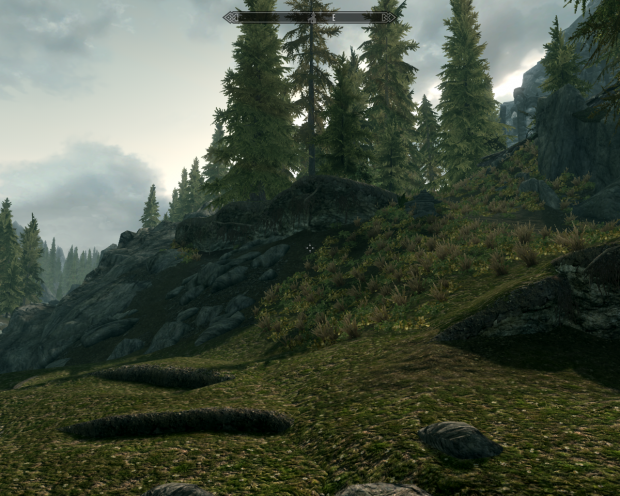
RELEASE: Skyrim Realistic Overhaul v1.8
Skyrim Realistic Overhaul 1.8 mod contains 10gb of high quality 2048k/4096k textures. It drastically increase quality while keeping artistic look of original textures. This version is for Special Edition of Skyrim, but it can be used with original version too.
WEDNESDAY
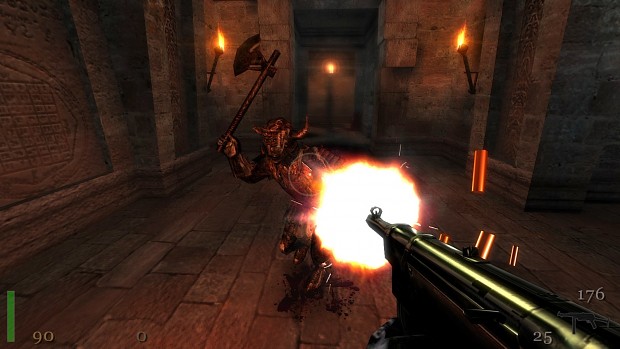
RELEASE: Return to Castle Wolfenstein Venom mod v5.5
Venom Mod is a general improvement of original RTCW game, with a new challenging and aggressive AI and some exploitation of features of iD Tech 3 engine, keeping the original gameplay.
THURSDAY

ARTICLE: Microsoft Exploring Xbox One Mod Support
Earlier this year, we reported on job listings posted to Microsoft’s official Careers page that hinted at new roles within the company dedicated to exploring mod support for Xbox games. Now, a new report from Windows Central contains details from a presentation intended for Microsoft internally and other development partners that goes into greater detail on what this initiative actually involves.
FRIDAY
RELEASE: Diabolus Ex
DOOM meets Deus Ex. This map is a love letter to cyberpunk genre as a whole and the Deus Ex franchise in particular. Using the whole new set of custom made textures, the project aims to recreate the look and vibe of an unethical near future corporation run by the forces of hell.


Post article >>
No articles were found matching the criteria specified. We suggest you try the article list with no filter applied, to browse all available. Post article and help us achieve our mission of showcasing the best content from all developers. Join now to share your own content, we welcome creators and consumers alike and look forward to your comments.
SRO 1.8. Original Skyrim version update
This is SRO 1.8. update for original version of Skyrim. Do not use this with Special Edition.
Skyrim Realistic Overhaul 1.8. Update
Updates Skyrim Realistic Overhaul to 1.8 version.
Skyrim Realistic Overhaul Part 3
Skyrim Realistic Overhaul 1.7. mod contains 10gb of high quality 2048k/4096k textures. It drastically increase quality while keeping artistic look of.
Skyrim Realistic Overhaul Part 2
Skyrim Realistic Overhaul 1.7. mod contains 10gb of high quality 2048k/4096k textures. It drastically increase quality while keeping artistic look of.
Skyrim Realistic Overhaul Part 1
Skyrim Realistic Overhaul 1.7. mod contains 10gb of high quality 2048k/4096k textures. It drastically increase quality while keeping artistic look of.
Add file >>
No files were found matching the criteria specified. We suggest you try the file list with no filter applied, to browse all available. Add file and help us achieve our mission of showcasing the best content from all developers. Join now to share your own content, we welcome creators and consumers alike and look forward to your comments.

I never did that, and the mod works.
Do you have problems with the mod?

I saw the previous comment about how to install this mod. When you say take the data file and overwrite skyrim installation files, do you mean the folder named textures in each of the overhaul files? A video would be very helpful as I dont want to ruin my files and have to re-download everything. I saw a video that combined each of the texture files in each download and then would take that and apply it, but they never showed me the proper place to drag and overwrite it. Some help would be appreciated.
In the Skyrim installation you have a data folder in which all textures are stored. This is what you need to overwrite. Simple.
And this mod has 3 parts plus update just because i upload it like this long time ago. It’s one large over 10gb mod.
How do I find this folder?
It’s in the place where Skyrim is installed: \Steam\SteamApps\common\skyrim\Data

When I drag the data folder with all the textures onto the base data folder it does not say it overwrites anything. It just creates a new folder called data once you click into the original. So I dragged part 1-3(with update) into the data folder and it creates a new folder called data inside. Did I do it correctly.
can someone please explain to me how to install this mod, I can’t figure it out
Extract data folder into your Skyrim installation and overwrite.
Really love this vanilla styled texture pack. I play SkyrimVR so it’s amazing to be able to play and not be distracted by blurry textures everywhere. I can stick my face up to a wall and the textures still hold up. My one gripe though with this pack is that the textures in Markarth could be updated, but overall I really enjoy this.
Thx.
Many people ask me about texture update, but don’t plan to improve anything simply because i can’t afford it. This takes way too much time and effort, and i can’t work for free anymore.
Obviously this can be improved to look way better for todays hardware, 4k textures, etc.
Back then in 2011 i have suggested to the people that i would improve all architecture and landscape textures, but not for free. But only small amount of people was interested.
I guess people think that this is easy. No it’s not, especially in the way how i do it, aka professionally.
Please log in or register
To enjoy the benefits of Nexus Mods, please log in or register a new account
Realistic Lighting Overhaul SSE
File information
Last updated
Original upload
Created by
Uploaded by
Virus scan
Tags for this mod
About this mod
This mod does not have any known dependencies other than the base game.
Mods requiring this file
Author’s instructions
Do not use the mod’s settings, assets or esp’s in any way or shape. Do not edit the esp’s in any way or shape. Do not upload this anywhere! This mod is currently a Nexus exclusive, if you see it uploaded on STEAM or BETHESDA.net please tell me.
Always ask permission to Sydney666 for ANYTHING. People who distribute, edit or plagiarize this mod in any way or shape will be reported.
Do not use former RLwC assets in order to make a mod that might in any way or shape hinder the future of RLO, this includes the former customization tools and esps.
File credits
Current Active Main Members :
Former Members and/or Special thanks to;
Donation Points system
This mod is opted-in to receive Donation Points
Translations available on the Nexus
Version 5.0.4
Version 5.0.3
— The No Guard Torch Utility in RLO Exteriors has been updated and is now On by default, you may turn it off if you wish through the RLO Options menu found under powers.
— The WizBAIN Installer has been heavily updated and revised by EAGnR, and it should work very similarly to the Fomod installer now.
— Candle smoke and flame textures from RLO Effects have been updated to be more realistic, credits to LupusHegemonia.
— RLO plugins including patches have been organized, and had their masters sorted.
Version 5.0.1
Version 5.0
Major City Exteriors, Minor City/Town Exteriors, and No Guard Torches Utility (Helps Prevent Flickering):
— Several redone major cities.
— Realistic new towns with a lived-in feeling.
— The No Guard Torches Utility can be found in the Magic Menu under Powers, and when activated it will dynamically remove torches from guards at night.
RLO Effects:
— Improved candles, torches, and embers.
— New realistic candle and torch smoke effects.
RLO Illuminated Spells:
— Spells will produce light and illuminate your sorroundings.
Straight donations accepted


Skyrim Nexus Mod of the Month for February 2013! Thank you!
RLO has been translated into the following languages, click your corresponding flag!


Remember to Endorse or alternatively DONATE if you like this mod. It will help keep us motivated.
This mod is dedicated to my brother Ross. You left us suddenly. You will be missed. RIP.
On a final note, this mod will be forever in the honor of those who have battled illness, depression and even death. Those who persevere and for those we have lost and remember in our hearts.
Thank you for all your donations over the years, they have helped us tremendously and saved a life!

Sydney666 has started a new Youtube Channel!

DON»T FORGET TO LIKE AND SUBSCRIBE!
GO CHECK US OUT HERE!
https://goo.gl/GJwiyj
Sydney666(MaskedHero) will be streaming daily!!

There are a few mods out there that try to fix the very intrusive eye adaptation in vanilla Skyrim. These mods tend to speed up the eye adaptation so fast that you literally never see its effects. However this is not realistic at all. In real life it can take anywhere from 5 minutes to 1 hour for a human to adapt to drastic lighting conditions and in some instances even hours.

RLO will fix all sorts of issues with dimming lights, mesh connection problems, shadow striping, lighting template fog issues, flickering and a whole host more. Every single esp in RLO is basically an Unofficial Lighting Patch. This means you will no longer need shadow striping fixes, removed interior fog mods, mods that fix lighting placements, missing lights and so forth. RLO basically has it all.
More stability, less bugs, more immersion, less hassles and less esp’s to worry about.
RLO will also carry over many of the USKP fixes to ensure that RLO does not override any unofficial patches by Arthmoor. Thanks goes to Arthmoor and others for this head’s up.


The Fake fog which is in the game can be a very bad eyesore and also frustrating for people using Ambient Occlusion. It also adds a fake layer of grey to most interiors that takes away the natural beauty of the lighting and even hinder hunter type classes. We have now removed this from every interior in the game and will be present in every single esp we release.

Realistic Lighting Overhaul is basically compatible with nearly every mod out there because it is so modular in nature. You can virtually pick whatever module you want and use it with other mods as long as they are modular in nature also. This means this mod is compatible with the great CLimates of Tamriel weather mod, Frostfall, Minty’s Lightning mod, all ENB’s and much much more. You are not forced into using anything if you do not want to.
So try out as many lighting and weather mods you like, ensure you install them correctly discarding any esp that you don’t want from RLO.
We are happy as long as you enjoy your game, so if you don’t want to use all our modules, that is totally fine.
Want to find out more about other lighting mods and/or compatibility?
Go to the below link!

In all honesty, the mods charm comes in the subtlety of it all.
Lighting will be balanced across all cells, so no cell will be lit differently purely to make a dramatic effect. If you are looking for a mod that will change how a cell looks dramatically, I would suggest other great lighting mods out there.
RLO is very lore friendly and actually aims to improve the lore by adding a lot more immersion to the game, feeding off lore from previous games while using only the assets available in Skyrim.
In some instances you may find some added statues, graveyard offerings or notes scattered around the exterior of cities. This was made to aid in the immersion of added lights in exteriors. As an example, we added more tombstones and offerings in Whiterun. This is so we could add some candles near the offerings and have a reason for the lights to be added to a dark part of the city or to a bland area of the city.
5.0 introduces a new feature called Dwemer Lighting Technology or DLT. This adds numerous contraptions, working steam vents, new npcs, new lore books, levers, valves and more. Please check Markarth’s Understone Keep for an introduction to this feature!

Check your load order! It is VERY important!
Thank you to all the people who helped me survive numerous surgeries via their donations back in 2013. You helped save a life.
I am also a single dad of 3 children and am scraping by on a disability pension, your donations usually go straight to my kids and for that I thank you all.
I would love to thank everyone who donated here, but there are over 250 of you and I tried my best to reply to all your Paypal emails with a
personal note of gratitude.
A donation pop-up has been added to the file when you download or endorse. This is a Nexus file feature added by DarkOne and his team.
Many thanks goes to the Nexus who help modders out for all the hard work they do. So thank you.
On a final note, Tony (Sydney666) evenly distributes all donations made via the donations TAB to all active team members.
Skyrim мод skyrim realistic overhaul
After you have downloaded and installed/enabled all the mods. Make sure to run LOOT (separate program that sorts mod load order). Other wise you will probably have crashing issues.
The current modset I am using, additionally I have a few mods from nexus (around 40 total)
They are:

Custom Heavy Armor set for when you want to be well protected but look stylish at tthe same time.

Welcome to Build Your Own Home, the mod where you do just as the title suggests. This mod exploded to be the 3rd* most endorsed house mod on Nexus ( http://skyrim.nexusmods.com/mods/18480/ ). And now I can finally upload it here.
Yes thats right! YOU bu.
Hate your over-confident, easily killed, dragon fodder horse? This mod adds a «Conjure Ethereal Horse» spell which allows the player to summon a rideable, mystical, lemony-fresh steed! Read on for more action-packed details!
For even more Snow and Wind in this mod you can also check http://skyrim.nexusmods.com/downloads/file.php?id=8328
.
Adds and labels all Mine Map Markers to display the main material it yields.
This will not automatically reveal Mine locations to you. You must still find them yourself.
Inspired buy one of my favorite swords from the MET’s armor room
Location: Bloated Man’s Grotto,a werewolf lair from the «Ill Met by moonlight» quest aka Hircine Daedric Quest
Stats: weight=15 Dmg=13 Crit=6 Value=720
Tempering: 1x steel ingot
.
Expand your arsenal with Gemstone Crossbows and Bolts. Rain down elemental fury upon your enemies and leave the battlefield smoldering in your wake with Explosive Gemstone Bolts.
This mod is fully independent but is best enjo.
Custom Light and Midweight Diamond and Gemstone armor sets for you stealthy rogues who have stolen enough loot to buy up all of Skyrim and want everyone to know it.
A custom set of Diamond and Gemstone edged weapons and shield. (Long sword, Great sword, Dagger, Shields). To Install click the Green +Subscribe button under the screen shots above, it will download when you launch Skyrim.
Please log in or register
To enjoy the benefits of Nexus Mods, please log in or register a new account
Realistic Lighting Overhaul
File information
Last updated
Original upload
Created by
Uploaded by
Virus scan
Tags for this mod
About this mod
This mod does not have any known dependencies other than the base game.
Mods requiring this file
Author’s instructions
Do not use the mod’s settings, assets or esp’s in any way or shape. Do not edit the esp’s in any way or shape. Do not upload this anywhere! This mod is currently a Nexus exclusive, if you see it uploaded on STEAM, please tell me.
Always ask permission to Sydney666 for ANYTHING. People who distribute, edit or plagiarize this mod in any way or shape will be reported.
Do not use former RLwC assets in order to make a mod that might in any way or shape hinder the future of RLO, this includes the former customization tools and esps.
File credits
5.0 finally released 10th June 2017.
As always Realistic Lighting Overhaul continues on in it’s path as not only one of the oldest mods on the Nexus, but continues to be an awesome community project.
Thanks to all the volunteers that join the team through each version. It is nice to know that I was once a volunteer of this mod, and 4 years later it is still going strong.
Current Active Main Members :
Former Members and/or Special thanks to;
Donation Points system
This mod is opted-in to receive Donation Points
Translations available on the Nexus
Version 5.0.3
— The No Guard Torch Utility in RLO Exteriors has been updated and is now On by default, you may turn it off if you wish through the RLO Options menu found under powers.
— The WizBAIN Installer has been heavily updated and revised by EAGnR, and it should work very similarly to the Fomod installer now.
— Candle smoke and flame textures from RLO Effects have been updated to be more realistic, credits to LupusHegemonia.
Version 5.0.2
Major City Exteriors, Minor City/Town Exteriors, and No Guard Torches Utility (Helps Prevent Flickering):
— Several redone major cities.
— Realistic new towns with a lived-in feeling.
— The No Guard Torches Utility can be found in the Magic Menu under Powers, and when activated it will dynamically remove torches from guards at night.
RLO Effects:
— Improved candles, torches, and embers.
— New realistic candle and torch smoke effects.
RLO Illuminated Spells:
— Spells will produce light and illuminate your surroundings.
Initial Release to Oldrim:
— RLO v5 ported over to 32-bit Creation Kit, organized and cleaned up plugin records, USKP changes passed over, plugin masters updated, and fomod updated.
Version 4.0.8
Version 4.0.7c
Version 4.0.7b
Version 4.0.7a
Version 4.0.7
Version 4.0.6
Version 4.0.5
Version 4.0.4
Version 4.0.3
Version 4.0.2
Version 4.0.1
Straight donations accepted
Realistic Lighting for Skyrim Special Edition is OUT!
Click the link below to see the SSE Version!
Translations Below! Click the corresponding flag for your language!

Remember to Endorse or alternatively DONATE if you like this mod. It will help keep us motivated.
This mod is dedicated to my brother Ross. You left us suddenly. You will be missed. RIP.
On a final note, this mod will be forever in the honor of those who have battled illness, depression and even death. Those who persevere and for those we have lost and remember in our hearts.
Thank you for all your donations over the years, they have helped us tremendously.
Sydney666 has started a new Youtube Channel!
DON»T FORGET TO LIKE AND SUBSCRIBE!
GO CHECK US OUT HERE!
https://goo.gl/GJwiyj
Sydney666(MaskedHero) will be streaming daily!!
Link to latest videos! : https://goo.gl/JzL3VY
CAUTION : This esp also causes FPS dips on some machines. The fps dips usually occur out in the wilderness or around many light sources. Projected FPS loss on lower spec machines could be 10-15 fps (at times), while on a top end video card + decent quad core CPU the fps drops are minimal. If you do not like this esp or it causes you fps dips, then feel free to disable it via your game options.
There are a few mods out there that try to fix the very intrusive eye adaptation in vanilla Skyrim. These mods tend to speed up the eye adaptation so fast that you literally never see its effects. However this is not realistic at all. In real life it can take anywhere from 5 minutes to 1 hour for a human to adapt to drastic lighting conditions and in some instances even hours.
There are dozens of mods released that fix all sorts of issues with dimming lights, mesh connection problems, shadow striping, lighting template fog issues, flickering and a whole host more. Every single esp in RLO is basically an Unofficial Lighting Patch. We fix issues that affect the lighting and also include the wonderful Particle Patch by Mindflux. This means you will no longer need shadow striping fixes, removed interior fog mods, mods that fix lighting placements, missing lights and so forth.
More stability, less bugs, more immersion, less hassles and less esp’s to worry about.
RLO will also carry over many of the USKP fixes to ensure that RLO does not override any unofficial patches by Arthmoor. Thanks goes to Arthmoor and others for this head’s up.
The CPU/GPU throttling fog which is in the game can be a very bad eyesore and frustrating for people using Ambient Occlusion. It also adds a fake layer of grey to most interiors that takes away the natural beauty of the lighting and even hinder hunter type classes. We have now removed this from every interior in the game and will be present in every single esp we release.
Realistic Lighting Overhaul is basically compatible with nearly every mod out there because it is so modular in nature. You can virtually pick whatever module you want and use it with other mods as long as they are modular in nature also. This means this mod is compatible with the great CLimates of Tamriel weather mod, Frostfall, Minty’s Lightning mod, all ENB’s and much much more. You are not forced into using anything if you do not want to.
The mod is even compatible with Dynavision, Imaginator and other weather mods. In fact, our interiors will adapt to other weather mods if you should have the need to install our interiors with another weather mod. You will instantly see changes in brightness, saturation levels hue, all according to the weather mod installed!
RLO is very lore friendly and actually aims to improve the lore by adding a lot more immersion to the game, feeding off lore from previous games while using the assets available in Skyrim.
RLO 5.0 introduces Dwemer Lighting Technology (DLT). This adds numerous contraptions, working vents, levers, valves and more to Dwemer buildings and dungeons. Please check out Markarths Understone Keep for a lore friendly introduction to this feature!
Thank you to all the people who helped me survive numerous surgeries via their donations. You helped save a life.
I would love to thank everyone who donated here, but there are over 250 of you. I tried my best to reply to all your Paypal emails with a
personal note of gratitude.
A donation pop-up has been added to the file when you download or endorse. This is a Nexus file feature added by DarkOne and his team.
Many thanks goes to the Nexus who help modders out for all the hard work they do. So thank you.
On a final note, Tony (Sydney666) evenly distrubutes all donations made via the donations TAB to all active team members.